
1. הקדמה
This manual provides essential information for the safe and efficient operation of your Digi International WR21-L52A-DE1-TB Cellular Wireless Router. Please read this manual thoroughly before installation and use, and retain it for future reference. This device is designed to provide reliable cellular connectivity for various applications.
2. מידע בטיחות
- ספק כוח: Use only the power adapter supplied with the device. Using an incorrect adapter may damage the device and void the warranty.
- אוורור: ודא אוורור נאות סביב הנתב. אין לחסום פתחי אוורור.
- סְבִיבָה: Avoid exposing the device to extreme temperatures, humidity, direct sunlight, or corrosive environments.
- שֵׁרוּת: אל תנסה לפתוח או לתקן את המכשיר בעצמך. יש לפנות לכל טיפול וטיפול באנשי מקצוע מוסמכים.
- אנטנות: Ensure antennas are securely connected before powering on the device.
3. תכולת החבילה
ודא שכל הפריטים נמצאים בחבילה:
- Digi International WR21-L52A-DE1-TB Cellular Wireless Router
- מתאם מתח
- Antennas (quantity may vary)
- כבל Ethernet
- מדריך התחלה מהירה (אם כלול)
אם פריטים כלשהם חסרים או ניזוקים, פנו לספק שלכם מיד.
4. המוצר נגמרview
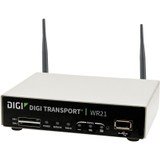
תמונה: חזית view of the Digi International WR21-L52A-DE1-TB Cellular Wireless Router. This image displays the compact form factor of the device, likely showing ports for antennas, power, and network connections.
The Digi International WR21-L52A-DE1-TB is a robust cellular wireless router designed for reliable and secure connectivity. It features multiple connectivity options and is suitable for various industrial and enterprise applications requiring remote access and data transfer over cellular networks.
5. התקנה
5.1. התקנת כרטיס SIM
- ודא שהנתב כבוי ומנתק ממקור החשמל.
- Locate the SIM card slot(s) on the device. Refer to the device's physical markings for exact location.
- Insert the activated cellular SIM card into the slot with the gold contacts facing down and the notched corner oriented correctly. Push until it clicks into place.
- If applicable, secure the SIM card tray or cover.
5.2. חיבור אנטנה
- Identify the cellular antenna ports (typically labeled 'MAIN' and 'DIV' or similar).
- Screw the provided cellular antennas onto the corresponding ports until finger-tight. Do not overtighten.
- מקם את האנטנות לקבלת אות אופטימלי.
5.3. חיבור חשמל
- חבר את ספק הכוח לשקע החשמל של הנתב.
- חבר את מתאם החשמל לשקע חשמל מתאים.
- The router will power on automatically or may require pressing a power button. Observe the LED indicators for power status.
5.4. חיבור רשת (אופציונלי)
- To connect a device via Ethernet, plug one end of an Ethernet cable into an available LAN port on the router.
- Plug the other end of the Ethernet cable into the network port of your computer or other network device.
6. הוראות הפעלה
6.1. הפעלה / כיבוי
- הפעלה: Connect the power adapter. The device will typically power on automatically. Observe the power LED.
- כיבוי: Disconnect the power adapter from the electrical outlet. For controlled shutdown, refer to the device's web interface or specific documentation for a software shutdown procedure if available.
6.2. גישה ל Web מִמְשָׁק
- Ensure your computer is connected to the router via Ethernet or Wi-Fi (if enabled).
- פתח א web דפדפן (למשל, כרום, פיירפוקס, אדג').
- Enter the router's default IP address (e.g., 192.168.1.1 or 192.168.0.1) into the address bar and press Enter. Refer to the Quick Start Guide or device label for the exact default IP address.
- Enter the default username and password when prompted. These are typically found on a label on the device or in the Quick Start Guide.
- Upon successful login, you will access the router's configuration interface.
6.3. תצורה בסיסית
בתוך ה web בממשק, ניתן להגדיר הגדרות שונות:
- Cellular Settings: Verify APN settings, signal strength, and connection status.
- הגדרות רשת: Configure LAN IP address, DHCP server, and port forwarding.
- בִּטָחוֹן: Change default login credentials, configure firewall rules, and VPN settings.
- עדכון קושחה: Check for and apply firmware updates to ensure optimal performance and security.
7. תחזוקה
- ניקוי: השתמשו במטלית רכה ויבשה לניקוי החלק החיצוני של הנתב. אין להשתמש בחומרי ניקוי נוזליים או בתרסיסים.
- עדכוני קושחה: בדקו באופן קבוע את הוראות היצרן webאתר לעדכוני קושחה. עדכון הקושחה מבטיח את התכונות, תיקוני האבטחה ושיפורי הביצועים העדכניים ביותר.
- תנאים סביבתיים: Ensure the router is operating within its specified temperature and humidity ranges to prevent overheating or damage.
8. פתרון תקלות
8.1. No Cellular Connection
- Verify the SIM card is correctly inserted and activated with your cellular provider.
- Check antenna connections and ensure they are positioned for optimal signal.
- היכנס ל- web interface to check cellular signal strength and connection status.
- הפעל מחדש את הנתב.
8.2. אין גישה Web מִמְשָׁק
- Ensure your computer is directly connected to the router via Ethernet.
- Verify your computer's IP address is in the same subnet as the router (e.g., if router is 192.168.1.1, computer should be 192.168.1.x).
- נסה לנקות את המטמון של הדפדפן שלך או להשתמש בדפדפן אחר.
- If you forgot the password, a factory reset might be necessary (refer to specific device documentation for this procedure, as it will erase all configurations).
8.3. מהירות חיבור איטית
- Check cellular signal strength in the web interface. Weak signal can lead to slow speeds.
- ודא שהאנטנות ממוקמות כראוי וללא חסימה.
- Verify your cellular data plan has not reached its data cap or is being throttled.
- Restart the router and connected devices.
9. מפרטים
| תכונה | תֵאוּר |
|---|---|
| דֶגֶם | WR21-L52A-DE1-TB |
| מותג | Digi International |
| פרוטוקול קישוריות | תָאִי |
| טכנולוגיית קישוריות | USB |
| שיטת בקרה | מְרוּחָק |
| תכונה מיוחדת | WPS |
| מכשירים תואמים | מחשב אישי |
| שימושים מומלצים | בַּיִת |
| UPC | 747356312219 |
10. אחריות ותמיכה
For detailed warranty information, please refer to the warranty card included with your product or visit the official Digi International website. Technical support is available through the manufacturer's support channels. Please have your product model number (WR21-L52A-DE1-TB) and serial number ready when contacting support.