
מָבוֹא
Thank you for choosing the LAOPAO PS6100 Digital Stopwatch. This handheld, waterproof stopwatch features a large LCD display, 1/100 second precision timing, and multiple functions including a daily alarm, timer, and metronome. Designed for sports, training, and general timing needs, this manual provides detailed instructions for its operation and maintenance.

Image: The LAOPAO PS6100 Digital Stopwatch, a silver-colored device with a large LCD display and three control buttons on top, attached to a white lanyard.
המוצר נגמרview ופונקציות כפתורים
The LAOPAO PS6100 stopwatch features three primary control buttons and a clear LCD display. Understanding these controls is essential for proper operation.
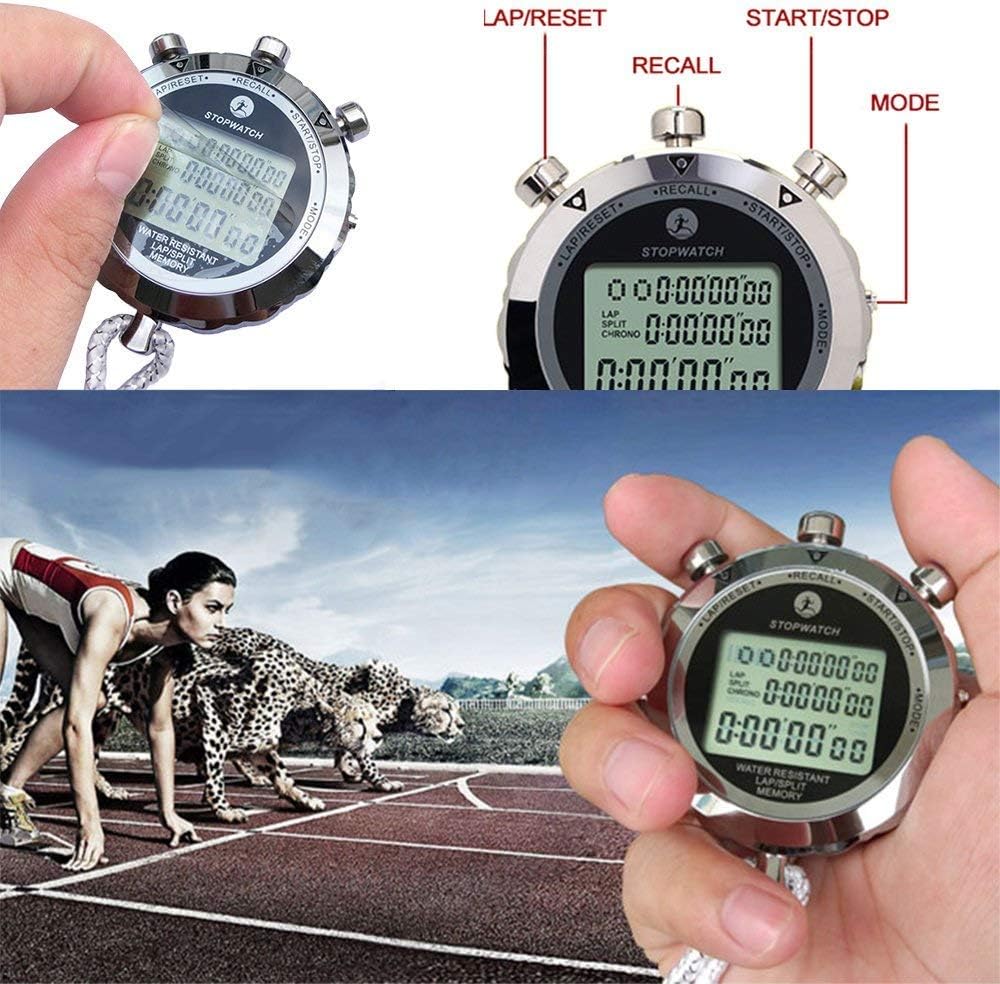
Image: Close-up of the LAOPAO PS6100 stopwatch highlighting the three buttons: "LAP/RESET" (left), "RECALL" (top center), and "START/STOP" (right). The "MODE" button is indicated on the right side of the stopwatch body.
- לחצן START/STOP: Initiates and pauses timing in stopwatch mode. Used for setting values in other modes.
- LAP/RESET Button: Records lap times or resets the stopwatch. Used for adjusting values in other modes.
- לחצן MODE: Cycles through different operational modes (Time, Stopwatch, Alarm, Timer, Metronome).
- לחצן RECALL: Accesses stored lap/split times in stopwatch mode.
הגדרה
התקנת סוללה
The LAOPAO PS6100 stopwatch requires one Lithium-ion battery for operation. Ensure the battery is correctly installed according to the polarity markings inside the battery compartment. If the display is dim or unresponsive, replace the battery.
הגדרת זמן ראשונית
Upon first use or after battery replacement, you may need to set the current time and date.
- הקש על MODE button repeatedly until the time display mode is shown (typically displaying hour, minute, second, day, month, and date).
- לחץ והחזק את הקפה/איפוס button until the digits begin to flash, indicating setting mode.
- השתמש ב- התחל/עצור כפתור כדי לכוונן את הערך המהבהב (למשל, שניות, דקות, שעות).
- השתמש ב- הקפה/איפוס button to move to the next setting (e.g., from seconds to minutes, then hours, date, month, day of the week).
- לאחר שכל ההגדרות נכונות, לחצו על הלחצן MODE לחצן כדי לצאת ממצב ההגדרה.
הוראות הפעלה
The stopwatch offers several modes for various timing and display needs. Use the MODE כפתור כדי לעבור ביניהם.

Image: A composite image showing the different display modes of the LAOPAO PS6100 stopwatch: Clock, Alarm clock, Stopwatch, Timer, and Metronome (Pace).
1. Time Display Mode (Clock)
This mode displays the current time (hour, minute, second), day of the week, month, and date. It also supports 12-hour and 24-hour formats. To switch between 12/24-hour display, press the התחל/עצור button while in time display mode.
2. Stopwatch Mode (Chronograph)
This mode is used for precise timing of events, accurate to 1/100th of a second. It supports split and lap timing.
- לִלְחוֹץ MODE until "STOPWATCH" or "CHRONO" is displayed.
- לִלְחוֹץ התחל/עצור כדי להתחיל בתזמון.
- כדי להקליט זמן הקפה (time for a segment while the main timer continues), press הקפה/איפוס. The lap time will be displayed briefly.
- כדי להקליט זמן מפוצל (time from the start to a specific point, pausing the display but not the timer), press הקפה/איפוס. The split time will be displayed. Press הקפה/איפוס שוב כדי לחזור לזמן הריצה.
- לִלְחוֹץ התחל/עצור שוב כדי לעצור את שעון העצר.
- בזמן השהיה, לחץ הקפה/איפוס כדי לאפס את שעון העצר.
- כדי לשחזר זמני הקפה/מקטע שנשמרו, לחצו על הלחצן לִזכּוֹר button while the stopwatch is paused and reset. Use התחל/עצור ו הקפה/איפוס to navigate through stored records.
3. Daily Alarm Mode
הגדר התראה יומית שתשמע בשעה מסוימת.
- לִלְחוֹץ MODE עד שיוצג "ALARM".
- לחץ והחזק הקפה/איפוס עד שספרות זמן האזעקה יהבהבו.
- לְהִשְׁתַמֵשׁ התחל/עצור to adjust the flashing value (hours, then minutes).
- לְהִשְׁתַמֵשׁ הקפה/איפוס כדי לעבור בין הגדרות שעות לדקות.
- לִלְחוֹץ MODE כדי לאשר ולצאת ממצב הגדרות.
- כדי להפעיל/לכבות את האזעקה, לחצו התחל/עצור while in alarm display mode (not setting mode). An alarm icon will appear/disappear.
4. Timer Mode (Countdown)
Use the timer for countdown functions.
- לִלְחוֹץ MODE until "TIMER" or "TR" is displayed.
- לחץ והחזק הקפה/איפוס עד שספרות הטיימר יהבהבו.
- לְהִשְׁתַמֵשׁ התחל/עצור כדי לכוונן את ערך ההבהוב (שעות, דקות, שניות).
- לְהִשְׁתַמֵשׁ הקפה/איפוס to move between settings.
- לִלְחוֹץ MODE כדי לאשר ולצאת ממצב הגדרות.
- לִלְחוֹץ התחל/עצור כדי להתחיל את הספירה לאחור. לחץ שוב כדי להשהות.
- כאשר מושהה, לחץ הקפה/איפוס כדי לאפס את הטיימר לערך שנקבע.
5. Metronome Mode (Pace)
The metronome function provides a rhythmic beat for training.
- לִלְחוֹץ MODE until "PACE" is displayed.
- לחץ והחזק הקפה/איפוס until the pace value flashes.
- לְהִשְׁתַמֵשׁ התחל/עצור to adjust the desired pace (beats per minute).
- לִלְחוֹץ MODE כדי לאשר ולצאת ממצב הגדרות.
- לִלְחוֹץ התחל/עצור to start the metronome. Press again to stop.
תַחזוּקָה
To ensure the longevity and optimal performance of your LAOPAO PS6100 stopwatch, follow these maintenance guidelines:
- ניקוי: נגבו את שעון העצר במטלית רכה ויבשה. במקרה של לכלוך עיקש, נגבו מעטamp ניתן להשתמש במטלית, ולאחר מכן ייבוש מיידי. יש להימנע מכימיקלים חזקים או חומרי ניקוי שוחקים.
- עמידות במים: The stopwatch is designed to be waterproof for daily use and sports activities. However, avoid prolonged submersion or operating buttons underwater to prevent water ingress.
- אִחסוּן: אחסנו את שעון העצר במקום קריר ויבש, הרחק מאור שמש ישיר וטמפרטורות קיצוניות.
- החלפת סוללה: If the display becomes dim or functions are erratic, replace the battery promptly. Refer to the "Battery Installation" section for guidance.
פתרון בעיות
If you encounter issues with your LAOPAO PS6100 stopwatch, refer to the following common problems and solutions:
- ללא תצוגה או תצוגה עמומה:
- Check battery level. Replace the battery if necessary.
- ודא שהסוללה מותקנת עם הקוטביות הנכונה.
- הלחצנים לא מגיבים:
- ודא שהסטופר אינו במצב נעילה (אם רלוונטי, אם כי לא צוין עבור דגם זה).
- נסה לאפס את המכשיר על ידי הסרה והכנסה מחדש של הסוללה.
- שעה/תאריך שגויים:
- Refer to the "Initial Time Setting" section to re-adjust the time and date.
- נזקי מים:
- While waterproof, extreme conditions or button presses underwater can cause issues. If water ingress is suspected, discontinue use and allow the device to dry completely in a dry, warm environment. Do not attempt to open the device.
מפרטים
| תכונה | פְּרָט |
|---|---|
| מספר דגם | PS6100 |
| חוֹמֶר | נירוסטה |
| מידות (מוצר) | 6 x 1 x 4 ס"מ (בקירוב) |
| משקל פריט | 180 גרם |
| סוג תצוגה | LCD גדול |
| גודל תצוגה | 3.6 סנטימטרים |
| דיוק תזמון | 1/100 שניה |
| עמידות במים | Yes (suitable for daily use and sports) |
| נדרש סוללה | 1 סוללת ליתיום-יון |
| פונקציות | Clock, Stopwatch (Lap/Split), Daily Alarm, Timer, Metronome |
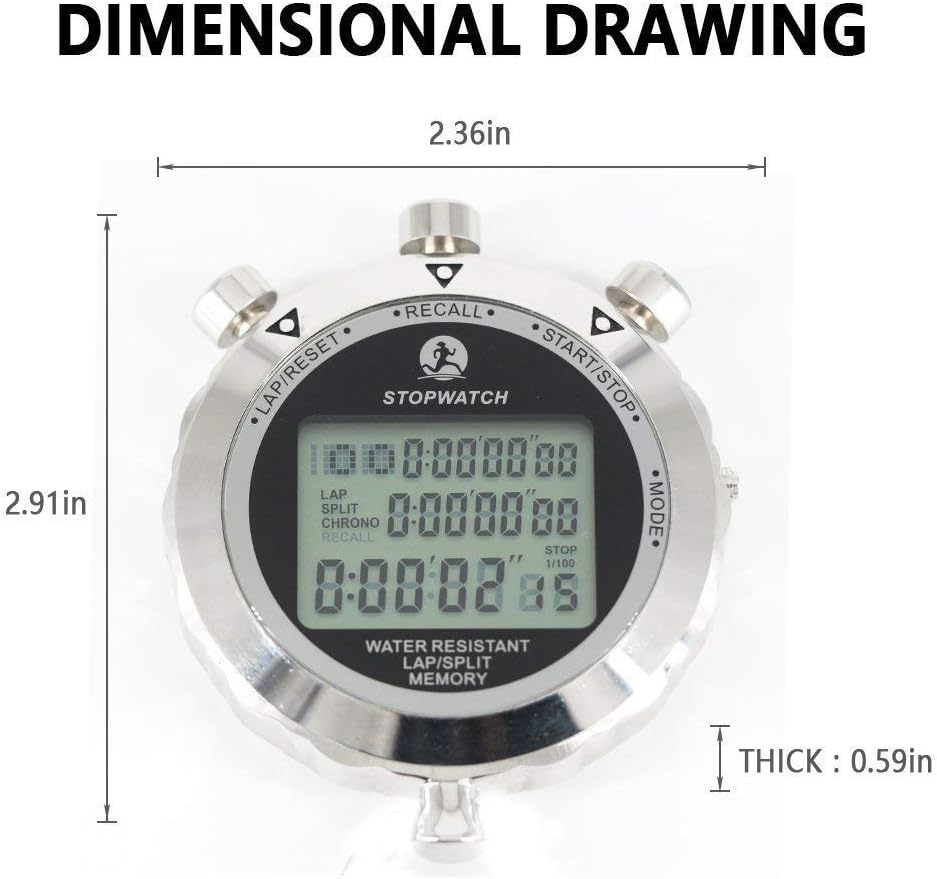
Image: A dimensional drawing of the LAOPAO PS6100 stopwatch, indicating its width as 2.36 inches, height as 2.91 inches, and thickness as 0.59 inches.
אחריות ותמיכה
Information regarding specific warranty terms or direct customer support contacts for the LAOPAO PS6100 Digital Stopwatch is not available in the provided product data. For warranty claims or technical assistance, please refer to the retailer or the official LAOPAO webאתר אם זמין.