
1. הקדמה
Thank you for choosing the ASAKUKI Smart Wi-Fi Essential Oil Diffuser. This device combines aromatherapy with smart technology, allowing you to control it via a mobile application or voice commands. It is designed to humidify and purify the air, creating a relaxing atmosphere in your home or office.
This manual provides detailed instructions for the safe and efficient use of your diffuser. Please read it thoroughly before operation and retain it for future reference.

Image: The ASAKUKI Smart Wi-Fi Essential Oil Diffuser is versatile for various environments, including nurseries, family rooms, bedrooms, yoga studios, and workspaces.
2. אמצעי בטיחות
כדי להבטיח פעולה בטוחה ולמנוע נזק, אנא הקפידו על ההנחיות הבאות:
- Always place the diffuser on a flat, stable surface.
- Do not exceed the maximum water fill line (500ml).
- Use only clean tap water or distilled water. Avoid using hot water.
- Add essential oils carefully to avoid spilling on the exterior of the unit.
- הרחק את המפזר מהישג ידם של ילדים וחיות מחמד.
- Do not cover the mist outlet during operation.
- נתקו את המכשיר משקע החשמל לפני ניקוי או מילוי מחדש.
- אין לטבול את היחידה במים או בנוזלים אחרים.
- If the unit is damaged, do not attempt to repair it yourself. Contact customer support.
- The diffuser features an automatic shut-off when water runs out, but it is recommended to monitor water levels.
3. תכולת החבילה
ודא שכל הפריטים נמצאים בחבילה שלך:
- ASAKUKI Smart Wi-Fi Essential Oil Diffuser (Model DF010)
- מתאם מתח
- מדריך למשתמש
- Measuring Cup (may be included)
4. המוצר נגמרview
Familiarize yourself with the main components of your diffuser:

Image: The ASAKUKI Smart Wi-Fi Essential Oil Diffuser, showing its sleek design and the accompanying mobile app for control.
- מִכסֶה: Top cover of the diffuser.
- שקע ערפל: Where the mist is released.
- מיכל מים: Holds up to 500ml of water.
- Max Water Line: מציין את מפלס המילוי המקסימלי.
- Ultrasonic Plate: Located at the bottom of the water tank, responsible for mist generation.
- יציאת אוויר: Located on the base.
- Drain Side: Indicated for proper water drainage.
- כפתור אור: Controls the LED light functions.
- Mist/Wi-Fi Button: Controls mist output and initiates Wi-Fi pairing.
- שקע חשמל: לחיבור מתאם החשמל.
5. הוראות התקנה
בצע את השלבים הבאים להגדרה ראשונית:
- Place the Diffuser: Position the diffuser on a flat, stable, and water-resistant surface.
- הסר את המכסה: Gently lift the top lid off the diffuser.
- הוסף מים: Using a measuring cup, fill the water tank with clean tap water or distilled water up to the maximum water line (500ml). Do not overfill.
- הוסף שמנים אתריים: Add 3-5 drops of your preferred essential oil directly into the water tank. Adjust the amount based on personal preference and room size.
- החלף את המכסה: Securely place the lid back onto the diffuser.
- חבר חשמל: Plug the power adapter into the power jack at the base of the diffuser, then plug the adapter into a wall outlet.
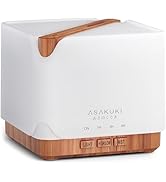
Image: Simple setup guide illustrating connecting power, app pairing, and wireless control.
6. הוראות הפעלה
6.1 שליטה ידנית
- בקרת ערפל: הקש על Mist/Wi-Fi button once for continuous mist. Press again for intermittent mist (30 seconds on, 30 seconds off). Press a third time to turn off the mist.
- בקרת אור: הקש על אוֹר button once to turn on the LED light with automatic color cycling. Press again to fix the light to a specific color. Continue pressing to cycle through colors. Press and hold the Light button to turn off the light.
6.2 Smart Wi-Fi and App Control
The diffuser can be controlled remotely using the TuyaSmart app.
- הורד את האפליקציה: חפש "TuyaSmart" in your smartphone's app store (iOS or Android) and download it.
- הרשמה/התחברות: פתחו את האפליקציה ופתחו חשבון חדש או התחברו אם כבר יש לכם אחד.
- היכנסו למצב התאמה: With the diffuser plugged in, press and hold the Mist/Wi-Fi button for 5 seconds until the indicator light flashes rapidly. This indicates the diffuser is in pairing mode.
- הוסף מכשיר: In the TuyaSmart app, tap "Add Device" or the "+" icon. Select "Small Home Appliance" > "Diffuser" (Wi-Fi).
- התחבר ל-Wi-Fi: Follow the in-app instructions to connect the diffuser to your 2.4GHz Wi-Fi network. Ensure your phone is also connected to the same 2.4GHz network during setup.
- לִשְׁלוֹט: Once successfully paired, you can control the mist, light, set timers, and create schedules directly from the TuyaSmart app.

Image: The mobile app allows for convenient control of the diffuser's functions.
6.3 שליטה קולית עם Alexa
The diffuser is compatible with Amazon Alexa for voice control.
- אפשר מיומנות: In the Alexa app, search for and enable the "TuyaSmart" skill.
- קישור חשבון: Link your TuyaSmart account to your Alexa account.
- גלה מכשירים: Ask Alexa to "Discover devices" or manually discover them in the Alexa app.
- פקודות קוליות: לאחר גילוי, ניתן להשתמש בפקודות כגון:
- "אלכסה, תדליקי את המפזר."
- "Alexa, turn off the diffuser."
- "Alexa, set the diffuser to red."
- "Alexa, set diffuser brightness to 50%."

Image: Voice control with Alexa allows hands-free operation of the diffuser.
7. תחזוקה
Regular cleaning helps maintain optimal performance and extends the lifespan of your diffuser.
7.1 ניקוי
יש לנקות את המפזר לאחר כל 5-6 שימושים או כל 3-5 ימים, במיוחד בעת החלפת שמנים אתריים.
- נתק: Disconnect the diffuser from the power outlet.
- מים ריקים: Remove the lid and carefully pour out any remaining water from the drain side of the water tank.
- לנקות: Use a soft cloth or cotton swab with a small amount of mild dish soap to gently wipe the inside of the water tank and the ultrasonic plate.
- לִשְׁטוֹף: Rinse the water tank with clean water, being careful not to get water into the air outlet.
- יָבֵשׁ: Wipe all parts dry with a clean, soft cloth.
- Deep Clean (Optional): For stubborn residue, add a small amount of white vinegar to the water tank and let it sit for 10-15 minutes before wiping and rinsing.
7.2 אחסון
When not in use for an extended period, ensure the diffuser is clean and completely dry. Store it in a cool, dry place away from direct sunlight.
8. פתרון תקלות
אם נתקלת בבעיות, עיין בבעיות הנפוצות ובפתרונות הבאות:
| בְּעָיָה | סיבה אפשרית | פִּתָרוֹן |
|---|---|---|
| אין ערפל או תפוקת ערפל נמוכה |
|
|
| המפזר לא נדלק |
|
|
| לא ניתן להתחבר ל-Wi-Fi/אפליקציה |
|
|
| נזילת מים |
|
|
9. מפרטים
| תכונה | פְּרָט |
|---|---|
| מותג | אסאקוקי |
| מספר דגם | DF010 |
| יְכוֹלֶת | 500 מיליליטר |
| מידות | אורך 6 אינץ', רוחב 6 אינץ', גובה 7 אינץ' |
| חוֹמֶר | אקרילוניטריל בוטדיאן סטירן (ABS), פוליפרופילן (PP) |
| מקור כוח | חשמלי עם כבלים |
| מהtage | 10 וואט |
| אזור כיסוי | עד 323 רגל מרובע |
| תכונות מיוחדות | App Control, Automatic Shut-Off, Multiple Light Settings, Multiple Mist Settings, Voice Control (Alexa) |
| רמת רעש | Lower than 35 dB |
| Runtime (Full Capacity) | Up to 16 hours (on weak mist setting) |
10. אחריות ותמיכה
The ASAKUKI Smart Wi-Fi Essential Oil Diffuser comes with a 1-year technical support warrantyאחריות זו מכסה פגמי ייצור ובעיות הנובעות משימוש רגיל.
For technical assistance, troubleshooting, or warranty claims, please contact ASAKUKI customer support through the retailer where you purchased the product or visit the official ASAKUKI webאתר ליצירת קשר.
Please have your model number (DF010) and proof of purchase ready when contacting support.