
מָבוֹא
Thank you for choosing the Awei B923BL Wireless Magnetic Sports Bluetooth Earphones. This manual provides essential information for setting up, operating, maintaining, and troubleshooting your new earphones. Please read it carefully before use to ensure optimal performance and longevity of your device.
תוכן החבילה
אנא בדקו את החבילה עבור הפריטים הבאים:
- Awei B923BL Wireless Magnetic Sports Bluetooth Earphones
- כבל טעינה USB
- גדלים מרובים של קצוות אוזניים
- מדריך למשתמש
המוצר נגמרview
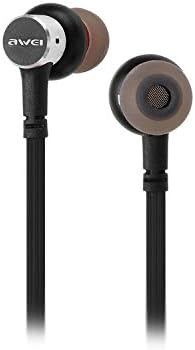
The Awei B923BL earphones are designed for active lifestyles, featuring a wireless Bluetooth connection and a magnetic design for convenient storage around your neck when not in use. They include an integrated microphone for hands-free calling.

הגדרה
1. טעינת האוזניות
Before first use, fully charge your earphones. Connect the provided USB charging cable to the charging port on the earphones and the other end to a USB power source (e.g., computer USB port, wall adapter). The indicator light will show charging status and turn off or change color when fully charged.
2. זיווג Bluetooth
- ודא שהאוזניות כבויות.
- Press and hold the multi-function button (usually the power button) until the indicator light flashes red and blue alternately, indicating pairing mode.
- On your mobile phone or Bluetooth-enabled device, go to the Bluetooth settings and enable Bluetooth.
- חפש available devices. You should see "Awei B923BL" or a similar name in the list.
- Select "Awei B923BL" to connect. Once connected, the indicator light will usually flash blue slowly or turn off, and you may hear a confirmation tone.
- אם תתבקש להזין סיסמה, הזן "0000".
Once paired, the earphones will automatically connect to the last paired device when turned on, if the device's Bluetooth is active and within range.
הוראות הפעלה
הפעלה/כיבוי
- הפעלה: לחץ והחזק את לחצן הרב-תכליתי למשך כ-3 שניות עד שנורית החיווי הכחולה תהבהב.
- כיבוי: לחץ והחזק את לחצן הרב-תכליתי למשך כ-5 שניות עד שנורית החיווי האדומה תהבהב ולאחר מכן תכבה.
השמעת מוסיקה
- הפעל/השהה: לחץ פעם אחת על הלחצן הרב-פונקציונלי.
- הרצועה הבאה: לחץ והחזק את כפתור עוצמת הקול +.
- רצועה קודמת: לחץ והחזק את כפתור עוצמת הקול -.
ניהול שיחות
- מענה/סיום שיחה: לחץ פעם אחת על הלחצן הרב-פונקציונלי.
- דחה שיחה: לחץ והחזק את לחצן הרב-תכליתי למשך כ-2 שניות.
- חיוג חוזר למספר האחרון: לחץ פעמיים על כפתור הרב-תכליתי.
בקרת עוצמת הקול
- הגדל את עוצמת הקול: לחץ על לחצן עוצמת הקול +.
- הפחת עוצמת הקול: לחץ על כפתור עוצמת הקול -.
תַחזוּקָה
- Clean the earphones regularly with a soft, dry cloth. Do not use harsh chemicals or abrasive materials.
- הסירו את קצוות האוזניים ונקו אותם עם סבון עדין ומים במידת הצורך, וודאו שהם יבשים לחלוטין לפני חיבורם מחדש.
- יש לאחסן את האוזניות במקום קריר ויבש, הרחק מאור שמש ישיר וטמפרטורות קיצוניות.
- הימנעו מחשיפת האוזניות למים או לחות מוגזמת.
- Do not attempt to disassemble or modify the earphones, as this will void the warranty.
פתרון בעיות
- האוזניות לא נדלקות: ודא שהאוזניות טעונות במלואן.
- לא ניתן להתאים למכשיר:
- ודא שהאוזניות נמצאות במצב צימוד (מהבהבות באדום וכחול).
- ודא שה-Bluetooth מופעל במכשיר שלך.
- קרב את האוזניות למכשיר שלך.
- נסה להפעיל מחדש גם את האוזניות וגם את המכשיר.
- נקה חיבורי Bluetooth קודמים במכשיר שלך אם יש לך יותר מדי.
- אין צליל או עוצמת קול נמוכה:
- בדקו את עוצמת הקול הן באוזניות והן במכשיר המחובר.
- ודא שהאוזניות מחוברות כראוי למכשיר שלך.
- נסה להשמיע מקורות שמע שונים.
- בעיות איכות שיחה:
- ודא שהמיקרופון אינו חסום.
- עברו לאזור עם פחות הפרעות.
מפרטים
| תכונה | פְּרָט |
|---|---|
| שם מותג | אווי |
| מספר דגם | B923BL |
| צֶבַע | שָׁחוֹר |
| גורם צורת אוזניות | אין אוזן |
| טכנולוגיית קישוריות | אַלחוּט |
| טכנולוגיית תקשורת אלחוטית | אַלחוּט |
| תיאור טווח גילאים | מְבוּגָר |
| חוֹמֶר | גוּמִי |
| מכשירים תואמים | טלפונים ניידים |
| תכונת כבלים | בלי כבל |
| שיטת בקרה | לָגַעַת |
| מספר פריטים | 1 |
| יַצרָן | אווי |
| תכונות מיוחדות | Microphone Included (Note: This model does not feature active noise cancellation as per product description.) |
אחריות ותמיכה
מידע על אחריות
This product comes with a 1-year manufacturer's warranty from the date of purchase. For warranty claims or service, please contact the manufacturer or their authorized service agent. For further details, you may also contact the retailer where the product was purchased.
תמיכת לקוחות
If you encounter any issues not covered in this manual or require further assistance, please refer to the contact information provided with your product packaging or visit the official Awei webאתר למשאבי תמיכה.