
מָבוֹא
This manual provides comprehensive instructions for the setup, operation, maintenance, and troubleshooting of your Thomson Universal 2-in-1 Zapper Remote Control ROC Z107. Please read this manual carefully before using the device to ensure optimal performance and longevity.
המוצר נגמרview
The Thomson ROC Z107 is a universal remote control designed to operate two devices, typically a Television (TV) and a Set-Top Box (STB). It features large buttons for ease of use and includes a learning function for expanded compatibility.
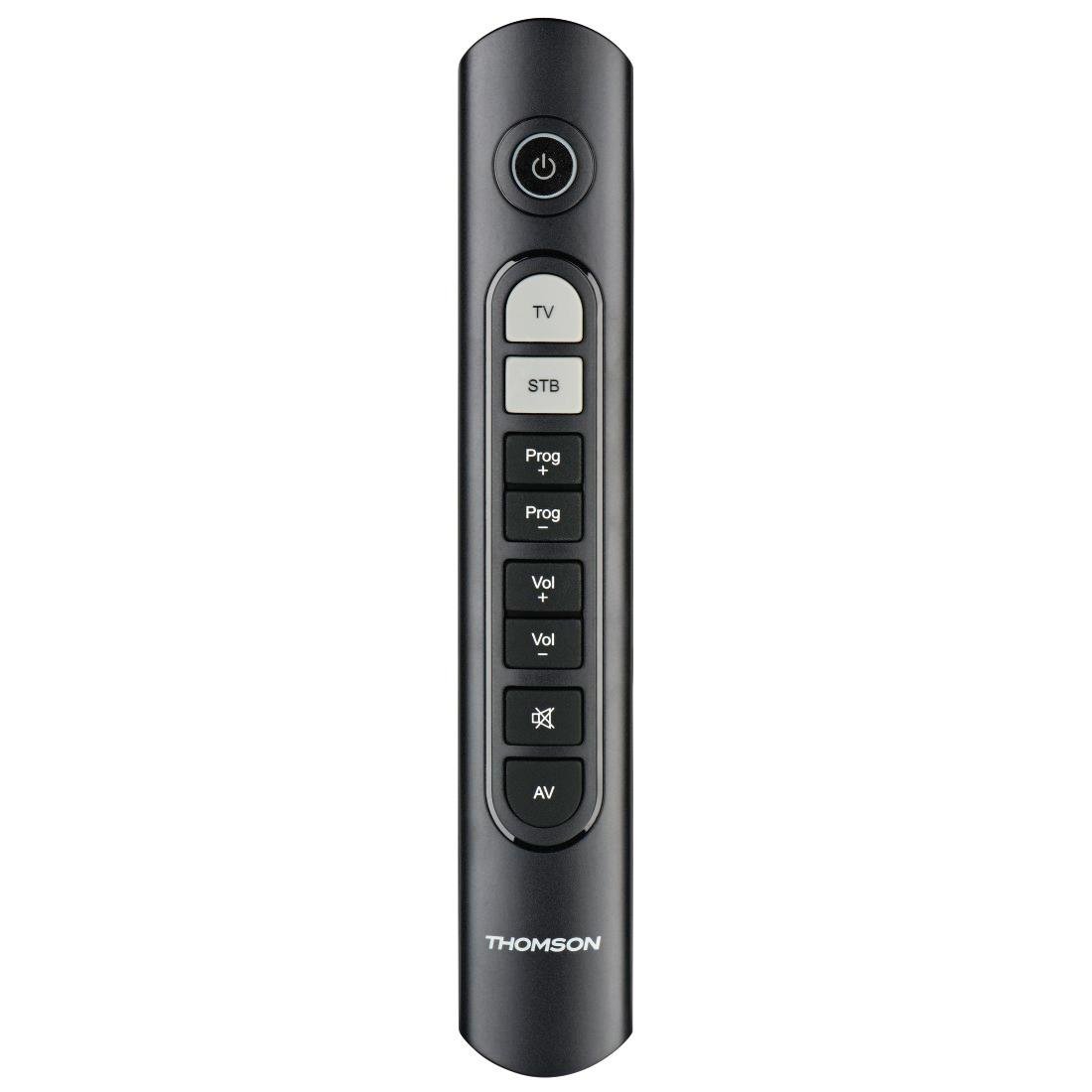
Image: Thomson Universal 2-in-1 Zapper Remote Control ROC Z107. This image displays the remote control from a slightly angled top-down perspective, highlighting its ergonomic design and the layout of its primary buttons.
הגדרה
1. התקנת סוללה
- פתח את מכסה תא הסוללה בגב השלט הרחוק.
- Insert two AAA batteries, ensuring correct polarity (+ and -). Two AAA batteries are included with your purchase.
- סגור היטב את מכסה תא הסוללות.
2. Initial Programming (Pre-programmed Devices)
The remote control is pre-programmed for many popular brands such as LG, Sony, Samsung, Sharp, and Philips. For these brands, the remote may function immediately after battery installation without further setup. Test the remote with your TV and STB.
3. Learning Function (For Unlisted or Specific Functions)
If your device is not immediately compatible or if you wish to add specific functions from your original remote, use the learning function:
- Place the Thomson remote and your original remote control head-to-head, approximately 2-5 cm apart.
- Press and hold the desired device button (TV or STB) on the Thomson remote until the indicator light blinks.
- Press the button on the Thomson remote that you wish to program. The indicator light will blink slowly.
- Press the corresponding button on your original remote control. The indicator light on the Thomson remote will blink rapidly to confirm successful learning.
- Repeat for other buttons as needed.
- Press the device button (TV or STB) again to exit learning mode.
4. Master Volume and Program Selection
This feature allows you to designate which device (TV or STB) controls the volume and program channels, regardless of which device mode the remote is currently in. Refer to the full user manual for specific steps on setting up master control functions.
הוראות הפעלה
The Thomson ROC Z107 remote control features a simplified button layout for essential functions.

Image: Close-up of Thomson ROC Z107 remote control buttons. This image provides a detailed view of the remote's buttons, including Power, TV, STB, Program Up/Down, Volume Up/Down, Mute, and AV input selection.
- כפתור הפעלה (⏻): Turns the selected device (TV or STB) on or off.
- כפתור טלוויזיה: Selects the Television control mode.
- STB Button: Selects the Set-Top Box control mode.
- Prog + / Prog - Buttons: Changes the program/channel up or down.
- Vol + / Vol - Buttons: מגביר או מפחית את עוצמת הקול.
- לחצן השתקה (🔇): השתקה או ביטול השתקת השמע.
- כפתור AV: Switches the input source on the TV (e.g., HDMI 1, HDMI 2, AV).
תַחזוּקָה
החלפת סוללה
When the remote control's performance degrades or the indicator light does not respond, it is time to replace the batteries. Follow the battery installation steps outlined in the Setup section.
ניקוי
לניקוי השלט רחוק, השתמשו במטלית רכה ויבשה. אין להשתמש בחומרי ניקוי נוזליים או בחומרים שוחקים, מכיוון שאלה עלולים לפגוע בפני השטח של השלט או ברכיבים הפנימיים שלו.
פתרון בעיות
- השלט לא מגיב:
- בדוק אם הסוללות הוכנסו כהלכה ואינן התרוקנות. החלף במידת הצורך.
- ודא שאין מכשולים בין השלט רחוק למקלט ה-IR של המכשיר.
- Verify that the remote is in the correct device mode (TV or STB).
- פונקציות ספציפיות שלא עובדות:
- If a specific button does not work, it may not be programmed for your device or the device may not support that function. Use the learning function to program the button from your original remote.
- Some older devices may have limited compatibility with universal remotes.
- Remote range is limited:
- ודא שהסוללות טריות.
- The maximum operating range is 10 meters. Operating beyond this distance may result in unreliable performance.
מפרטים
| מותג | תומסון |
| שם הדגם | ROC Z107 |
| מספר דגם | 00132672 |
| חוֹמֶר | פּלָסטִי |
| צֶבַע | שָׁחוֹר |
| הפצה | אינפרא אדום (אינפרא אדום אלחוטי) |
| מספר המכשירים הנתמכים | 2 (TV, STB) |
| ציוד היקפי תואם | Television, DTH, Set-Top Box |
| מקור כוח | 2 x AAA סוללות (כלולות) |
| טווח מקסימלי | 10 מטר |
| מידות המוצר | 31.5 x 15.5 x 4 ס"מ |
| משקל פריט | 170 גרם |
| מספר כפתורים | 9 |
אַחֲרָיוּת
This product is covered by a manufacturer's warranty. Please refer to the warranty card included in the product packaging or contact Thomson customer support for detailed warranty information and terms.
תְמִיכָה
For further assistance, technical support, or inquiries regarding your Thomson Universal 2-in-1 Zapper Remote Control ROC Z107, please visit the official Thomson webבאתר או צרו קשר עם מחלקת שירות הלקוחות שלהם. פרטי התקשרות ניתן למצוא בדרך כלל על אריזת המוצר או בנוכחות המקוונת הרשמית של המותג.