
מָבוֹא
This manual provides essential information for the installation, operation, maintenance, and troubleshooting of the Whirlpool W10911040 Washer User Interface. This component is a genuine Original Equipment Manufacturer (OEM) replacement part designed to restore full functionality to your compatible washing machine's control panel and display.
The user interface is a critical component that allows you to interact with your washer, selecting cycles, adjusting settings, and viewing status information. Proper installation and care ensure optimal performance and longevity of your appliance.
מידע בטיחות חשוב
אַזהָרָה: Before attempting any installation, repair, or maintenance on your washing machine, always disconnect the appliance from its power source to prevent electric shock or injury. Turn off the circuit breaker or unplug the washer.
- ללבוש ציוד מגן אישי מתאים, כגון כפפות ומשקפי בטיחות.
- If you are not comfortable performing appliance repairs, it is recommended to contact a qualified service technician.
- הרחק ילדים וחיות מחמד מאזור העבודה.
- Ensure all connections are secure before restoring power to the appliance.
התקנה והתקנה
The Whirlpool W10911040 User Interface is a direct replacement for the original part in compatible washing machine models. This part may differ in appearance from prior parts (e.g., W10679028, W10825104) but is functionally equivalent.
דגמים תואמים:
- MHW3500FW1
- MHW3505FW0
- MHW3505FW1
- MHW3500FW0
שלבי התקנה:
- נתק חשמל: Ensure the washing machine is completely disconnected from the electrical supply.
- לוח בקרת גישה: Carefully follow the instructions in your specific washer model's service manual to access the existing user interface. This typically involves removing the top panel or control console.
- Disconnect Old Interface: Disconnect any wiring harnesses or ribbon cables connected to the old user interface. Note their orientation for reinstallation.
- Remove Old Interface: Unfasten any screws, clips, or tabs holding the old user interface in place and carefully remove it.
- Install New Interface: Position the new Whirlpool W10911040 User Interface in the designated slot. Secure it with the original fasteners.
- חבר חיווט: Reconnect all wiring harnesses and ribbon cables to the new user interface, ensuring they are firmly seated.
- הרכב מחדש את מכונת הכביסה: Reattach the control console and any other panels removed during the process.
- החזר כוח: Once fully reassembled, restore power to the washing machine.
- פונקציונליות בדיקה: Power on the washer and test all functions of the control panel to ensure proper operation.
For detailed, model-specific installation instructions, always refer to the service manual provided with your washing machine.
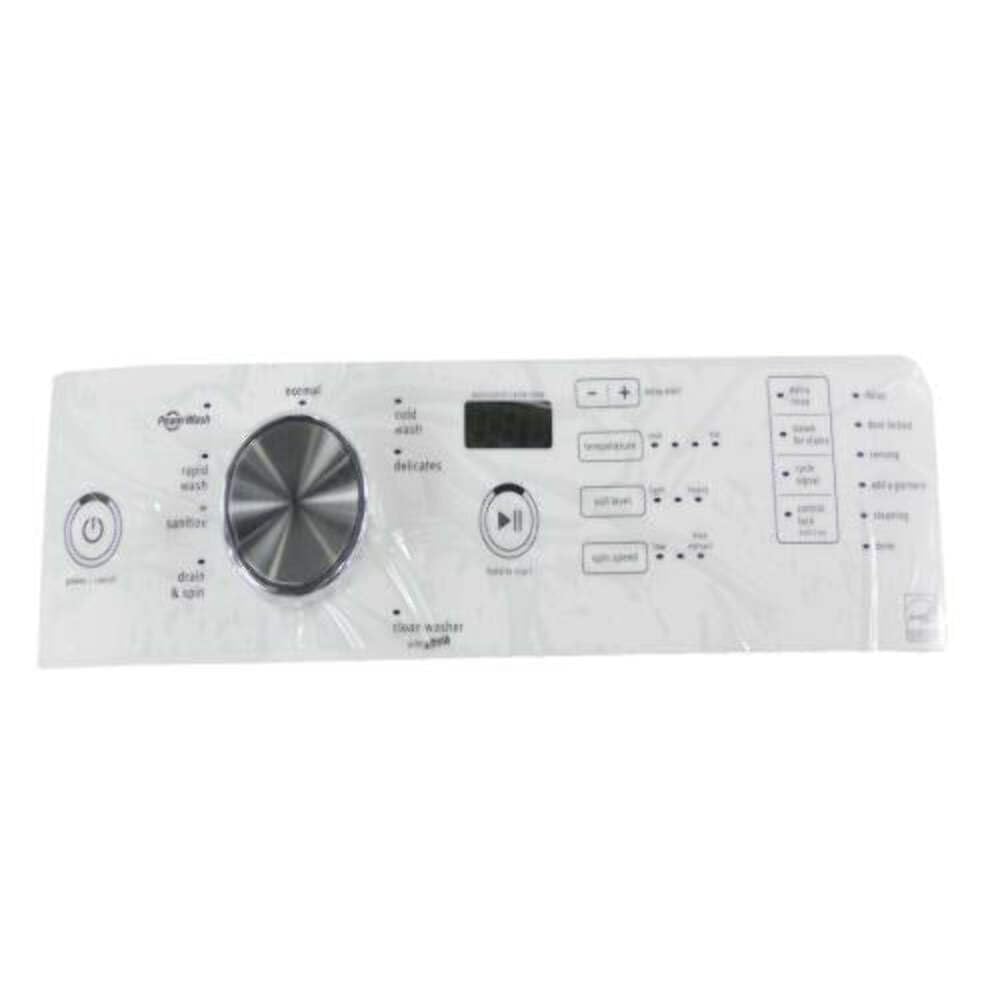
Image: The Whirlpool W10911040 Washer User Interface, a genuine OEM replacement part. This component houses the display and control buttons for compatible washing machines.
הפעלת ממשק המשתמש
The Whirlpool W10911040 User Interface serves as the primary control panel for your washing machine. It enables you to:
- Power the washer on and off.
- Select wash cycles and options.
- Adjust temperature, spin speed, and soil level settings.
- View cycle status and remaining time on the integrated display.
- Start, pause, or cancel wash cycles.
For detailed instructions on how to operate your specific washing machine model and utilize all its features, please refer to the comprehensive user manual that came with your appliance.
תַחזוּקָה
To ensure the longevity and proper functioning of your user interface, follow these simple maintenance guidelines:
- ניקוי: Regularly wipe the surface of the user interface with a soft, damp cloth. Use mild soap and water if necessary.
- הימנע מכימיקלים קשים: Do not use abrasive cleaners, solvents, or harsh chemicals, as these can damage the display and control panel surface.
- מניעת שפיכות: Be careful to avoid liquid spills on the control panel, which can seep into the electronics and cause damage.
- פעולה עדינה: Operate buttons and touch controls gently. Excessive force is unnecessary and can cause wear.
פתרון בעיות
If your washing machine exhibits erratic behavior or issues related to the control panel after replacing the user interface, consider the following:
- No Power/Erratic Behavior: Ensure all wiring harnesses are securely connected to the user interface and the main control board. Verify that the washer is receiving power.
- בעיות תצוגה: If the display is blank, flickering, or showing incorrect information, check the ribbon cable connection to the user interface.
- כפתורים לא מגיבים: Confirm that the user interface is correctly seated and that no debris is obstructing the buttons or touch sensors.
- קודי שגיאה: If the washer displays an error code, consult your washing machine's main user manual or service manual for the specific meaning and recommended corrective actions.
If troubleshooting steps do not resolve the issue, it is recommended to contact a qualified appliance repair technician for further diagnosis and repair.
מפרטים
| מספר חלק | W10911040 |
| יַצרָן | מְעַרבּוֹלֶת |
| מותגים תואמים | מַאִיtag |
| גימור חיצוני | מַתֶכֶת |
| גוֹדֶל | 2.828 אינץ' |
| Compatible Groove Diameter | 1.41 אינץ' |
אחריות ותמיכה
As a Genuine Original Equipment Manufacturer (OEM) part, the Whirlpool W10911040 User Interface is manufactured to high-quality standards. For specific warranty information, including coverage duration and terms, please refer to the documentation provided with your original appliance or contact Whirlpool customer support directly.
For technical assistance or to locate authorized service providers, visit the official Whirlpool or Maytag website, or consult your appliance's user manual for contact information.