1. הקדמה
Welcome to the world of interactive robotic dinosaurs! The Fistone RC Robot Dinosaur K9 is an intelligent, remote-controlled toy designed for engaging play. It features multiple functions including walking, dancing, singing, fight mode with sucker bullets, touch-sensitive interaction, and independent programming. This manual provides detailed instructions for setup, operation, maintenance, and troubleshooting to ensure a fun and safe experience.

Image 1: The Fistone RC Robot Dinosaur K9 and its remote control.
2. המוצר נגמרview
Familiarize yourself with the main components and features of your robot dinosaur:

Image 2: Labeled diagram of the robot dinosaur, highlighting LED lights, weapon launcher, rotatable head, swinging tail, battery compartment, mouth, front paws, and sliding wheels.
- נורות LED: Located on the head, indicating status and enhancing visual appeal.
- Weapon Launcher: Mounted on the back, capable of firing sucker bullets.
- ראש מסתובב: Allows for dynamic head movements.
- זנב מתנדנד: Provides realistic dinosaur movement.
- תא סוללות: Located on the underside for the robot's main battery.
- פֶּה: Can open and close, accompanied by sound effects.
- Front Paws: Capable of swinging for expressive gestures.
- גלגלים הזזה: Enable smooth movement across surfaces.
3. מה בקופסה
אנא בדקו את תוכן החבילה כדי לוודא שכל הפריטים נמצאים:
- 1 x Fistone RC Robot Dinosaur K9
- 1 x שלט רחוק
- 1 x כבל טעינה USB
- 1 x Lithium Polymer Battery (for robot)
- 5 x Sucker Bullets
- 1 x מברג קטן
4. התקנה
4.1. Battery Installation (Robot)
- Locate the battery compartment on the underside of the robot dinosaur.
- השתמש במברג המצורף כדי לפתוח את מכסה תא הסוללה.
- Connect the included Lithium Polymer battery to the robot's battery connector.
- הנח בזהירות את הסוללה בתוך התא וסגור את המכסה, תוך אבטחתו בעזרת הבורג.
4.2. התקנת סוללה (שלט רחוק)
- אתר את תא הסוללות בגב השלט הרחוק.
- השתמש במברג המצורף כדי לפתוח את מכסה תא הסוללה.
- Insert 2 AAA batteries (not included) into the compartment, observing correct polarity (+/-).
- סגור את המכסה ואבטח אותו עם הבורג.
4.3. Charging the Robot Battery
Before first use, fully charge the robot's Lithium Polymer battery.
- Remove the Lithium Polymer battery from the robot's compartment.
- חבר את הסוללה לכבל הטעינה של ה-USB.
- חבר את כבל הטעינה מסוג USB למקור מתח USB תואם (למשל, מחשב, מתאם קיר USB).
- The charging indicator on the cable will typically show red during charging and turn off or change color when fully charged.
- Charging usually takes approximately 4 hours. Do not overcharge.
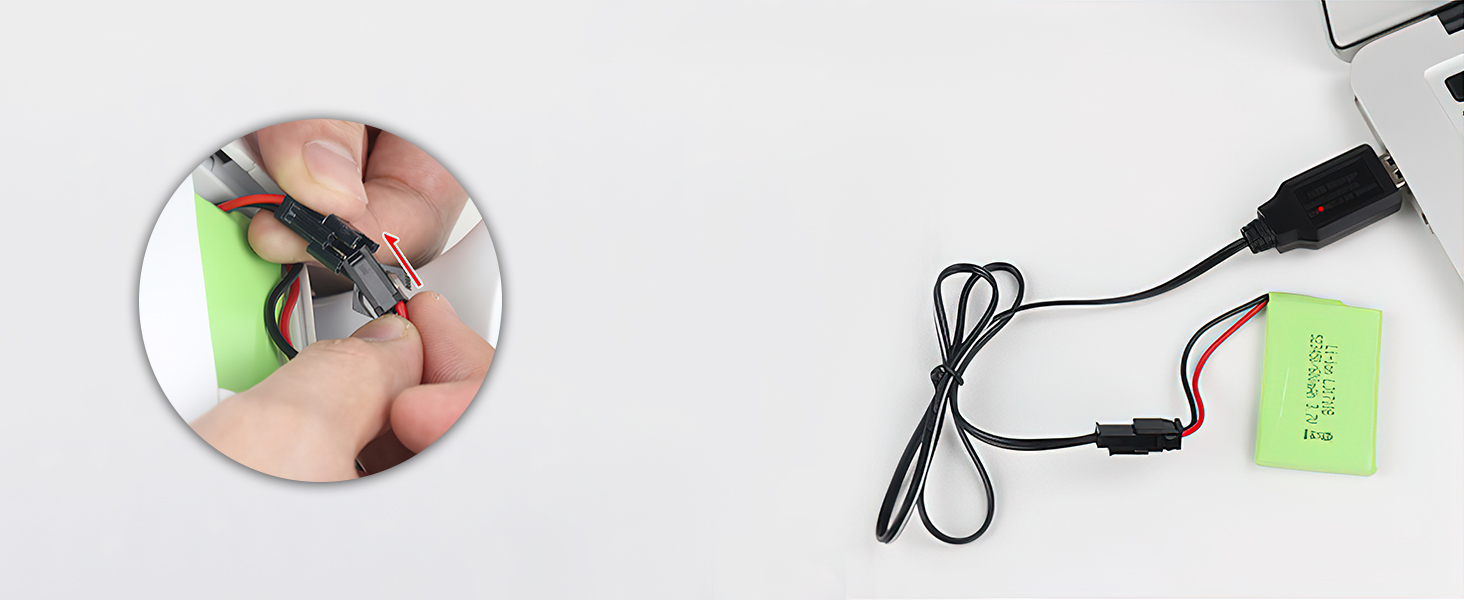
Image 3: Illustration of connecting the robot's battery to the USB charging cable for recharging.
5. הוראות הפעלה
5.1. פונקציות שלט רחוק
The remote control allows full command over your robot dinosaur. Refer to the diagram below for button identification:

Image 4: Remote control with labels for functions like Step Forward, Step Back, Turn Left, Turn Right, Shake Head, Shake Tail, Music, Shooting, Program, and more.
- משטח כיווני (למעלה/למטה/שמאלה/ימינה): Controls forward, backward, left turn, and right turn movements.
- VOL+/VOL-: Adjusts the robot's volume.
- Shake the Head: Activates head movements.
- Shake the Tail: Activates tail wagging.
- Music 1/2/3: Plays different music and dance routines.
- Touch to Interact: Activates touch-sensitive responses.
- תָכְנִית: Initiates and saves programming sequences.
- בסדר גמור: Fine-tunes movements.
- Start War Mode (Shooting): Activates fight mode and launches sucker bullets.
- Mechanical Language: Activates mechanical sound effects.
- עצור: Halts current actions.
5.2. Basic Movement Modes
Use the directional pad on the remote control to command the robot:
- לִלְחוֹץ קָדִימָה to make the dinosaur walk or slide forward.
- לִלְחוֹץ לְאָחוֹר to make the dinosaur walk or slide backward.
- לִלְחוֹץ פנה שמאלה or פנה ימינה לשנות כיוון.

Image 5: The robot dinosaur demonstrating forward, turning, and backward movements.
5.3. תכונות אינטראקטיביות
- Touch-Sensitive Interaction: Touch the interactive respondent area on the robot's head. The robot will respond by shaking its head, wagging its tail, and emitting different voices with multiple touches.

Image 6: A hand interacting with the touch-sensitive head of the robot dinosaur.
5.4. מצבים מיוחדים
- Fight Mode (Shooting): Press the 'Start War Mode' button on the remote. The robot will scream, perform launch functions, lock onto a target, and launch sucker bullets.

Image 7: The robot dinosaur in action, firing a sucker bullet.
- Independent Programming: Press the 'Program' button. You can program up to 50 actions. After inputting the desired sequence, press 'Program' again to execute the actions one by one.
- Music & Dance: Press 'Music 1', 'Music 2', or 'Music 3' to activate different music and dance routines.

Image 8: The robot dinosaur performing a dance routine with music.
Video 1: Official product video demonstrating various functions of the Fistone RC Robot Dinosaur K9, including movement, sound, and interactive features.
6. תחזוקה
- ניקוי: Wipe the robot and remote control with a soft, damp בַּד. אין לטבול במים.
- אִחסוּן: Store the toy in a cool, dry place away from direct sunlight. Remove batteries from both the robot and remote control if not used for extended periods to prevent leakage.
- טיפול בסוללה: Always use the provided charging cable for the robot's battery. Do not mix old and new batteries or different types of batteries in the remote control.
7. פתרון תקלות
- הרובוט לא מגיב: Ensure both the robot and remote control are powered on. Check if batteries are correctly installed and charged. Try replacing remote control batteries.
- Sucker bullets not firing: Verify that the sucker bullets are properly loaded into the launcher. Check the robot's battery level.
- התנהגות בלתי צפויה: Turn off both the robot and remote control, then turn them back on to reset the connection.
8. מפרטים
- מידות המוצר: 25.98 x 6.3 x 12.99 אינץ'
- משקל פריט: 3.8 פאונד
- מספר דגם של פריט: K9
- גיל מומלץ על ידי יצרן: 36 חודשים - 10 שנים
- סוללת רובוט: סוללת ליתיום פולימר אחת (כלול)
- סוללות שלט רחוק: 2 סוללות AAA (לא כלולות)
- יַצרָן: פיסטון
9. מידע בטיחות
- השגחת מבוגרים מומלצת במהלך המשחק.
- Keep small parts, such as sucker bullets, away from young children to prevent choking hazards.
- Do not aim the launcher at eyes or face.
- Do not modify or disassemble the product, as this may cause damage or injury.
- Follow all battery safety guidelines: do not mix old and new batteries, do not mix alkaline, standard (carbon-zinc), or rechargeable (nickel-cadmium) batteries. Dispose of batteries properly.
10. אחריות ותמיכה
For any questions, concerns, or support needs regarding your Fistone RC Robot Dinosaur K9, please contact the manufacturer directly or visit the official Fistone store for assistance.
Thank you for choosing Fistone!