
Sephia A11
Sephia A11 Portable Bluetooth Speaker
מדריך למשתמש
מָבוֹא
Thank you for choosing the Sephia A11 Portable Bluetooth Speaker. This manual provides essential information for setting up, operating, and maintaining your speaker to ensure optimal performance and longevity. The Sephia A11 offers versatile connectivity options, including Bluetooth, USB, Micro SD, and AUX input, delivering clear and powerful audio in a compact design.
מה יש בקופסה
- Sephia A11 Bluetooth Speaker
- כבל טעינה
- כבל Aux
- מדריך למשתמש (מסמך זה)

Image: The Sephia A11 Portable Bluetooth Speaker, showcasinהעיצוב השחור והחלקלק שלו והגריל הקדמי.
המוצר נגמרview
Familiarize yourself with the buttons and ports on your Sephia A11 speaker.
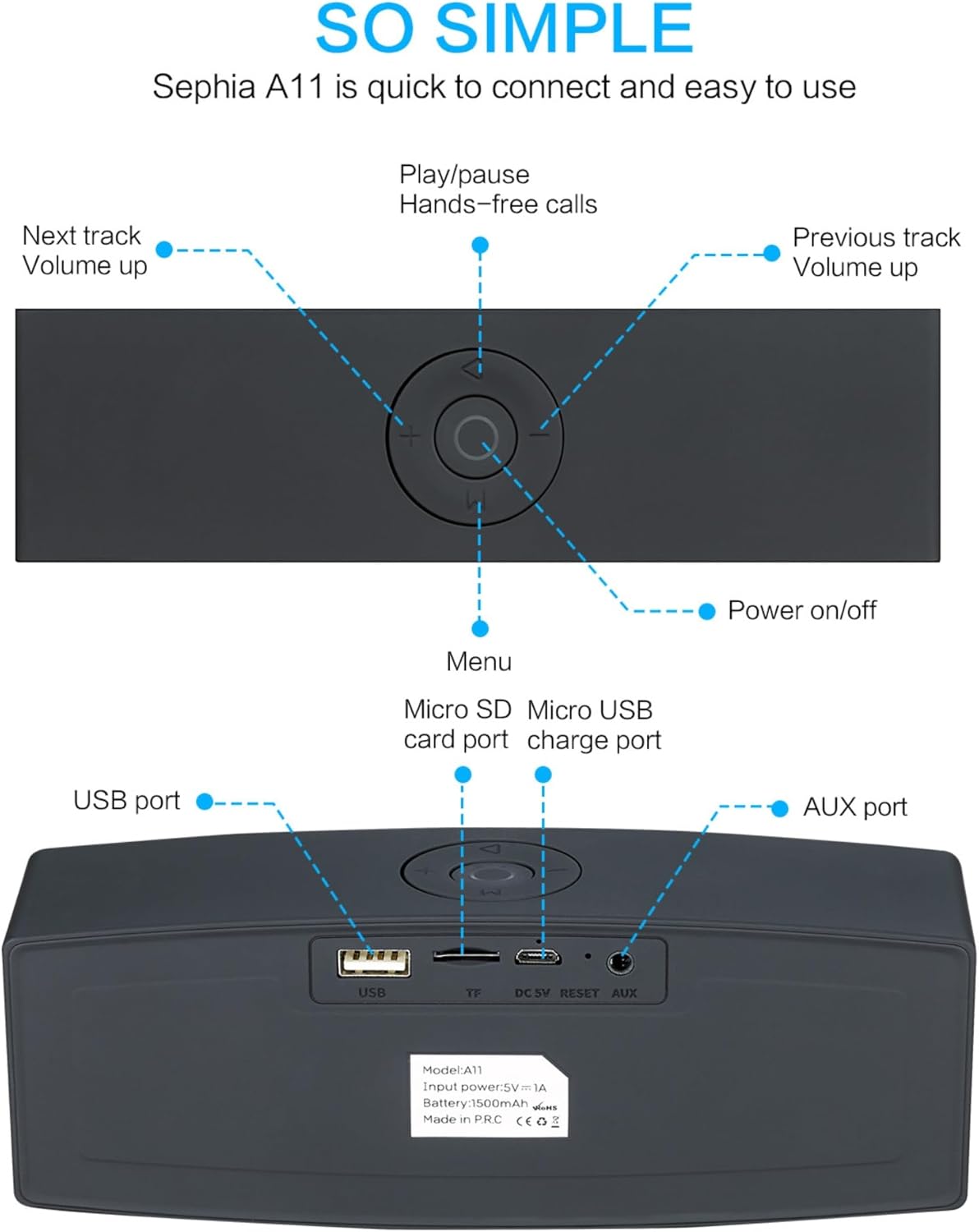
Image: Detailed diagram illustrating the top control panel and rear input/output ports of the Sephia A11 speaker.
Top Controls:
- לחצן הפעלה / כיבוי: לחץ והחזק כדי להפעיל או לכבות את הרמקול.
- לחצן הפעלה/השהה: Press to play or pause audio. Also used for hands-free calls (answer/end).
- Previous Track / Volume Down Button (-): לחיצה קצרה לרצועה הקודמת, לחיצה ארוכה להנמכת עוצמת הקול.
- Next Track / Volume Up Button (+): לחיצה קצרה לרצועה הבאה, לחיצה ארוכה להגברת עוצמת הקול.
- כפתור תפריט (M): Press to switch between input modes (Bluetooth, USB, Micro SD, AUX).
יציאות אחוריות:
- יציאת USB: להשמעת אודיו מדיסק און קי USB או טעינת התקנים חיצוניים.
- חריץ לכרטיס מיקרו SD (TF): להשמעת אודיו מכרטיס Micro SD.
- Micro USB Charge Port (DC 5V): לטעינת הרמקול.
- לחצן איפוס: Small pinhole for resetting the device if needed.
- יציאת AUX: For wired audio connection using the provided 3.5mm AUX cable.
הגדרה
1. טעינת הרמקול
- Connect the supplied charging cable to the Micro USB Charge Port (DC 5V) on the rear of the speaker.
- חבר את הקצה השני של כבל הטעינה למתאם חשמל USB (לא כלול) או ליציאת USB של מחשב.
- The charging indicator light will illuminate. Once fully charged, the light will change or turn off (refer to specific model behavior if indicated by LED). A full charge provides up to 8 hours of playtime.
2. הפעלה / כיבוי
- To power on, press and hold the Power On/Off button on the top panel until you hear an audible prompt or see an indicator light.
- To power off, press and hold the Power On/Off button again until the speaker shuts down.
3. זיווג Bluetooth
- Ensure the speaker is powered on and in Bluetooth mode. If not, press the 'M' (Menu) button to switch to Bluetooth mode. The speaker will enter pairing mode, indicated by a flashing LED light and an audible prompt.
- במכשיר הנייד שלך (סמארטפון, טאבלט, מחשב נייד), הפעל את Bluetooth וחפש מכשירים זמינים.
- Select "Sephia A11" from the list of found devices.
- Once successfully paired, the speaker will provide an audible confirmation, and the LED indicator will stop flashing.
- לרמקול טווח בלוטות' של עד 10 מטרים (33 רגל).
4. Wired Connections (AUX, USB, Micro SD)
- כניסת AUX: Connect one end of the supplied 3.5mm AUX cable to the AUX port on the speaker and the other end to the audio output of your device (e.g., MP3 player, computer). The speaker will automatically switch to AUX mode or can be selected using the 'M' button.
- השמעת USB: הכנס כונן הבזק מסוג USB המכיל אודיו fileליציאת ה-USB. הרמקול יזהה וינגן את השמע באופן אוטומטי files.
- השמעת כרטיס Micro SD: הכנס כרטיס Micro SD המכיל אודיו files into the Micro SD (TF) slot. The speaker will automatically detect and play the audio files.
הפעלת הרמקול
השמעת אודיו
- הפעל/השהה: Press the Play/Pause button to toggle between playing and pausing audio.
- התאמת עוצמת הקול: לחץ לחיצה ארוכה על כפתור '+' כדי להגביר את עוצמת הקול, ולחץ לחיצה ארוכה על כפתור '-' כדי להנמיך את עוצמת הקול.
- הרצועה הבאה / הקודמת: Short press the '+' button for the next track, and short press the '-' button for the previous track.

Image: A hand demonstrating how to interact with the top control buttons of the Sephia A11 speaker.
שיחות ללא ידיים
- When a call comes in while connected via Bluetooth, press the Play/Pause button to answer the call.
- לחץ שוב על כפתור ההפעלה/השהיה כדי לסיים את השיחה.
- המיקרופון המובנה מאפשר תקשורת ברורה.
תַחזוּקָה
- ניקוי: Use a soft, dry cloth to clean the speaker's surface. Do not use abrasive cleaners, alcohol, or chemical solvents, as these may damage the finish.
- אִחסוּן: יש לאחסן את הרמקול במקום קריר ויבש, הרחק מאור שמש ישיר וטמפרטורות קיצוניות.
- טיפול בסוללה: To prolong battery life, avoid fully discharging the speaker frequently. Charge the speaker regularly, even if not in use for extended periods.
- עמידות במים: רמקול זה אינו עמיד למים. יש להימנע מחשיפה למים או ללחות מוגזמת.
פתרון בעיות
| בְּעָיָה | סיבה אפשרית | פִּתָרוֹן |
|---|---|---|
| הרמקול לא נדלק. | סוללה חלשה; כפתור ההפעלה לא נלחץ מספיק זמן. | טען את הרמקול במלואו. לחץ והחזק את לחצן ההפעלה למשך 3-5 שניות. |
| אין קול מהרמקול. | עוצמת קול נמוכה מדי; מצב קלט שגוי; המכשיר אינו מחובר כראוי. | Increase speaker and device volume. Press 'M' button to select correct input mode. Re-pair Bluetooth or re-connect AUX/USB/SD. |
| התאמת Bluetooth נכשלה. | הרמקול לא במצב צימוד; המכשיר רחוק מדי; הפרעות. | Ensure speaker is in Bluetooth pairing mode (flashing LED). Move speaker closer to device. Turn off other Bluetooth devices. Try forgetting "Sephia A11" on your device and re-pairing. |
| איכות צליל ירודה. | Low battery; Device volume too high (distortion); Interference. | Charge the speaker. Adjust volume on both speaker and device. Move away from sources of interference. |
מפרטים
| שם הדגם | A11 |
| מידות | 18 x 7 x 5 ס"מ |
| מִשׁקָל | 426 גרם |
| טכנולוגיית קישוריות | Bluetooth, USB, Micro SD, AUX |
| כוח פלט רמקול | 6 וואט (2 דרייברים של 3 וואט) |
| תגובת תדר | 20 הרץ - 20 קילוהרץ |
| סוג סוללה | ליתיום יון |
| זמן משחק | עד 8 שעות |
| טווח בלוטות' | עד 10 מטר (33 רגל) |
| תכונות מיוחדות | Bass Boost, Portable, Hi-Res Audio, Built-in Microphone, Shockproof |

Image: Visual representation of the Sephia A11 speaker's dimensions.
אחריות ותמיכה
The Sephia A11 Portable Bluetooth Speaker comes with a אחריות ל-12 חודשים מיום הרכישה, כיסוי פגמי ייצור. אנא שמור את הוכחת הרכישה שלך לצורך תביעות אחריות.
For technical support, warranty inquiries, or further assistance, please refer to the contact information provided with your purchase or visit the official Sephia webאֲתַר.