
1. הקדמה
This manual provides detailed instructions for the installation, operation, maintenance, and troubleshooting of your FSP 400W Micro ATX Power Supply (Model FSP400-60GHS(85)-R1). This power supply unit is designed for compact small form factor PC systems, offering 400 watts of power output with 80 Plus Bronze certification for high efficiency. It is compatible with Intel and AMD CPU systems and standard PC configurations.
Please read this manual thoroughly before installation and operation to ensure proper usage and to prevent damage to the unit or other components.
2. מידע בטיחות
אַזהָרָה: Power supplies contain high voltagרכיבים e. אין לפתוח את ספק הכוח casinז. אין חלקים בפנים הניתנים לתיקון על ידי המשתמש. פתיחת ה-casing will void the warranty and poses a risk of electric shock.
- ודא שספק הכוח מנותק משקע החשמל AC לפני התקנה או תחזוקה.
- התקן את ספק הכוח באזור מאוורר היטב.
- Do not operate the power supply in high humidity or extreme temperature environments.
- השתמשו רק בכבלים המצורפים לספק הכוח.
- ודא שכל הכבלים מחוברים היטב לפני הפעלת המערכת.
- מוצר זה מיועד לשימוש במחשבים אישיים. אין להשתמש בו לכל מטרה אחרת.
3. תכולת החבילה
ודא שכל הפריטים המפורטים להלן נמצאים בחבילה שלך:
- FSP 400W Micro ATX Power Supply (FSP400-60GHS(85)-R1)
- כבל מתח AC
- SFX to PS2 Bracket
- מדריך למשתמש
- Mounting Screws (typically included with PC cases, but sometimes with PSUs)

Figure 3.1: Package Contents. Shows the power supply unit, user manual, various power cables, an AC power cord, and an SFX to PS2 adapter bracket.
4. המוצר נגמרview
The FSP400-60GHS(85)-R1 is a compact power supply designed for small form factor systems. Key features include an 80mm cooling fan with thermal sensing technology and an energy-saving 1-watt standby mode.
4.1 פריסה פיזית

איור 4.1: זוויתי view of the FSP 400W Micro ATX Power Supply, highlighting the fan grille, power switch, and AC power input.

איור 4.2: אחורי view of the power supply, detailing the main power switch and the AC power input socket.

איור 4.3: למעלה view of the power supply, showing the protective grille over the 80mm cooling fan.
4.2 מחברי פלט
The power supply includes various connectors to power your system components:
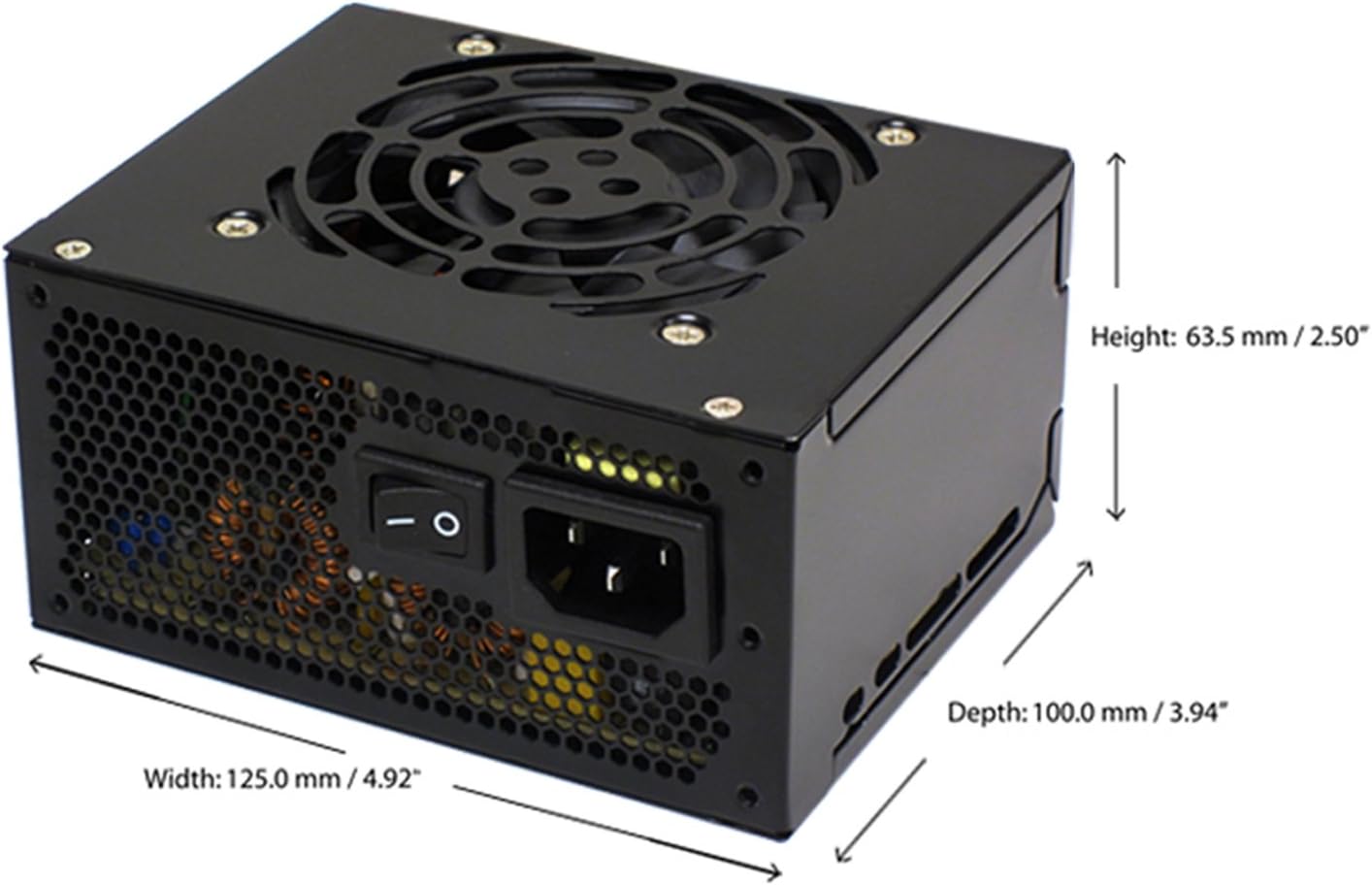
Figure 4.4: Diagram illustrating the types and quantities of output connectors available on the FSP400-60GHS(85)-R1 power supply.
- Main 24 Pin (1): For motherboard power.
- P4 | EPS 4+4 Pin (1): For CPU power.
- PCI-E 8 Pin (6+2) (1): עבור כרטיסי מסך.
- Molex 4 Pin (3): For older peripherals and fans.
- Serial ATA 15 Pin (3): For SATA hard drives and SSDs.
- FDD 4 Pin (1): For floppy disk drives or other legacy devices.
5. התקנה והתקנה
Before beginning installation, ensure your computer system is powered off and disconnected from the AC power outlet. It is recommended to wear an anti-static wrist strap to prevent electrostatic discharge (ESD) damage to components.
5.1 התקנת ספק הכוח
- הכינו את התיק: Open your computer case. Identify the power supply mounting area.
- הרכבת ספק הכוח:
- For SFX cases: Insert the FSP400-60GHS(85)-R1 directly into the SFX power supply bay and secure it with screws.
- For standard ATX cases: Attach the included SFX to PS2 bracket to the power supply. Then, mount the power supply with the bracket into the ATX power supply bay and secure it with screws.

Figure 5.1: The FSP 400W Micro ATX Power Supply shown with the SFX to PS2 adapter bracket installed, ready for mounting in a standard ATX case.

Figure 5.2: Illustration demonstrating how the SFX power supply fits into a PS2 (ATX) case using the provided adapter bracket.
5.2 כבלים חיבור
Connect the appropriate cables to your motherboard and components. Refer to your motherboard and component manuals for specific connection points.
- כוח לוח האם: Connect the 24-pin ATX connector to the corresponding socket on your motherboard.
- כוח מעבד: Connect the 4+4-pin EPS/ATX 12V connector to the CPU power socket on your motherboard.
- עוצמת כרטיס המסך: If your graphics card requires external power, connect the 6+2-pin PCI-E connector(s) to the graphics card.
- התקני אחסון: Connect SATA power connectors to your SATA hard drives, SSDs, and optical drives.
- ציוד היקפי: Use Molex 4-pin connectors for case fans or other legacy peripherals as needed.
- ניהול כבלים: Route cables neatly to ensure proper airflow within the case.
לאחר שכל החיבורים הפנימיים בוצעו, סגרו את מארז המחשב.
5.3 חיבור חיצוני
- חבר את כבל החשמל AC לשקע ה-AC של ספק הכוח.
- חבר את הקצה השני של כבל החשמל AC לשקע קיר מוארק או למכשיר להגנה מפני נחשולי מתח.
- Ensure the power switch on the back of the power supply is in the "OFF" (O) position before plugging it in.
6. הוראות הפעלה
6.1 הפעלת המערכת
- After all connections are secure, flip the power switch on the back of the power supply to the "ON" (I) position.
- לחץ על כפתור ההפעלה במארז המחשב כדי להפעיל את המערכת.
6.2 Thermal Control System
The FSP400-60GHS(85)-R1 features an 80mm cooling fan with thermal sensing technology. This system automatically adjusts the fan speed based on the internal temperature of the power supply, optimizing cooling performance while minimizing noise.
6.3 Energy Saver Standby Mode
This power supply is designed with an energy-saving 1-watt standby mode, reducing power consumption when the system is in a low-power state or turned off but still connected to AC power.
7. תחזוקה
תחזוקה נאותה מבטיחה את אורך החיים והביצועים האופטימליים של ספק הכוח שלך.
- ניקוי: Periodically clean the exterior of the power supply and its fan grille to prevent dust buildup. Use a soft, dry cloth or compressed air. Ensure the power supply is disconnected from AC power before cleaning.
- אוורור: Ensure that the power supply's fan and ventilation openings are not obstructed. Good airflow is crucial for cooling.
- שלמות כבל: בדקו באופן קבוע את כל כבלי החשמל לאיתור סימני בלאי, שפשוף או נזק. החליפו כבלים פגומים מיד.
Do not attempt to open the power supply unit for internal cleaning or repair. This will void the warranty and can be dangerous.
8. פתרון תקלות
אם נתקלת בבעיות באספקת החשמל שלך, עיין בבעיות הנפוצות ובפתרונות הבאות:
8.1 אין חשמל למערכת
- בדיקת מתח AC: ודא שכבל החשמל AC מחובר היטב הן לספק הכוח והן לשקע קיר תקין.
- מתג הפעלה: Verify that the power switch on the back of the power supply is in the "ON" (I) position.
- חיבורים פנימיים: Confirm that the 24-pin ATX and 4+4-pin EPS/ATX 12V connectors are firmly seated in the motherboard.
- קצר: Disconnect all peripheral power cables (SATA, Molex, PCI-E) and attempt to power on. If the system powers on, a short circuit may exist in one of the connected components or cables. Reconnect them one by one to identify the faulty component.
8.2 System Instability or Random Shutdowns
- לְהַעֲמִיס יוֹתֵר מִדַי: ודא שדרישות החשמל של המערכת שלך אינן עולות על קיבולת ספק הכוח של 400W.
- אוורור: Check for proper airflow within the case and ensure the power supply's fan is not obstructed. Overheating can cause instability.
- חיבורי כבלים: Re-check all power connections to ensure they are secure. Loose connections can lead to intermittent power delivery.
8.3 רעש מאוורר מוגזם
- הצטברות אבק: Clean the fan grille and fan blades with compressed air.
- חֲסִימָה: Ensure no cables or foreign objects are interfering with the fan's rotation.
- סביבת הפעלה: High ambient temperatures can cause the thermal control system to increase fan speed. Ensure adequate room ventilation.
If troubleshooting steps do not resolve the issue, contact FSP customer support or your retailer for assistance.
9. מפרטים
Detailed technical specifications for the FSP400-60GHS(85)-R1 power supply:
| שם הדגם | FSP 400W Micro ATX Power Supply |
| מספר דגם | FSP400-60GHS(85)-R1 |
| מותג | FSP |
| פלט וואטtage | 400 וואט |
| הסמכת 80 פלוס | 80 פלוס ברונזה |
| גורם צורה | Micro ATX (SFX with PS2 bracket) |
| שיטת קירור | Air (80mm fan with thermal control) |
| עיצוב ספק כוח | לא מודולרי |
| קלט כרךtage | 100 - 265 Volts (AC) |
| מידות (L x W x H) | 4.9 x 3.9 x 2.5 אינץ' (125.0 x 100.0 x 63.5 מ"מ) |
| משקל פריט | 2.31 פאונד |
| מכשירים תואמים | Personal Computer (AMD/Intel CPU systems) |
| מחברים | Main 24 Pin (1), P4 | EPS 4+4 Pin (1), PCI-E 8 Pin (6+2) (1), Molex 4 Pin (3), Serial ATA 15 Pin (3), FDD 4 Pin (1) |
| ציות לאיכות הסביבה | RoHS, Lead-Free, Green Product (G.P) |

Figure 9.1: Physical dimensions of the FSP 400W Micro ATX Power Supply.

Figure 9.2: Illustrative diagram showing typical cable lengths for the power supply connectors.
10. מידע על אחריות
The FSP 400W Micro ATX Power Supply (FSP400-60GHS(85)-R1) is covered by a אחריות יצרן לשנה. This warranty guarantees the quality and performance of the product for the specified period from the date of purchase.
The warranty covers defects in materials and workmanship under normal use. It does not cover damage resulting from improper installation, accidents, misuse, abuse, natural disasters, or unauthorized modifications or repairs. Opening the power supply casing יבטל את האחריות.
For warranty claims or service, please retain your proof of purchase and contact FSP customer support.
11. תמיכת לקוחות
If you require further assistance, have questions, or need to report an issue that cannot be resolved using the troubleshooting guide, please contact FSP customer support.
- FSP Webאֲתַר: Visit the official FSP webאתר למידע על מוצרים, שאלות נפוצות ומשאבי תמיכה.
- מידע ליצירת קשר: Refer to the FSP website or your product packaging for the most current customer service contact details (phone, email, or support portal).
When contacting support, please have your product model number (FSP400-60GHS(85)-R1) and proof of purchase readily available.