
1. הקדמה
The Darkglass Microtubes B7K V2 is a versatile bass preamp pedal designed to provide a wide range of tonal options for electric bass players. It combines a powerful overdrive circuit with a comprehensive 4-band equalizer and a balanced XLR output, making it suitable for both live performance and studio recording. This manual provides detailed instructions for setting up, operating, and maintaining your B7K V2 pedal.
2. תכונות
- Combines a preamp, EQ, and overdrive in one unit for powerful tone shaping.
- Features a blend control to mix clean and overdriven signals for perfect balance.
- Includes a 4-band active EQ with bass, low mids, high mids, and treble controls.
- Grunt switch adds three levels of low-end boost for a thicker sound.
- Attack switch adjusts treble content, offering boost, flat, and cut settings.
- Low mids switch changes the center frequency from 1 kHz to 500 Hz.
- Hi mids switch changes the center frequency from 3 kHz to 1.5 kHz.
- Parallel output for running the input signal through unaffected.
- Direct output provides a balanced version for PA systems or studio consoles.
- Operates with a regulated 9V DC adapter (not included).
3. בקרות וחיבורים
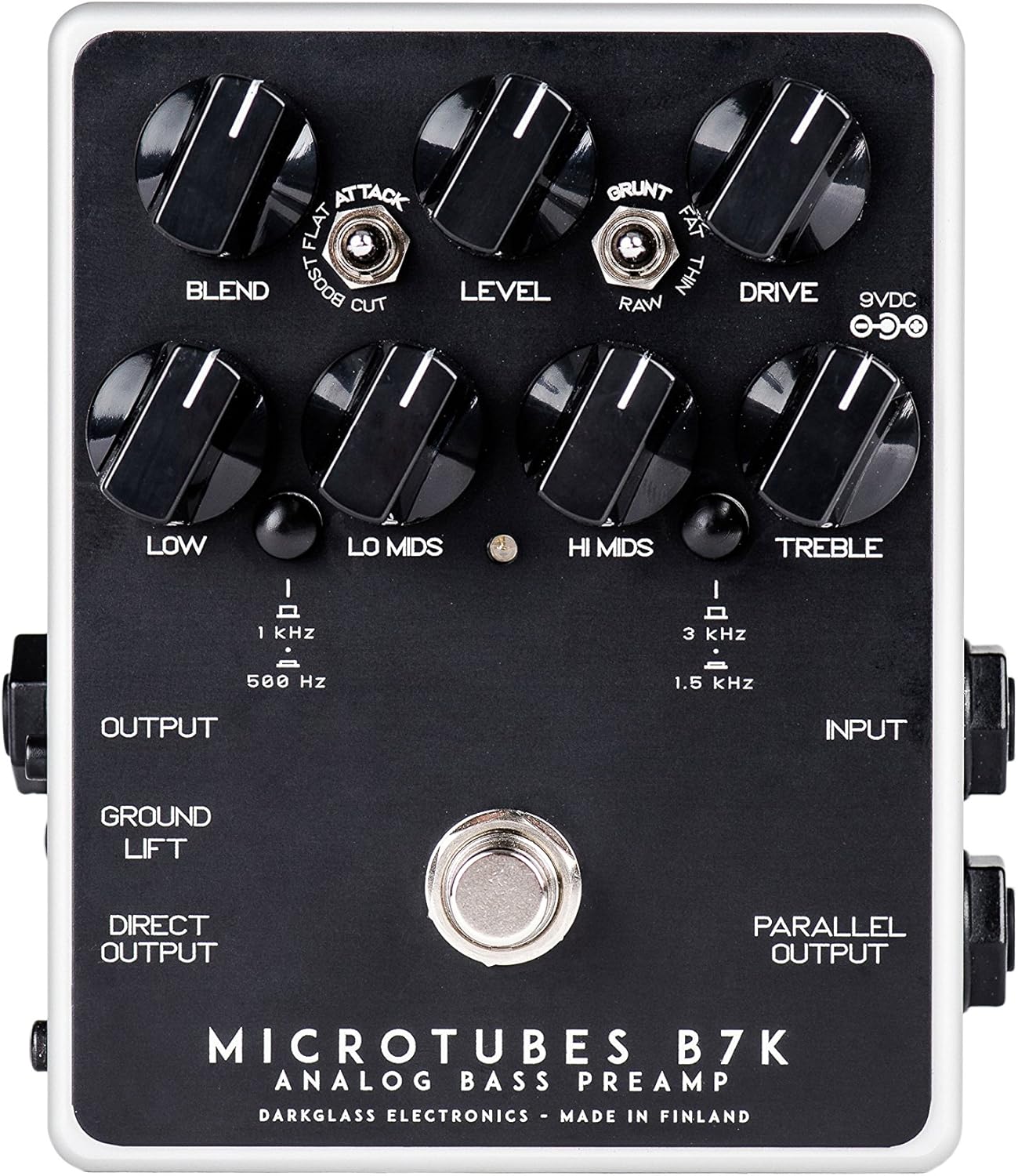
איור 1: למעלה view of the B7K V2 pedal.
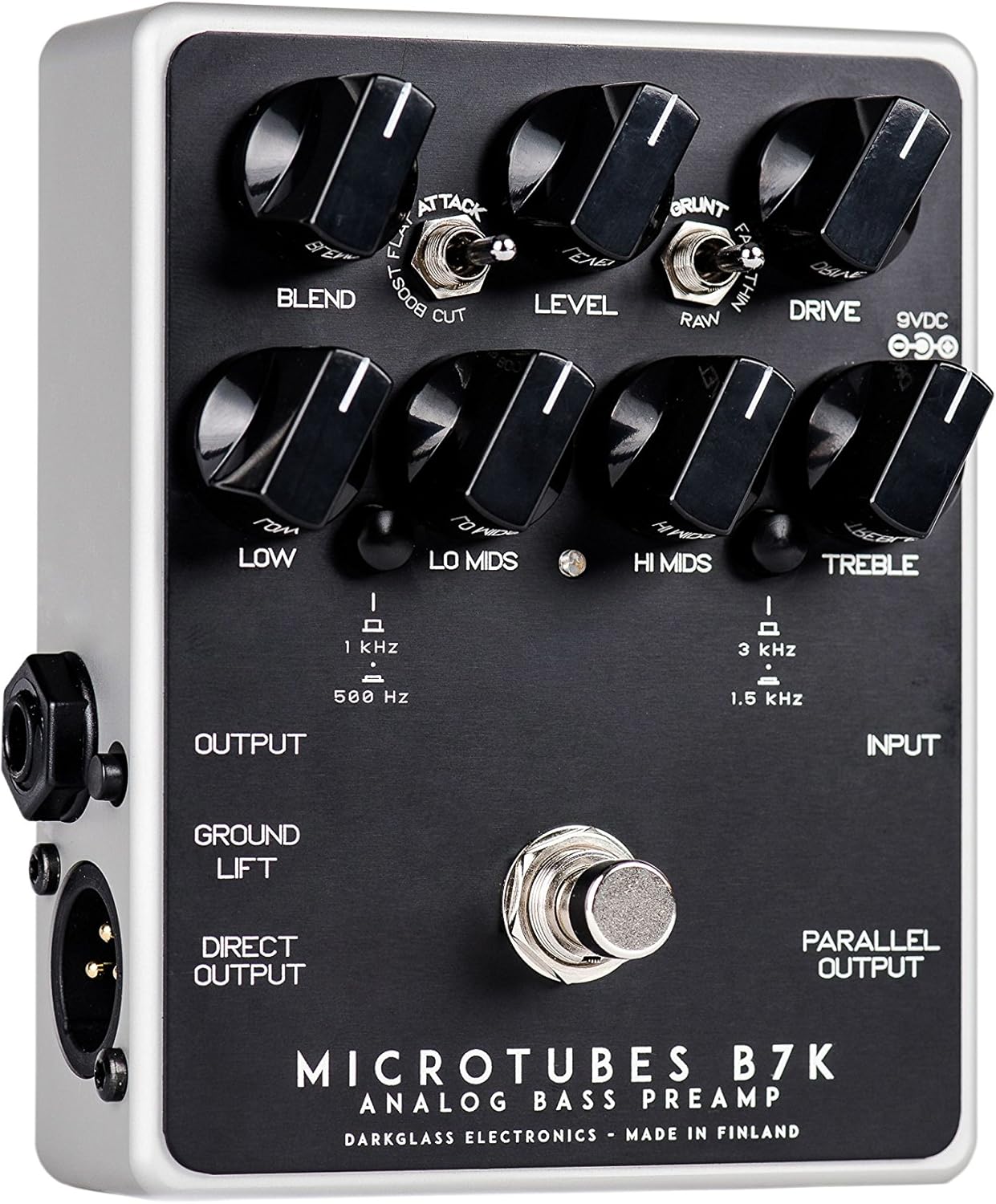
Figure 2: Left side connections.

Figure 3: Right side connections.
3.1 ידיות שליטה
- מיזוג: Mixes the clean input signal with the overdriven signal. The clean signal remains at unity gain while the volume of the overdriven signal is controlled by the Drive knob, allowing for fine-tuning of the blend ratio.
- רָמָה: קובע את עוצמת הקול הכוללת של הדוושה.
- לִנְהוֹג: שולט בכמות ההגבר באות המוגבר.
- נָמוּך: Adjusts the level of the low frequencies.
- לו מידס: Adjusts the level of the low-mid frequencies. The center frequency can be switched between 500 Hz and 1 kHz.
- היי מידס: Adjusts the level of the high-mid frequencies. The center frequency can be switched between 1.5 kHz and 3 kHz.
- לְשַׁלֵשׁ: Adjusts the level of the high frequencies.
3.2 מתגים
- מתג התקפה: Modifies the treble content of the overdriven signal. Options are Boost, Flat, and Cut.
- מתג גרנט: Modifies the low-end content of the overdriven signal. Options are Thin, Raw, and Fat.
- Lo Mids Switch: Selects the center frequency for the Lo Mids knob (500 Hz or 1 kHz).
- היי Mids Switch: Selects the center frequency for the Hi Mids knob (1.5 kHz or 3 kHz).
- מתג הרמה לקרקע: Disconnects the ground from the XLR output to help eliminate hum or ground loops when connected to external equipment.
3.3 חיבורים
- Input (1/4" Jack): Connect your bass guitar or other instrument here.
- Output (1/4" Jack): Connect to your bass ampדוושות ליפיר או אפקטים אחרים.
- Direct Output (XLR): Provides a balanced output for connecting directly to a PA system, mixing console, or audio interface.
- Parallel Output (1/4" Jack): Outputs the unaffected input signal, useful for parallel processing or sending a clean signal to another device.
- כניסת 9VDC: Connect a regulated 9V DC power supply (center negative, minimum 30mA).
4. התקנה
- Ensure the pedal is powered off before making any connections.
- חבר את גיטרת הבס שלך ל קֶלֶט שקע בצד ימין של הדוושה.
- חבר את תְפוּקָה jack on the left side to your bass ampקלט של המפיץ.
- If using the balanced output, connect the Direct Output (XLR) to a PA system, mixing console, or audio interface.
- If you need an unaffected signal, connect the פלט מקביל למכשיר אחר.
- Connect a regulated 9V DC (center negative) power supply to the קלט 9VDC. The pedal requires a minimum of 30mA. Note: A power supply is not included with the pedal.
- Once all connections are secure, you can power on the pedal.
5. הוראות הפעלה
5.1 פעולה בסיסית
To activate the pedal, press the footswitch. The LED indicator will illuminate. To bypass the effect, press the footswitch again.
5.2 עיצוב צלילים
- Start with all EQ knobs (Low, Lo Mids, Hi Mids, Treble) at the 12 o'clock position for a flat response.
- התאם את לִנְהוֹג knob to achieve your desired level of overdrive. Higher settings will produce more distortion.
- השתמש ב- תַעֲרוֹבֶת knob to mix the clean signal with the overdriven signal. This allows you to retain clarity and low-end presence while adding grit.
- ניסוי עם לִתְקוֹף ו Grunt switches to fine-tune the treble and bass characteristics of the overdriven tone.
- Utilize the 4-band EQ to sculpt your overall tone. The Lo Mids ו היי מידס switches allow you to select different frequency centers for precise control.
- התאם את רָמָה knob to match the output volume with your bypassed signal or to boost your signal for solos.
6. תחזוקה
- שמרו על ניקיון הדוושה על ידי ניגובה במטלית רכה ויבשה. הימנעו משימוש בחומרי ניקוי שוחקים או ממסים.
- Protect the pedal from extreme temperatures, moisture, and direct sunlight.
- Ensure all cables are in good condition and properly connected to prevent signal loss or damage.
- Always use a regulated 9V DC center-negative power supply to avoid damage to the unit.
7. פתרון תקלות
| בְּעָיָה | סיבה אפשרית | פִּתָרוֹן |
|---|---|---|
| אין קול | Incorrect power supply; cables not connected properly; pedal bypassed. | Verify 9V DC center-negative power supply is connected. Check all input/output cables. Ensure pedal is engaged (LED illuminated). |
| זמזום או רעש מוגזמים | Ground loop; faulty cables; interference from other equipment. | לעסוק ב מעלית קרקע switch on the XLR output. Try different cables. Ensure power supply is isolated and free from noise. Move pedal away from power transformers or other noisy electronics. |
| Weak or distorted signal (unintended) | Incorrect gain staging; faulty instrument cable. | לְהַתְאִים רָמָה ו לִנְהוֹג knobs. Test with a different instrument cable. |
8. מפרטים
- משקל פריט: 1.1 פאונד (0.5 קילוגרם)
- מידות המוצר: 6 x 7 x 10 אינץ'
- מספר דגם של פריט: B7K2
- צֶבַע: שָׁחוֹר
- סוג מחבר: 1/4" (aux), XLR
- ממשק חומרה: USB (for potential future firmware updates, not for audio)
- פורמט אותות: אנלוגי
- מקור כוח: חשמלי עם כבלים
- כרך ידtage: 9 Volts DC (center negative)
- הגרלה נוכחית: מינימום 30mA
9. אחריות ותמיכה
Darkglass Electronics products are designed for reliability and performance. For specific warranty information and support, please refer to the documentation included with your purchase or visit the official Darkglass Electronics webאתר. שמור את הוכחת הרכישה שלך לצורך תביעות אחריות.
For technical assistance or service inquiries, please contact Darkglass Electronics customer support through their official channels.