
1. הקדמה
This manual provides instructions for the installation, operation, and maintenance of the Nexxt Solutions Naxos800 8-Port Fast Ethernet Network Switch. The Naxos800 is an unmanaged compact desktop switch designed for small office/home office (SOHO) environments, student dormitories, and small enterprises, offering reliable network connectivity.
2. תכונות עיקריות
- 8 Fast Ethernet Ports: Provides 8 UTP/STP 10/100Mbps ports with auto MDI/MDIX.
- הכנס והפעל: Simple setup requiring no software configuration.
- מתג לא מנוהל: Operates without requiring complex management interfaces.
- Store-and-Forward Technology: Ensures efficient packet transmission.
- לימוד כתובות MAC: Supports auto-learning and aging with a built-in 1000 MAC address table.
- עיצוב קומפקטי: Suitable for desktop or wall mounting.
- חיסכון באנרגיה: עיצוב צריכת חשמל נמוכה.
- בקרת זרימה: Full duplex and half duplex back pressure flow control.
- עֲמִידוּת: Integrated lightning protection and a sturdy metal case.
- פעולה שקטה: Fanless design for silent performance.
3. תכולת החבילה
ודא שהחבילה שלך מכילה את הפריטים הבאים:
- One (1) Nexxt Solutions Naxos800 8-Port Fast Ethernet Switch
- מתאם מתח אחד (1).

Image: The Nexxt Solutions Naxos800 switch, its power adapter, and product packaging.
4. המוצר נגמרview

תמונה: חזית view of the Naxos800 switch, showing the Nexxt logo and eight green LED indicators for port activity.
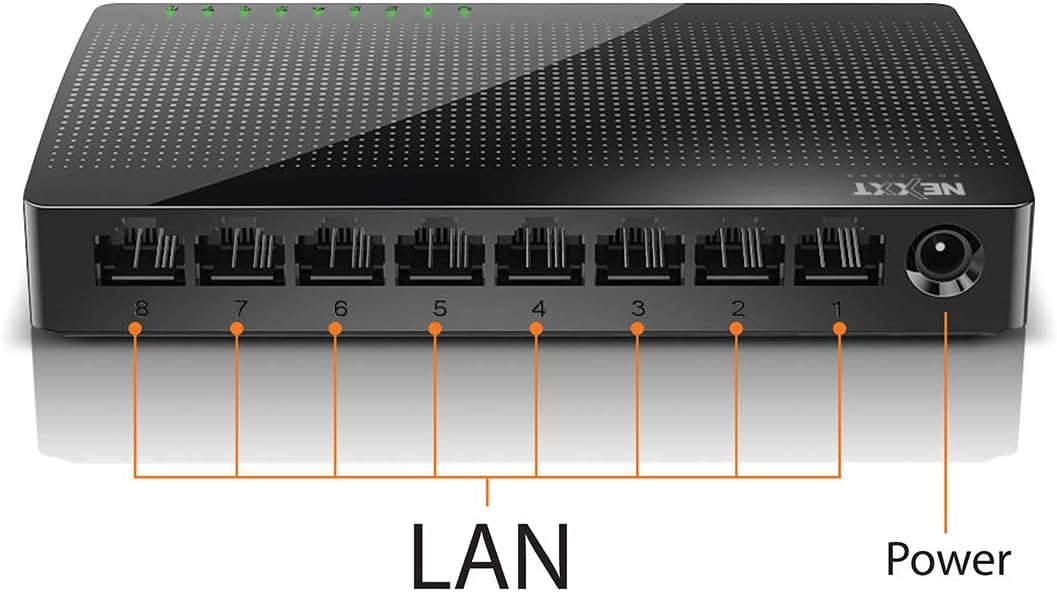
תמונה: אחורי view of the Naxos800 switch, highlighting the eight LAN ports (numbered 1-8) and the power input port.
מחווני LED
The front panel features LED indicators for each port, providing visual status:
- נורית LED ירוקה (רציפה): Indicates a stable link connection.
- LED ירוק (מהבהב): Indicates data activity on the corresponding port.
- הוביל את: No link or connection detected.
5. התקנה והתקנה
The Naxos800 switch is designed for simple plug-and-play installation. No software or complex configuration is required.
- מיקום: Place the switch on a stable, flat surface or mount it on a wall using appropriate hardware (not included). Ensure adequate ventilation around the device.
- התחבר לכוח: Connect the provided power adapter to the power input port on the switch and then plug the adapter into a standard electrical outlet. The power LED (if present, or the port LEDs will light up) should illuminate.
- התחבר לרשת:
- Connect your router or modem to any of the 8 LAN ports on the Naxos800 switch using an Ethernet cable.
- Connect your network devices (e.g., computers, gaming consoles, IP cameras, Smart TVs, printers) to the remaining LAN ports on the Naxos800 switch using an Ethernet cable.
- אמת חיבור: Once devices are connected, the corresponding LED indicators on the switch's front panel should light up green (solid for link, flashing for activity).

Image: Diagram illustrating a typical network setup. An ADSL or Cable Modem connects to a Router, which then connects to the Naxos800 switch. Various devices like laptops, media players, game consoles, IP cameras, Smart TVs, and IP phones are connected to the Naxos800 switch.
6. הפעלת המתג
The Naxos800 is an unmanaged switch, meaning it operates automatically without user intervention once connected. It functions as an internet splitter, expanding the number of wired network connections available from your router or modem.
- Automatic Speed Detection: Each port automatically detects the speed of the connected device (10Mbps or 100Mbps) and adjusts accordingly.
- MDI/MDIX אוטומטי: Eliminates the need for crossover cables; the switch automatically detects and corrects for straight-through or crossover cable types.
- העברת נתונים: Data packets are forwarded between connected devices at Fast Ethernet speeds. The store-and-forward architecture ensures data integrity.
7. תחזוקה
The Naxos800 switch requires minimal maintenance.
- ניקוי: השתמשו במטלית רכה ויבשה לניקוי החלק החיצוני של המתג. אין להשתמש בחומרי ניקוי נוזליים או בתרסיס.
- אוורור: ודא שפתחי האוורור אינם חסומים כדי למנוע התחממות יתר.
- מחזור הפעלה: If the device experiences issues, a simple power cycle (unplugging and replugging the power adapter) can often resolve minor problems.
8. פתרון תקלות
If you encounter issues with your Naxos800 switch, refer to the following common problems and solutions:
| בְּעָיָה | סיבה אפשרית | פִּתָרוֹן |
|---|---|---|
| אין חשמל / המכשיר לא נדלק. | מתאם החשמל לא מחובר או פגום; שקע החשמל לא פועל. | ודא שמתאם החשמל מחובר היטב למתג ולשקע חשמלי תקין. נסה שקע אחר. |
| אין נורית קישור עבור מכשיר מחובר. | Ethernet cable faulty or improperly connected; device not powered on or faulty; incorrect port. |
|
| מהירויות רשת איטיות. | Network congestion; faulty cable; device limitations. |
|
9. מפרטים
| תְכוּנָה | עֵרֶך |
|---|---|
| מספר דגם | ASIDT084U3 |
| נמלים | 8 x 10/100Mbps Fast Ethernet (UTP/STP) |
| רוחב פס של מטוס אחורי | 1.6 Gbps |
| טבלת כתובות MAC | 1000 כניסות |
| בקרת גישה | CDMA |
| בקרת זרימה | Full duplex and half duplex back pressure |
| מידות (L x W x H) | 12.4 x 5.9 x 2.3 ס"מ |
| מִשׁקָל | 140 גרם |
| קלט כוח | מתאם מתח חיצוני (כלול) |
הערה: המפרט נתון לשינויים ללא הודעה מוקדמת.
10. אחריות ותמיכה
The Nexxt Solutions Naxos800 8-Port Fast Ethernet Network Switch comes with a אחריות מוגבלת לשנה. For warranty claims or technical support, please contact Nexxt Solutions customer service. Refer to the official Nexxt Solutions webאתר לקבלת מידע תמיכה ופרטי יצירת קשר עדכניים ביותר.
Nexxt Solutions is a US company committed to quality and customer service.