
1. הקדמה
This manual provides essential information for the safe and efficient operation of your Rigol DS1104Z-S Plus 100 MHz Digital Oscilloscope. Please read this manual thoroughly before using the instrument to ensure proper functionality and to prevent damage. The Rigol DS1104Z-S Plus is a 4-channel digital storage oscilloscope designed for precise signal analysis with a 100 MHz bandwidth and a 1 GSa/s real-time sampשיעור.
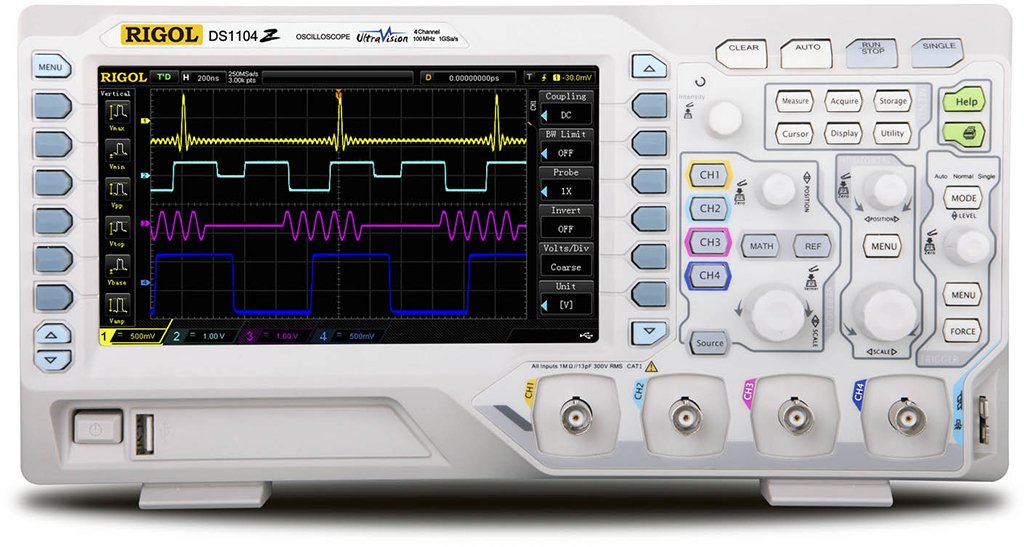
Figure 1: Rigol DS1104Z-S Plus Digital Oscilloscope. This image shows the front panel of the oscilloscope with its display, control knobs, and input channels.
2. מידע בטיחות
יש להקפיד תמיד על אמצעי הזהירות הבאים כדי למנוע פגיעה ונזק למכשיר:
- מקור כוח: חבר את המכשיר אך ורק למקור חשמל בעל עוצמת הקול שצוינהtage ותדירות.
- הַאֲרָקָה: ודא שהמכשיר מחובר כראוי להארקה כדי למנוע התחשמלות.
- אוורור: אין לחסום פתחי אוורור. יש לוודא זרימת אוויר נאותה סביב המכשיר.
- סְבִיבָה: Operate the oscilloscope in a dry, well-ventilated area, away from direct sunlight, high temperatures, and excessive dust.
- בדיקות: Use only probes designed for the specified voltage ודירוגי תדירות.
- שֵׁרוּת: הפנה את כל הטיפולים לאנשי שירות מוסמכים. אל תנסה לתקן את המכשיר בעצמך.
- ניקוי: נתק את החשמל לפני הניקוי. השתמש במטלית רכה, דקהamp בַּד. אין להשתמש בחומרי ניקוי שוחקים או ממסים.
3. תכולת החבילה
ודא שהחבילה שלך מכילה את הפריטים הבאים:
- Rigol DS1104Z-S Plus Digital Oscilloscope
- כבל חשמל
- Passive Probes (4 units)
- כבל USB
- מדריך מהיר
- Resource CD (User Manual, Programming Manual, Software)
4. המוצר נגמרview
The Rigol DS1104Z-S Plus features a user-friendly interface and robust design for various measurement applications.
4.1 לוח קדמי
The front panel includes the display, control knobs, function buttons, and input connectors for channels 1-4.
- מסך תצוגה: Shows waveforms, measurement results, and menu options.
- בקרות אנכיות: התאם כרךtage per division and position for each channel.
- בקרות אופקיות: Adjust time per division and horizontal position.
- בקרות טריגר: Set trigger level, mode, and type.
- לחצני פונקציה: Access various menus such as Acquire, Measure, Storage, Utility, etc.
- Channel Inputs (CH1-CH4): BNC connectors for probe connection.
4.2 פאנל אחורי
The rear panel provides power input, USB host/device ports, and LAN port for connectivity.
- כניסת מתח AC: לחיבור כבל החשמל.
- יציאת USB מארח: לחיבור התקני אחסון USB.
- יציאת התקן USB: לחיבור למחשב.
- יציאת LAN: לחיבור רשת ושלט רחוק.
5. התקנה
5.1 חיבור מתח
- ודא שמתג ההפעלה בפאנל האחורי נמצא במצב כבוי.
- חבר את כבל החשמל המצורף לכניסת החשמל AC בפאנל האחורי של האוסילוסקופ.
- חבר את הקצה השני של כבל החשמל לשקע חשמל AC מוארק.
5.2 חיבור בדיקה
- Connect the BNC connector of a passive probe to one of the input channels (CH1, CH2, CH3, or CH4) on the front panel.
- Connect the probe's ground clip to the circuit's ground reference.
- Set the attenuation ratio on the probe to match the setting on the oscilloscope (e.g., 1X or 10X).
5.3 הפעלה ראשונית
- Press the power switch on the rear panel to the ON position.
- The oscilloscope will perform a self-test and display the Rigol logo.
- After startup, the default waveform display will appear.
6. הוראות הפעלה
This section covers basic operations for acquiring and analyzing waveforms.
6.1 תצוגת צורת גל בסיסית
- Vertical Scale (VOLTS/DIV): Use the vertical scale knob for the active channel to adjust the voltage רגישות.
- מיקום אנכי: Use the vertical position knob to move the waveform up or down on the screen.
- Horizontal Scale (SEC/DIV): Use the horizontal scale knob to adjust the time base.
- מיקום אופקי: Use the horizontal position knob to shift the waveform left or right.
6.2 הפעלה
טריגר מייצב צורות גל חוזרות ולוכד אירועים חד-פעמיים.
- רמת טריגר: כוונן את כפתור רמת ההדק כדי להגדיר את עוצמת הקולtagהנקודה שבה מתרחש הטריגר.
- Trigger Menu: הקש על תפריט טריגרים button to configure trigger type (Edge, Pulse, Video, etc.), source, and slope.
- מצב טריגר: Select between Auto, Normal, and Single modes.
6.3 פונקציות מדידה
האוסילוסקופ מציע מגוון פונקציות מדידה אוטומטיות.
- הקש על לִמְדוֹד button to display the measurement menu.
- Select desired measurements such as Vpp, Vmax, Vmin, Freq, Period, Rise Time, etc.
- The results will be displayed on the screen.
6.4 Saving Data
Waveforms and settings can be saved to internal memory or a USB storage device.
- הקש על אִחסוּן לַחְצָן.
- Select the storage type (Waveform, Setup, Image) and destination (Internal, USB).
- Follow the on-screen prompts to save the data.
7. תחזוקה
7.1 ניקוי
To maintain the instrument's appearance and performance:
- נתק את כבל החשמל לפני הניקוי.
- השתמשו במטלית רכה דampened with mild detergent and water to clean the exterior.
- אין להשתמש בחומרי ניקוי שוחקים, ממסים או כימיקלים חזקים.
- ודא שאין נוזלים שנכנסים למכשיר.
7.2 כיול
The oscilloscope is factory calibrated. For optimal performance, periodic calibration by qualified service personnel is recommended, typically every 1-2 years, depending on usage.
7.3 אחסון
When not in use for extended periods, store the oscilloscope in a dry, dust-free environment within the specified operating temperature range.
8. פתרון תקלות
This section lists common problems and their solutions. If the problem persists, contact Rigol customer support.
| בְּעָיָה | סיבה אפשרית | פִּתָרוֹן |
|---|---|---|
| אין תצוגה לאחר ההפעלה | Power cord not connected; Power switch off; Faulty power outlet | בדוק את חיבור כבל החשמל; ודא שמתג ההפעלה פועל; בדוק את שקע החשמל עם מכשיר אחר |
| לא מוצג צורת גל | Probe not connected; Incorrect channel settings; Trigger level incorrect; Input signal too small/large | Connect probe to active channel; Adjust vertical scale and position; Adjust trigger level; Check input signal source |
| צורת גל לא יציבה | Incorrect trigger settings; Noisy signal | Adjust trigger level and mode; Check signal source for noise; Use averaging acquisition mode |
| Cannot save data to USB | USB drive not formatted correctly; USB drive full; USB drive faulty | Format USB drive to FAT32; Delete unnecessary files; Try a different USB drive |
9. מפרטים
Key technical specifications for the Rigol DS1104Z-S Plus Digital Oscilloscope:
- רוחב פס: 100 מגה-הרץ
- ערוצים: 4 ערוצים אנלוגיים
- S בזמן אמתampLe Rate: עד 1 GSa/s
- עומק זיכרון: 12 Mpts (Standard), 24 Mpts (Optional)
- קצב לכידת צורת גל: Up to 30,000 wfms/s
- לְהַצִיג: מסך TFT LCD בגודל 7 אינץ' (רזולוציה 800x480)
- רגישות אנכית: 1 מיליוולט/דיו עד 10 וולט/דיו
- Time Base Range: 2 ns/div to 50 s/div
- סוגי טריגרים: Edge, Pulse, Video, Slope, Alternate, Runt, Window, Delay, Setup/Hold, Nth Edge
- מִמְשָׁק: USB Host, USB Device, LAN, Pass/Fail, Trigger Out
- מקור כוח: חשמלי עם כבלים
- משקל פריט: 1 קילוגרם
- הַתאָמָה: CE
10. אחריות ותמיכה
Rigol Technologies provides a standard warranty for its products. For detailed warranty terms and conditions, please refer to the warranty card included with your product or visit the official Rigol website. For technical support, service, or inquiries, please contact your local Rigol distributor or Rigol customer service. Contact information can typically be found on the Rigol website or in the documentation provided with your oscilloscope.
רִשְׁמִי Webאֲתַר: www.rigol.com