
מָבוֹא
תודה על הרכישהasing the Max Power MPD125L Karaoke DJ Speaker System. This portable 12-inch speaker system is designed to deliver powerful sound and vibrant LED lighting for your entertainment needs. It features a built-in rechargeable battery, multiple connectivity options including USB, SD, AM/FM radio, and Bluetooth, along with a strong ampמכשיר חיטוי לחוויית אודיו סוחפת.
Please read this manual thoroughly before operating the device to ensure proper use, optimal performance, and to prevent damage.
מידע בטיחות
- אין לחשוף את המכשיר לגשם או לחות כדי למנוע שריפה או התחשמלות.
- אל תפתח את ה-casinז. אין חלקים בפנים הניתנים לתיקון על ידי המשתמש. יש לפנות לכל טיפול וטיפול באנשי מקצוע מוסמכים.
- הנח את היחידה על משטח יציב ושטוח כדי למנוע ממנה ליפול.
- הרחק את היחידה מאור שמש ישיר, מקורות חום ואבק מוגזם.
- יש לוודא אוורור נאות. אין לחסום פתחי אוורור.
- השתמש רק במתאם החשמל שסופק עם היחידה.
- נתק את היחידה מהחשמל במהלך סופות ברקים או כאשר אינו בשימוש לתקופות ארוכות.
- הימנע מהנחת חפצים כבדים על כבל החשמל.
- אין להכניס חפצים לפתחי היחידה.
תוכן החבילה
אנא בדקו שכל הפריטים נמצאים ובמצב תקין:
- Max Power MPD125L Karaoke DJ Speaker System
- מיקרופון אלחוטי
- שלט רחוק אלחוטי
- מתאם חשמל/כבל טעינה
- מדריך למשתמש (מסמך זה)
תכונות המוצר
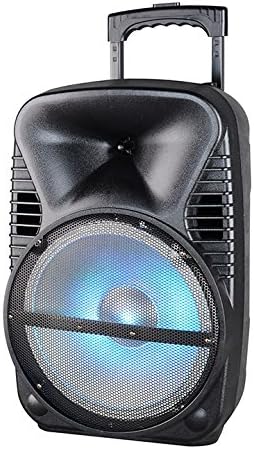
תמונה: חזית view of the Max Power MPD125L Karaoke DJ Speaker System. It is a black, portable speaker with a retractable handle on top and wheels at the bottom. The front features a large speaker grille with blue LED lights illuminating the woofer, indicating its active state.
- עיצוב נייד: 12-inch speaker with built-in retractable handle and wheels for easy transport.
- אודיו רב עוצמה: 4000W peak power output for loud and clear sound with good bass.
- סוללה נטענת מובנית: Provides up to 4 hours of continuous playback. (Battery size: 12V/2.6A)
- LED Dance Lights: Integrated LED lights that flash, transforming any room into a disco club.
- אפשרויות קישוריות מרובות:
- בלוטות': Wireless streaming from compatible devices (laptops, smartphones).
- חריץ USB: להשמעת אודיו files מכונני USB.
- חריץ SD: להשמעת אודיו fileמכרטיסי SD.
- רדיו AM/FM: Built-in tuner for radio broadcasts.
- פונקציונליות קריוקי: Includes a wireless microphone for karaoke sessions.
- Full-Function Wireless Remote Control: לתפעול נוח מרחוק.
- עַכָּבָּה: 4 אוהם.
- תגובת תדירות: 40 הרץ - 20 קילוהרץ.
הגדרה
1. טעינת הרמקול
- Locate the DC input port on the speaker (usually on the rear panel).
- Connect the supplied power adapter to the DC input port.
- חבר את מתאם החשמל לשקע חשמל רגיל.
- The charging indicator light (if present) will illuminate, typically red, during charging and turn green when fully charged.
- Allow approximately 4-6 hours for a full charge before first use. The speaker can be used while charging.
2. הגדרת מיקרופון אלחוטי
- Insert appropriate batteries (not included, usually AA) into the wireless microphone.
- הפעל את המיקרופון. הוא אמור להתחבר אוטומטית לרמקול.
- Adjust the microphone volume knob on the speaker's control panel to your desired level.
3. הגדרת שלט רחוק
- Insert appropriate batteries (not included, usually AAA) into the wireless remote control.
- Point the remote control towards the speaker's IR receiver (usually on the front panel or near the controls) to operate.
הוראות הפעלה
1. הפעלה/כיבוי
Locate the Power switch (usually a rocker switch) on the speaker's control panel. Flip it to the "ON" position to power on the speaker. Flip it to "OFF" to power off.
2. בחירת מצב
Press the "MODE" button on the control panel or remote control to cycle through available input modes: Bluetooth, USB, SD, FM Radio, AM Radio, AUX (if available).
3. זיווג Bluetooth
- Turn on the speaker and select Bluetooth mode. The speaker will typically announce "Bluetooth Mode" or display "BT" and enter pairing mode (indicated by a flashing Bluetooth indicator).
- On your smartphone, tablet, or laptop, enable Bluetooth and search for new devices.
- Select "MPD125L" (or similar name) from the list of available devices.
- Once paired, the speaker will confirm with an audible tone or a solid Bluetooth indicator light. You can now play audio wirelessly.
4. השמעת USB/SD
- Insert a USB flash drive or SD card (pre-loaded with MP3 or compatible audio files) לתוך החריץ המתאים.
- The speaker should automatically switch to USB/SD mode and begin playing the first track. If not, press the "MODE" button to select USB or SD mode.
- Use the Play/Pause, Next Track, and Previous Track buttons on the control panel or remote to navigate.
5. פעולת רדיו AM/FM
- Select FM or AM radio mode using the "MODE" button.
- Press and hold the Play/Pause button (often labeled "SCAN") to automatically scan and save available radio stations.
- Use the Next Track and Previous Track buttons to switch between saved stations.
- Extend the telescopic antenna (if present) for better reception.
6. פונקציית קריוקי
Ensure the wireless microphone is powered on and paired. Play your desired music through any input mode (Bluetooth, USB, etc.). Speak or sing into the microphone. Adjust the microphone volume and echo effects (if available) using the dedicated knobs on the control panel.
7. LED Dance Lights
The LED lights typically activate automatically when the speaker is powered on. There may be a dedicated button (e.g., "LIGHT" or "LED") on the control panel or remote to toggle them on/off or change patterns.
8. בקרת עוצמת הקול
Adjust the master volume using the main volume knob on the speaker's control panel or the volume buttons on the remote control.
תַחזוּקָה
- ניקוי: Use a soft, dry cloth to wipe the exterior of the speaker. Do not use liquid cleaners or abrasive chemicals.
- אִחסוּן: כאשר הרמקול אינו בשימוש למשך תקופות ממושכות, יש לאחסן אותו במקום קריר ויבש, הרחק מאור שמש ישיר וטמפרטורות קיצוניות.
- טיפול בסוללה: To prolong battery life, avoid fully discharging the battery frequently. Recharge the battery at least once every 3 months if not in regular use.
- אוורור: Ensure the speaker's ventilation openings are clear of dust and debris to prevent overheating.
פתרון בעיות
| בְּעָיָה | סיבה אפשרית | פִּתָרוֹן |
|---|---|---|
| הרמקול לא נדלק. | הסוללה התרוקנה. כבל החשמל אינו מחובר כראוי. | Connect the speaker to a power outlet and allow it to charge. Ensure the power cable is securely plugged into both the speaker and the outlet. |
| אין קול מהרמקול. | עוצמת הקול נמוכה מדי. נבחר מצב קלט שגוי. Device not properly connected (Bluetooth/USB/SD). | הגבר את עוצמת הקול הראשית. Press the "MODE" button to select the correct input. Re-pair Bluetooth device, re-insert USB/SD, or check AUX cable connection. |
| מכשיר בלוטות' לא מתחבר. | הרמקול לא במצב צימוד. המכשיר רחוק מדי מהרמקול. בלוטות' במכשיר כבוי. | Ensure speaker is in Bluetooth mode and indicator is flashing. קרב את המכשיר לרמקול (עד 10 מטרים). הפעל Bluetooth במכשיר שלך. |
| המיקרופון לא עובד. | Microphone is off or batteries are dead. Microphone volume is too low. | Turn on the microphone and replace batteries if necessary. Increase the microphone volume knob on the speaker. |
| קליטת הרדיו גרועה. | אות חלש. האנטנה לא מורחבת. | העבר את הרמקול לאזור עם קליטה טובה יותר. הרחב את האנטנה הטלסקופית לחלוטין. |
מפרטים
| מספר דגם | MPD125L |
| מותג | MAX POWER |
| שיא הספק | 4000 וואט |
| עַכָּבָּה | 4 אוהם |
| תגובת תדר | 40 הרץ - 20 קילוהרץ |
| גודל סוללה | 12V / 2.6A |
| חיי סוללה | עד 4 שעות |
| מידות המוצר (L x W x H) | 33.02 x 38.1 x 58.42 ס"מ (13 x 15 x 23 אינץ ') |
| משקל המוצר | 15.88 ק"ג (35 פאונד) |
| מכשירים תואמים | מחשב נייד, סמארטפון |
| סוג מחבר | USB |
| UPC | 703510623201 |
אחריות ותמיכה
למידע על אחריות ותמיכה טכנית, אנא עיין בתיעוד שסופק בעת הרכישה או פנה לספק. שמור את הוכחת הרכישה שלך עבור כל תביעת אחריות.
For further assistance or inquiries, please visit the official MAX POWER webלאתר או לפנות למחלקת שירות הלקוחות שלהם.