
1. הקדמה
The Zoom LiveTrak L-12 is a versatile 12-channel digital mixer and 14-track multitrack recorder, engineered for a wide range of audio applications including live performances, studio recording, band rehearsals, and podcast production. This compact unit integrates a digital mixer with a robust multitrack recorder and a USB audio interface, providing comprehensive control over your audio environment.
Key features include 8 mono channels with high-gain, low-noise microphone preamps, +48V phantom power, and a compression knob, alongside two stereo input channels. Channels 1 and 2 are equipped with Hi-Z inputs for direct instrument connection. Each channel offers a low-cut filter, a 3-band equalizer, pan control, and a dedicated send for the 16 built-in high-quality effects.
2. תכולת החבילה
ודא שכל הפריטים המפורטים להלן כלולים בחבילה שלך. אם חסרים פריטים או פגומים, אנא פנה לספק שלך.
- Zoom LiveTrak L-12 Digital Mixer & Multitrack Recorder
- כבל חשמל
- כבל USB
- XLR-XLR Cable (2 units)
- XLR-TRS Cable (2 units)
- אוזניות מוניטור אולפן סגורות Polsen HPC-A30
- Gator Cases G-MIXERBAG-1815 Padded Nylon Mixer/Equipment Bag
3. התקנה
3.1 פריקה ומיקום
Carefully remove the LiveTrak L-12 from its packaging. Place the unit on a stable, flat surface, ensuring adequate ventilation around the device. Avoid placing it near heat sources or in direct sunlight.

Figure 3.1: Zoom LiveTrak L-12 Digital Mixer and Multitrack Recorder. This image shows the top-down view of the L-12 unit, highlighting its various faders, knobs, and input/output ports.
3.2 חיבור מתח
- Connect the supplied power cable to the DC IN port on the rear panel of the L-12.
- חבר את הקצה השני של כבל החשמל לשקע חשמל AC מתאים.
- Press the POWER switch to turn on the unit. The display will illuminate.
3.3 חיבורי קלט שמע
The L-12 offers various input options:
- ערוצי מונו (1-8): Use XLR or 1/4" TRS/TS cables for microphones, line-level instruments, or other audio sources. Channels 1 and 2 feature Hi-Z inputs for direct connection of guitars and basses.
- ערוצי סטריאו (9/10, 11/12): Use dual 1/4" TS/TRS or RCA cables for stereo line-level sources.

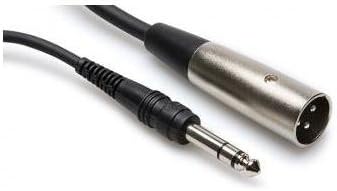
איור 3.2: דוגמהamples of XLR-XLR (left) and XLR-TRS (right) cables used for connecting microphones and other audio equipment to the L-12.
3.4 חיבורי פלט
- מאסטר אאוט: Connect to your main PA system or studio monitors using XLR cables.
- ניטור יציאה: Use for connecting stage monitors or personal monitoring systems.
- יציאות אוזניות: Five independent headphone outputs are available for individual monitoring.

Figure 3.3: Polsen HPC-A30 Closed-Back Studio Monitor Headphones, suitable for monitoring audio from the L-12.
3.5 חיבור USB
Connect the L-12 to a computer via the USB cable to use it as a 14-in/4-out USB audio interface. This allows for multi-track recording directly to a DAW or playback from a computer. The L-12 is also compatible with iOS devices.
4. הוראות הפעלה
בקרות רצועת ערוצים 4.1
- כפתור GAIN: מכוונן את עוצמת הקלט עבור כל ערוץ.
- COMP (Compression) Knob: Applies compression to mono channels (1-8) to control dynamics.
- כפתור LOW CUT: Activates a high-pass filter to reduce unwanted low-frequency noise.
- 3-band EQ: Adjusts High, Mid, and Low frequencies for tone shaping.
- כפתור PAN: Positions the channel's sound in the stereo field.
- SEND EFX Knob: שולט בכמות האות הנשלחת למעבד האפקטים הפנימי.
- REC/PLAY Button: Engages recording or playback for individual tracks on the SD card.
- כפתור השתק: משתיק את פלט הערוץ.
- מַדעֵך: Adjusts the overall volume level of the channel.
4.2 Recording to SD Card
The L-12 features a built-in 14-track SD recorder. Insert an SD card (Class 10 or higher recommended) into the SD card slot. Use the dedicated REC/PLAY buttons on each channel and the master recorder controls (REC, PLAY, STOP) to manage your recording sessions. Recordings are saved as WAV files.
4.3 שימוש באפקטים
The L-12 includes 16 editable effects. Use the SEND EFX knobs on individual channels to route signal to the effects processor. The EFX RETURN fader controls the overall level of the effects in the mix. Adjust effect parameters using the dedicated controls in the master section.
4.4 Scene Memory
The L-12 allows you to save and recall up to nine mix scenes. This feature is useful for quickly switching between different setups for various songs or performance segments. Use the SCENE buttons to store and recall your preferred settings.
5. תחזוקה
- ניקוי: השתמשו במטלית רכה ויבשה לניקוי החלק החיצוני של היחידה. הימנעו מחומרי ניקוי שוחקים או ממסים.
- אִחסוּן: When not in use, store the L-12 in a cool, dry place, away from direct sunlight and extreme temperatures. The included Gator Cases G-MIXERBAG-1815 is ideal for protection during storage and transport.
- עדכוני קושחה: בדקו את הזום מעת לעת webאתר לעדכוני קושחה כדי להבטיח ביצועים אופטימליים וגישה לתכונות חדשות.

Figure 5.1: Gator Cases G-MIXERBAG-1815 Padded Nylon Mixer/Equipment Bag, designed for protecting and transporting the L-12.
6. פתרון תקלות
- אין פלט קול:
- Ensure the L-12 is powered on and connected correctly to your speakers or headphones.
- Check all faders (channel, master, EFX return) are raised and not muted.
- Verify input sources are connected properly and their gain levels are set appropriately.
- Confirm that the correct output (Master Out, Monitor Out, Headphone) is selected and its level is up.
- סאונד מעוות:
- הנמיכו את רמות GAIN של הקלט כדי למנוע גזירה (מסומן על ידי נורית PEAK).
- Check that output levels are not too high, causing distortion in connected devices.
- ודא שהכבלים במצב תקין ומחוברים כראוי.
- בעיות הקלטה:
- Ensure an SD card is inserted and has sufficient free space.
- Verify the SD card is Class 10 or higher for reliable recording.
- Check that the REC/PLAY button for the desired track is engaged (red).
- Confirm that the master recorder's REC button is pressed to start recording.
- ממשק שמע USB לא מזוהה:
- Ensure the USB cable is securely connected to both the L-12 and your computer.
- Check your computer's audio settings to select the L-12 as the input/output device.
- Install any necessary drivers from the Zoom webאתר אם מערכת ההפעלה שלך תתבקש.
7. מפרטים
| תכונה | מִפרָט |
|---|---|
| מספר ערוצים | 12 (8 מונו, 2 סטריאו) |
| מקליט מובנה | 14-track SD Recorder |
| ממשק אודיו USB | 14-in/4-out (iOS Compatible) |
| תשומות | 8x Combo XLR-1/4" (Channels 1-8), 2x Dual 1/4" (Channels 9/10, 11/12), 2x RCA (Channels 9/10, 11/12) |
| Hi-Z Inputs | ערוצים 1-2 |
| כוח פאנטום | +48V |
| מִרֹאשׁamps | High-gain, low-noise |
| דְחִיסָה | Single knob (Channels 1-8) |
| EQ | 3-band (High, Mid, Low) per channel |
| אפקטים | 16 built-in, editable |
| פלטים | Master Out (XLR), Monitor Out, 5x Headphone Outputs |
| מקור כוח | חשמלי עם כבלים |
| רמת רעש | 26 דציבלים |
8. אחריות ותמיכה
8.1 אחריות למוצר
The Zoom LiveTrak L-12 comes with a Limited 1-Year Warranty from the date of purchase. This warranty covers defects in materials and workmanship under normal use. Please retain your proof of purchase for warranty claims. For specific terms and conditions, refer to the warranty card included with your product or visit the official Zoom webאֲתַר.
The Polsen HPC-A30 Closed-Back Studio Monitor Headphones and Gator Cases G-MIXERBAG-1815 Padded Nylon Mixer/Equipment Bag included in this bundle may have separate warranties. Please refer to their respective documentation for details.
8.2 תמיכת לקוחות
For technical assistance, troubleshooting, or service inquiries, please visit the official Zoom support website or contact their customer service department. You can typically find contact information and FAQs on the manufacturer's webאֲתַר: