
Alarm.com ADC-V723x
מדריך למשתמש של מצלמת Wi-Fi חיצונית Alarm.com ADC-V723
Model: ADC-V723x
1. המוצר נגמרview
The Alarm.com ADC-V723 is a high-definition 1080p outdoor Wi-Fi camera designed to provide reliable surveillance for your property. Featuring High Dynamic Range (HDR) and powerful Video Analytics, it can detect and alert you to people, vehicles, and animals. Its robust design ensures performance in various lighting conditions and environments. This manual provides comprehensive instructions for installation, operation, and maintenance.
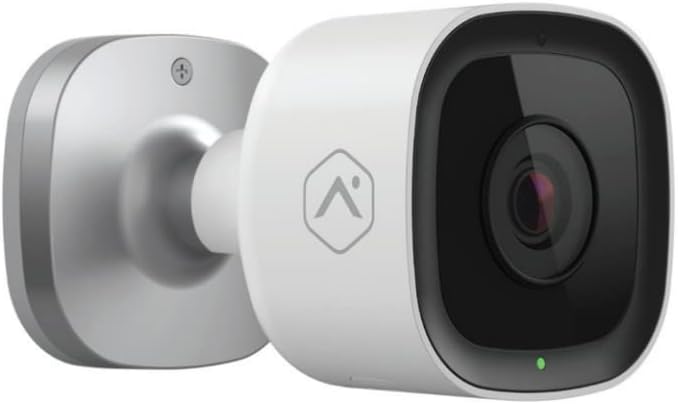
תמונה: חזית view of the Alarm.com ADC-V723 Outdoor Wi-Fi Camera, showing its compact, bullet-style design and lens.
2. מידע בטיחות
- Ensure the camera is installed in a location that complies with local building codes and regulations.
- השתמשו רק במתאם החשמל המצורף למצלמה.
- אין לחשוף את המצלמה לטמפרטורות קיצוניות מחוץ לטווח הפעולה שלה.
- Avoid placing the camera near sources of strong electromagnetic interference.
- נתק את החשמל לפני ניקוי או ביצוע כל תחזוקה.
3. תכולת החבילה
ודא שכל הפריטים נמצאים בחבילה שלך:
- מצלמת Wi-Fi חיצונית Alarm.com ADC-V723
- לוחית הרכבה
- ברגי הרכבה ועוגני קיר
- מתאם מתח
- מדריך התקנה (מסמך זה)
4. התקנה והתקנה
4.1 בחירת מיקום
בחר מיקום חיצוני המספק את הרצוי viewing angle and is within range of your Wi-Fi network. The camera is designed for outdoor use and is IP67 rated for weather resistance. Consider areas with good lighting or where the camera's night vision capabilities can be maximized.
4.2 הרכבת המצלמה
- Secure the mounting plate to the desired surface using the provided screws and wall anchors. Ensure the plate is level.
- Attach the camera to the mounting plate by aligning the camera with the plate and twisting until it locks securely.
- Adjust the camera's angle to achieve the optimal field of view.
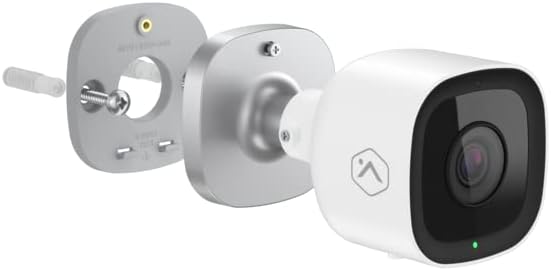
תמונה: פיצוץ view showing the Alarm.com ADC-V723 camera, its mounting plate, and a screw with wall anchor, illustrating the assembly process.
4.3 Powering On and Connecting to Wi-Fi
- Connect the power adapter to the camera and plug it into a suitable outdoor power outlet.
- Wait for the camera's LED indicator to show a specific status (refer to the LED status guide in Section 5.2).
- Download the Alarm.com mobile application from your device's app store.
- Follow the in-app instructions to add the ADC-V723 camera to your Alarm.com system and connect it to your Wi-Fi network. This typically involves scanning a QR code on the camera or entering its MAC address.
5. הפעלת המצלמה
5.1 בשידור חי View והקלטה
Access live video feeds and recorded clips through the Alarm.com mobile app or web portal. You can view foo בזמן אמתtage, initiate manual recordings, and review event-triggered clips.
5.2 מחווני מצב LED
The camera features an LED indicator that communicates its current status:
- ירוק מלא: Connected to Wi-Fi and operating normally.
- ירוק מהבהב: Attempting to connect to Wi-Fi.
- אדום מלא: Not connected to Wi-Fi or an error has occurred.
- מהבהב אדום: Firmware update in progress or factory reset.
5.3 Video Analytics and Alerts
The ADC-V723 supports advanced Video Analytics. Configure detection zones and rules within the Alarm.com app to receive specific alerts for people, vehicles, or animals entering designated areas. Alerts can be customized to send notifications to your mobile device.
5.4 Night Vision and HDR
The camera is equipped with infrared night vision, allowing clear video capture up to 40 feet in low-light conditions. High Dynamic Range (HDR) technology enhances video quality by balancing bright and dark areas, providing clearer images in challenging lighting environments.
6. תחזוקה
- נקו את עדשת המצלמה באופן קבוע בעזרת מטלית רכהamp מטלית כדי להבטיח איכות תמונה ברורה. אין להשתמש בכימיקלים חזקים.
- Periodically check the mounting hardware to ensure the camera remains securely fastened.
- Ensure the power cable is free from damage and properly secured.
- Keep the camera's firmware updated through the Alarm.com app to ensure optimal performance and access to new features.
7. פתרון תקלות
| בְּעָיָה | סיבה אפשרית | פִּתָרוֹן |
|---|---|---|
| המצלמה לא נדלקת | אין חשמל, מתאם פגום, חיבור רופף. | Check power outlet, ensure connections are secure, try a different outlet. |
| לא ניתן להתחבר ל-Wi-Fi | Incorrect Wi-Fi password, camera too far from router, network interference. | Verify Wi-Fi password, move camera closer to router, reduce interference, restart router. |
| איכות וידאו ירודה | עדשה מלוכלכת, רוחב פס נמוך, תאורה גרועה. | Clean lens, check internet speed, ensure adequate lighting or rely on night vision. |
| אין התראות תנועה | Incorrect Video Analytics settings, notifications disabled. | Review and adjust Video Analytics rules in the app, enable notifications for the camera. |
8. מפרטים
| תכונה | פְּרָט |
|---|---|
| מספר דגם | ADC-V723x |
| רזולוציית לכידת וידאו | 1080p (1920x1080) |
| קישוריות | Wi-Fi |
| מקור כוח | חשמלי עם כבלים |
| שימוש בפנים/חוץ | בָּחוּץ |
| Viewזווית | 167 מעלות |
| טווח ראיית לילה | 40 רגל |
| חוֹמֶר | מַתֶכֶת |
| מידות (L x W x H) | 2.5 x 2.5 x 4.5 אינץ' |
| משקל פריט | 1.32 פאונד |
| דירוג הגנה בינלאומי | IP67 |
| תכונה מיוחדת | Motion Sensor, HDR |
9. אחריות ותמיכה
For warranty information and technical support, please contact your Alarm.com service provider or visit the official Alarm.com webאתר. אל תנסה לתקן את המכשיר בעצמך, מכיוון שהדבר עלול לבטל את האחריות.
For additional resources and FAQs, please refer to the Alarm.com support portal.
Ask a question about this manual
Ask about setup, troubleshooting, compatibility, parts, safety, or missing instructions. Manuals+ will review the question and use this page’s manual context to help answer it.