
1. מבוא ומעלהview
Thank you for choosing the KLH Bassbite-II Powered Subwoofer. This unit is designed to enhance the low-frequency response of your existing audio system, providing deep, rich bass for an immersive listening experience. This manual provides essential information for the safe and effective operation of your subwoofer.
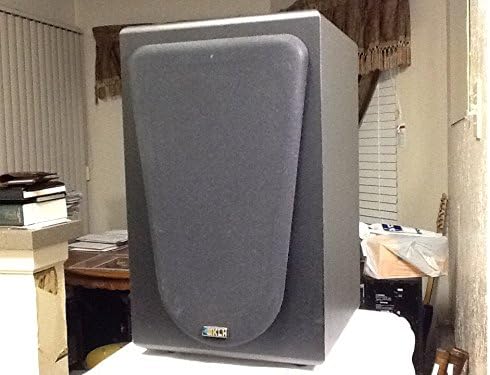
איור 1.1: חזית view of the KLH Bassbite-II Powered Subwoofer with grille.
This image shows the front of the KLH Bassbite-II subwoofer, featuring its dark gray cabinet and a removable front grille that covers the speaker driver. The KLH logo is visible at the bottom of the grille.
2. הוראות בטיחות חשובות
Please read and follow all safety instructions before operating the subwoofer to prevent electric shock, fire, or injury.
- קרא הוראות: קרא את כל הוראות הבטיחות וההפעלה לפני הפעלת המכשיר.
- שמור את ההוראות: שמור את הוראות הבטיחות וההפעלה לעיון עתידי.
- שימו לב לאזהרות: הקפידו על כל האזהרות המופיעות במכשיר ובהוראות ההפעלה.
- עקוב אחר ההוראות: פעל לפי כל הוראות ההפעלה והשימוש.
- מים ולחות: אין להשתמש במכשיר זה ליד מים.
- ניקוי: נקה רק עם מטלית יבשה.
- אוורור: אין לחסום פתחי אוורור. יש להתקין בהתאם להוראות היצרן.
- חוֹם: אין להתקין ליד מקורות חום כלשהם כגון רדיאטורים, אוגרי חום, תנורים או מכשירים אחרים (כולל ampמחצבים) המייצרים חום.
- הגנה על כבל חשמל: הגן על כבל החשמל מפני הליכה או צביטה, במיוחד בתקעים, בשקעי נוחות ובנקודה שבה הם יוצאים מהמכשיר.
- בָּרָק: נתק את המכשיר מהחשמל במהלך סופות ברקים או כאשר אינו בשימוש לפרקי זמן ארוכים.
- שֵׁרוּת: הפנה כל טיפול לצוות שירות מוסמך. שירות נדרש כאשר המכשיר ניזוק בכל דרך שהיא, כגון כבל או תקע חשמל פגומים, נוזל נשפך או חפצים נפלו לתוך המכשיר, המכשיר נחשף לגשם או לחות, אינו פועל כרגיל , או הושמט.
3. תכולת החבילה
אנא בדקו את החבילה עבור הפריטים הבאים:
- KLH Bassbite-II Powered Subwoofer
- כבל חשמל (מצורף)
אם פריטים חסרים או ניזוקים, אנא צרו קשר עם הספק שלכם.
4. התקנה
4.1. מיקום
The placement of your subwoofer can significantly affect its sound performance. Experiment with different locations to find the best bass response for your room.
- מיקום פינה: Placing the subwoofer in a corner of the room can often maximize its output and provide the most impactful bass.
- רמקולים קדמיים קרובים: Placing the subwoofer near your main front speakers can help create a more seamless soundstage.
- הימנע מחסימות: Ensure the subwoofer is not placed in an enclosed cabinet or directly against a wall that might block its port (if applicable) or restrict airflow.
4.2. חיבורים
The KLH Bassbite-II subwoofer offers multiple connection options to integrate with your audio system. Ensure all components are turned off before making any connections.

Figure 4.1: Rear panel of the KLH Bassbite-II Subwoofer.
This image displays the rear panel of the subwoofer, featuring the speaker level inputs/outputs ("FROM AMPLIFIER", "TO SPEAKERS"), RCA low-level inputs, a power switch, and a volume control knob. The attached power cord is also visible.

Figure 4.2: Close-up of the connection panel.
א מפורט view of the connection panel, highlighting the speaker wire terminals (red and black clips) for "FROM AMPLIFIER" and "TO SPEAKERS", and the RCA jacks for "LOW LEVEL" input. The "POWER" switch and "VOLUME" knob are also clearly visible.
Option 1: Low-Level (RCA) Connection (Recommended for Receivers with Subwoofer Output)
- Connect an RCA cable from the "SUBWOOFER OUT" or "LFE OUT" jack on your receiver/amplifier to the "LOW LEVEL" (L or R) input on the Bassbite-II subwoofer. If your receiver has a single LFE output, connect it to either the L or R input on the subwoofer.
- ודאו שמתג ההפעלה של הסאב-וופר נמצא במצב כבוי.
- Plug the subwoofer's power cord into a standard 120 VAC, 60 Hz electrical outlet.
Option 2: Speaker Level Connection (For Amplifiers without Subwoofer Output)
- Connect speaker wires from the "SPEAKER OUT" terminals of your amplifier/receiver to the "FROM AMPLIFIER" speaker level inputs on the Bassbite-II subwoofer. Ensure correct polarity (+ to + and - to -).
- Connect speaker wires from the "TO SPEAKERS" outputs on the Bassbite-II subwoofer to your main left and right speakers. Again, ensure correct polarity.
- ודאו שמתג ההפעלה של הסאב-וופר נמצא במצב כבוי.
- Plug the subwoofer's power cord into a standard 120 VAC, 60 Hz electrical outlet.
5. הוראות הפעלה
5.1. הפעלה / כיבוי
- To turn on the subwoofer, flip the "POWER" switch located on the rear panel to the ON position.
- To turn off the subwoofer, flip the "POWER" switch to the OFF position.
5.2. התאמת עוצמת הקול
The "VOLUME" knob on the rear panel controls the output level of the subwoofer.
- Rotate the knob clockwise to increase the volume.
- Rotate the knob counter-clockwise to decrease the volume.
- Start with the volume at a low setting and gradually increase it until the bass blends seamlessly with your main speakers without overpowering them.
6. תחזוקה
Proper care will ensure the longevity and performance of your KLH Bassbite-II Subwoofer.
- ניקוי: Use a soft, dry cloth to clean the cabinet. Do not use abrasive cleaners, waxes, or solvents, as they may damage the finish.
- אָבָק: Regularly dust the subwoofer to prevent accumulation, especially around the rear panel connections and ventilation areas.
- סְבִיבָה: הימנעו מחשיפת הסאב-וופר לטמפרטורות קיצוניות, לחות או אור שמש ישיר.

Figure 6.1: Subwoofer with grille removed.
This image shows the KLH Bassbite-II subwoofer with its front grille detached, revealing the bass reflex port located at the bottom of the front baffle. This port helps enhance the low-frequency output.
7. פתרון תקלות
אם אתם נתקלים בבעיות עם הסאב-וופר שלכם, עיינו בבעיות הנפוצות ובפתרונות הבאות:
| בְּעָיָה | סיבה אפשרית | פִּתָרוֹן |
|---|---|---|
| אין כוח | Power cord not connected; Power switch off; Outlet not working. | Ensure power cord is securely plugged into the subwoofer and a working electrical outlet. Flip the power switch to ON. Test the outlet with another device. |
| אין סאונד | Incorrect connections; Volume too low; Source device not sending signal. | Check all audio connections (RCA or speaker wires) for proper seating and polarity. Increase the subwoofer's volume knob. Ensure your receiver/amplifier is powered on and sending an audio signal. |
| Distorted or Boomy Sound | Volume too high; Improper placement; Source signal distortion. | Decrease the subwoofer's volume. Experiment with different placement locations (refer to Section 4.1). Check if the audio source itself is distorted. |
| רעש זמזום | Ground loop; Nearby electrical interference. | Try plugging the subwoofer into a different electrical outlet (preferably on a different circuit). Ensure all audio cables are high quality and properly shielded. Avoid running audio cables parallel to power cables. |
8. מפרטים
| שם הדגם | Bassbite-II |
| מספר דגם | E206825 (KLH Bassbite-II) |
| מותג | KLH |
| סוג רמקול | סאב וופר מופעל |
| עוצמת פלט מקסימלית של הרמקול | 40 וואט |
| מקור כוח | Corded Electric (120 VAC, 60 Hz) |
| מידות (H x W x D) | 38.1 ס"מ x 22.9 ס"מ x 26.7 ס"מ (15 אינץ' x 9 אינץ' x 10.5 אינץ') |
| מִשׁקָל | 6.35 ק"ג (14 פאונד) |
| מכשירים תואמים | Video Game Consoles, Home Theater Systems, Televisions |
9. אחריות ותמיכה
For specific warranty information, please refer to the documentation provided by your retailer at the time of purchase. Manufacturer warranty details are typically included with new products.
If you require technical support or have questions regarding your KLH Bassbite-II Subwoofer, please contact your original retailer or visit the official KLH Audio Systems webאתר למשאבי תמיכה.
Note: The product description mentions a "Two weeks Return/Refund Guarantee" which refers to a seller's return policy and not a manufacturer's warranty.