
מָבוֹא
This manual provides instructions for the proper use and care of your Helios 77M-4 50mm F1.8 vintage lens. Designed for Sony E-mount cameras, this manual focus lens offers a classic photographic experience with its distinct optical characteristics. Please read this manual thoroughly before using the lens to ensure optimal performance and longevity.
רכיבי עדשה
Familiarize yourself with the main components of your Helios 77M-4 lens.
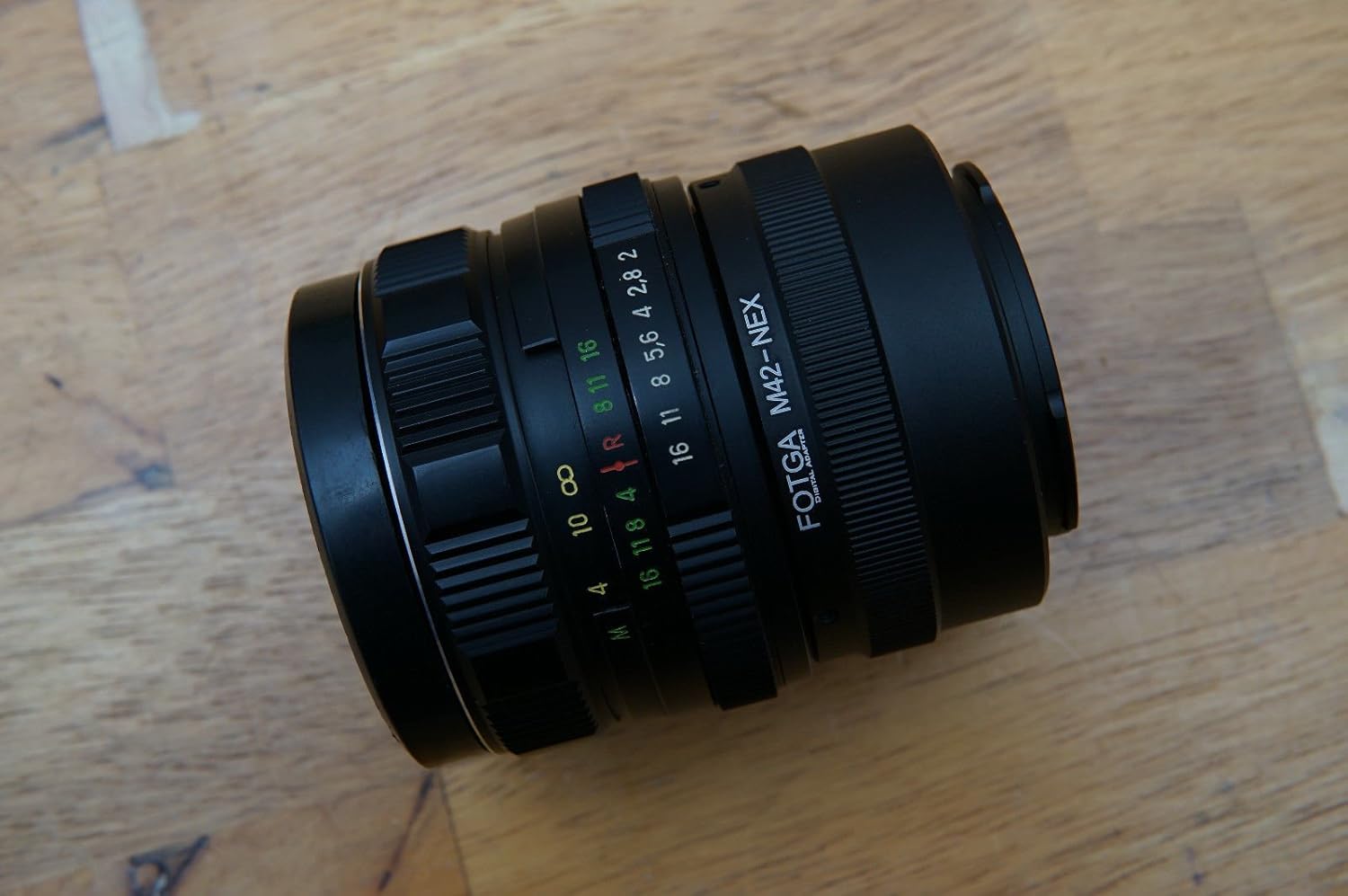
Image: The Helios 77M-4 50mm F1.8 lens, displaying its manual focus ring, aperture ring, and depth of field scale. This view highlights the robust construction and clear markings essential for manual operation.
- טבעת מיקוד: Used to adjust the focus manually.
- טבעת צמצם: Used to set the desired aperture (f-stop).
- סולם עומק השדה: Provides an indication of the depth of field at various apertures.
- טבעת הרכבה: מחבר את העדשה לגוף המצלמה.
הגדרה
הרכבת העדשה
- ודא שהמצלמה שלך כבויה.
- Remove the rear lens cap from the Helios 77M-4 lens and the body cap from your Sony E-mount camera.
- Align the white index mark on the lens barrel with the corresponding white index mark on the camera body.
- הכנס את העדשה לתוך תושבת המצלמה וסובב אותה עם כיוון השעון עד שהיא תיכנס למקומה בנקישה. אל תפעיל את העדשה בכוח.
- Once mounted, remove the front lens cap.

Image: The Helios 77M-4 lens securely attached to a Sony E-mount camera body. This illustrates the correct mounting position, ready for use.
הגדרות מצלמה
Since this is a manual lens, you will need to adjust your camera settings:
- הגדר את המצלמה שלך ל ידני (M) or Aperture Priority (A) מצב.
- לְאַפשֵׁר "Release without lens" or "Shoot without lens" in your camera's menu, as the camera will not detect an electronic connection to the lens.
- Consider using "Focus Peaking" ו "Magnified View" features on your camera for easier manual focusing. Refer to your camera's manual for specific instructions on these features.
הפעלת העדשה
התאמת צמצם
The aperture is controlled directly on the lens using the aperture ring. Rotate the ring to select your desired f-stop. A wider aperture (smaller f-number like F1.8) allows more light and creates a shallower depth of field, ideal for portraits. A narrower aperture (larger f-number) allows less light and creates a deeper depth of field, suitable for landscapes.
מיקוד ידני
To focus, rotate the focus ring on the lens barrel until your subject appears sharp in the viewfinder or on the LCD screen. Utilize your camera's focus peaking and magnification features for precise focusing, especially at wider apertures.
- שיא מיקוד: מדגיש אזורים בפוקוס באמצעות קווי מתאר צבעוניים.
- מוּגדָל View: Zooms in on a portion of the image for critical focus assessment.
תַחזוּקָה
ניקוי העדשה
- Use a soft, lint-free microfiber cloth specifically designed for optical surfaces to clean the front and rear elements.
- עבור כתמים עקשניים, יש למרוח כמות קטנה של תמיסת ניקוי עדשות על המטלית, לא ישירות על העדשה.
- השתמשו במברשת מפוח כדי להסיר חלקיקי אבק לפני הניגוב כדי למנוע שריטות.
- לעולם אל תשתמשו בחומרים שוחקים או בכימיקלים חזקים.
אִחסוּן
- תמיד חברו את מכסי העדשה הקדמיים והאחוריים כאשר העדשה אינה בשימוש.
- יש לאחסן את העדשה במקום קריר ויבש, הרחק מאור שמש ישיר וטמפרטורות קיצוניות.
- If storing for extended periods, consider using a dehumidifying agent to prevent fungus growth.
פתרון בעיות
| בְּעָיָה | סיבה אפשרית | פִּתָרוֹן |
|---|---|---|
| Camera does not recognize lens / Cannot take photos | Manual lens, no electronic contacts. | Enable "Release without lens" or "Shoot without lens" in camera settings. |
| התמונות מטושטשות | Incorrect focus or camera shake. | Ensure proper manual focus using focus peaking/magnification. Use a faster shutter speed or tripod to prevent camera shake. |
| Images are too dark/bright | Incorrect exposure settings (aperture, shutter speed, ISO). | Adjust aperture on the lens. Adjust shutter speed and ISO on the camera to achieve desired exposure. |
| אבק או כתמים על תמונות | אלמנטים של עדשה מלוכלכים. | Clean lens elements carefully using a blower brush and microfiber cloth. |
מפרטים
| תכונה | פְּרָט |
|---|---|
| דֶגֶם | Helios 77M-4 |
| אורך מוקד | 50 מ"מ |
| צמצם מקסימלי | F1.8 |
| סוג עדשה | עדשת פריים סטנדרטית |
| תואמים תואמים | Sony E-Mount (NEX, A7 series, 6500, a6300, a6000, a5100, a5000, a3000) |
| סוג פוקוס | פוקוס ידני |
| יַצרָן | 77M-4 (as per product data) |
אחריות ותמיכה
This product is a vintage lens. Specific warranty information may vary depending on the seller and purchase conditions. Please refer to your purchase documentation for details regarding any applicable warranty.
For technical support or inquiries, please contact the retailer or the original manufacturer if contact information is available. As a vintage item, direct manufacturer support may be limited.