
מָבוֹא
The Anderic RR3UNV is a versatile 3-device universal remote control designed to simplify the management of your entertainment systems. This remote can control up to three different devices, including TVs, DVD players, VCRs, cable boxes, satellite receivers, and audio systems. It features a learning function for expanded compatibility and glow-in-the-dark buttons for ease of use in low-light conditions. This manual provides detailed instructions for setup, operation, and maintenance of your RR3UNV remote control.
הגדרה
1. התקנת סוללה
The Anderic RR3UNV remote requires two (2) AA batteries for operation. Ensure correct polarity when inserting the batteries.
- פתחו את מכסה תא הסוללות הממוקם בגב השלט רחוק.
- הכניסו שתי סוללות AA חדשות, תוך התאמת הדקי ה-(+) וה-(-) כפי שמסומן בתוך התא.
- סגור היטב את מכסה תא הסוללות.

תמונה: אחורי view of the Anderic RR3UNV remote control, showing the battery compartment cover at the bottom. The back is black with a textured grip area.
2. תכנות השלט
The RR3UNV can be programmed using direct code entry or the learning function. Refer to the included code booklet for a list of compatible device codes.
2.1. הזנת קוד ישירה
- הפעילו את המכשיר שברצונכם לתכנת (למשל, טלוויזיה, נגן DVD).
- לחץ והחזק את לחצן המכשיר הרצוי (TV, DVD, או שֶׁמַע) for approximately 5 seconds until the device button lights up and stays lit.
- Enter the 3-digit code for your device brand from the code booklet.
- If the code is valid, the device button light will blink twice and then turn off.
- בדוק את השלט על ידי לחיצה על כּוֹחַ button. If the device turns off, the programming was successful. If not, repeat the process with the next code listed for your brand.
2.2. פונקציית למידה
The learning function allows the RR3UNV to learn commands directly from your original remote control.
- Place the RR3UNV and your original remote control head-to-head on a flat surface, approximately 1-2 inches apart.
- לחץ והחזק את לחצן המכשיר הרצוי (TV, DVD, או שֶׁמַע) on the RR3UNV for approximately 5 seconds until the device button lights up and stays lit.
- Press and release the button on the RR3UNV that you want to program (e.g., כּוֹחַ). The device button light will start blinking slowly.
- Press and hold the corresponding button on your original remote control (e.g., כּוֹחַ).
- The device button light on the RR3UNV will blink rapidly three times and then stay lit, indicating successful learning.
- Repeat steps 3-5 for all other buttons you wish to program.
- To exit learning mode, press the device button again. The light will turn off.
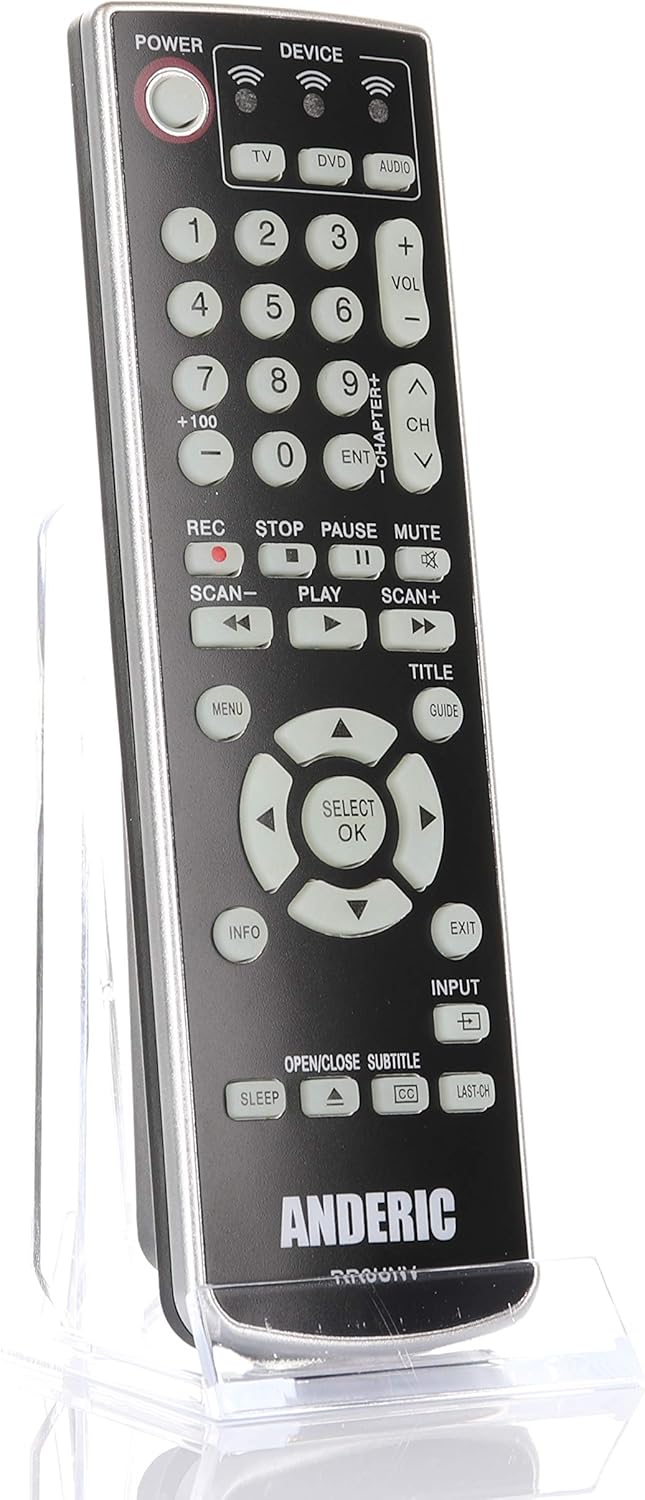
תמונה: חזית view of the Anderic RR3UNV remote control. It is black with silver trim, featuring glow-in-the-dark buttons for power, device selection, number pad, volume, channel, playback, menu, and navigation controls.
הפעלת השלט הרחוק
Once programmed, the Anderic RR3UNV remote functions like your original remote. Select the desired device mode before sending commands.
- בחירת מכשיר: הקש על TV, DVD, או שֶׁמַע button to select the device you want to control. The selected device button will light up briefly.
- כּוֹחַ: הקש על כּוֹחַ כפתור כדי להפעיל או לכבות את המכשיר שנבחר.
- בקרת עוצמת הקול: השתמש ב- VOL+ ו כרך- כפתורים לכוונון עוצמת הקול.
- בקרת ערוץ: השתמש ב- CH+ ו CH- לחצנים לשינוי ערוצים.
- לְהַשְׁתִיק: הקש על לְהַשְׁתִיק כפתור כדי להשתיק את השמע.
- לוח מספרים: Use the number buttons (0-9) to directly enter channel numbers or other numerical inputs.
- בקרות השמעה: כפתורים כמו לְשַׂחֵק, הַפסָקָה, לְהַפְסִיק, REC, לִסְרוֹק-, ו סריקה+ control media playback functions.
- ניווט: The directional arrow buttons and SELECT/OK button are used for menu navigation.
- Menu/Guide/Info/Exit: These buttons provide access to device-specific menus, program guides, information displays, and exit functions.
- קֶלֶט: ה קֶלֶט button cycles through available input sources on your TV.
- לִישׁוֹן: ה לִישׁוֹן button may activate a sleep timer function on compatible devices.
- CC/Subtitles: ה CC/SUBTITLE button toggles closed captions or subtitles.
תַחזוּקָה
- החלפת סוללה: Replace batteries when the remote's performance degrades or if the device indicator light does not illuminate. Always replace both AA batteries at the same time with new ones.
- ניקוי: Clean the remote control with a soft, dry cloth. Do not use liquid cleaners or abrasive materials, as they may damage the remote's surface or internal components.
- אִחסוּן: Store the remote in a dry place away from direct sunlight and extreme temperatures. If storing for an extended period, remove the batteries to prevent leakage.
פתרון בעיות
| בְּעָיָה | סיבה אפשרית | פִּתָרוֹן |
|---|---|---|
| השלט רחוק לא עובד בכלל. | סוללות מתות או שהוכנסו בצורה שגויה. | החליפו את הסוללות בסוללות AA חדשות, תוך הקפדה על קוטביות נכונה. |
| שלט רחוק שולט בחלק מהפונקציות אך לא באחרות. | Incorrect device code or incomplete learning. | Try a different code for your device brand or re-program specific buttons using the learning function. |
| Device does not respond to remote commands. | Remote not aimed correctly; obstruction; device not selected. | Ensure the remote is aimed directly at the device's IR sensor. Remove any obstructions. Press the correct device button (TV, DVD, AUDIO) before sending commands. |
| פונקציית הלמידה נכשלת. | Original remote batteries low; remotes too far apart; ambient light interference. | Ensure original remote has fresh batteries. Place remotes 1-2 inches apart. Try learning in a dimly lit room. |
מפרטים
- מותג: אנדריק
- שם הדגם: RR3UNV
- מספר דגם: RR3UNV
- מספר מרבי של מכשירים נתמכים: 3
- טכנולוגיית קישוריות: אינפרא אדום (IR)
- סוג סוללה: 2 x סוללות AA (לא כלול)
- טווח מקסימלי: בערך 25 רגל (7.6 מטר)
- כמות כפתורים: 41
- מאפיינים מיוחדים: Universal compatibility, Learning function, Glow-in-the-dark buttons
- מכשירים תואמים: TV, DVD, VCR, Cable, Satellite, Audio, DVD/VCR Combos, TV/DVD/VCR Combos
מידע על אחריות
Anderic products typically come with a limited warranty covering manufacturing defects. For specific warranty details, including duration and terms, please refer to the documentation included with your purchase or visit the official Anderic webאתר. שמור את הוכחת הרכישה שלך לצורך תביעות אחריות.
תמיכת לקוחות
For technical assistance, programming help, or general inquiries regarding your Anderic RR3UNV remote control, please contact Anderic customer support:
- Webאֲתַר: www.anderic.com
- טֵלֵפוֹן: 1-855-573-6683
Please have your model number (RR3UNV) and a description of your issue ready when contacting support.