
1. הקדמה
Thank you for choosing the Cecotec Extreme Track Folding Electric Treadmill. This manual provides essential information for the safe and efficient operation, assembly, maintenance, and troubleshooting of your new fitness equipment. Please read this manual thoroughly before using the treadmill and retain it for future reference.
2. הוראות בטיחות חשובות
To reduce the risk of serious injury, read all instructions before using this treadmill. The manufacturer is not responsible for personal injury or property damage sustained by or through the use of this product.
- יש להתייעץ תמיד עם רופא לפני תחילת כל תוכנית אימונים.
- הרחק ילדים וחיות מחמד מההליכון במהלך הפעולה.
- Place the treadmill on a solid, level surface with at least 2 meters of clear space behind it and 0.6 meters on each side.
- לבשו בגדי ספורט מתאימים ונעלי ספורט. הימנעו מבגדים רפויים שעלולים להיתפס.
- Use the magnetic safety key at all times. Attach the clip to your clothing. If the key is removed, the treadmill will stop.
- אין להפעיל את ההליכון אם יש לו כבל או תקע פגומים, אם הוא אינו פועל כראוי, או אם הוא נפל או ניזוק.
- Do not attempt to service the treadmill yourself. Contact qualified service personnel.
- Maximum user weight for this treadmill is 120 ק"ג.
- Ensure the power cord is not pinched or damaged during setup or use.
- Do not use outdoors or in areas of high humidity.
- Always hold the foam grip arms when starting or stopping the treadmill, or when adjusting speed/incline.
3. תכולת החבילה
Carefully unpack the box and verify that all the following items are present:
- Cecotec Extreme Track Folding Electric Treadmill (main unit)
- מדריך למשתמש
- כבל חשמל
- מחזיק בקבוקים
- Armrests with Foam Grips (pre-attached or separate)
- LCD Screen (control panel)
- USB Connector (integrated)
- MP3 Connector (integrated)
- iPad Holder (integrated or attachable)
- תיעוד אחריות
- Assembly Tools (Allen keys, screwdriver - if not already included in the blister pack)
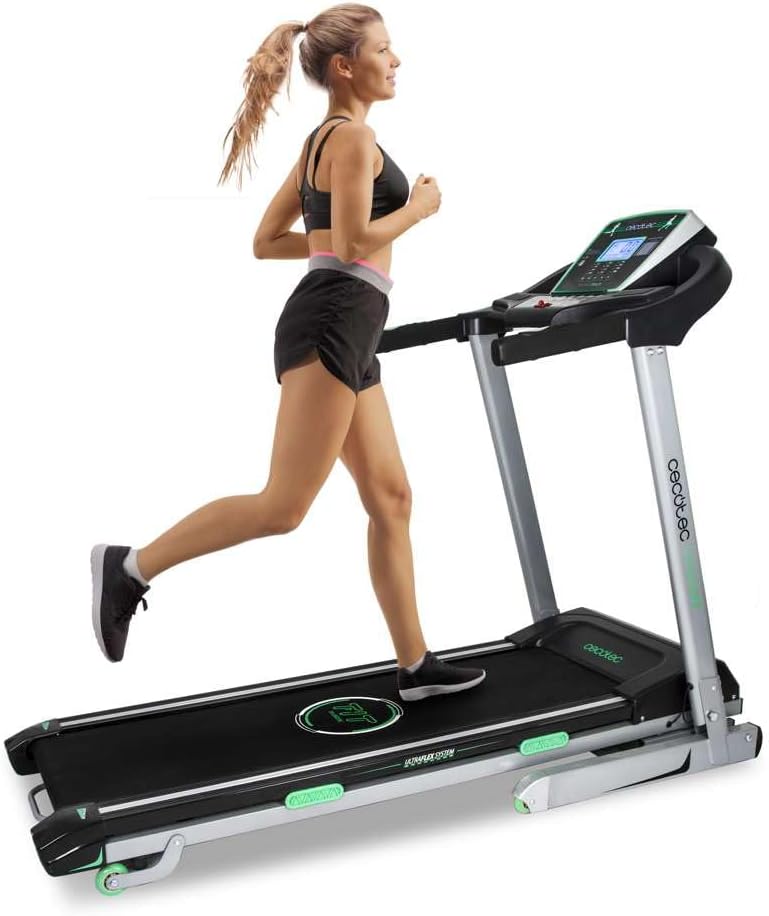
Image 1: Cecotec Extreme Track Folding Electric Treadmill. This image shows the treadmill in its unfolded, operational state with a user running on it, highlighting its design and functionality.
4. הרכבה והתקנה
The Cecotec Extreme Track treadmill comes largely pre-assembled. However, some final assembly steps are required before first use. Due to its weight (62 kg) and dimensions, it is recommended that שני אנשים perform the assembly.
4.1 פתיחת ההליכון
- הנח את ההליכון על משטח ישר ויציב.
- Locate the hydraulic folding system mechanism.
- Carefully lower the running deck until it is fully flat on the floor. Ensure it locks securely into place.
4.2 Attaching the Console and Uprights (if separate)
Follow the detailed instructions in the included user manual for attaching the console and securing the uprights. This typically involves aligning the uprights, securing them with bolts, and connecting any necessary cables to the LCD console.
4.3 חיבור מתח
- Ensure the treadmill's power switch is in the OFF position.
- Plug the power cable into the treadmill's power input.
- חבר את הקצה השני של כבל החשמל לשקע חשמלי מוארק.
5. הוראות הפעלה
5.1 לוח הבקרה נגמרview
The LCD control panel displays key workout metrics and allows you to control the treadmill's functions. It typically shows:
- מְהִירוּת: Current running speed (1-18 km/h).
- זְמַן: משך האימון שלך.
- מֶרְחָק: מרחק כולל שעבר.
- קלוריות: קלוריות משוערות שנשרפות.
- דופק: Measured via hand pulse sensors on the grip arms.
- פונקציית סריקה: Cycles through display metrics automatically.
5.2 התחלת אימון
- ודא שההליכון מחובר לחשמל ושהמפסק פועל.
- Attach the magnetic safety key to the designated spot on the console and clip the other end to your clothing.
- צעדו על מעקות הצד של ההליכון.
- הקש על הַתחָלָה button on the console. The belt will begin to move at a low speed.
- Carefully step onto the running belt and begin walking.
- כוונן את המהירות באמצעות SPEED +/- buttons or quick-speed buttons on the console or grip arms.
- כוונן את השיפוע באמצעות INCLINE +/- buttons or quick-incline buttons on the console.
5.3 Using Predefined Programs
The treadmill features 12 predefined training programs and 4 preset speed/inclination modes. Consult your specific user manual for detailed instructions on how to select and customize these programs. Generally, you will use a תָכְנִית button to cycle through options and MODE לחצן לבחירה.
5.4 הפסקת אימון
- הקש על לְהַפְסִיק button on the console. The belt will gradually slow down and stop.
- Alternatively, pull the magnetic safety key from the console to initiate an emergency stop.
- Once the belt has completely stopped, step off the treadmill.
5.5 Media Connectivity
- מחבר USB: Use the integrated USB port to charge your mobile device or tablet.
- MP3 Connector: Connect your MP3 player or smartphone via the MP3 input to play audio through the treadmill's speakers.
- iPad Holder: Place your tablet or smartphone in the integrated holder for entertainment during your workout.
6. תחזוקה
תחזוקה שוטפת מבטיחה את אורך החיים והביצועים האופטימליים של ההליכון שלכם.
6.1 ניקוי
- תמיד נתקו את ההליכון מהחשמל לפני ניקוי.
- נגבו את הקונסולה ומשטחים אחרים בעזרת מטלית רכהamp מטלית. הימנעו מחומרי ניקוי שוחקים או ממסים.
- יש לשאוב אבק מעת לעת מתחת להליכון כדי למנוע הצטברות אבק ופסולת.
6.2 שימון חגורת ריצה
Proper lubrication of the running belt is crucial for smooth operation and to prevent wear. While the provided manual may lack specific details, general guidelines for treadmill lubrication are:
- תֶדֶר: Lubricate every 3-6 months, or after approximately 100-150 hours of use, depending on usage intensity.
- נוֹהָל:
- נתק את ההליכון מהחשמל.
- שחררו מעט את ברגי הגליל האחורי כדי להרים את הרצועה.
- Apply a thin line of 100% silicone lubricant (specifically designed for treadmills) evenly under the center of the running belt.
- Tighten the rear roller bolts to their original tension.
- Plug in the treadmill and run it at a slow speed (e.g., 3 km/h) for 5 minutes to distribute the lubricant.
- Refer to the specific instructions provided with your treadmill lubricant for best results.
6.3 מתיחת רצועה ויישור
If the running belt feels loose or drifts to one side, it may need adjustment. Consult the detailed instructions in your user manual for proper belt tensioning and alignment procedures. Incorrect adjustment can damage the belt or motor.
7. פתרון תקלות
This section addresses common issues you might encounter with your treadmill. If the problem persists, contact customer support.
| בְּעָיָה | סיבה אפשרית | פִּתָרוֹן |
|---|---|---|
| הליכון לא מתחיל לפעול. | כבל החשמל מנותק, מפתח הבטיחות לא במקומו, מתג ההפעלה כבוי. | Ensure power cord is securely plugged in, safety key is correctly placed, and power switch is ON. |
| חגורת הריצה מחליקה או מהססת. | מתח הרצועה רופף מדי, הרצועה זקוקה לשימון. | Adjust belt tension (refer to manual), lubricate the running belt as per maintenance instructions. |
| רעש יוצא דופן במהלך הפעולה. | Loose components, lack of lubrication, belt rubbing. | Check and tighten all visible bolts and screws. Lubricate the belt. Ensure the belt is centered. |
| השיפוע לא מתכוונן. | Motor issue, cable disconnected. | בדוק את החיבורים. אם הבעיה נמשכת, צור קשר עם תמיכת הלקוחות. |
| Heart rate monitor inaccurate. | Hands not firmly on sensors, dry hands. | Ensure firm, consistent contact with both sensors. Lightly moisten hands if they are too dry. |
8. מפרט מוצר
- דֶגֶם: Extreme Track (07011)
- כוח מנוע: 3 CV (Continuous Horsepower)
- טווח מהירות: 1 - 18 קמ"ש
- Incline System: Automatic Motorized Tilt
- Cushioning System: מערכת אולטרה-פלקס (8 אלסטומרים)
- משטח ריצה: 130 על 42 ס"מ
- תוכניות: 12 Predefined Training Programs, 4 Preset Speed/Incline Modes
- לְהַצִיג: LCD Screen (Speed, Time, Distance, Calories, Heart Rate, Scan Function)
- קישוריות: USB port (charging), MP3 input, iPad/Tablet holder
- Folding System: AutoFold Tech (Hydraulic)
- בְּטִיחוּת: Magnetic Safety System
- משקל משתמש מקסימלי: 120 ק"ג
- מידות מוצר (לא מקופל): 173 ס"מ (אורך) x 78 ס"מ (רוחב) x 29.5 ס"מ (גובה)
- משקל מוצר: 62 ק"ג
- חוֹמֶר: סגסוגת פלדה
- צֶבַע: Green (as per product details, though main image shows black/grey/green)
9. אחריות ותמיכת לקוחות
Your Cecotec Extreme Track Treadmill comes with a manufacturer's warranty. Please refer to the included תיעוד אחריות for specific terms, conditions, and duration of the warranty.
For technical assistance, spare parts, or any questions regarding your product, please contact Cecotec customer support. Contact information can typically be found on the warranty documentation or the official Cecotec webאֲתַר.
בעת פנייה לתמיכה, אנא ודאו שמספר הדגם של המוצר (07011) ופרטי הרכישה זמינים.