
מָבוֹא
Thank you for choosing the SPT SF-16T07 Touch Stop Stand Fan. This 16-inch stand fan is designed to provide efficient air circulation with advanced features for comfort and safety. Key features include a unique touch-stop sensor, 6 fan speeds, 4 distinct wind modes (Normal, Natural, Sleep, and Smart), oscillation, and a convenient timer-off function. This manual provides detailed instructions for assembly, operation, maintenance, and troubleshooting to ensure safe and optimal use of your fan.
הוראות בטיחות חשובות
אנא קרא בעיון את כל ההוראות לפני השימוש במכשיר זה ושמור אותן לעיון עתידי. אי הקפדה על הוראות אלה עלולה לגרום להתחשמלות, שריפה או פציעה חמורה.
- יש לנתק תמיד את המאוורר משקע החשמל לפני ניקויו, טיפולו או הזזתו.
- אין להפעיל את המאוורר עם כבל או תקע פגומים. אם הכבל או התקע פגומים, פנו לאנשי שירות מוסמכים לתיקון או החלפה.
- הרחק את המאוורר ממים או נוזלים אחרים. אין לטבול את המאוורר במים.
- ודאו שהמאוורר ממוקם על משטח יציב ומאוזן כדי למנוע ממנו להתהפך.
- אין להכניס אצבעות או חפצים אחרים דרך הסורג כאשר המאוורר פועל.
- The fan features a Touch-Stop Sensor: If the fan guard is touched while the fan is operating, the fan will automatically stop. This is a safety feature designed to protect users, especially children. The fan will resume operation once the touch is removed and the fan is restarted.
- Close supervision is necessary when the fan is used by or near children or individuals with reduced physical, sensory, or mental capabilities.
- מאוורר זה מיועד לשימוש פנימי בלבד. אין להשתמש בחוץ.
תוכן החבילה
אנא בדקו את תוכן החבילה כדי לוודא שכל הפריטים נמצאים ולא ניזוקו:
- Fan Unit (Motor Housing, Fan Blades, Front and Rear Grilles)
- Stand Pole and Base
- שלט רחוק
- מדריך למשתמש (מסמך זה)
הוראות הרכבה
The SPT SF-16T07 fan requires some assembly before use. Follow these steps carefully:
- להרכיב את הבסיס: Connect the two halves of the base together, if applicable, and secure them with the provided screws.
- חבר את מוט המעמד: Insert the stand pole into the assembled base and tighten the locking nut or screw from underneath the base to secure it.
- Mount the Motor Housing: Place the fan's motor housing onto the top of the stand pole. Ensure it is firmly seated and secure it with the provided screw or locking mechanism.
- התקנת הגריל האחורי: Position the rear grille onto the motor housing, aligning the notches. Secure it with the grille nut.
- Attach the Fan Blade: Slide the fan blade onto the motor shaft, ensuring it clicks into place or is secured with a cap.
- התקנת הגריל הקדמי: Place the front grille over the fan blade and align it with the rear grille. Secure the grilles together using the clips or screws provided around the perimeter.
Ensure all parts are securely fastened before plugging in the fan.
הוראות הפעלה
Your SPT SF-16T07 fan can be operated using the control panel on the fan unit or the included remote control. Ensure the fan is plugged into a standard electrical outlet.
לוח הבקרה מעלview
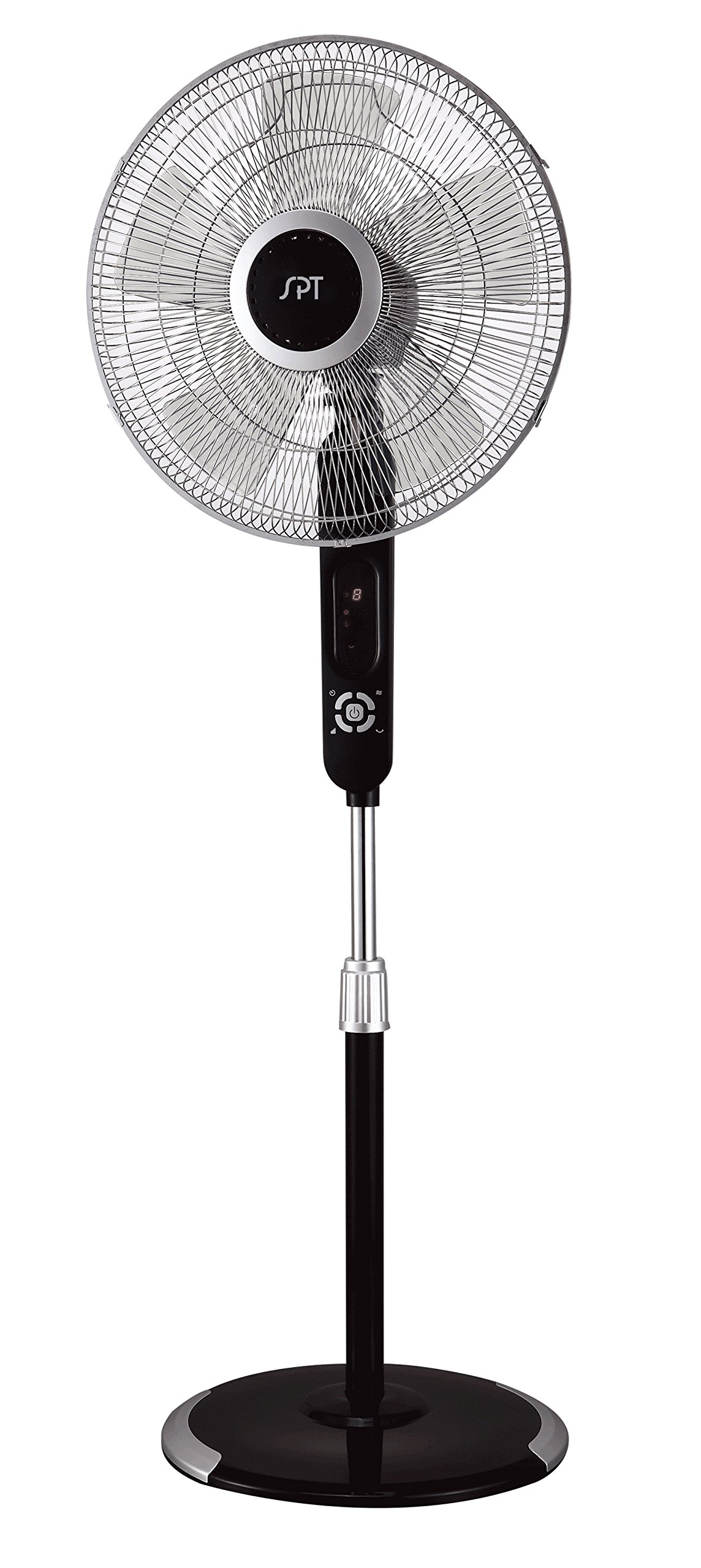
Image: The control panel of the SPT SF-16T07 Stand Fan. It features a digital display at the top showing numbers (e.g., '8') and icons for timer, fan speed, and mode. Below the display are several white buttons arranged in a circular pattern around a central power button. Other buttons include timer, fan speed, oscillation, and mode selection.
- כפתור הפעלה (⏻): לחץ כדי להפעיל או לכבות את המאוורר.
- Speed Button ( ✴ ): Press repeatedly to cycle through 6 fan speeds. The current speed will be indicated on the digital display.
- Mode Button ( ☻ ): Press to select one of the 4 wind modes: Normal, Natural, Sleep, or Smart.
- Oscillation Button ( 🌀 ): Press to start or stop the fan head oscillation (side-to-side movement).
- כפתור טיימר (⏱): Press to set the auto-off timer. Each press increases the timer by 1 hour, up to a maximum of 8 hours. The set time will be displayed.
Wind Modes Explained
- מצב רגיל: מספק זרימת אוויר קבועה במהירות הנבחרת.
- מצב טבעי: Simulates natural breezes by varying the fan speed intermittently.
- מצב שינה: Gradually decreases the fan speed over time to provide a quieter and more comfortable environment for sleeping.
- מצב חכם: Adjusts the fan speed automatically based on the ambient room temperature.
שְׁלַט רָחוֹק
The included remote control allows you to operate all fan functions from a distance. The buttons on the remote correspond to the functions on the main control panel. Ensure batteries are correctly installed in the remote control.
תַחזוּקָה
Regular cleaning and proper maintenance will ensure the longevity and efficient operation of your fan.
- ניקוי: תמיד נתקו את המאוורר מהחשמל לפני ניקוי. השתמשו במטלית רכהamp cloth to wipe the exterior surfaces. For stubborn dirt, a mild soap solution can be used. Do not use abrasive cleaners or solvents.
- ניקוי סורג: Periodically remove the front grille (refer to assembly instructions in reverse) to clean the fan blades and inside of the grilles. Use a soft brush or vacuum cleaner to remove dust and debris. Ensure all parts are dry before reassembling.
- אִחסוּן: כאשר המאוורר אינו בשימוש למשך תקופות ממושכות, יש לאחסן אותו במקום קריר ויבש, רצוי באריזתו המקורית, כדי להגן עליו מפני אבק ונזק.
פתרון בעיות
אם נתקלת בבעיות עם המאוורר שלך, עיין בבעיות הנפוצות ובפתרונות הבאים:
| בְּעָיָה | סיבה אפשרית | פִּתָרוֹן |
|---|---|---|
| המאוורר לא נדלק. | No power supply; fan unplugged; power button not pressed. | Ensure the fan is securely plugged into a working electrical outlet. Press the power button. Check household circuit breaker. |
| Fan stops unexpectedly during operation. | Touch-stop sensor activated; power interruption; internal fault. | Check if the fan guard was touched, activating the safety sensor. Remove any contact and restart the fan. Verify stable power supply. If the issue persists, contact customer support. |
| המאוורר משמיע רעש חריג. | Loose parts; obstruction in fan blades/grille; fan not on a level surface. | נתק את המאוורר מהחשמל ובדוק אם יש רכיבים רופפים או חסימות. ודא שהמאוורר ממוקם על משטח ישר ויציב. |
| השלט רחוק לא עובד. | Dead batteries; remote out of range; obstruction between remote and fan. | Replace batteries in the remote control. Ensure there are no obstructions and operate within effective range. |
מפרטים
| תכונה | פְּרָט |
|---|---|
| מותג | SPT |
| שם הדגם | SF-16T07 (Touch-stop) |
| עיצוב מאוורר חשמלי | מאוורר רצפה / מאוורר עמוד |
| צֶבַע | Black (Matte Black finish) |
| מידות המוצר | 16" D x 16" W x 57.09" H |
| משקל פריט | 17 פאונד |
| מקור כוח | חשמלי עם כבלים |
| מספר להבים | 3 |
| קיבולת זרימת אוויר | 1659.8 רגל מעוקב לדקה |
| מספר רמות הספק | 6 מהירויות מאוורר |
| מצבי רוח | 4 (Normal, Natural, Sleep, Smart) |
| פונקציית טיימר | עד 8 שעות |
| תכונות מיוחדות | 16" fan blade, Touch-stop sensor, Remote control, Head oscillation, Manual tilting, Adjustable height, ETL certified |
| שיטת בקרה | Touch (Control Panel) / Button Control (Remote) |
| שימוש בפנים/חוץ | מקורה |
מידע על אחריות
The SPT SF-16T07 Touch Stop Stand Fan comes with a אחריות לשנה covering both labor and parts from the date of purchase. This warranty covers defects in materials and workmanship under normal use. Please retain your proof of purchase for warranty claims. The warranty does not cover damage resulting from misuse, accident, alteration, or unauthorized repair.
תמיכת לקוחות
For further assistance, technical support, or warranty inquiries, please contact SPT customer service. Refer to the product packaging or the official SPT webאתר לקבלת פרטי הקשר העדכניים ביותר.