
מָבוֹא
This manual provides detailed instructions for the use and maintenance of your Strong SRT 7404 HD remote control. This remote is designed as an original replacement for the Strong SRT 7404 HD FRANSAT receiver, ensuring full compatibility and functionality.
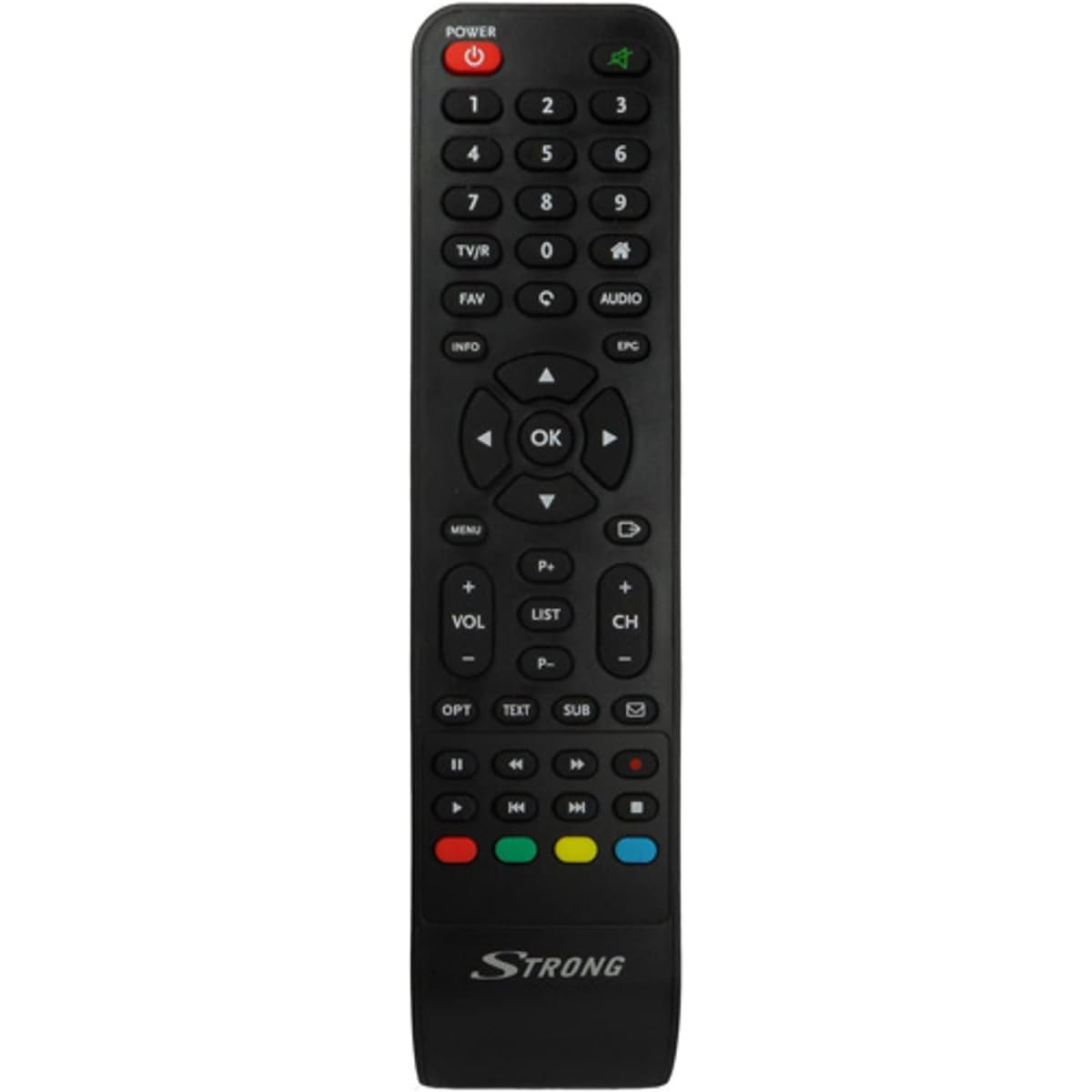
Image: The Strong SRT 7404 HD remote control, black in color, featuring various control buttons for television and receiver functions.
הגדרה
1. התקנת סוללה
- אתר את תא הסוללות בגב השלט הרחוק.
- החלק את מכסה הסוללה כלפי מטה או בכיוון המצוין על ידי חץ כדי לפתוח אותו.
- Insert two AAA alkaline batteries (not included), ensuring the positive (+) and negative (-) terminals align correctly with the markings inside the compartment.
- החזר את מכסה הסוללה למקומו על ידי החלקתו בחזרה עד שיישמע נקישה.
Note: Always use new alkaline batteries for optimal performance. Do not mix old and new batteries, or different types of batteries.
2. שימוש ראשוני
The Strong SRT 7404 HD remote control is an original replacement and is pre-programmed for the Strong SRT 7404 HD FRANSAT receiver. No additional setup or pairing is typically required. Simply install the batteries and point the remote control towards your receiver to begin operation.
הוראות הפעלה
This section outlines the basic functions of the remote control buttons.
- לחצן הפעלה: מפעיל או מכבה את המקלט.
- ערוץ למעלה/למטה: Navigates through television channels.
- עוצמת הקול מעלה/הנמכת: מכוונן את עוצמת השמע.
- כפתור השתק: Silences or restores the audio.
- לחצני מספרים (0-9): Directly selects channels or enters numerical data.
- לחצן תפריט: גישה לתפריט הראשי של המקלט.
- כפתורי ניווט (למעלה, למטה, שמאלה, ימינה, אישור): משמש לניווט בתפריטים ולאישור בחירות.
- כפתור יציאה/חזרה: חזרה למסך הקודם או יציאה מתפריט.
- לחצן מידע: מציג מידע על התוכנית.
- כפתורי צבע (אדום, ירוק, צהוב, כחול): Functions vary depending on the on-screen menu or application.
Refer to your Strong SRT 7404 HD FRANSAT receiver's manual for specific functions related to its menu system and advanced features.
תַחזוּקָה
ניקוי
כדי לנקות את השלט רחוק, נגבו בעדינות את פני השטח שלו בעזרת מטלית רכה ויבשה. במקרה של לכלוך עיקש, נגבו מעטampen the cloth with water. Avoid using abrasive cleaners, solvents, or alcohol, as these can damage the remote's finish or internal components.
החלפת סוללה
Replace batteries when the remote control becomes unresponsive or its range decreases significantly. Follow the battery installation steps outlined in the "Setup" section. Dispose of used batteries according to local regulations.
אִחסוּן
כאשר השלט אינו בשימוש למשך תקופות ממושכות, יש להוציא את הסוללות כדי למנוע דליפה, אשר עלולה לגרום נזק לשלט הרחוק. יש לאחסן את השלט במקום קריר ויבש הרחק מאור שמש ישיר וטמפרטורות קיצוניות.
פתרון בעיות
- שלט רחוק לא מגיב:
- בדוק אם הסוללות הוכנסו כהלכה עם הקוטביות הנכונה (+/-).
- Replace old batteries with new alkaline batteries.
- Ensure there are no obstructions between the remote control and the receiver's infrared sensor.
- ודא שאתה נמצא בטווח הפעולה האפקטיבי (עד 10 מטרים).
- כוון את השלט ישירות אל המקלט.
- כפתורים ספציפיים שלא עובדים:
- נקו את משטח השלט רחוק, במיוחד סביב הכפתורים שאינם מגיבים, כדי להסיר כל לכלוך או פסולת שעלולים למנוע מגע תקין.
- If cleaning and battery replacement do not resolve the issue, the button or remote may be faulty.
מפרטים
| תכונה | פְּרָט |
|---|---|
| מותג | חָזָק |
| שם הדגם | 7404 |
| תכונה מיוחדת | קַל מִשְׁקָל |
| צֶבַע | שָׁחוֹר |
| מקסימום מכשירים נתמכים | 1 |
| מכשירים תואמים | TV Decoder (Strong SRT 7404 HD FRANSAT Receiver) |
| טכנולוגיית קישוריות | תדר רדיו |
| מספר כפתורים | 5 |
| סוג בקר | שְׁלַט רָחוֹק |
| טווח מקסימלי | 10 מטר |
| סוג סוללה | Alkaline (AAA, not included) |
| ארץ מוצא | סִין |
אחריות ותמיכה
מידע על אחריות
This Strong SRT 7404 HD remote control comes with a 2-year warranty from the date of purchase. This warranty covers manufacturing defects under normal use. Please retain your proof of purchase for warranty claims.
תמיכת לקוחות
For further assistance, technical support, or warranty inquiries, please contact Strong customer service. Contact details can typically be found on the official Strong webבאתר או דרך קמעונאי המוצרים שלך.
You can visit the official Strong brand store for more information: חנות מותג חזקה