
1. הקדמה
The Surecom SW-102 is a compact and versatile digital VHF/UHF antenna power and SWR meter designed for radio enthusiasts and professionals. It provides direct digital readout of VSWR, forward power, and reflected power without the need for calibration. Its low insertion loss allows for permanent connection within your setup. The device also features a built-in frequency counter and displays comprehensive information including frequency, power, SWR, forward power (FW), reflected power (RW), and battery voltage.
2. מידע בטיחות
- אין לחשוף את המכשיר לטמפרטורות קיצוניות, ללחות או לאור שמש ישיר.
- הימנעו מהפלת המכשיר או מחשיפתו לפגיעות חזקות.
- אל תנסה לפרק או לשנות את המכשיר. פעולה זו תגרום לביטול האחריות ועלולה לגרום נזק.
- Use only the specified charger (5V micro USB) to prevent damage to the battery and device.
- Ensure proper connection of all cables and adapters before operation to prevent damage to the meter or connected equipment.
- This device is designed for analog radio systems only and is not compatible with DMR radios.
3. תכולת החבילה
עם פתיחת החבילה, אנא ודא שכל הפריטים המפורטים להלן נמצאים ובמצב תקין:
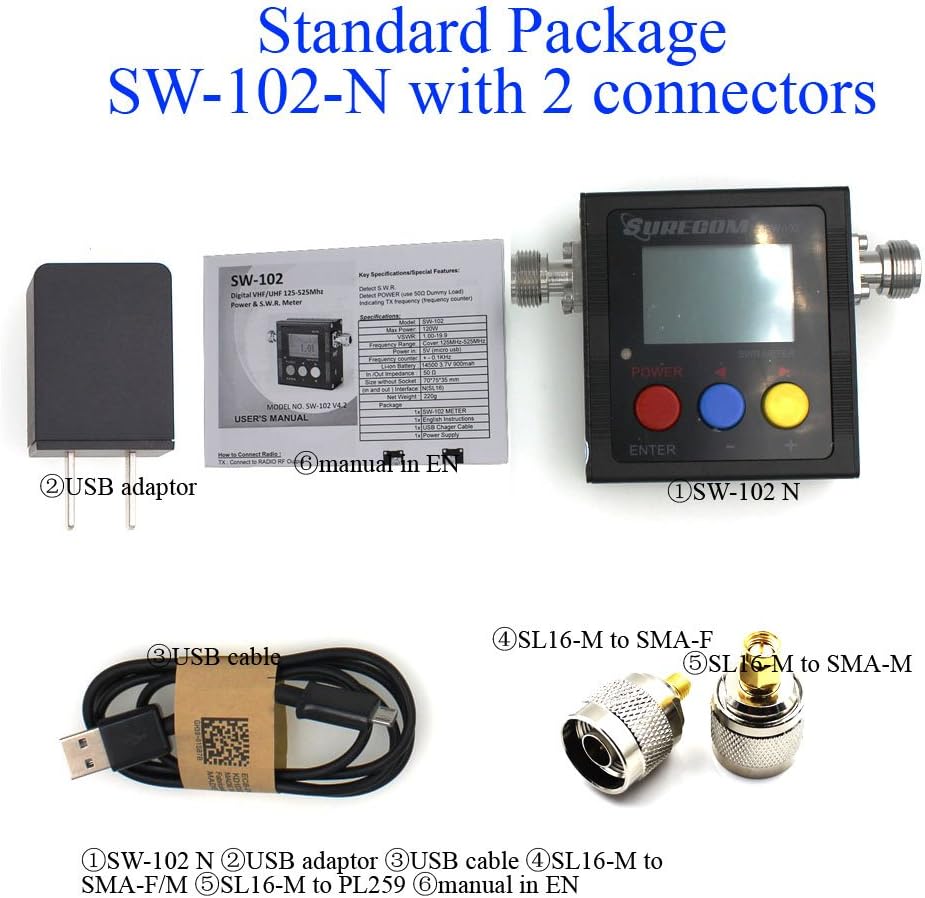
- 1x SURECOM SW-102 Meter
- 1x Charger Cable (Micro USB)
- 1x Users Manual
- SL16 to SMA-F Connector (included)
- SL16 to SMA-M Connector (included)
4. המוצר נגמרview
4.1. תכונות עיקריות
- Direct digital readout of VSWR, Forward Power, and Reflected Power.
- אין צורך בכיול.
- Maximum measurable power range up to 120W.
- Low insertion loss (<0.15dB VHF, <0.25dB UHF) allows permanent connection.
- Built-in Frequency Counter.
- All-function display: Frequency, Power, SWR, FW, RW, Battery voltage.
- Compact and handheld size with large LCD display.
4.2. רכיבים ובקרות


The SW-102 features an N-J Interface for connections. Optional accessories such as SL16 to SMA and SL16 to BNC adapters are available to ensure compatibility with various radio and antenna connectors.

5. התקנה
5.1. חיבור המונה
To connect the Surecom SW-102, connect the output of your transceiver to the "TX" port on the meter. Then, connect your antenna or dummy load to the "ANT" port. Ensure proper adapters or cables are used if your device has different connector types. The device ships with SL16 to SMA-F and SL16 to SMA-M connectors for common applications.
Watch the video below for a visual guide on connecting the SW-102 to your radio and antenna:
Video 5.1: Demonstration of unboxing, physical overview, and connecting the Surecom SW-102 to a radio and antenna for SWR measurement.
5.2. הפעלה
To power on the SW-102, press and hold the כפתור אדום for 2 seconds. To power off, press and hold the כפתור אדום שוב למשך 2 שניות.
6. הוראות הפעלה
6.1. לקיחת מדידות
Once connected and powered on, the SW-102 will display real-time measurements. To measure SWR and power, ensure the meter is in a vertical position and avoid touching the antenna during measurement. Press the PTT (Push-To-Talk) button on your radio to transmit, and the meter will display the VSWR, transmit power, and other relevant data.
כרךtage Standing Wave Ratio (VSWR) is an indication of the amount of mismatch between an antenna and the feed line connecting to it. The range of values for VSWR is from 1 to ∞. A VSWR value under 2 is considered suitable for most antenna applications. The antenna can be described as having a good match. So when someone says that the antenna is poorly matched, very often it means that the VSWR value exceeds 2 for a frequency of interest.
Video 6.1: Demonstration of taking SWR measurements with the Surecom SW-102, including proper positioning and interpreting the display.
6.2. הצג מבוא
The LCD display provides comprehensive information at a glance. Key indicators include:
- מצב סוללה
- זמן עבודה
- כוח שידור (W)
- תדר שידור (MHz)
- VSWR (כרךtage יחס גלים עומדים)
- Forward Power (FW)
- Reflected Power (RW)
Video 6.2: Detailed introduction to the Surecom SW-102's display, explaining each parameter and its significance.
6.3. Function Memory Save
To save function memory settings:
- הקש על MENU (Blue button).
- לִלְחוֹץ F1 (Red button) to select a function (1-6).
- Adjust values using the Blue button (-) ו Yellow button (+).
- הקש על כפתור אדום למשך 2 שניות לאישור.
- הקש על כפתור כחול to SAVE and EXIT.
7. תחזוקה
7.1. טעינת הסוללה
The SW-102 is equipped with a 3.7V Li-ion rechargeable battery (14500 type). To charge the device, connect the provided USB charger cable to the micro USB port on the side of the meter and plug the other end into a 5V (0.5-1A) USB power source.

Video 7.1: Instructions on how to charge the Surecom SW-102 using the provided USB cable.
7.2. תכונות חיסכון באנרגיה
- המכשיר כולל כיבוי אוטומטי function, configurable from 1 to 9 minutes.
- ה תאורה אחורית also has an AUTO OFF feature, configurable from 1 to 9 minutes, to conserve battery life.
8. פתרון תקלות
- If the device does not power on, ensure the battery is charged.
- If readings are inconsistent, check all cable connections for tightness and proper adapter usage.
- Ensure the SW-102 is used with analog radios only. זה כן not compatible with DMR radios.
- For significant discrepancies in SWR readings, verify the antenna's condition and proper installation.
9. מפרטים
| תכונה | מִפרָט |
|---|---|
| טווח תדרים | 100 - 520 מגה-הרץ |
| Measurable Power Range | 0 - 120W |
| כניסת חשמל מקסימלית | 120W |
| דִיוּק | +/- 5% |
| טווח VSWR | 1.00 ~ 19.9 |
| עַכָּבָּה | 50Ω |
| Insertion Loss (VHF) | <0.15dB |
| Insertion Loss (UHF) | <0.25dB |
| טמפרטורת הפעלה | 0℃ ~ 60℃ |
| Input Frequency Counter | כֵּן |
| סוללה כרךtage תצוגה | כֵּן |
| סוג סוללה | 3.7V Li-ion Rechargeable Battery (14500) |
| כיבוי אוטומטי | 1-9 minutes (configurable) |
| כניסת מטען | 5 וולט (מיקרו USB) |
| כיבוי אוטומטי של תאורה אחורית | 1-9 minutes (configurable) |
| Interface (In and Out) | N (SL16) |
| גוֹדֶל | 66*68*37 (מ"מ) |
| מִשׁקָל | 220 גרם |
| משקל פריט | 13.4 אונקיות |
| מידות חבילה | 7.76 x 5.43 x 1.81 אינץ' |
10. אחריות ותמיכה
Specific warranty information and detailed support contacts are not provided in this manual. Please refer to the product packaging or the manufacturer's official webאתר לקבלת פרטי אחריות ואפשרויות תמיכת לקוחות.