
1. הקדמה
Thank you for choosing the Comelit Classic Monitor, Model 6101N. This manual provides essential information for the correct installation, operation, and maintenance of your video intercom monitor. Please read these instructions carefully before using the device to ensure safe and efficient operation.
The Comelit Classic Monitor is designed to provide reliable video and audio communication for door entry systems, enhancing security and convenience for your home or office.
2. מידע בטיחות
- בטיחות חשמל: Installation and maintenance should only be performed by qualified personnel. Disconnect power before performing any wiring or service.
- סְבִיבָה: Do not expose the monitor to extreme temperatures, humidity, direct sunlight, or corrosive substances.
- ניקוי: השתמש במטלית רכה ויבשה לניקוי. אין להשתמש בחומרי ניקוי שוחקים או ממסים.
- שינויים: Do not attempt to modify or repair the device yourself. Unauthorized modifications may void the warranty and pose safety risks.
3. תכולת החבילה
אנא ודאו שכל הרכיבים נמצאים באריזה:
- Comelit Classic Monitor (Model 6101N)
- הרכבה הרכבה
- ברגי הרכבה ותקעים בקיר
- מדריך הוראות (מסמך זה)
4. המוצר נגמרview
The Comelit Classic Monitor features a sleek design and intuitive controls for managing your door entry system. Below is an image of the monitor, highlighting its key features.
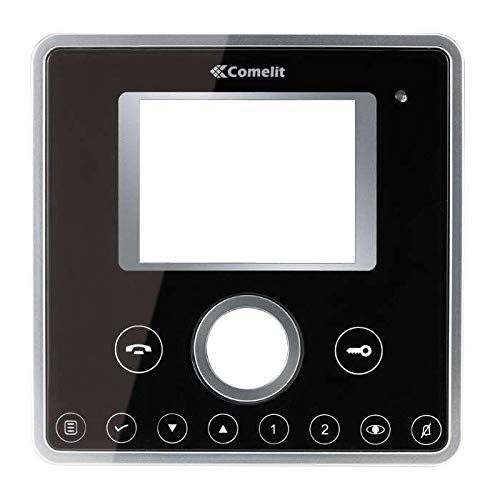
איור 1: חזית view of the Comelit Classic Monitor (Model 6101N). This image shows the monitor's display screen, handset, and control buttons. The monitor is black with a minimalist design.
רכיבים מרכזיים כוללים בדרך כלל:
- מסך תצוגה: Shows video feed from the outdoor unit.
- מכשיר: עבור תקשורת שמע.
- לחצן שחרור דלת: Activates the electric lock to open the door.
- כפתור עזר: May control additional functions (e.g., secondary door, stair light).
- בקרת עוצמת הקול: Adjusts ringtone and communication volume.
5. התקנה והתקנה
Installation of the Comelit Classic Monitor requires electrical wiring and should ideally be performed by a qualified technician. Incorrect installation can lead to device malfunction or safety hazards.
5.1 התקנת הצג
- בחרו מיקום מתאים על קיר פנימי, הרחק ממקורות חום ישירים או לחות.
- Secure the mounting bracket to the wall using the provided screws and wall plugs. Ensure the bracket is level.
- Refer to the system wiring diagram (provided with your outdoor unit or system documentation) for correct cable connections.
- Connect the system cables to the monitor's terminals as indicated in the wiring diagram. Ensure all connections are secure.
- Carefully attach the monitor to the mounting bracket, ensuring it clicks securely into place.
5.2 הפעלה ראשונית
Once installed, restore power to the system. The monitor should power on and display a standby screen or indicator light. Perform a test call from the outdoor unit to verify proper operation.
6. הוראות הפעלה
6.1 מענה לשיחה
- When someone calls from the outdoor unit, the monitor will ring and display the video feed.
- הרם את השפופרת כדי לענות לשיחה ולהתחיל תקשורת שמע דו-כיוונית.
- כדי לסיים את השיחה, הניחו את השפופרת בידיים.
6.2 פתיחת הדלת
During a call, or when the monitor is active, press the לחצן שחרור הדלת (often marked with a key symbol) to activate the electric lock and open the door.
6.3 התאמת הגדרות
- כֶּרֶך: Use the volume control (usually a rotary dial or buttons on the side/bottom) to adjust the ringtone and communication volume.
- ניגוד בהירות: Some models may have controls for adjusting screen brightness or contrast. Refer to specific model features if available.
7. תחזוקה
- ניקוי: Regularly wipe the monitor's surface and screen with a soft, dry, anti-static cloth. Do not use liquid cleaners directly on the screen or device.
- בְּדִיקָה: בדקו מעת לעת לאיתור חיבורים רופפים או נזקים גלויים. אם מתגלות בעיות כלשהן, צרו קשר עם טכנאי מוסמך.
- עדכוני תוכנה: If your system supports firmware updates, follow the manufacturer's instructions for applying them to ensure optimal performance and security.
8. פתרון תקלות
| בְּעָיָה | סיבה אפשרית | פִּתָרוֹן |
|---|---|---|
| No video/audio from outdoor unit. | Loose wiring, power issue, outdoor unit malfunction. | Check all connections. Ensure system has power. Contact technician if problem persists. |
| המסך לא נדלק. | No power supply, faulty wiring, monitor malfunction. | Verify power supply to the system. Check wiring. Contact technician. |
| פתיחת דלת לא עובדת. | Wiring issue to electric lock, faulty lock, monitor button malfunction. | Check wiring to the lock. Test the lock independently if possible. Contact technician. |
| איכות וידאו ירודה. | Dirty camera lens (outdoor unit), poor wiring, interference. | Clean outdoor camera lens. Check wiring for damage or interference. |
9. מפרטים
Below are the technical specifications for the Comelit Classic Monitor, Model 6101N:
- מספר דגם: 6101N
- יַצרָן: קומליט
- סוג מוצר: צג אינטרקום וידאו
- ASIN: B01MSE76EO
- מספר מוצרים: 1
- תאריך זמין ראשון: 2 בפברואר 2017
- Note: Specific electrical and display specifications may vary by system configuration. Refer to your system's main documentation for full details.
10. אחריות ותמיכה
Comelit products are covered by a manufacturer's warranty. For specific warranty terms and conditions, please refer to the warranty card included with your product or visit the official Comelit webאתר. שמור את הוכחת הרכישה שלך לצורך תביעות אחריות.
For technical support, service, or further assistance, please contact your authorized Comelit dealer or visit the official Comelit support page:
Official Comelit Webאֲתַר: www.comelitgroup.com
Please have your model number (6101N) and purchase details ready when contacting support.