
מָבוֹא
This manual provides comprehensive instructions for the setup, operation, and maintenance of your GPX Digital AM/FM Clock Radio, model C224B. Please read this manual thoroughly before using the device to ensure proper functionality and to maximize your user experience. Keep this manual for future reference.
המוצר נגמרview
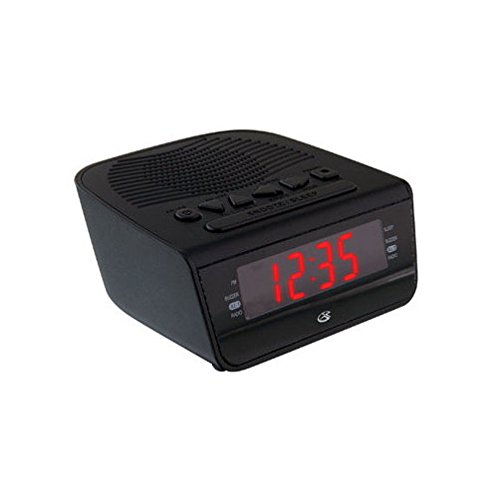
איור 1: חֲזִית view of the GPX Digital AM/FM Clock Radio. This image shows the compact black unit with its digital display and control buttons.
The GPX Digital AM/FM Clock Radio (C224B) is designed for reliable timekeeping and audio entertainment. Key features include a clear multi-display clock, AM/FM radio tuner, dual alarm functionality, and a battery backup option to ensure continuous operation during power interruptions. Its compact and modern design makes it suitable for various indoor settings.
הגדרה
1. פורקים
Carefully remove the clock radio from its packaging. Ensure all components are present: the clock radio unit and the power adapter.
2. חיבור חשמל
- Plug the power adapter into the DC input jack located on the back of the clock radio.
- Plug the other end of the power adapter into a standard wall outlet (AC 120V, 60Hz).
- The display will illuminate, indicating the unit is receiving power.
3. התקנת גיבוי סוללה (אופציונלי)
לחשמל גיבוי במהלך היציאהtages, install batteries (not included).
- אתר את תא הסוללה בתחתית היחידה.
- פתח את מכסה תא הסוללות.
- Insert the required batteries (e.g., 2 x AAA, check unit for specific type) according to the polarity markings (+ and -).
- סגור היטב את מכסה תא הסוללות.
פֶּתֶק: Batteries are for backup only and will not power the display or radio functions continuously. They preserve time and alarm settings during a power interruption.
הוראות הפעלה
1. קביעת הזמן
- לחץ והחזק את זמן מוגדר כפתור עד שהתצוגה תהבהב.
- השתמש ב- שָׁעָה ו דַקָה כפתורים לכוונון הזמן.
- לִלְחוֹץ זמן מוגדר שוב כדי לאשר ולצאת ממצב הגדרת זמן.
2. הגדרת אזעקות (אזעקה 1 ואזעקה 2)
This unit features dual alarms, allowing you to set two independent wake-up times.
- לחץ והחזק את אזעקה 1 סט (אוֹ אזעקה 2 סט) button until the alarm time flashes.
- השתמש ב- שָׁעָה ו דַקָה כפתורים כדי לכוונן את זמן ההתראה הרצוי.
- לִלְחוֹץ אזעקה 1 סט (אוֹ אזעקה 2 סט) again to confirm the time.
- Immediately after confirming the time, use the מצב התראה button to select the alarm source: זַמזָם or רָדִיוֹ.
- The alarm icon (e.g., AL1 or AL2) will appear on the display, indicating the alarm is active.
To turn off an alarm, press the corresponding אזעקה 1 פועל/כיבוי (אוֹ אזעקה 2 פועל/כיבוי) button. The alarm icon will disappear.
3. פעולת רדיו AM/FM
- הקש על רדיו הפעלה/כיבוי לחצן להפעלת הרדיו.
- הקש על לְהִתְאַגֵד כפתור כדי לעבור בין תדרי AM ו- FM.
- השתמש ב- TUNE + or כוון - כפתורים כדי לכוון ידנית לתחנה הרצויה.
- To automatically scan for the next available station, press and hold TUNE + or כוון - לכמה שניות.
- כוונן את עוצמת הקול באמצעות VOLUME + or כרך - כפתורים.
- כדי לכבות את הרדיו, לחץ על רדיו הפעלה/כיבוי כפתור שוב.
4. פונקציית נודניק
כאשר נשמעת אזעקה, לחצו על נִמנוּם כדי להשתיק את השעון המעורר באופן זמני למשך כ-9 דקות. השעון המעורר יישמע שוב לאחר תקופת הנודניק.
5. פונקציית שינה
פונקציית השינה מאפשרת לרדיו להשמיע נגן למשך זמן מוגדר לפני שהוא נכבה אוטומטית.
- בזמן שהרדיו מתנגן, לחצו על הלחצן לִישׁוֹן לחץ שוב ושוב על הלחצן כדי לעבור בין זמני השינה הזמינים (למשל, 90, 60, 30, 15 דקות, כבוי).
- הרדיו יכבה אוטומטית לאחר הזמן שנבחר.
תַחזוּקָה
1. ניקיון
To clean the unit, wipe the exterior with a soft, slightly damp cloth. Do not use abrasive cleaners or solvents, as these may damage the finish. Ensure the unit is unplugged before cleaning.
2. החלפת סוללה
If the battery backup function is not working, or if the unit loses time during a power outage, the backup batteries may need replacement. Follow the "Battery Backup Installation" steps in the Setup section to replace them.
פתרון בעיות
| בְּעָיָה | סיבה אפשרית | פִּתָרוֹן |
|---|---|---|
| היחידה לא נדלקת. | מתאם החשמל לא מחובר או ששקע פגום. | ודא שמתאם החשמל מחובר היטב ליחידה ולשקע חשמל תקין. נסה שקע אחר. |
| האזעקה לא נשמעת. | השעון המעורר לא הוגדר, עוצמת הקול של השעון המעורר נמוכה מדי, או שהשעון המעורר כבוי. | Verify alarm time and source (buzzer/radio) are set correctly. Ensure alarm is activated (icon visible). Increase radio volume if alarm source is radio. |
| קליטת רדיו גרועה. | אות חלש או הפרעות. | Adjust the position of the unit or the antenna (if external). Move away from other electronic devices that may cause interference. |
| זמן/הגדרות אבדו לאחר ניתוק החשמלtage. | סוללות הגיבוי מתות או לא מותקנות. | Install fresh backup batteries or replace existing ones. |
מפרטים
- דֶגֶם: C224B
- מקור כוח: AC 120V, 60Hz (main); Battery Powered (backup)
- סוג תצוגה: תצוגת LED דיגיטלית
- להקות רדיו: AM/FM
- מידות (בערך): רוחב 5.12 אינץ' x גובה 5.12 אינץ'
- משקל (בערך): 3 פאונד
- צֶבַע: שָׁחוֹר
- חוֹמֶר: פּלָסטִי
אחריות ותמיכה
למידע על אחריות או תמיכה טכנית, אנא עיינו בכרטיס האחריות המצורף למוצר שלכם או בקרו באתר הרשמי של GPX website. Do not attempt to repair this unit yourself, as this may void your warranty.
GPX רשמי Webאֲתַר: www.gpx.com