תודה על הרכישהasing the MUSE M-1600 SBT Soundbar. This manual provides important information regarding the installation, operation, and maintenance of your new soundbar. Please read it thoroughly before use and retain it for future reference.
The M-1600 SBT is designed to enhance your audio experience with its powerful 60W output, versatile connectivity options including Bluetooth, USB, AUX-in, RCA, and Optical inputs, and an integrated PLL FM radio.
2. הוראות בטיחות
מקור כוח: ודא את אספקת החשמל כרךtage matches the rating label on the soundbar.
אוורור: אין לחסום פתחי אוורור. יש לשמור על מרווח מספיק סביב היחידה לזרימת אוויר תקינה.
מים ולחות: אין לחשוף את הסאונד בר לגשם, לחות או נוזלים מטפטפים/מתיזים. אין להניח חפצים מלאים בנוזלים, כגון אגרטלים, על המכשיר.
מקורות חום: הרחק את היחידה ממקורות חום כגון רדיאטורים, אוגרי חום, תנורים או מכשירים אחרים (כולל ampמחצבים) המייצרים חום.
ניקוי: נקה רק עם מטלית יבשה. אין להשתמש בחומרי ניקוי נוזליים או בחומרי ניקוי אירוסולים.
שֵׁרוּת: אל תנסה לתת שירות למוצר זה בעצמך. הפנה את כל השירות לאנשי שירות מוסמכים.
מיקום: Place the soundbar on a stable, flat surface. Avoid placing it in direct sunlight or near strong magnetic fields.
3. תכולת החבילה
Carefully unpack your soundbar and ensure all items are present and in good condition. If any items are missing or damaged, contact your retailer immediately.
MUSE M-1600 SBT Soundbar
שְׁלַט רָחוֹק
RCA כבלים
מדריך למשתמש
Power Adapter (not explicitly listed but implied for a wired device)
4. המוצר נגמרview
Familiarize yourself with the main components and controls of your M-1600 SBT Soundbar.
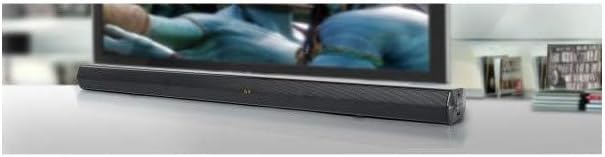
תמונה 1: חֲזִית view of the Muse M-1600 SBT Soundbar, showcasing its sleek design and central display. The soundbar is positioned in front of a television.
פאנל קדמי
לְהַצִיג: Shows current input mode, volume level, and radio frequency.
לחצני שליטה: (Located on the right side) Power, Volume Up/Down, Input Source, Play/Pause.
פאנל אחורי (חיבורים)
תמונה 2: אֲחוֹרִי view of the Muse M-1600 SBT Soundbar, highlighting the various input ports for external devices.
DC in יציאת כניסת חשמל.
אופטי ב: For connecting devices via optical cable.
RCA IN (L/R): For connecting devices via RCA cables.
AUX IN: 3.5mm jack for connecting portable audio devices.
יציאת USB: להשמעת אודיו files מכונן USB.
שְׁלַט רָחוֹק
The included remote control allows for convenient operation of all soundbar functions from a distance. Ensure batteries are correctly inserted (not included).
5. התקנה
5.1 מיקום
Place the soundbar on a stable, flat surface, preferably directly in front of your television or monitor. Ensure there are no obstructions in front of the soundbar to allow for optimal sound projection.
5.2 חיבור מתח
Connect the power adapter to the DC IN port on the rear of the soundbar.
חבר את הקצה השני של מתאם החשמל לשקע בקיר.
5.3 חיבור למקורות שמע
Choose one of the following methods to connect your soundbar to an audio source (e.g., TV, DVD player, smartphone).
חיבור אופטי: For high-quality digital audio. Connect an optical cable (not supplied) from your TV's Optical Out port to the soundbar's OPTICAL IN port.
חיבור RCA: Connect the supplied RCA cable to the RCA OUT ports (red for right, white for left) on your TV and to the corresponding RCA IN ports on the soundbar.
חיבור AUX: Use a 3.5mm audio cable (not supplied) to connect the headphone jack or AUX Out port of your device to the soundbar's AUX IN port.
חיבור Bluetooth: Refer to section 6.3 for Bluetooth pairing instructions.
6. הוראות הפעלה
6.1 הפעלה/כיבוי
הקש על כּוֹחַ לחצו על הלחצן שעל סאונד בר או בשלט רחוק כדי להפעיל או לכבות את היחידה.
6.2 בקרת עוצמת הקול
השתמש ב- VOL+ ו כרך- buttons on the soundbar or remote control to adjust the volume level. The current volume will be displayed on the soundbar's screen.
6.3 בחירת מקור קלט
הקש על קֶלֶט button on the soundbar or remote control repeatedly to cycle through the available input sources: Bluetooth (BT), USB, AUX, RCA, OPTICAL, and FM Radio.
פעולת רדיו FM 6.4
Switch the input source to רדיו FM.
לחץ והחזק את PLAY/PAUSE button on the remote control to initiate an automatic scan for FM stations. The soundbar will scan and save up to 30 preset stations.
השתמש ב- הקודם הבא × buttons on the remote to navigate through the saved preset stations.
7. קישוריות
7.1 זיווג בלוטות '
Switch the soundbar's input source to בלוטות' (BT) mode. The display will show "BT" and start flashing, indicating it's in pairing mode.
במכשיר התומך ב-Bluetooth שלך (סמארטפון, טאבלט וכו'), הפעל את Bluetooth וחפש מכשירים זמינים.
Select "M-1600 SBT" from the list of devices.
Once paired, the "BT" indicator on the soundbar's display will stop flashing and remain solid. You can now play audio from your device through the soundbar.
7.2 השמעת USB
Insert a USB flash drive (formatted to FAT32) containing compatible audio files (e.g., MP3) into the USB port on the soundbar.
Switch the input source to USB מצב.
The soundbar will automatically begin playing the audio files. השתמשו בשלט רחוק עבור פונקציות השמעה (הפעלה/השהיה, רצועה הבאה/קודמת).
8. תחזוקה
8.1 ניקוי
Wipe the exterior of the soundbar with a soft, dry, lint-free cloth. Do not use abrasive cleaners, waxes, or solvents as they may damage the finish.
8.2 אחסון
אם אתם מתכננים לאחסן את הסאונד בר לתקופה ממושכת, נתקו אותו משקע החשמל ואחסנו אותו במקום קריר ויבש, הרחק מאור שמש ישיר וטמפרטורות קיצוניות.
9. פתרון תקלות
If you encounter any issues with your soundbar, refer to the following table for common problems and solutions.
בְּעָיָה
סיבה אפשרית
פִּתָרוֹן
אין כוח
כבל חשמל לא מחובר; שקע החשמל אינו פעיל
ודא שכבל החשמל מחובר היטב. בדוק אם שקע החשמל פועל.
Soundbar not in pairing mode; Device Bluetooth off; Device too far
Ensure soundbar is in BT pairing mode. Enable Bluetooth on your device. Move device closer to soundbar.
השלט רחוק לא עובד
סוללות התרוקנו; חסימה בין השלט לסאונד בר; זווית שגויה
Replace remote control batteries. Remove any obstructions. Point remote directly at the soundbar's sensor.
קליטת רדיו FM גרועה
אות חלש; הפרעות
Adjust the position of the soundbar. Avoid placing near other electronic devices that may cause interference.
10. מפרטים
שם הדגם
M-1600 SBT
מותג
מוּזָה
כוח פלט
60 וואט
טכנולוגיית קישוריות
Bluetooth, Wired & Wireless
קישוריות רמקול
Bluetooth, Optical, RCA, USB
טכנולוגיית תקשורת אלחוטית
בלוטות'
מצב פלט שמע
סטריאו
תצורת ערוץ סאונד סראונד
2.0
שיטת בקרה
שְׁלַט רָחוֹק
מקור כוח
חוטי
מספר יציאות USB
1
מידות (L x W x H)
88.5 x 5.9 x 82.5 ס"מ (34.8 x 2.3 x 32.5 אינץ ')
משקל פריט
1.8 קילוגרם (3.97 פאונד)
צֶבַע
שָׁחוֹר
תכונות מיוחדות
Remote control, PLL FM Radio with 30 presets
מכשירים תואמים
Game console, MP3 player, Laptop, Smartphone, Tablet, Television
11. אחריות ותמיכה
11.1 מידע אחריות
This product is covered by a legal manufacturer's warranty. Please refer to the warranty card included in your package or contact your retailer for specific terms and conditions regarding the warranty period and coverage in your region.
11.2 תמיכת לקוחות
For technical assistance, troubleshooting beyond this manual, or service inquiries, please contact your local retailer or the MUSE customer support service. Contact details can typically be found on the manufacturer's webבאתר או על אריזת המוצר.
Ask a question about this manual
Ask about setup, troubleshooting, compatibility, parts, safety, or missing instructions. Manuals+ will review the question and use this page’s manual context to help answer it.