
Kaiser KAS-9012
Kaiser KAS-9012 Wireless Amplified Speaker Kit
מדריך למשתמש
מָבוֹא
Thank you for choosing the Kaiser KAS-9012 Wireless Amplified Speaker Kit. This manual provides essential information for the safe and efficient operation of your new speaker system. Please read it thoroughly before use and retain it for future reference.
The KAS-9012 is a portable amplified speaker system featuring 9700W PMPO / 28W RMS audio power, a 12-inch woofer, 2x3-inch speakers, audio-rhythmic LED lights, and a rechargeable battery offering up to 8 hours of continuous music playback. It supports Bluetooth connectivity and includes scratch discs for volume and playback control.
מידע בטיחות
- אין לחשוף את המכשיר לגשם או לחות כדי למנוע שריפה או התחשמלות.
- אין לפתוח את מארז הרמקול. אין בפנים חלקים הניתנים לתיקון על ידי המשתמש. יש לפנות לכל טיפול וטכנאי מוסמך.
- יש לוודא אוורור נאות. אין לחסום פתחי אוורור.
- הרחיקו את הרמקול ממקורות חום כגון רדיאטורים, אוגרי חום, תנורים או מכשירים אחרים (כולל ampמחצבים) המייצרים חום.
- הגן על כבל החשמל מפני הליכה או צביטה, במיוחד בתקעים, בשקעי נוחות ובנקודה שבה הם יוצאים מהמכשיר.
- נתק את המכשיר מהחשמל במהלך סופות ברקים או כאשר אינו בשימוש לפרקי זמן ארוכים.
- מוצר זה אינו עמיד למים. הימנע ממגע עם נוזלים.
תוכן החבילה
אנא ודאו שכל הפריטים המפורטים להלן כלולים בחבילה שלכם:
- Kaiser KAS-9012 Amplified Speaker Unit
- מִיקרוֹפוֹן
- שְׁלַט רָחוֹק
- כבל חשמל
- מדריך למשתמש (מסמך זה)
המוצר נגמרview
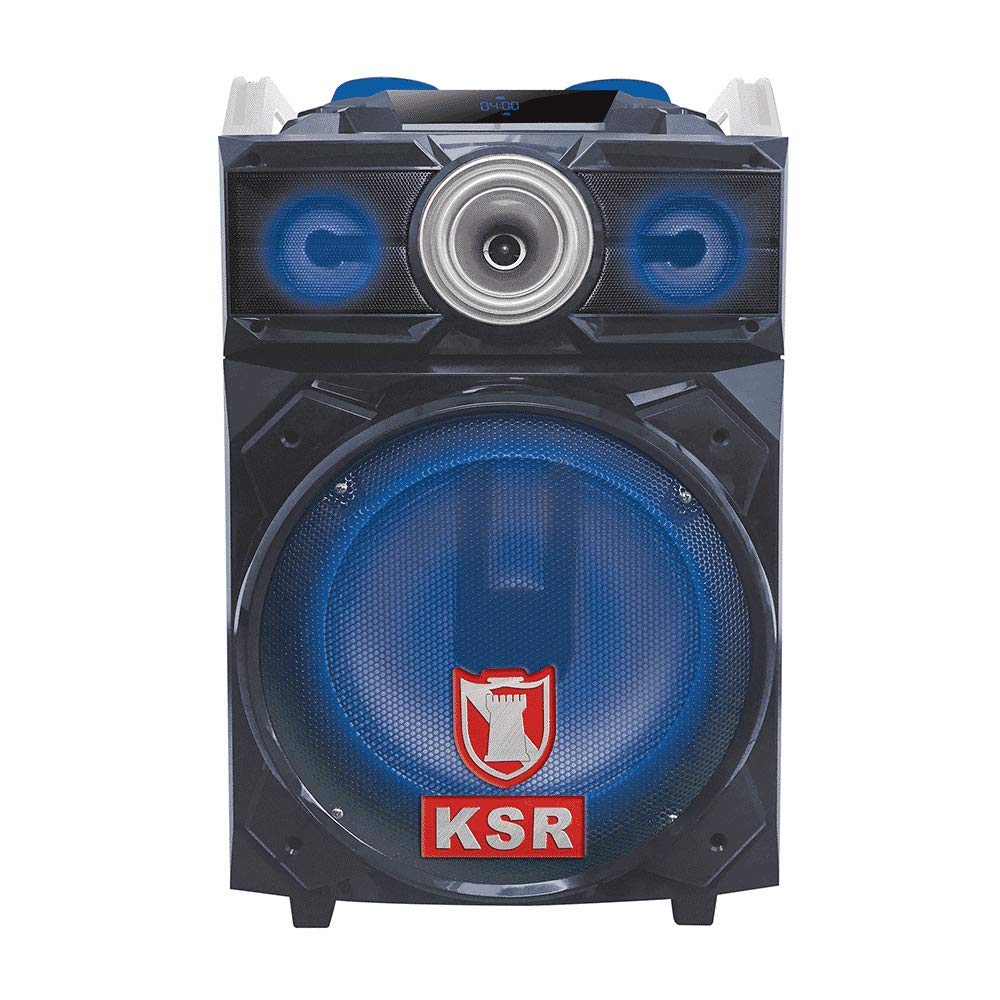
איור 1: חזית view of the Kaiser KAS-9012 Wireless Amplified Speaker Kit, showing the main speaker, control panel, and LED lights.
The Kaiser KAS-9012 is designed for powerful and portable audio. It features a robust enclosure, a comprehensive control panel, and various connectivity options to suit different audio sources.
תכונות עיקריות:
- High Power Output: 9700W PMPO / 28W RMS.
- Integrated 12-inch Woofer and 2x3-inch Speakers.
- Bluetooth Wireless Connectivity.
- Audio-Rhythmic LED Lights (deactivatable).
- Rechargeable Battery with up to 8 hours playback.
- Scratch Discs for Volume and Playback Control.
- Multiple Input Options: USB, SD Card, AUX, Microphone.
- תפעול שלט רחוק.
בקרות וחיבורים
Familiarize yourself with the control panel and connection ports on your KAS-9012 speaker.
פקדי לוח קדמי:
- לחצן הפעלה: מפעיל או מכבה את היחידה.
- לחצן מצב: Switches between Bluetooth, USB, SD, AUX, and FM radio modes.
- לחצן הפעלה/השהה: מנגן או משהה את השמעת האודיו.
- לחצני המסלול הקודם/הבא: מנווט בין מסלולים.
- כפתורי עוצמת קול: Adjusts master volume, microphone volume, and echo.
- Scratch Discs: For DJ-style sound effects and fine-tuning volume/playback.
- לחצן אור LED: Activates or deactivates the audio-rhythmic LED lights.
- מסך תצוגה: Shows current mode, track information, and battery status.
חיבורי לוח אחורי:
- יציאת טעינה: Connect the power cable to recharge the internal battery.
- יציאת USB: להשמעת אודיו מכונני הבזק מסוג USB.
- חריץ לכרטיס SD: For playing audio from SD memory cards.
- כניסת AUX (3.5 מ"מ): Connect external audio devices using an AUX cable.
- כניסת מיקרופון (6.35 מ"מ): Connect the included microphone or another compatible microphone.
הגדרה
1. טעינת הסוללה
- לפני השימוש הראשון, טען את הסוללה הפנימית של הרמקול במלואה.
- Connect the provided power cable to the charging port on the rear panel of the speaker.
- חבר את הקצה השני של כבל החשמל לשקע חשמלי רגיל.
- The charging indicator light (if present) will illuminate. Once fully charged, the light may change color or turn off.
- A full charge typically takes several hours and provides up to 8 hours of playback.
2. הפעלה ראשונית
- לחץ והחזק את כפתור הפעלה on the front panel for a few seconds until the display screen illuminates.
- The speaker will typically start in Bluetooth mode by default.
הוראות הפעלה
1. זיווג Bluetooth
- Ensure the speaker is powered on and in Bluetooth mode. The display will show "BLUE" or a Bluetooth icon, and you may hear an audible prompt.
- במכשיר הנייד שלך (סמארטפון, טאבלט וכו'), הפעל את Bluetooth וחפש מכשירים זמינים.
- Select "KAS-9012" from the list of devices.
- Once paired, the speaker will confirm with an audible sound, and the Bluetooth indicator on the display will become solid.
- You can now play audio from your device through the KAS-9012 speaker.
2. ניגון באמצעות כרטיס USB/SD
- הכנס כונן הבזק מסוג USB או כרטיס SD (עם אודיו MP3) files) לתוך הפורט/חריץ המתאים.
- הקש על כפתור מצב until the display shows "USB" or "SD". The speaker will automatically begin playing audio files.
- השתמש ב- הפעל/השהה ו המסלול הקודם/הבא לחצנים לשליטה בהפעלה.
3. קלט AUX
- חבר התקן שמע חיצוני (למשל, נגן MP3, מחשב נייד) ל כניסת AUX באמצעות כבל שמע 3.5 מ"מ.
- הקש על כפתור מצב until the display shows "AUX".
- שלוט בהשמעה ובעוצמת הקול מהמכשיר המחובר שלך.
4. שימוש במיקרופון
- Plug the microphone into the כניסת מיקרופון נָמָל.
- Adjust the microphone volume using the dedicated knob on the control panel.
- Adjust the echo effect using the echo knob for desired vocal effects.
5. בקרת אורות LED
הקש על לחצן אור LED to toggle the audio-rhythmic LED lights on or off according to your preference.
6. Scratch Discs
The scratch discs allow for DJ-style sound manipulation and can also be used for precise volume adjustments or track scrubbing depending on the active mode.
תַחזוּקָה
ניקוי
- Always unplug the speaker from the power source before cleaning.
- השתמש במטלית רכה ויבשה כדי לנגב את המשטחים החיצוניים של הרמקול.
- אין להשתמש בחומרי ניקוי שוחקים, שעווה או ממיסים מכיוון שהם עלולים לפגוע בגימור.
- הימנעו מריסוס נוזלים ישירות על הרמקול.
אִחסוּן
- כאשר הרמקול אינו בשימוש למשך תקופות ממושכות, יש לאחסן אותו במקום קריר ויבש.
- It is recommended to fully charge the battery every 3-6 months to maintain its lifespan.
פתרון בעיות
| בְּעָיָה | סיבה אפשרית | פִּתָרוֹן |
|---|---|---|
| אין כוח | הסוללה התרוקנה; כבל החשמל אינו מחובר. | Charge the battery; Ensure power cable is securely connected to both speaker and outlet. |
| אין קול | עוצמת קול נמוכה מדי; מצב שגוי נבחר; המכשיר לא קושר (Bluetooth). | Increase master volume; Select correct input mode (Bluetooth, USB, AUX); Re-pair Bluetooth device. |
| חיבור בלוטות' לא יציב | המכשיר רחוק מדי מהרמקול; הפרעות. | Move device closer to speaker (within 10 meters); Avoid obstacles between devices; Turn off other Bluetooth devices. |
| המיקרופון לא עובד | המיקרופון לא מחובר כראוי; עוצמת המיקרופון נמוכה מדי. | Ensure microphone is fully inserted into the input; Increase microphone volume knob. |
מפרטים
| דֶגֶם: | KAS-9012 |
| מותג: | קֵיסָר |
| פלט כוח שמע: | 9700W PMPO / 28W RMS (Max Speaker Output Power: 180 Watts) |
| תצורת רמקול: | 12-inch Woofer, 2x3-inch Speakers |
| תגובת תדירות: | 20 KHz |
| טכנולוגיית קישוריות: | בלוטות' |
| מצב פלט אודיו: | סטריאו (2.0 ערוצים) |
| עַכָּבָּה: | 4 אוהם |
| מקור כוח: | סוללה נטענת |
| חיי סוללה ממוצעים: | עד 8 שעות |
| שיטת בקרה: | כפתורים, שלט רחוק |
| מכשירים תואמים: | Smartphone, Tablet, MP3 Player, Game Consoles |
| משקל פריט: | 15.5 קילוגרם |
| אֲטִימוּת: | לֹא |
אחריות ותמיכה
אחריות למוצר
The Kaiser KAS-9012 Wireless Amplified Speaker Kit comes with a אחריות מוגבלת ל-3 חודשים מתאריך הרכישה. אחריות זו מכסה פגמי ייצור בשימוש רגיל. היא אינה מכסה נזק שנגרם כתוצאה משימוש לרעה, תאונות, שינויים לא מורשים או בלאי רגיל.
אנא שמור את הוכחת הרכישה שלך עבור תביעות אחריות.
תמיכת לקוחות
For technical assistance, troubleshooting, or warranty inquiries, please contact Kaiser customer support. Refer to the contact information provided on the product packaging or the official Kaiser webאֲתַר.
אתה יכול גם לבקר ב Kaiser Store on Amazon למידע נוסף על המוצר.
Ask a question about this manual
Ask about setup, troubleshooting, compatibility, parts, safety, or missing instructions. Manuals+ will review the question and use this page’s manual context to help answer it.