
Instapark PWT-07
Instapark PWT-07 Digital Programmable Water Timer User Manual
Model: PWT-07
מָבוֹא
This manual provides detailed instructions for the setup, operation, maintenance, and troubleshooting of your Instapark PWT-07 Digital Programmable Water Timer. Please read this manual thoroughly before using the device to ensure proper function and longevity.
מידע בטיחות
- Use only 1.5V AA alkaline batteries. Do not mix old and new batteries, or different battery types.
- ודא שתא הסוללה סגור היטב כדי לשמור על דירוג עמידות למים IP66.
- Do not expose the timer to extreme temperatures or direct sunlight for prolonged periods, which may affect battery life and device performance.
- Disconnect the timer from the faucet and drain it before freezing temperatures to prevent damage.
- This device is designed for outdoor use with standard ¾” (GHS) threaded faucets.
תוכן החבילה
ודא שכל הפריטים נמצאים בחבילה:
- Instapark PWT-07 Water Timer
- מדריך למשתמש (מסמך זה)
- תעודת אחריות
Note: 2 AA alkaline batteries are required and not included.
תכונות המוצר
- Single-station digital programmable faucet water timer.
- Impulse solenoid valve for reliable operation.
- Compatible with standard ¾” (GHS) threaded outdoor hose faucets.
- User-friendly interface with a single oversized rotary dial and 4 pushbuttons.
- Large, easy-to-read LCD display (2.1” x 1”).
- דירוג עמיד למים: IP66.
- Built-in rain delay function (24, 48, or 72 hours).
- Manual watering option without interrupting programmed schedules.
- Detachable battery compartment for easy battery replacement.
- Low power consumption, up to 4,000 on/off cycles per battery set.
הגדרה
1. התקנת סוללה
The Instapark PWT-07 requires two (2) 1.5V AA alkaline batteries (not included).
- אתר את תא הסוללות בגב הטיימר.
- החלק את מכסה תא הסוללות כלפי מטה כדי לפתוח.
- הכניסו שתי סוללות אלקליין AA חדשות, תוך הקפדה על קוטביות נכונה (+/-).
- החלק את מכסה תא הסוללה בחזרה למקומו עד שיישמע נקישה בטוחה.
- The LCD display should illuminate, indicating successful battery installation. If the display shows a low battery indicator, remove the batteries, wait for the screen to go completely dark, then reinsert them.
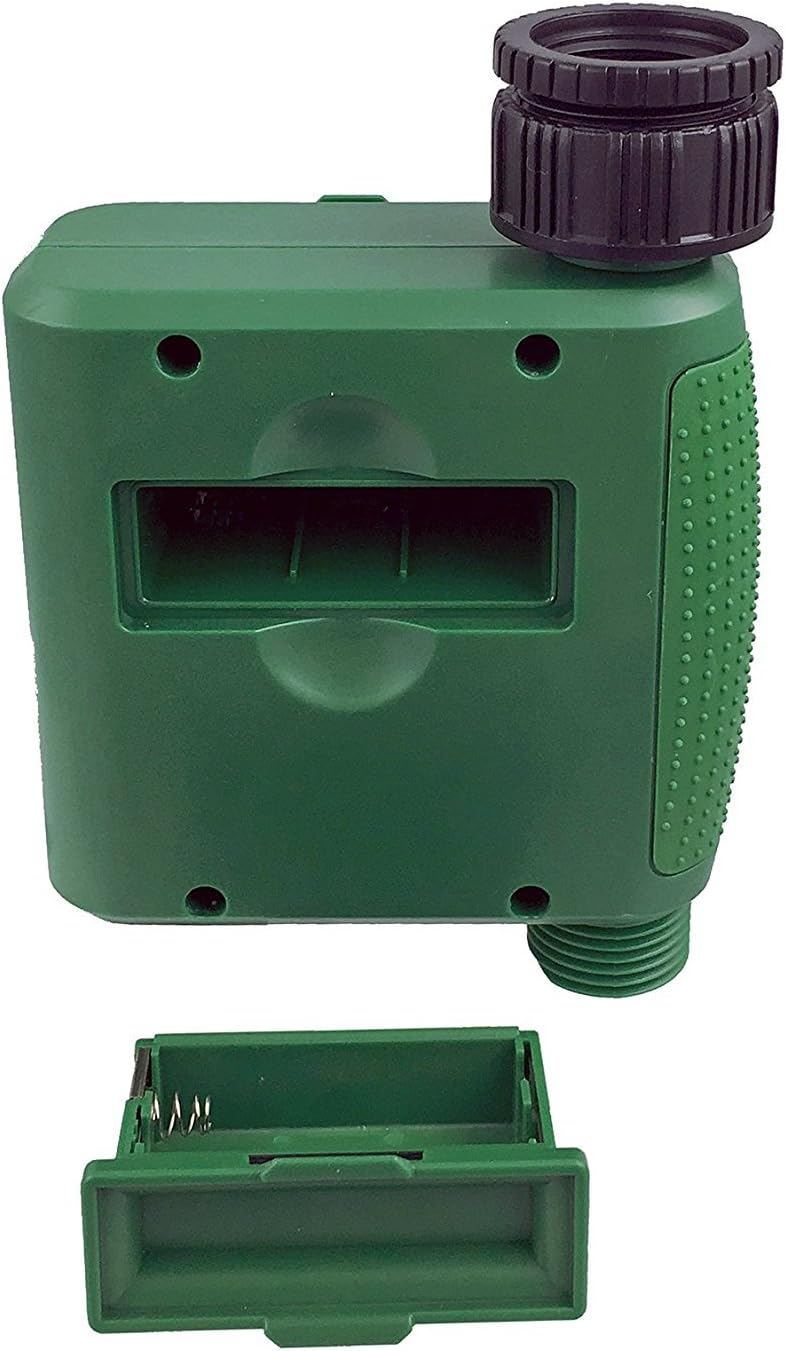
איור 1: תא הסוללה לאחר הסרת המכסה.
2. Mounting the Timer
Attach the timer to your outdoor faucet:
- ודאו שהברז נקי וללא לכלוך.
- Screw the timer's inlet (top connector) onto a standard ¾” (GHS) outdoor hose faucet. Hand-tighten only to prevent damage. Do not overtighten.
- Connect your garden hose or irrigation system to the timer's outlet (bottom connector). Hand-tighten securely.
- Turn on the faucet fully. The timer is designed to operate under pressure.

Figure 2: Instapark PWT-07 mounted on a faucet.
הוראות הפעלה
The timer features a large rotary dial and four buttons: מַעֲרֶכֶת, +, -, ו יָדָנִי.

Figure 3: Control panel and LCD display.
1. הגדרת זמן נוכחי
- סובב את החוגה הסיבובית ל הגדר את השעון.
- השתמש ב- + ו - buttons to adjust the current hour. Press מַעֲרֶכֶת כדי לאשר.
- השתמש ב- + ו - buttons to adjust the current minute. Press מַעֲרֶכֶת כדי לאשר.
2. Programming Watering Schedule
The timer allows you to set a start time, duration, and frequency for watering.
הגדר זמן התחלה:
- סובב את החוגה הסיבובית ל שעת התחלה.
- השתמש ב- + ו - buttons to set the desired watering start hour. Press מַעֲרֶכֶת כדי לאשר.
- השתמש ב- + ו - buttons to set the desired watering start minute. Press מַעֲרֶכֶת כדי לאשר.
הגדר כמה זמן (משך):
- סובב את החוגה הסיבובית ל עַד מָתַי.
- השתמש ב- + ו - buttons to set the watering duration (from 5 seconds to 360 minutes). Press מַעֲרֶכֶת כדי לאשר.
הגדר את התדירות (Frequency):
- סובב את החוגה הסיבובית ל באיזו תדירות.
- השתמש ב- + ו - buttons to select the watering frequency (e.g., every 10 seconds, 30 seconds, 1 minute, 3 minutes, 5 minutes, 1 hour, 2 hours, 4 hours, 12 hours, 1 day, 2 days, 3 days, 4 days, 5 days, 6 days, 7 days). Press מַעֲרֶכֶת כדי לאשר.
After setting all parameters, turn the rotary dial to לָרוּץ to activate the programmed schedule.
3. השקיה ידנית
להשקות ידנית מבלי להשפיע על לוח הזמנים המתוכנת שלך:
- ודא שהחוגה מכוונה ל לָרוּץ or כבוי.
- הקש על יָדָנִי כפתור. התצוגה תציג את משך ההשקיה הידני המוגדר כברירת מחדל.
- השתמש ב- + ו - כפתורים כדי לכוונן את משך ההשקיה הידנית הרצוי.
- לִלְחוֹץ מַעֲרֶכֶת to start manual watering. The timer will run for the selected duration and then automatically shut off.
- כדי להפסיק את ההשקיה הידנית בטרם עת, לחצו על הלחצן יָדָנִי כפתור שוב.
4. פונקציית עיכוב גשם
The rain delay function allows you to pause your watering schedule for a set period without losing your program settings.
- ודא שהחוגה מכוונה ל לָרוּץ.
- לחץ והחזק את - button for 3 seconds. The display will show "DELAY" and a default delay duration.
- השתמש ב- + ו - buttons to select a delay duration of 24, 48, or 72 hours.
- לִלְחוֹץ מַעֲרֶכֶת כדי להפעיל את השהיית הגשם. הטיימר יחזור ללוח הזמנים המתוכנת שלו לאחר סיום תקופת ההשהיה.
- To cancel the rain delay, press and hold the - כפתור שוב למשך 3 שניות.
תַחזוּקָה
- החלפת סוללה: Replace batteries when the low battery indicator appears on the LCD. Always use new AA alkaline batteries.
- ניקוי: נגב את הטיימר בעזרת מודעהamp בַּד. אין להשתמש בחומרי ניקוי שוחקים או ממסים.
- חורף: Before the first frost, disconnect the timer from the faucet. Remove the batteries and store the timer indoors in a dry, frost-free location. Failure to do so may result in damage from freezing water.
- מסך סינון: Periodically check the filter screen inside the inlet connector for debris. Clean if necessary to ensure proper water flow.
פתרון בעיות
| בְּעָיָה | סיבה אפשרית | פִּתָרוֹן |
|---|---|---|
| Timer does not turn on / LCD is blank. | סוללות מתות או מותקנות בצורה שגויה. | Replace with new AA alkaline batteries, ensuring correct polarity. If still blank, remove batteries, wait for screen to fully clear, then reinsert. |
| Water does not turn on at scheduled time. |
|
|
| Water does not turn off. |
|
|
| נזילת מים מחיבורים. |
|
|
| Low battery indicator flashes even with new batteries. | Firmware not booting correctly after battery change. | Remove batteries, wait for the LCD screen to go completely dark (may take a few minutes), then reinsert new batteries. |
מפרטים
| דֶגֶם | PWT-07 |
| מקור כוח | 2 סוללות אלקליין AA 1.5V (לא כלולות) |
| סוג שסתום | שסתום סולנואיד אימפולס |
| לחץ מים עבודה | 14.5 עד 116 psi |
| זרם המתנה | <100 µA |
| Watering Frequency Settings | 10s, 30s, 1m, 3m, 5m, 1h, 2h, 4h, 12h, 1d, 2d, 3d, 4d, 5d, 6d, 7d (16 settings) |
| Watering Duration Settings | 5s, 10s, 15s, 20s, 25s, 30s, 35s, 40s, 45s, 50s, 55s, 1-360m |
| פורמט תצוגת זמן | 24 שעות |
| דירוג עמיד למים | IP66 |
| חוֹמֶר | ABS פלסטיק |
| מידות המוצר | 4.25" D x 6" W x 2.6" H |
| משקל פריט | 14.2 אונקיות |
אחריות ותמיכה
The Instapark PWT-07 Digital Programmable Water Timer is backed by a standard 1-year manufacturer's warranty from the date of purchase. This warranty covers defects in materials and workmanship under normal use.
For warranty claims, technical support, or any questions regarding your product, please contact Instapark customer service. Please have your purchase receipt and product model number (PWT-07) available when contacting support.
Contact information for Instapark customer service can typically be found on the manufacturer's webהאתר או מסמכי הרכישה שלך.
Ask a question about this manual
Ask about setup, troubleshooting, compatibility, parts, safety, or missing instructions. Manuals+ will review the question and use this page’s manual context to help answer it.