
מָבוֹא
תודה על הרכישהasing the QUMOX L165U 2.4GHz Wireless Gamepad. This high-quality game controller is designed for use with PC and Android devices, offering a reliable 2.4GHz wireless connection for an enhanced gaming experience. Please read this manual carefully to ensure proper setup and operation of your new gamepad.

Figure 1: QUMOX L165U Gamepad with included USB adapter and OTG connection kit.
תוכן החבילה
ודא שכל הפריטים נמצאים בחבילה שלך:
- 1x QUMOX L165U Gamepad
- 1x 2.4GHz USB Wireless Adapter
- 1x OTG Connection Kit (Micro USB to USB-A adapter)
הגדרה
1. התקנת סוללה
The QUMOX L165U Gamepad is powered by 2 AAA batteries (not included). To install the batteries:
- Locate the battery compartment on the back of the gamepad.
- פתחו את מכסה הסוללה.
- הכניסו 2 סוללות AAA, תוך הקפדה על קוטביות נכונה (+/-).
- סגור היטב את מכסה הסוללה.

איור 2: פתח את תא הסוללות לצורך התקנת סוללות AAA.
2. חיבור למחשב
- Plug the 2.4GHz USB Wireless Adapter into an available USB port on your PC.
- Turn on the gamepad by pressing the 'START' button. The gamepad will automatically attempt to connect.
- The PC should recognize the gamepad and install necessary drivers automatically.
- If the gamepad does not connect, press the 'MODE' button on the gamepad to cycle through connection modes until it is recognized by your PC.
3. Connecting to an Android Device (with OTG support)
- Connect the OTG Connection Kit to your Android device's Micro USB port.
- Plug the 2.4GHz USB Wireless Adapter into the USB-A end of the OTG Connection Kit.
- Turn on the gamepad by pressing the 'START' button. The gamepad will automatically attempt to connect.
- Your Android device should recognize the gamepad.
- If the gamepad does not connect, press the 'MODE' button on the gamepad to cycle through connection modes until it is recognized by your Android device.
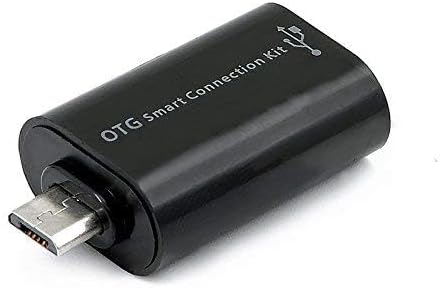
Figure 3: OTG Connection Kit for Android device connectivity.
הוראות הפעלה
Once connected, your QUMOX L165U Gamepad is ready for use. The layout is standard for most game controllers.
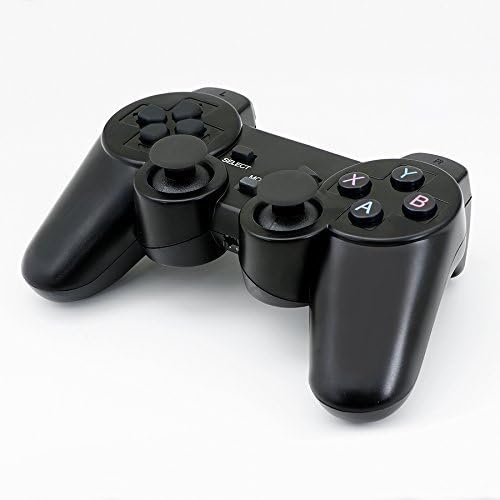
איור 4: למעלה view of the QUMOX L165U Gamepad, highlighting button layout.
- משטח כיווני (D-Pad): לקבלת קלט כיווני מדויק.
- ג'ויסטיקים אנלוגיים: Two analog sticks for 360-degree movement and camera control.
- כפתורי פעולה (A, B, X, Y): כפתורי פעולה סטנדרטיים לפקודות במשחק.
- כפתורי כתף (L1, R1) ומפעילים (L2, R2): Located on the top of the gamepad for additional actions.
- כפתור בחירה/חזרה: משמש בדרך כלל לניווט בתפריטים או לפונקציות ספציפיות במשחק.
- כפתור התחל: משמש להשהיית משחקים או לאישור בחירות.
- לחצן MODE: Cycles through different operating modes (e.g., Android, PC) if automatic detection fails.
הדגמת וידאו
Video 1: A seller-provided overview of a 2-pack wireless controller, demonstrating its features and compatibility. While showing a similar product, it illustrates general wireless controller usage and setup.
תַחזוּקָה
- ניקוי: השתמש במטלית רכה ויבשה לניקוי הגיימפקט. הימנע משימוש בכימיקלים חזקים או בחומרים שוחקים.
- אִחסוּן: יש לאחסן את הגיימפאד במקום קריר ויבש, הרחק מאור שמש ישיר וטמפרטורות קיצוניות.
- טיפול בסוללה: Remove batteries if the gamepad will not be used for an extended period to prevent leakage.
פתרון בעיות
| בְּעָיָה | סיבה אפשרית | פִּתָרוֹן |
|---|---|---|
| הגיימפאד לא מתחבר. | Low batteries, incorrect mode, adapter not properly inserted. | Replace batteries. Press the 'MODE' button to cycle through modes. Ensure USB adapter is fully inserted into PC or OTG adapter. |
| כפתורים או ג'ויסטיקים אינם מגיבים. | Connection issue, game incompatibility, physical damage. | Reconnect the gamepad. Check game settings for controller support. If issue persists, contact support. |
| Android device does not recognize gamepad. | Android device lacks OTG support, OTG adapter issue. | Verify your Android device supports OTG. Ensure OTG adapter is functioning correctly. |
מפרטים
| תכונה | פְּרָט |
|---|---|
| מספר דגם | L165U |
| טכנולוגיית קישוריות | 2.4GHz Wireless (via USB Adapter) |
| מכשירים תואמים | PC, Android (with OTG support) |
| מקור כוח | 2x סוללות AAA |
| משקל פריט | 5.3 אונקיות |
| מידות חבילה | 8.07 x 5.63 x 2.95 אינץ' |
| צֶבַע | שָׁחוֹר |
אחריות ותמיכה
For warranty information or technical support, please refer to the contact details provided with your purchase or visit the official QUMOX webאתר. שמור את הוכחת הרכישה שלך עבור כל תביעת אחריות.