
מָבוֹא
Thank you for choosing the Awei A860BL-BK Bluetooth In-Ear Earphones. This manual provides essential information for the proper setup, operation, and maintenance of your device. Please read it thoroughly before use to ensure optimal performance and longevity of your earphones.
תוכן החבילה
ודא שכל הפריטים המפורטים להלן נמצאים בחבילה שלך:
- Awei A860BL-BK Bluetooth In-Ear Earphones
- כבל טעינה USB
- קצות אוזניים (גדלים שונים)
- מדריך למשתמש

המוצר נגמרview
The Awei A860BL-BK earphones are designed for wireless audio playback and hands-free calling. They feature an in-ear design for comfortable fit and sound isolation.
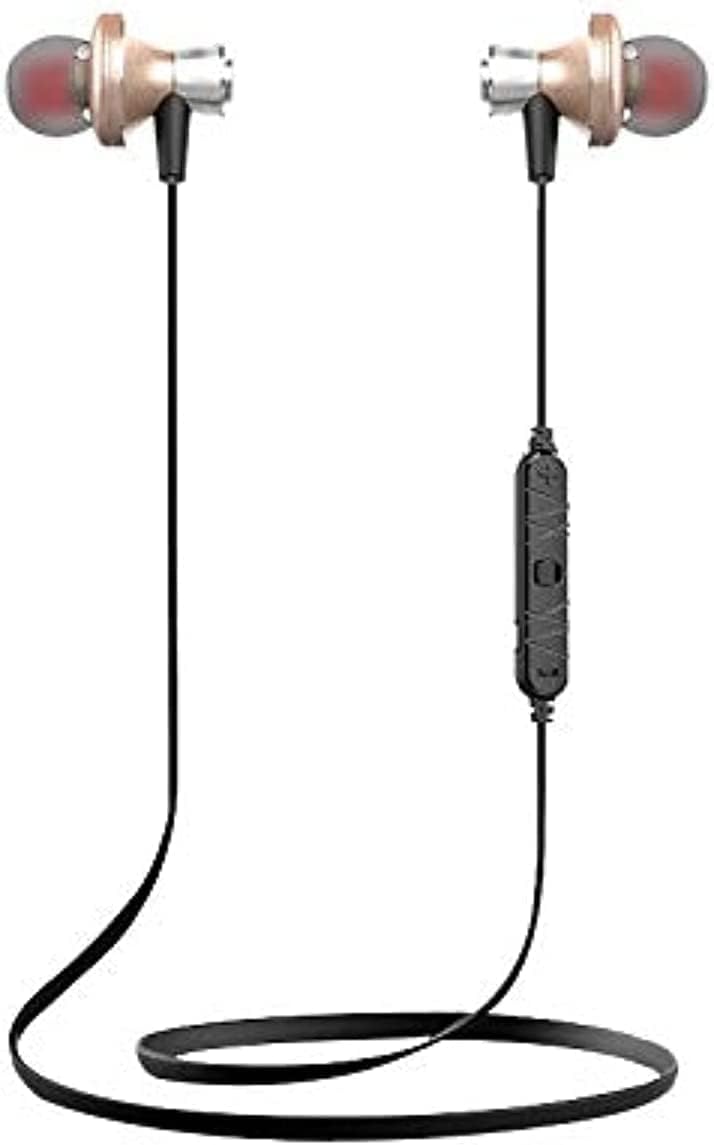

הגדרה
1. טעינת האוזניות
Before first use, fully charge the earphones. Connect the USB charging cable to the charging port on the earphones and to a compatible USB power source (e.g., computer, wall adapter). The charging indicator light will typically show red during charging and turn off or blue when fully charged.
- זמן טעינה: Approximately 1 to 2 hours.
2. זיווג Bluetooth
כדי לחבר את האוזניות שלך למכשיר התומך ב-Bluetooth:
- ודאו שהאוזניות טעונות במלואן וכבויות.
- Press and hold the multi-function button on the earphones until the indicator light flashes red and blue alternately, indicating pairing mode.
- במכשיר שלך (סמארטפון, טאבלט וכו'), הפעל את Bluetooth וחפש מכשירים זמינים.
- Select "Awei A860BL-BK" from the list of found devices.
- Once connected, the indicator light on the earphones will typically flash blue slowly or turn off.
If pairing fails, turn off both devices, restart them, and repeat the pairing process.
הוראות הפעלה
הפעלה/כיבוי
- הפעלה: לחץ והחזק את לחצן הרב-תכליתי למשך כ-3 שניות עד שנורית החיווי תהבהב בכחול.
- כיבוי: Press and hold the multi-function button for approximately 3-5 seconds until the indicator light flashes red and then turns off.
בקרת מוזיקה
- הפעל/השהה: לחיצה קצרה על הכפתור הרב-תכליתי.
- הרצועה הבאה: לחץ לחיצה ארוכה על כפתור עוצמת קול +.
- רצועה קודמת: לחץ לחיצה ארוכה על כפתור עוצמת הקול -.
- הגבר קול: לחיצה קצרה על כפתור עוצמת קול +.
- להנמיך קול: לחיצה קצרה על כפתור עוצמת הקול -.
בקרת שיחות
- מענה/סיום שיחה: לחיצה קצרה על הכפתור הרב-תכליתי.
- דחה שיחה: לחץ לחיצה ארוכה על כפתור הרב-תכליתי.
- חיוג חוזר למספר האחרון: לחץ פעמיים על כפתור הרב-תכליתי.
עוזר קולי
- הפעל את Assistant Voice: Triple-press the multi-function button (functionality depends on your connected device).
תַחזוּקָה
תחזוקה נכונה מבטיחה את אורך החיים והביצועים של האוזניות שלכם.
- ניקוי: השתמשו במטלית רכה ויבשה לניקוי האוזניות. אין להשתמש בחומרי ניקוי שוחקים או ממסים.
- אִחסוּן: יש לאחסן את האוזניות במקום קריר ויבש, הרחק מאור שמש ישיר וטמפרטורות קיצוניות.
- עמידות במים: האוזניות האלה הן לא עמיד במים. Avoid exposure to liquids, moisture, and high humidity.
- טיפול בכבלים: Avoid pulling the cable excessively or bending it sharply to prevent damage.
פתרון בעיות
If you encounter issues with your Awei A860BL-BK earphones, refer to the following common solutions:
| בְּעָיָה | פתרון אפשרי |
|---|---|
| האוזניות לא נדלקות. | Ensure the earphones are fully charged. Connect to a power source and charge for 1-2 hours. |
| לא ניתן לבצע התאמה עם המכשיר. |
|
| אין צליל או עוצמת קול נמוכה. |
|
| איכות השיחה ירודה. |
|
מפרטים
Detailed technical specifications for the Awei A860BL-BK Bluetooth In-Ear Earphones:
- מותג: אווי
- דֶגֶם: A860BL-BK
- קישוריות: אלחוטי (Bluetooth)
- גרסת בלוטות': Not specified (assumed standard)
- טווח אלחוטי: עד 10 מטר
- מִיקרוֹפוֹן: כֵּן
- תמיכה מוזיקלית: כֵּן
- צֶבַע: שָׁחוֹר
- סוג אוזניות: בתוך האוזן
- זמן טעינה: 1-2 שעות
- זמן השמעת מוזיקה: בערך שעתיים
- זמן דיבור: בערך שעתיים
- בקרת רעש: לֹא
- סוג בקרה: Volume control, Touch
- עמידות במים: לא עמיד במים
- רכיבים כלולים: טיפים לאוזן
מידע בטיחות
אנא הקפידו על הנחיות הבטיחות הבאות:
- Do not disassemble, repair, or modify the earphones.
- יש להרחיק מטמפרטורות קיצוניות, מאור שמש ישיר ולהבות גלויות.
- הימנע מחשיפה למים או לנוזלים אחרים.
- Do not use the earphones at excessively high volumes for prolonged periods to prevent hearing damage.
- הרחק מהישג ידם של ילדים וחיות מחמד.
אחריות ותמיכה
למידע על אחריות או תמיכה טכנית, אנא עיינו בתיעוד שסופק בנקודת הרכישה או צרו קשר עם הספק שלכם. שמרו את הוכחת הרכישה שלכם לכל תביעת אחריות.