
1. הקדמה
This manual provides instructions for the proper use and maintenance of your Casio GX-12B Value Series Desk Top/Compact Desk Type Calculator. Please read this manual thoroughly before using the calculator to ensure optimal performance and longevity.
תכונות עיקריות:
- Extra Large 12-Digit Display
- Two-Way Power (Solar and Battery)
- 2 Independent Memories
- Item Counter Function
- Mark-up Percentage פונקציה
- Durable Plastic Keys
- Compact Desk Type Design
2. התקנה ואספקת חשמל
מקור כוח:
The Casio GX-12B calculator operates on a two-way power system, utilizing both solar power and a single LR44 button-cell battery. For optimal performance, ensure the solar panel is exposed to sufficient light. In low-light conditions, the battery automatically takes over.
התקנה/החלפה של סוללה:
- ודא שהמחשבון כבוי.
- אתר את מכסה תא הסוללה בגב המחשבון.
- Using a small screwdriver, carefully remove the screw and open the battery compartment cover.
- Remove the old LR44 battery (if replacing) and insert a new LR44 battery with the positive (+) side facing up.
- החזר את מכסה תא הסוללות למקומו ואבטח אותו באמצעות הבורג.
- הקש על AC (All Clear) button to reset the calculator.
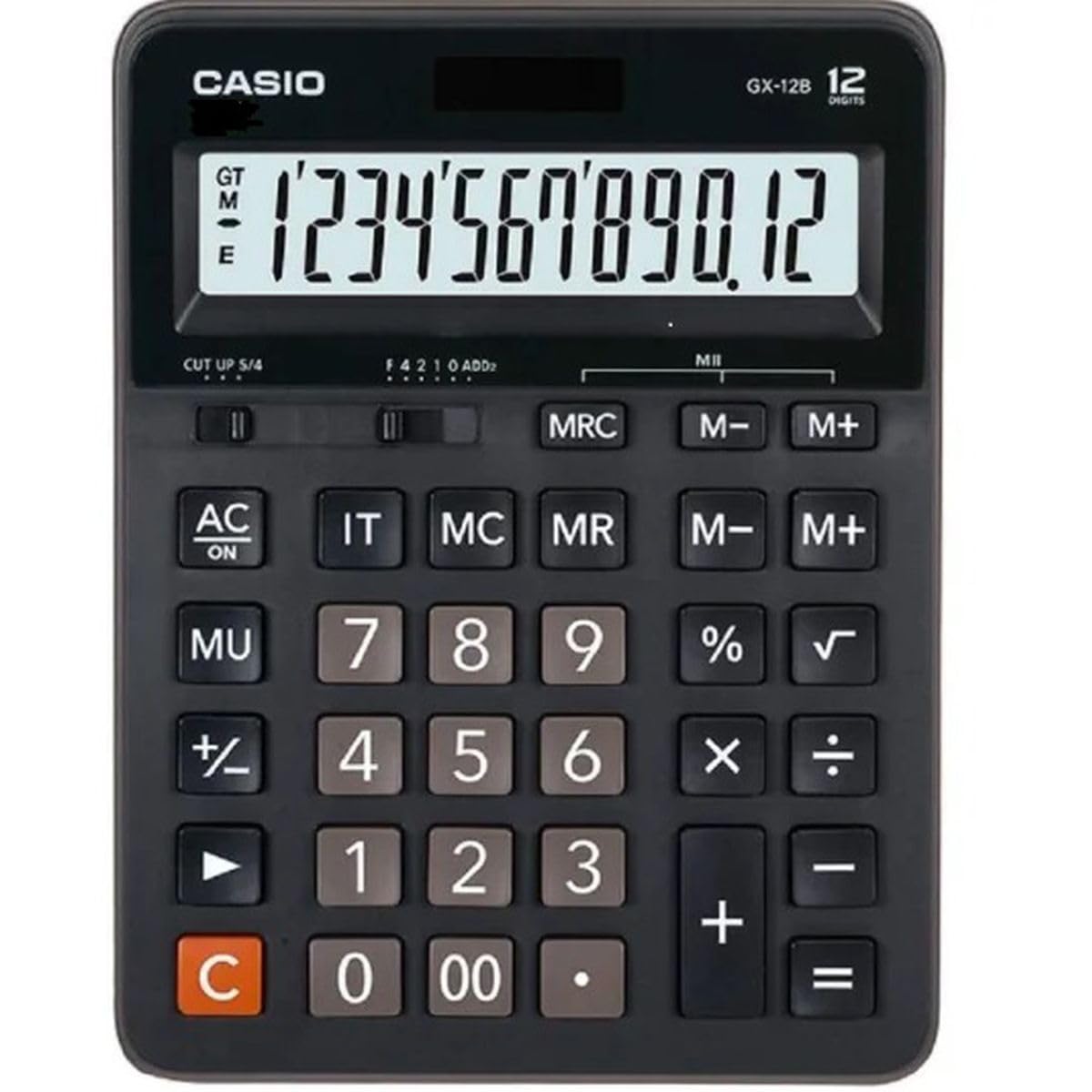
This image displays the Casio GX-12B calculator, highlighting its approximate length of 8.8 inches (22 cm) for scale. The calculator features a large display and clearly labeled keys.
3. פעולות בסיסיות
Familiarize yourself with the key functions to perform calculations efficiently.
פונקציות מפתח נגמרוview:
- AC: All Clear. Clears all values and operations, resetting the calculator.
- C: Clear Entry. Clears the last entered number.
- + / - / × / ÷: Basic arithmetic operations.
- =: Executes the pending calculation.
- %: אחוזtage key. Used for percentage calculations (e.g., 100 + 10% = 110).
- MU: Mark-up key. Used for profit margin calculations.
- M+: מוסיף את הערך המוצג לזיכרון.
- M-: מחסר את הערך המוצג מהזיכרון.
- MRC: Memory Recall/Clear. Press once to recall the memory value. Press twice to clear the memory.
- IT: Item Counter. Counts the number of entries in a series of calculations.
Example Calculations:
- תוֹסֶפֶת: כדי לחשב 123 + 456:
- לִלְחוֹץ AC
- לְהַכנִיס 123
- לִלְחוֹץ +
- לְהַכנִיס 456
- לִלְחוֹץ = (תוצאה: 579)
- אחוזיםtage: To add 10% to 200:
- לִלְחוֹץ AC
- לְהַכנִיס 200
- לִלְחוֹץ +
- לְהַכנִיס 10
- לִלְחוֹץ % (תוצאה: 220)
- פונקציית זיכרון: To calculate (5 × 3) + (8 × 2):
- לִלְחוֹץ AC
- לְהַכנִיס 5 × 3 M+ (15 is added to memory)
- לְהַכנִיס 8 × 2 M+ (16 is added to memory)
- לִלְחוֹץ MRC (תוצאה: 31)
- לִלְחוֹץ MRC שוב כדי לנקות את הזיכרון.
4. טיפול ותחזוקה
- ניקוי: Wipe the calculator with a soft, dry cloth. For stubborn dirt, use a cloth lightly dampened with water and a mild detergent, then wipe dry immediately. Avoid using strong solvents or abrasive cleaners.
- אִחסוּן: יש לאחסן את המחשבון במקום קריר ויבש, הרחק מאור שמש ישיר וטמפרטורות קיצוניות.
- הימנע מהשפעה: Do not drop or subject the calculator to strong impacts, as this can damage internal components or the display.
- חיי סוללה: If the display becomes dim or unresponsive, replace the LR44 battery.
5. פתרון תקלות
| בְּעָיָה | סיבה אפשרית | פִּתָרוֹן |
|---|---|---|
| התצוגה ריקה או עמומה. | אור לא מספיק לפאנל סולארי, או סוללה חלשה. | Move the calculator to a brighter area. Replace the LR44 battery if the issue persists. |
| תוצאות חישוב שגויות. | הזנת מקש שגויה, או שהזיכרון לא נוקה. | לִלְחוֹץ AC to clear all operations and memory, then re-enter the calculation. Ensure correct order of operations. |
| המקשים אינם מגיבים. | Low battery, or internal malfunction. | Replace the LR44 battery. If the problem continues, contact customer support. |
6. מפרטים
- דֶגֶם: GX-12B
- לְהַצִיג: 12-Digit Extra Large LCD
- מקור כוח: Two-Way Power (Solar and 1 x LR44 Battery)
- מידות (L x W): 20.8 ס"מ x 15.9 ס"מ לערך (8.2 אינץ' x 6.3 אינץ')
- מִשׁקָל: 0.32 ק"ג (0.7 ק"ג)
- חוֹמֶר: פּלָסטִי
- פונקציות: חשבון בסיסי, אחוזיםtage, Mark-up, Memory (M+, M-, MRC), Item Counter
7. מידע על אחריות
This Casio product is covered by a Limited Warranty. For specific terms, conditions, and duration of the warranty, please refer to the warranty card included with your purchase or visit the official Casio webאתר. שמור את הוכחת הרכישה שלך לצורך תביעות אחריות.
8. תמיכת לקוחות
If you encounter any issues not covered in this manual or require further assistance, please contact Casio customer support. Contact details can typically be found on the official Casio webבאתר או על אריזת המוצר.