
DESCO 718
מדריך למשתמש של חיישן סטטי SCS 718
Model: 718 | Brand: DESCO
1. הקדמה
מדריך זה מספק מידע חיוני לשימוש, התקנה, הפעלה ותחזוקה נכונים של חיישן סטטי SCS 718. ה-SCS 718 הוא מכשיר נייד המיועד למדידת נפח מטען אלקטרוסטטי.tagה. הוא כולל נורית LED אדומהamp for accurate measurement distance guidance and can be used with the 718A Charger (Part No: 718CH) to perform ionizer function checks. This sensor is specifically designed for measuring charged potential.
2. המוצר נגמרview
The SCS 718 Static Sensor is a compact and portable instrument used to detect and measure static electricity. Its primary function is to identify and quantify electrostatic charges on surfaces, which is crucial in environments where static discharge can cause damage or interference.
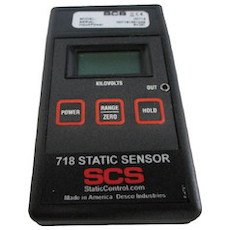
Figure 1: SCS 718 Static Sensor. This image displays the SCS 718 Static Sensor, a handheld device. The front panel features a digital display at the top, below which are three rectangular buttons: 'POWER' on the left, 'RANGE/ZERO' in the center, and 'HOLD' on the right. The device is labeled '718 STATIC SENSOR' with the 'SCS' logo and 'StaticControl.com Made in America Desco Industries' at the bottom.
3. תכונות
- Electrostatic measurement capability.
- LED אדום lamp for accurate measurement distance guidance.
- Compatibility with 718A Charger (Part No: 718CH) for ionizer function checks.
- Measures charged potential.
4. מידע בטיחות
אנא קראו והבינו את כל הוראות הבטיחות לפני הפעלת המכשיר. אי ביצוע הוראות אלה עלול לגרום לפציעה או נזק למוצר.
- אין לחשוף את המכשיר לטמפרטורות קיצוניות, ללחות או לאור שמש ישיר.
- הימנע מלהפיל את המכשיר או לחשוף אותו למכות חזקות.
- אל תנסה לפתוח או לשנות את המכשיר. יש לפנות לכל טיפול וטיפול באנשי מקצוע מוסמכים.
- Keep the device away from liquids and corrosive materials.
- Ensure the measurement area is clear of obstructions and potential hazards.
5. התקנה
The SCS 718 Static Sensor is designed for immediate use. No battery installation is required as the device does not use batteries.
- פריקת אריזה: Carefully remove the sensor from its packaging and inspect for any signs of damage.
- בדיקה ראשונית: הקש על כּוֹחַ button to turn on the device. The display should illuminate.
- אפס: Before each measurement, ensure the device is zeroed. Point the sensor away from any charged objects and press the RANGE/ZERO button to reset the reading to zero.
6. הוראות הפעלה
Follow these steps to accurately measure electrostatic charges:
- הפעלה: הקש על כּוֹחַ button to activate the sensor.
- Zero the Sensor: Hold the sensor in free air, away from any charged surfaces. Press the RANGE/ZERO button until the display reads "0.00" or close to zero. This calibrates the sensor for accurate readings.
- Positioning for Measurement: Point the sensor towards the object or surface you wish to measure. The red LED lamp on the sensor acts as a distance guide. Position the sensor so that the red LED light is focused on the target surface, typically indicating the optimal measurement distance (e.g., 1 inch or 2.5 cm).
- קרא את התצוגה: The display will show the electrostatic charge in kilovolts (kV).
- החזקת קריאה: כדי להקפיא את הקריאה הנוכחית בתצוגה, לחצו על הלחצן לְהַחזִיק לחצו עליו שוב כדי לשחרר את הלחיצה ולחדש את הקריאות בזמן אמת.
- Ionizer Function Check (with 718A Charger):
- Connect the SCS 718 Static Sensor to the 718A Charger (Part No: 718CH).
- Follow the instructions provided with the 718A Charger to perform ionizer function checks. This typically involves measuring the decay time of a charge.
- כיבוי: הקש על כּוֹחַ button again to turn off the device when not in use.
7. תחזוקה
Proper maintenance ensures the longevity and accuracy of your SCS 718 Static Sensor.
- ניקוי: Use a soft, dry, lint-free cloth to clean the exterior of the sensor. Do not use abrasive cleaners, solvents, or liquids.
- אִחסוּן: Store the sensor in a cool, dry place, away from direct sunlight and extreme temperatures. Keep it in its original packaging or a protective case when not in use to prevent dust accumulation and physical damage.
- כִּיוּל: Regular calibration is recommended to maintain measurement accuracy. Refer to DESCO's official website or contact their support for calibration services.
8. פתרון תקלות
| בְּעָיָה | סיבה אפשרית | פִּתָרוֹן |
|---|---|---|
| המכשיר לא נדלק. | Internal power issue. | Ensure the power button is pressed firmly. If still unresponsive, contact customer support. |
| קריאות לא מדויקות. | Sensor not zeroed; environmental interference; dirty sensor. | Zero the sensor before each use. Ensure no strong electromagnetic fields are nearby. Clean the sensor surface. Consider professional calibration. |
| Red LED not illuminating. | תקלה של LED. | צור קשר עם תמיכת הלקוחות לתיקון או החלפה. |
9. מפרטים
| תְכוּנָה | עֵרֶך |
|---|---|
| יַצרָן | דסקו |
| מספר חלק | 718 |
| משקל המוצר | 130 גרם (0.13 ק"ג) |
| מידות חבילה | 26 x 19 x 8 ס"מ |
| שימוש בסוללה | לֹא |
| ASIN | B01KMB21LM |
| תאריך זמין ראשון | 18 באוגוסט 2016 |
10. אחריות ותמיכה
For information regarding product warranty, please refer to the warranty card included with your purchase or visit the official DESCO website. For technical support, troubleshooting assistance, or service inquiries, please contact DESCO customer service through their official channels.
יַצרָן: דסקו
Webאֲתַר: www.desco.com (לְשֶׁעָבַרampהקישור, הקישור בפועל עשוי להשתנות)
Ask a question about this manual
Ask about setup, troubleshooting, compatibility, parts, safety, or missing instructions. Manuals+ will review the question and use this page’s manual context to help answer it.