
מָבוֹא
This manual provides essential information for the proper setup, operation, and maintenance of your SOEHNLE PROFESSIONAL Counting Scale Model 9221. This precision instrument is designed for accurate weighing and counting of items, featuring a large memory for reference weights, quick article access, and a USB interface for PC connection. Please read these instructions carefully before using the device to ensure safe and efficient operation.

Image: The SOEHNLE PROFESSIONAL Counting Scale 9221, displaying its robust design, digital screens, and numeric keypad.
הוראות בטיחות
- Always operate the scale on a stable, level surface to ensure accurate measurements.
- הימנעו מחשיפת המשקל לטמפרטורות קיצוניות, לחות או אור שמש ישיר.
- אין להעמיס את המשקל מעבר לקיבולת המקסימלית שלו של 6 ק"ג.
- הרחיקו את המשקל משדות אלקטרומגנטיים חזקים, אשר עלולים לפגוע ברמת הדיוק.
- Use only the specified power adapter and battery type (1 x 9V battery) for the device.
- אל תנסו לפרק או לתקן את המשקל בעצמכם. צרו קשר עם אנשי שירות מוסמכים.
- נקה את האבנית עם רך, דamp מטלית. אין להשתמש בחומרי ניקוי שוחקים או לטבול את המכשיר במים.
הגדרה
1. פורקים
Carefully remove the counting scale from its packaging. Retain the packaging for future transport or storage. Check for any visible damage. If damage is present, do not operate the device and contact your supplier.
2. ספק כוח
The scale can be powered by the included 9V battery or an appropriate AC adapter (not specified if included, assume external or internal rechargeable). Ensure the battery is correctly inserted according to polarity markings. For AC power, connect the adapter to the scale's power input and then to a suitable power outlet.
3. מיקום
Place the scale on a firm, level, and vibration-free surface. Avoid locations near air vents, windows, or machinery that could cause air currents or vibrations, as these can affect measurement accuracy.
4. איפוס ראשוני
After powering on, allow the scale a few minutes to warm up. The display should show "0.000" or similar. If not, press the אֶפֶס or טארה button to set the display to zero before weighing.
הוראות הפעלה
1. הפעלה/כיבוי
הקש על הפעלה/כיבוי button (usually located on the front panel) to turn the scale on or off. The scale will perform a self-test upon startup.
2. שקילה בסיסית
- Ensure the scale is on a stable surface and the display shows zero.
- Place the item(s) to be weighed gently on the center of the weighing platform.
- Read the weight displayed on the מִשׁקָל screen. The scale supports units in kilograms (kg) and pounds (lb). Use the unit conversion button (if available, often labeled יְחִידָה or kg / lb) to switch between units.
- To tare (zero out the weight of a container), place the empty container on the platform and press the טארה button. The display will return to zero, allowing you to weigh only the contents.
3. פונקציית ספירה
The 9221 scale is optimized for counting. To use the counting function:
- מקם s ידועample quantity (e.g., 10, 20, 50 pieces) of the items to be counted on the platform.
- הזן את מספר הס'ample pieces using the numeric keypad.
- הקש על SAMPLE or PCS button (refer to specific button labels on your device, often indicated by an icon like →→→ or →→→ with dots). The scale will calculate and store the average piece weight.
- הסר את ה- sample and place the bulk quantity of items on the platform. The חתיכות display will show the total count.
- ה משקל חתיכה display shows the calculated weight of a single item.
4. Memory Functions (M1-M5, PLU)
The scale features a large memory for 1,000 reference weights and quick access via 5 direct keys (M1-M5).
- Storing Piece Weight: After determining a piece weight (e.g., via sampling), press a memory key (M1-M5) או ה PLU button followed by a numeric code to store the piece weight for that item.
- Recalling Piece Weight: To recall a stored piece weight, simply press the corresponding memory key (M1-M5) or enter the PLU code and press PLU again. The scale will then use this stored piece weight for counting.
- Quick Article Access: The 5 direct keys (M1-M5) allow for immediate recall of frequently used item piece weights.

תמונה: מפורט view of the scale's three backlit LCD screens, clearly labeled for Weight, Piece Weight, and Pieces, along with unit indicators (lb, kg) and battery status.
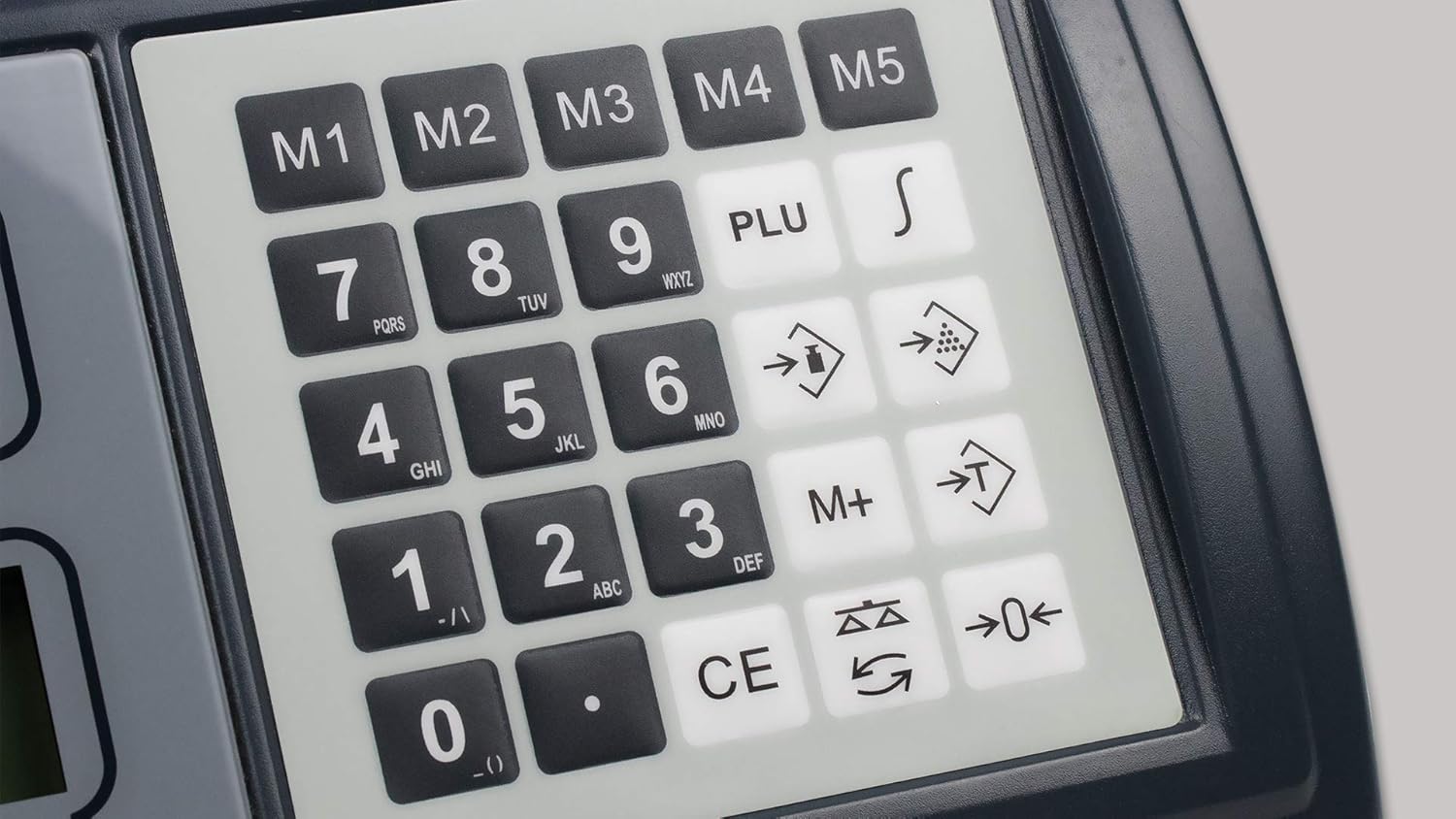
Image: Close-up of the scale's control panel, highlighting the numeric keypad, memory keys (M1-M5), PLU button, and other function keys for counting and tare operations.
5. ממשק USB
The scale is equipped with a USB interface for connection to a PC. This allows for data transfer, such as weighing results or inventory data, to compatible software. Refer to the software's documentation for specific connection and data transfer procedures. A USB cable is typically required (check product contents).
תַחזוּקָה
- ניקוי: Wipe the scale's surface with a soft, slightly damp cloth. Do not use harsh chemicals, abrasive cleaners, or excessive water. Ensure no liquids enter the internal components.
- החלפת סוללה: When the low battery indicator appears on the display, replace the 9V battery promptly. Ensure the scale is turned off before opening the battery compartment and inserting the new battery with correct polarity.
- אִחסוּן: If the scale will not be used for an extended period, remove the battery to prevent leakage. Store the scale in a dry, dust-free environment at moderate temperatures.
- כִּיוּל: While the scale is factory calibrated, periodic checks with certified weights are recommended for professional applications to ensure continued accuracy. Refer to local regulations for calibration requirements.
פתרון בעיות
| בְּעָיָה | סיבה אפשרית | פִּתָרוֹן |
|---|---|---|
| קנה המידה לא נדלק. | No power, dead battery, or faulty power connection. | Check battery insertion and charge. Ensure AC adapter is securely connected and power outlet is functional. |
| קריאות לא מדויקות. | Unstable surface, air currents, overload, or need for calibration. | Place on a stable, level surface. Avoid drafts. Do not exceed max capacity. Perform calibration if necessary. |
| התצוגה מציגה "Err" או קוד שגיאה. | Overload, internal malfunction, or incorrect operation. | Remove excess weight. Turn off and restart the scale. If error persists, contact support. |
| Counting function is incorrect. | ס' שגויample size, inconsistent piece weight, or piece weight not stored correctly. | ודא שample pieces are uniform. Re-enter sample quantity accurately. Verify piece weight is correctly stored or calculated. |
מפרטים
- דֶגֶם: SOEHNLE PROFESSIONAL 9221
- קיבולת מקסימלית: 6 ק"ג
- טֶקֶס סִיוּם: 0.2 גרם
- סוג תצוגה: 3 x Backlit LCD (Weight, Piece Weight, Pieces)
- גובה ספרות התצוגה: 19 מ"מ
- זֵכֶר: 1,000 reference weights, 5 direct access keys (M1-M5)
- מִמְשָׁק: USB לחיבור למחשב
- ספק כוח: 1 x 9V battery (included), AC adapter (optional/external)
- חוֹמֶר: פּלָסטִי
- מידות המוצר (L x W x H): 37 x 44 x 13.5 ס"מ
- משקל פריט: 5 ק"ג
- יַצרָן: Soehnle Industrial Solutions GmbH
אחריות ותמיכה
This SOEHNLE PROFESSIONAL product is manufactured by Soehnle Industrial Solutions GmbH. For warranty information, please refer to the warranty card included with your purchase or contact your local distributor. For technical support, service, or spare parts inquiries, please contact Soehnle Industrial Solutions GmbH directly or visit their official webאתר. אנא ודאו כי מספר הדגם (9221) ופרטי הרכישה שלכם מוכנים בעת פנייה לתמיכה.
Note: Information regarding spare parts availability is not provided in the product details.