
1. הקדמה
This manual provides detailed instructions for the assembly, installation, operation, and maintenance of your BONTEC Table Top Desk Pedestal TV Stand Mount. Please read this manual thoroughly before installation to ensure correct setup and safe operation. Keep this manual for future reference.
2. מידע בטיחות
- קיבולת משקל: Do not exceed the maximum weight capacity of 50kg (110 lbs). This stand is designed for TVs between 32 and 60 inches.
- תאימות VESA: Ensure your TV's VESA mounting pattern is compatible with this stand (refer to specifications).
- התקנה מאובטחת: Always ensure all screws and bolts are securely tightened before placing the TV on the stand.
- יציבות פני השטח: Place the stand on a stable, level, and sturdy surface that can support the combined weight of the stand and your television.
- ילדים וחיות מחמד: הרחיקו ילדים וחיות מחמד מאזור ההרכבה. חלקים קטנים עלולים להוות סכנת חנק.
- סיוע מקצועי: אם אינך בטוח לגבי חלק כלשהו בתהליך ההתקנה, התייעץ עם איש מקצוע מוסמך.
3. תכולת החבילה
Please verify that all components are present and undamaged before assembly. If any parts are missing or damaged, contact BONTEC customer support.
- פלטת בסיס
- Upright Support Column
- TV Mounting Brackets (2 pieces)
- Hardware Kit (various screws, washers, spacers, Allen wrench, spanner)
- רפידות נגד החלקה
4. התקנה והרכבה
בצעו את השלבים הבאים בקפידה כדי להרכיב את מעמד הטלוויזיה שלכם.
Step 4.1: Attach Anti-slip Pads to the Base
Peel and stick the provided anti-slip pads to the bottom of the base plate. This prevents scratching your furniture and provides stability.
Step 4.2: Assemble the Upright Support Column to the Base
Secure the upright support column to the base plate using the designated screws and tools from the hardware kit. Ensure it is firmly attached and stable.
Step 4.3: Attach TV Mounting Brackets to Your TV
Identify the VESA mounting holes on the back of your television. Select the appropriate screws, washers, and spacers from the hardware kit that fit your TV's specific VESA pattern. Attach the two TV mounting brackets to the back of your TV. Ensure they are level and securely fastened.

איור 4.3.1: This image illustrates the VESA compatibility (50x50mm to 800x400mm) and screen size range (22-65 inches) supported by the stand, with a maximum capacity of 50kg. It helps in selecting the correct mounting hardware for your TV.

איור 4.3.2: This image displays two installation options for the TV mounting brackets: one for larger TVs (Max VESA: 800x400mm) and another for smaller TVs (Max VESA: 400x200mm). It also provides detailed dimensions of the stand, including height and width, to aid in proper setup.
שלב 4.4: הרכבת הטלוויזיה על המעמד
Carefully lift your TV with the attached brackets and hook them onto the upright support column. Ensure the brackets are properly seated and secured. The stand offers multiple height adjustment levels.

איור 4.4.1: This image demonstrates the three adjustable height levels of the TV stand: Maximum (700mm), Mid (640mm), and Minimum (580mm). This allows users to customize the TV's viewגובה.
איור 4.4.2: This image compares the stability of the BONTEC stand, showing a TV securely upright, against another stand that appears unstable. It highlights the design's focus on keeping your TV safely in position.

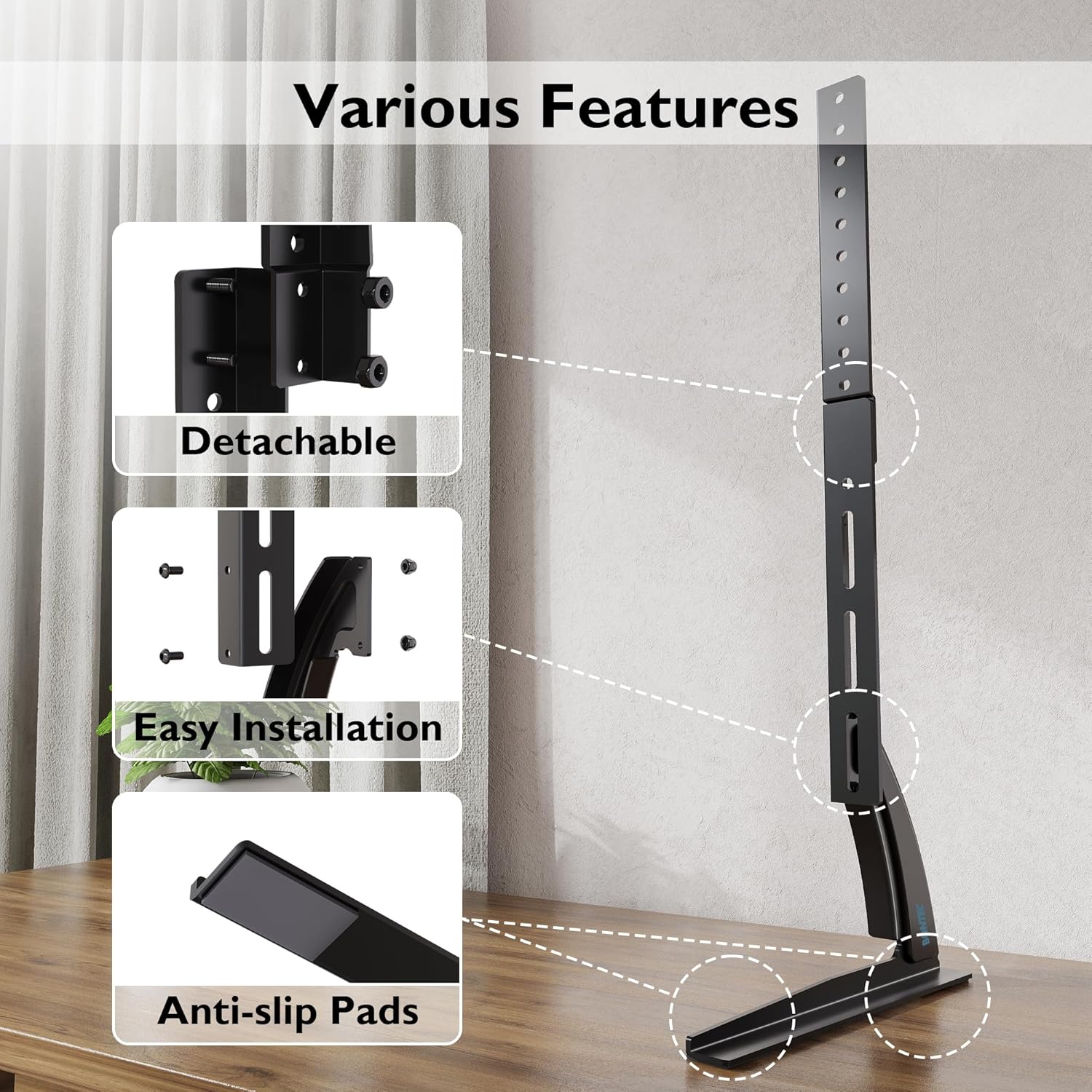
איור 4.4.3: This image details key features of the stand, including its detachable components for easier assembly, the straightforward installation process, and the inclusion of anti-slip pads on the base for enhanced stability and surface protection.
5. הוראות הפעלה
Once assembled, the BONTEC TV stand is designed for fixed placement. The primary operation involves adjusting the TV's height during initial setup.
5.1 התאמת גובה
The stand offers three distinct height levels. To adjust the height:
- Carefully remove the TV from the mounting brackets.
- Adjust the position of the mounting brackets on the upright support column to your desired height level (Max, Mid, or Min).
- Re-mount the TV onto the adjusted brackets, ensuring it is securely locked in place.
Always ensure the TV is balanced and stable after any height adjustment.
6. תחזוקה
Regular maintenance ensures the longevity and safety of your TV stand.
- ניקוי: נגבו את המעמד במטלית רכה ויבשה. הימנעו מחומרי ניקוי שוחקים או ממסים שעלולים לפגוע בגימור.
- בדוק חיבורים: בדקו מעת לעת את כל הברגים והברגים כדי לוודא שהם נשארים מהודקים היטב. הדקו מחדש במידת הצורך.
- בדוק לאיתור נזק: Regularly inspect the stand for any signs of wear, damage, or instability. If damage is found, discontinue use and contact customer support.
7. פתרון תקלות
אם נתקלתם בבעיות עם מעמד הטלוויזיה שלכם, עיינו בבעיות הנפוצות ובפתרונות הבאים:
| בְּעָיָה | סיבה אפשרית | פִּתָרוֹן |
|---|---|---|
| TV is unstable or wobbles | Loose screws; uneven surface; TV too heavy; incorrect assembly | Ensure all screws are tightened. Place stand on a level surface. Verify TV weight is within limits. Review שלבי הרכבה. |
| TV does not fit the stand | Incorrect VESA pattern; TV size outside range | Check your TV's VESA pattern against the stand's specifications. Confirm TV size is between 32-60 inches. |
| חלקים חסרים | שגיאת אריזה | Contact BONTEC customer support with your purchase details. |
8. מפרטים
- מותג: BONTEC
- דֶגֶם: B01ESPNXJW
- סוג הרכבה: מתקן לשולחן
- סוג תנועה: Fixed (Height adjustable during assembly)
- מכשירים תואמים: טֵלֶוִיזִיָה
- Minimum Supported Screen Size: 32 אינץ'
- Maximum Supported Screen Size: 60 Inches (Note: Some users report compatibility with up to 65 inches, but official specification is 60 inches)
- קיבולת משקל מקסימלית: 50 ק"ג (110 פאונד)
- משקל פריט: 1.9 קילוגרם
- תאימות VESA: 50x50mm, 75x75mm, 100x100mm, 200x100mm, 200x200mm, 300x200mm, 300x300mm, 400x200mm, 400x300mm, 400x400mm, 600x400mm, 800x400mm
- רמות גובה מתכווננות: 3 levels (Max 700mm, Mid 640mm, Min 580mm from base to top of bracket)
9. אחריות ותמיכה
BONTEC products are manufactured to high-quality standards. For warranty information, technical support, or to report missing/damaged parts, please contact BONTEC customer service through the retailer where the product was purchased or visit the official BONTEC website. Please have your model number (B01ESPNXJW) and purchase date ready.