
מָבוֹא
This manual provides detailed instructions for the setup, operation, maintenance, and troubleshooting of your EZCAP284 HD 1080P Capture HDMI YPbPr Recorder. Please read this manual thoroughly before using the device to ensure proper functionality and to prevent damage.
מידע בטיחות
- אין לחשוף את המכשיר ללחות, גשם או טמפרטורות קיצוניות.
- הימנע מנפילה או הכפיפה של המכשיר למכות חזקות.
- השתמש רק במתאם החשמל שצוין.
- אל תנסה לפרק או לשנות את המכשיר. פעולה זו תגרום לביטול האחריות.
- הרחק את המכשיר מילדים.
תוכן החבילה
ודא שכל הפריטים נמצאים בחבילה שלך:
- EZCAP284 HD 1080P Capture Device
- שְׁלַט רָחוֹק
- מתאם חשמל (לא רשום במפורש אך משתמע לפעולה)
- מדריך למשתמש (מסמך זה)
המוצר נגמרview
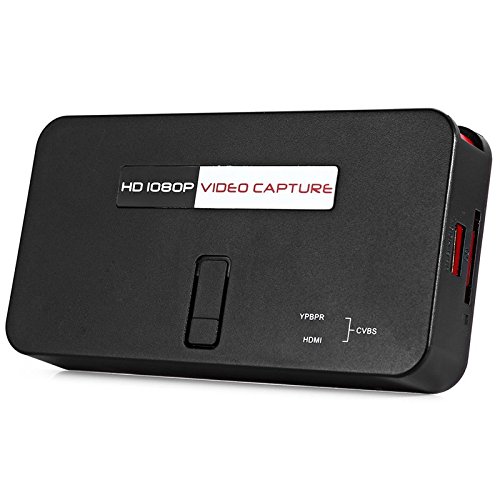
The EZCAP284 is a standalone HD video capture device designed for recording gameplay and other HDMI/YPbPr sources directly to a USB storage device without the need for a PC. It features HDMI pass-through for real-time viewing.

איור 1: למעלה view of the EZCAP284 device, featuring a prominent record button.

איור 2: מפורט view of the input and output ports on the EZCAP284.
איור 3: תחתון view of the EZCAP284 device, indicating model and certification information.
הגדרה
- חבר מקור וידאו: Connect your game console (e.g., PS3) or other video source to the HDMI IN or YPbPr IN port on the EZCAP284 using the appropriate cables.
- חיבור תצוגה: חבר את הטלוויזיה או המסך שלך ל HDMI OUT port on the EZCAP284. This allows you to view your gameplay in real-time while recording.
- חיבור אחסון USB: Insert a USB flash drive or external hard drive (formatted as FAT32 or NTFS) into the USB 2.0 port on the EZCAP284. This is where your recordings will be saved.
- חבר חשמל: Connect the power adapter to the DC IN port on the EZCAP284 and then plug it into a power outlet. The device will power on.
- Optional Audio Input: If you wish to record live commentary, connect a microphone to the כניסת שמע 3.5 מ"מ נָמָל.
הוראות הפעלה
הקלטת משחקיות
- ודא שכל החיבורים מאובטחים כמתואר בסעיף ההתקנה.
- Turn on your video source (e.g., game console) and your display.
- הקש על REC button on the EZCAP284 device or the remote control to start recording. The indicator light will change to show recording is in progress.
- הקש על REC button again to stop recording. The indicator light will revert to its standby state.
- Your recorded video file will be saved to the connected USB storage device.
Adding Live Commentary
To record your voice along with the gameplay:
- חבר מיקרופון ל כניסת שמע 3.5 מ"מ port before starting your recording.
- The device will automatically mix the microphone audio with the video source audio during recording.
השמעה
אֶל view your recorded videos, safely remove the USB storage device from the EZCAP284 and connect it to a computer or a media player that supports the recorded video format.
תַחזוּקָה
- ניקוי: השתמשו במטלית רכה ויבשה לניקוי החלק החיצוני של המכשיר. אין להשתמש בחומרי ניקוי נוזליים או ממסים.
- אִחסוּן: יש לאחסן את המכשיר במקום קריר ויבש, הרחק מאור שמש ישיר וטמפרטורות קיצוניות, כאשר אינו בשימוש.
- קושחה: בדוק את זה של היצרן webבאתר מעת לעת עבור עדכוני קושחה שעשויים לשפר את הביצועים או להוסיף תכונות.
פתרון בעיות
| בְּעָיָה | סיבה אפשרית | פִּתָרוֹן |
|---|---|---|
| אין פלט וידאו בתצוגה. | Incorrect cable connection; input source not active; display input not selected. | Check HDMI/YPbPr connections. Ensure video source is on. Select correct input on your TV/monitor. |
| ההקלטה נכשלת או נעצרת באופן בלתי צפוי. | USB storage full; USB drive not compatible; power interruption. | Ensure USB drive has sufficient space. Try a different USB drive (FAT32/NTFS). Check power connection. |
| No audio in recording. | Audio cables not connected; source audio muted; microphone not connected or faulty. | Verify audio connections from source. Ensure source audio is not muted. Check microphone connection and functionality. |
| השלט רחוק לא עובד. | Batteries low or inserted incorrectly; IR sensor blocked. | Replace batteries. Ensure line of sight to the device's IR sensor. |
מפרטים
| תכונה | תֵאוּר |
|---|---|
| דֶגֶם | EZCAP284 |
| סוּג | Adapter / Video Capture Device |
| חוֹמֶר | נחושת (רכיבים פנימיים) |
| ממשקים | 3.5mm Audio In, HDMI In, HDMI Out, YPbPr In, USB 2.0 |
| רזולוציית לכידת וידאו | עד 1080p |
| תאימות פלטפורמה | PlayStation (and other HDMI/YPbPr sources) |
| רכיבים כלולים | שְׁלַט רָחוֹק |
| צֶבַע | שָׁחוֹר |
| מידות (L x W x H) | 14.00 x 7.40 x 2.00 ס"מ (בקירוב) |
| מִשׁקָל | 0.463 ק"ג (משקל אריזה משוער) |
אחריות ותמיכה
למידע על אחריות ותמיכה טכנית, אנא עיינו בתיעוד המצורף לרכישה או צרו קשר ישירות עם המוכר/יצרן. שמרו את הוכחת הרכישה שלכם לצורך תביעות אחריות.