
1. הקדמה
This manual provides detailed instructions for the setup, operation, and maintenance of your Enover TS18 7-Day Programmable Digital Timer. This device is designed to automate the control of electrical appliances by setting specific ON/OFF times throughout the week, offering convenience and energy management.
2. תכונות מוצר
- גמישות בלוח הזמנים: Program up to 10 distinct ON/OFF cycles within a 7-day period. Each program repeats weekly.
- ניהול אנרגיה: Automatically controls lamps, holiday lights, humidifiers, and other electrical devices. Includes a feature to protect devices from overcharge.
- Security Function: Features a random ON/OFF option to vary lighting times, simulating occupancy when away from home.
- ממשק ידידותי למשתמש: Equipped with a large LCD display for clear visibility and a manual override switch for immediate control adjustments.
- גיבוי סוללה: An integrated battery retains programmed settings during power outages, ובכך מבטל את הצורך בתכנות מחדש.

Image: Enover TS18 Digital Timer highlighting key features for easy home automation.
3. תכולת החבילה
החבילה כוללת את הפריטים הבאים:
- 1 x Enover Digital Timer Switch (Model TS18)
- 1 x מדריך למשתמש

Image: Contents of the Enover TS18 Digital Timer package, including the timer and manual.
4. המוצר נגמרview
The Enover TS18 Digital Timer features a clear LCD display and intuitive buttons for easy programming. It plugs directly into a standard electrical outlet.

תמונה: חזית view of the Enover TS18 Digital Timer, displaying the time and control buttons.
פונקציות כפתור:
- שָׁבוּעַ: Sets the day(s) for programs.
- שָׁעָה: כוונון השעה עבור הגדרות זמן ותוכנית.
- דַקָה: כוונון הדקות עבור הגדרות הזמן והתוכנית.
- RES/RCL: Resets or recalls settings.
- שָׁעוֹן: כניסה או יציאה ממצב כיוון שעון.
- שָׁעוֹן עֶצֶר: Cycles through program settings (P1 ON, P1 OFF, P2 ON, etc.).
- הפעלה/אוטומטי/כיבוי: בחירת מצב פעולה (תמיד דלוק, אוטומטי, תמיד כבוי).
- אַקרַאִי: Activates or deactivates the random ON/OFF function.
- אפס: Small button (requires a pointed object) to clear all settings and reset the device.
Video: A brief demonstration of the Enover Digital Timer's basic functions and display.
5. התקנה
5.1 חיוב ראשוני
Before first use, plug the timer into an electrical outlet for approximately 5-10 minutes to charge the internal battery. This ensures the display is active and settings can be retained.
5.2 הגדרת השעה והיום הנוכחיים
- לחץ והחזק את שָׁעוֹן לַחְצָן.
- תוך כדי אחיזה שָׁעוֹן, לחץ על שָׁבוּעַ לחצו שוב ושוב על הלחצן כדי להגדיר את היום הנוכחי בשבוע.
- תוך כדי אחיזה שָׁעוֹן, לחץ על שָׁעָה button repeatedly to set the current hour (AM/PM will display).
- תוך כדי אחיזה שָׁעוֹן, לחץ על דַקָה לחץ שוב ושוב על הלחצן כדי לכוון את הדקה הנוכחית.
- שחרר את שָׁעוֹן כדי לשמור את ההגדרות.
6. הוראות הפעלה
6.1 תכנות מחזורי הפעלה/כיבוי
הטיימר מאפשר עד 10 תוכניות הפעלה/כיבוי. בצע את השלבים הבאים כדי להגדיר תוכנית:
- הקש על שָׁעוֹן עֶצֶר לחצן פעם אחת. הצג יציג "1 ON".
- לִלְחוֹץ שָׁבוּעַ to select the day(s) for this program (e.g., MO, TU, WE, TH, FR, SA, SU, MO TU WE TH FR, SA SU, MO TU WE TH FR SA SU, etc.).
- לִלְחוֹץ שָׁעָה כדי להגדיר את שעת ההפעלה הרצויה.
- לִלְחוֹץ דַקָה כדי להגדיר את דקת ההפעלה הרצויה.
- הקש על שָׁעוֹן עֶצֶר לחצן שוב. הצג יציג "1 OFF".
- Repeat steps 2-4 to set the desired OFF time for Program 1. Ensure the correct day(s) are selected for the OFF time.
- המשך ללחוץ שָׁעוֹן עֶצֶר to cycle through and set additional programs (2 ON, 2 OFF, up to 10 ON, 10 OFF).
- לאחר הגדרת כל התוכניות הרצויות, לחצו על הלחצן שָׁעוֹן כפתור כדי לחזור לתצוגת הזמן הנוכחית.
- ודא שהטיימר פועל AUTO mode for programs to execute. Press ON/AUTO/OFF לרכיבה על אופניים AUTO.
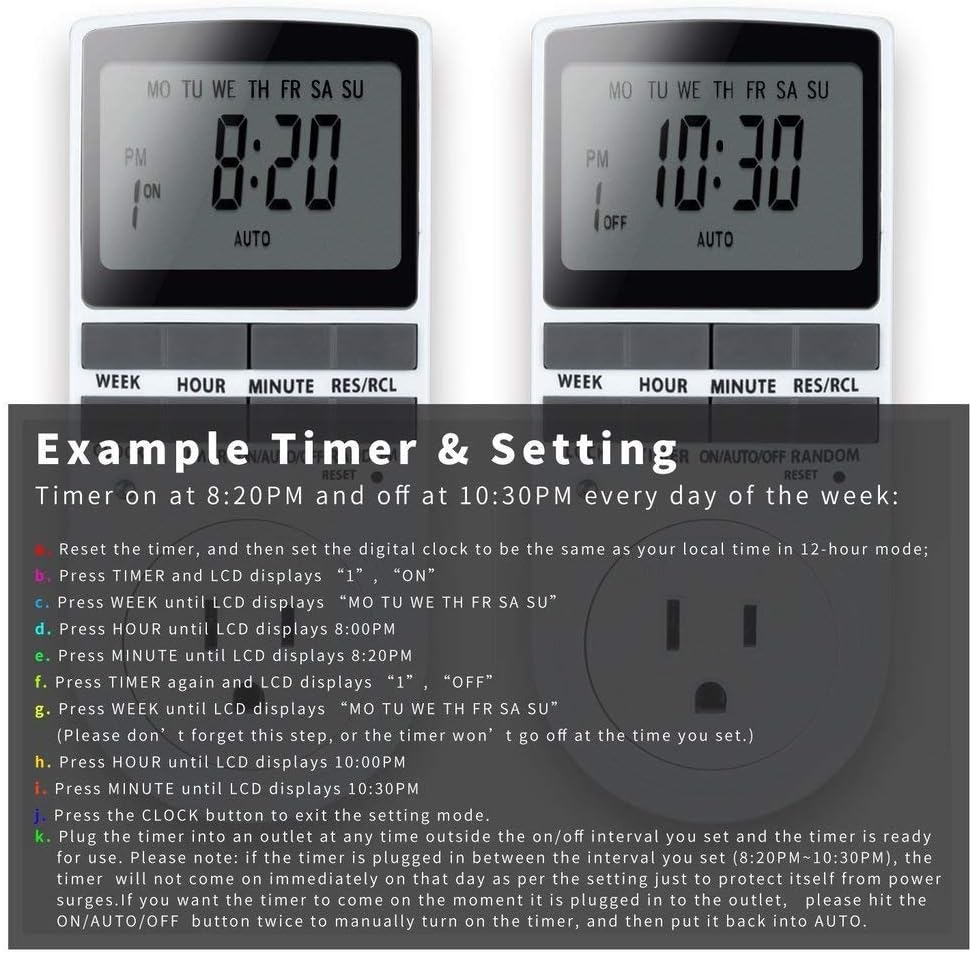
Image: Visual guide for setting an example timer program (ON at 8:20 PM, OFF at 10:30 PM daily).
6.2 Random Function (Anti-theft)
To activate the random ON/OFF feature:
- הקש על אַקרַאִי button. The word "RANDOM" will appear on the display.
- In random mode, the timer will turn ON and OFF at varying times within a set period, typically around the programmed ON/OFF times, to simulate occupancy.
- כדי לבטל, לחצו על אַקרַאִי כפתור שוב.

Image: The anti-theft random feature of the Enover TS18 Digital Timer, designed to deter intruders.
6.3 עקיפה ידנית
To manually switch the timer's output without affecting programmed settings:
- הקש על ON/AUTO/OFF לחצן כדי לעבור בין המצבים: ON (always on), AUTO (follows programs), כבוי (always off).
- Select the desired temporary mode. The timer will revert to AUTO mode at the next programmed ON/OFF event.
Video: A detailed demonstration of setting programs and using the manual override function on the Enover Digital Timer.
7. יישומים
The Enover TS18 Digital Timer can be used to automate various household devices, enhancing convenience and energy efficiency.
- Coffee Makers: Program your coffee maker to start brewing before you wake up.
- Aquarium Lights/Pumps: Automate the lighting and filtration cycles for your aquarium.
- Indoor Grow Lights: Maintain consistent light schedules for plants.
- קישוטים לחג: Set festive lights to turn on and off automatically.
- Fans/Humidifiers: Control environmental devices to operate only when needed.
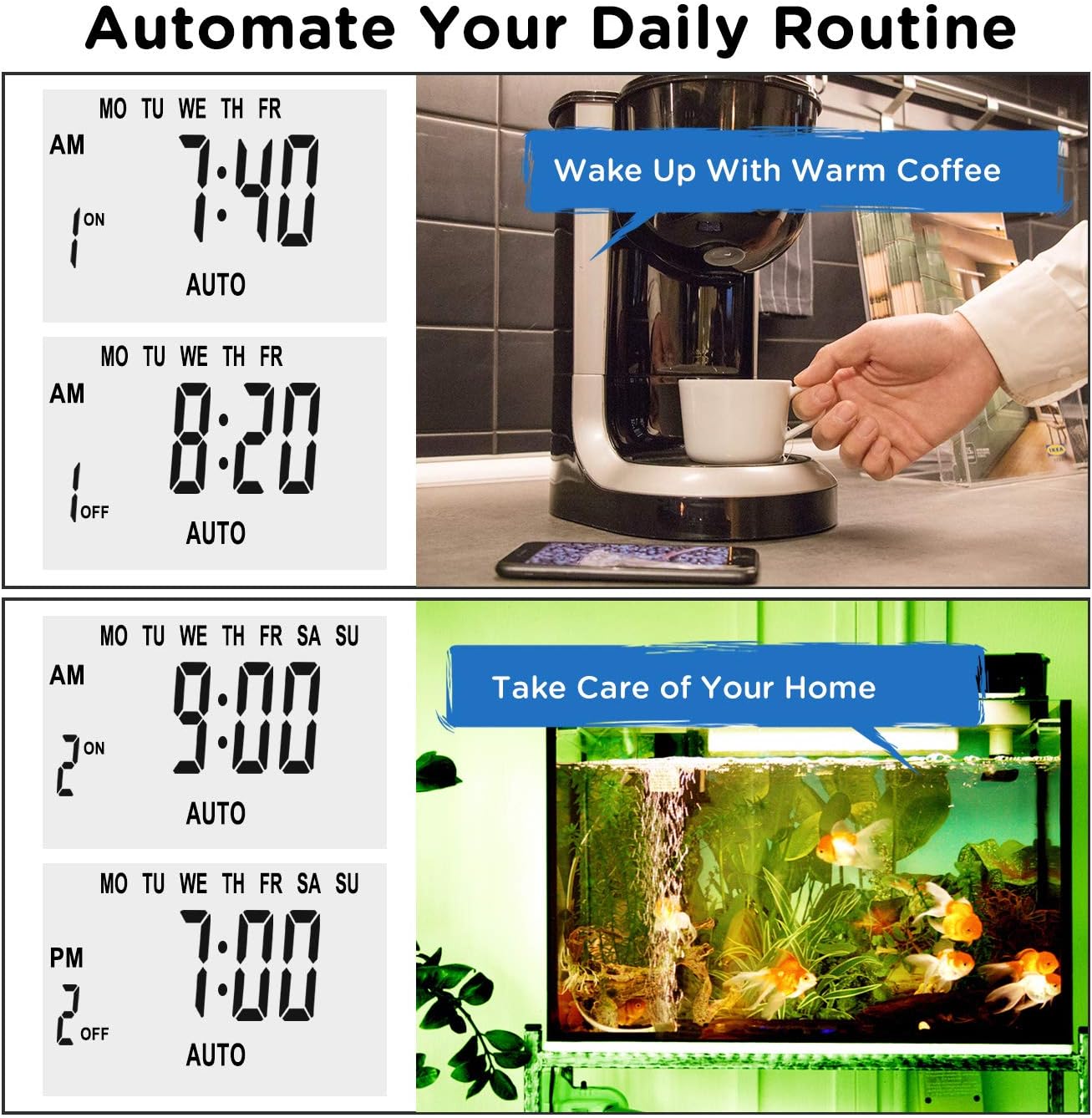
תמונה: דוגמהamples of automating daily routines with the Enover TS18 Digital Timer, such as a coffee maker and aquarium.
8. מפרטים
| מספר דגם | TS18 |
| מותג | אנובר |
| צֶבַע | לָבָן |
| חוֹמֶר | פּלָסטִי |
| מספר הגדרות | 10 (תוכניות הפעלה/כיבוי) |
| כרך ידtage | 120 וולט |
| מהtage | 1800 וואט |
| Ampלחסל קיבולת | 15 Amps |
| שיטת התקנה | פלאגין |
| סוג הרכבה | Plug-In Mount |
| פורמט תקע | B - US style with ground plug |
| תכונות מיוחדות | 3-wire grounded plug and 3-prong grounded outlet |
| נוֹהָג | שימוש פנימי בלבד |
| משקל פריט | 6.4 אונקיות |
| מידות חבילה | 5.67 x 3.31 x 2.6 אינץ' |
| סוג תא סוללה | NiMH |
| חיי סוללה | 100 days (backup) |
9. פתרון תקלות
- הטיימר לא נדלק/כבה כפי שתוכנת:
- ודא שהטיימר פועל AUTO מצב.
- ודא שהשעה והיום הנוכחיים מוגדרים כהלכה.
- Check that the ON and OFF times for the specific program are correctly entered and assigned to the desired days.
- Confirm the appliance connected to the timer is switched ON.
- התצוגה ריקה או עמומה:
- Plug the timer into an active electrical outlet for 5-10 minutes to charge the internal battery.
- All settings lost after power outage:
- The internal battery may not be sufficiently charged. Ensure the timer is regularly plugged in to maintain battery charge.
- To clear all settings:
- Use a pointed object (like a pen tip) to press the אִתחוּל button. This will clear all programs and reset the clock. You will need to re-enter all settings.
10. אחריות ותמיכה
For warranty information or technical support, please refer to the contact details provided on the product packaging or the official Enover webאֲתַר. שמור את קבלה הרכישה שלך לתביעות אחריות.