
1. הקדמה
Thank you for choosing the Superfish Smart Timer. This digital timer is designed to automate the on/off cycles of your aquarium lighting and other electrical devices, providing a consistent and stable environment for your aquatic life. Please read this manual carefully before use to ensure proper operation and safety.
2. הוראות בטיחות
- Always disconnect the timer from the power supply before handling or performing any maintenance.
- This device is designed for indoor use only. Do not expose it to water splashes or high humidity.
- Ensure your hands are dry when plugging in or unplugging the timer.
- Do not exceed the maximum load capacity specified for this timer.
- הרחק מהישג ידם של ילדים.
- If the timer appears damaged, do not use it. Contact customer support.
- Do not attempt to open or repair the timer yourself. This will void the warranty.
3. המוצר נגמרview
The Superfish Smart Timer is a compact digital timer featuring a clear display and intuitive buttons for programming. It allows for precise control over the power supply to connected devices.
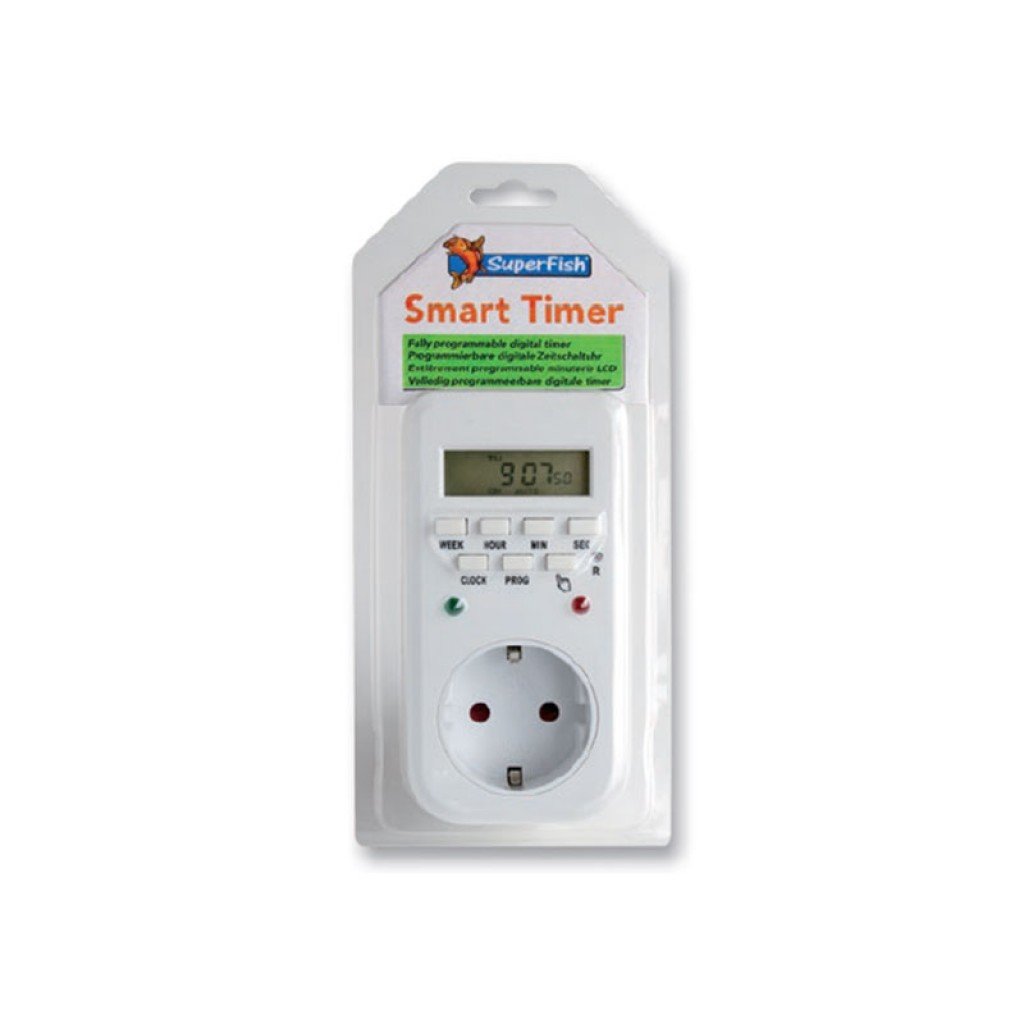
Image 1: Superfish Smart Timer. This image shows the front of the Superfish Smart Timer, highlighting its digital display and control buttons. The timer is designed for easy programming and monitoring of connected devices.
רכיבים מרכזיים כוללים בדרך כלל:
- תצוגה דיגיטלית: Shows current time, program status, and settings.
- לחצני שליטה: For setting time, programs, and manual override.
- שקע חשמל: Where you connect your appliance.
- תקע חשמל: To connect the timer to a wall socket.
4. התקנה
- חיוב ראשוני (אם רלוונטי): If your timer has a built-in battery for memory backup, plug it into a wall socket for at least 30 minutes before first use to charge the internal battery.
- נקה את כל ההגדרות: Press the "R" (Reset) button with a pointed object (e.g., a pen tip) to clear all previous settings. The display will show "00:00".
- הגדר זמן נוכחי:
- Press the "CLOCK" button and hold it.
- While holding "CLOCK", press "WEEK" to set the day of the week.
- While holding "CLOCK", press "HOUR" to set the hour.
- While holding "CLOCK", press "MINUTE" to set the minute.
- Release the "CLOCK" button. The current time is now set.
- חבר מכשיר: Plug the appliance you wish to control (e.g., aquarium light) into the outlet on the Superfish Smart Timer.
- Plug Timer into Wall Socket: Insert the Superfish Smart Timer's plug into a standard wall socket.
5. הפעלה
5.1 Programming On/Off Cycles
The Smart Timer allows you to set multiple ON/OFF programs. Follow these steps to program your desired cycles:
- Press the "PROG" button once. The display will show "1 ON".
- Press "WEEK" to select the day(s) for this program (e.g., MO, TU, WE, TH, FR, SA, SU, or combinations like MO-FR, SA-SU, MO-SU).
- Press "HOUR" to set the desired ON hour.
- Press "MINUTE" to set the desired ON minute.
- לחץ שוב על "PROG". התצוגה תציג "1 OFF".
- Repeat steps 2-4 to set the desired OFF time for the first program.
- Continue pressing "PROG" to cycle through "2 ON", "2 OFF", and so on, up to the maximum number of programs supported by your timer.
- לאחר הגדרת כל התוכניות הרצויות, לחצו על כפתור "CLOCK" כדי לחזור לתצוגת הזמן הנוכחית.
5.2 עקיפה ידנית
The "MANUAL" button allows you to override the programmed settings temporarily:
- Press "MANUAL" repeatedly to cycle through modes:
- עַל: The connected appliance will remain ON continuously, ignoring programs.
- OFF The connected appliance will remain OFF continuously, ignoring programs.
- אוטומטי: The timer will operate according to the programmed ON/OFF cycles. This is the standard operating mode.
- Always ensure the timer is set to "AUTO" for automatic operation.
5.3 Random Function (if available)
Some models may include a "RANDOM" function, which can slightly vary the ON/OFF times to simulate a more natural environment or deter intruders. Consult your specific model's features for activation.
6. תחזוקה
- ניקוי: Disconnect the timer from the power supply. Wipe the exterior with a soft, dry cloth. Do not use abrasive cleaners or immerse the timer in water.
- אִחסוּן: אם מאחסנים את הטיימר לתקופה ממושכת, ודאו שהוא נקי ויבש. יש לאחסן במקום קריר ויבש הרחק מאור שמש ישיר.
- גיבוי סוללה: The internal battery (if present) is designed for memory backup. If the display becomes dim or resets frequently after power outages, the internal battery may need recharging by keeping the timer plugged in for several hours.
7. פתרון תקלות
| בְּעָיָה | סיבה אפשרית | פִּתָרוֹן |
|---|---|---|
| תצוגת הטיימר ריקה. | אין ספק כוח. | Check if the timer is properly plugged into a live wall socket. Check the wall socket with another appliance. |
| המכשיר אינו נדלק/כבה כפי שתוכנת. | Incorrect program settings; Timer in Manual ON/OFF mode; Appliance not working. | Review program settings carefully. Ensure the timer is in "AUTO" mode. Test the appliance by plugging it directly into a wall socket. |
| Time or programs reset after power outage. | Internal backup battery low or not charged. | Keep the timer plugged into a live socket for at least 4 hours to fully charge the internal battery. |
| הכפתורים אינם מגיבים. | תקלת תוכנה זמנית. | Perform a full reset using the "R" button. Re-program all settings. |
8. מפרטים
- דֶגֶם: SF-SMARTIMER
- ASIN: B01CZTS47E
- משקל פריט: 349.27 גרם
- סוללות נדרשות: No (internal backup battery for memory, not user-replaceable)
- נדרשת הרכבה: לֹא
- התייחסות יצרן: SF-SMARTIMER
- תאריך זמין ראשון: 2 בדצמבר 2022
- עדכוני תוכנה מובטחים עד: לֹא יְדוּעַ
- מופסק על ידי יצרן: לֹא
- Note: Specific electrical ratings (Voltage, Max Load) are typically printed on the device itself. Always adhere to these ratings.
9. אחריות ותמיכה
Superfish products are manufactured to high-quality standards. For warranty information, please refer to the documentation provided with your purchase or visit the official Superfish webאתר. שמור את הוכחת הרכישה שלך לצורך תביעות אחריות.
For technical support or further assistance, please contact your retailer or the Superfish customer service department. Contact details can usually be found on the product packaging or the official Superfish webאֲתַר.
Webאֲתַר: www.superfish.com (הערה: זהו מציין מיקום URLאנא ודא את הרשמית בפועל website for Superfish.)