
ברידג' BRY5103
Brydge 7.9 Keyboard User Manual for iPad Mini (2019) and iPad Mini 4
דגם: BRY5103
1. הקדמה
The Brydge 7.9 Keyboard is designed to enhance the functionality of your iPad Mini (2019) or iPad Mini 4, transforming it into a versatile laptop-like device. This keyboard features a full QWERTY layout with backlit keys and dedicated iOS function keys, providing a comfortable and efficient typing experience. Constructed from 100% high-grade aluminum, it offers durability and a premium aesthetic that complements your iPad.
The patented hinges allow for a 180-degree viewing angle, securing your iPad in various positions. The keyboard connects wirelessly via Bluetooth and can be easily detached when not needed. Its slim and lightweight design ensures portability without compromising on build quality.

This manual provides detailed instructions for setting up, operating, and maintaining your Brydge 7.9 Keyboard.
2. מידע בטיחות
- אין לחשוף את המקלדת לנוזלים או לטמפרטורות קיצוניות.
- Avoid dropping or subjecting the keyboard to severe impacts.
- הרחק מהישג ידם של ילדים.
- השתמש רק בכבל הטעינה המצורף או בכבל שווה ערך מאושר.
- Do not attempt to disassemble or repair the keyboard yourself. This may void the warranty.
3. מה בקופסה
- Brydge 7.9 Keyboard
- כבל טעינה USB
- מדריך למשתמש (מסמך זה)
4. התקנה
4.1 חיבור האייפד שלך
- Ensure your iPad Mini (2019) or iPad Mini 4 is clean and free of debris.
- Gently align the iPad with the hinges of the Brydge keyboard.
- Carefully slide the iPad into the hinges until it is securely seated. The hinges are designed to hold the iPad firmly.

4.2 טעינת המקלדת
Before initial use, fully charge your Brydge keyboard. Connect the provided USB charging cable to the charging port on the keyboard and the other end to a USB power adapter (not included) or a computer's USB port. The charging indicator light will show the charging status.
4.3 זיווג בלוטות '
- Turn on the Brydge keyboard by pressing the power button.
- באייפד שלך, עבור אל הגדרות > Bluetooth.
- ודא ש-Bluetooth מופעל באייפד שלך.
- On the Brydge keyboard, press and hold the Bluetooth key (often indicated by a Bluetooth symbol) for a few seconds until the Bluetooth indicator light flashes.
- On your iPad, select 'Brydge Keyboard' from the list of available devices.
- Follow any on-screen prompts to complete the pairing process. The indicator light on the keyboard will turn solid to confirm a successful connection.
5. הפעלת המקלדת
5.1 General Typing
The Brydge 7.9 Keyboard provides a full QWERTY layout for comfortable and efficient typing. Keys offer a responsive tactile feedback.
5.2 מקשים עם תאורה אחורית
The keyboard features backlit keys with three adjustable brightness levels. To adjust the backlight, press the dedicated backlight key (often indicated by a sun or light bulb icon) repeatedly to cycle through the brightness settings or turn the backlight off.
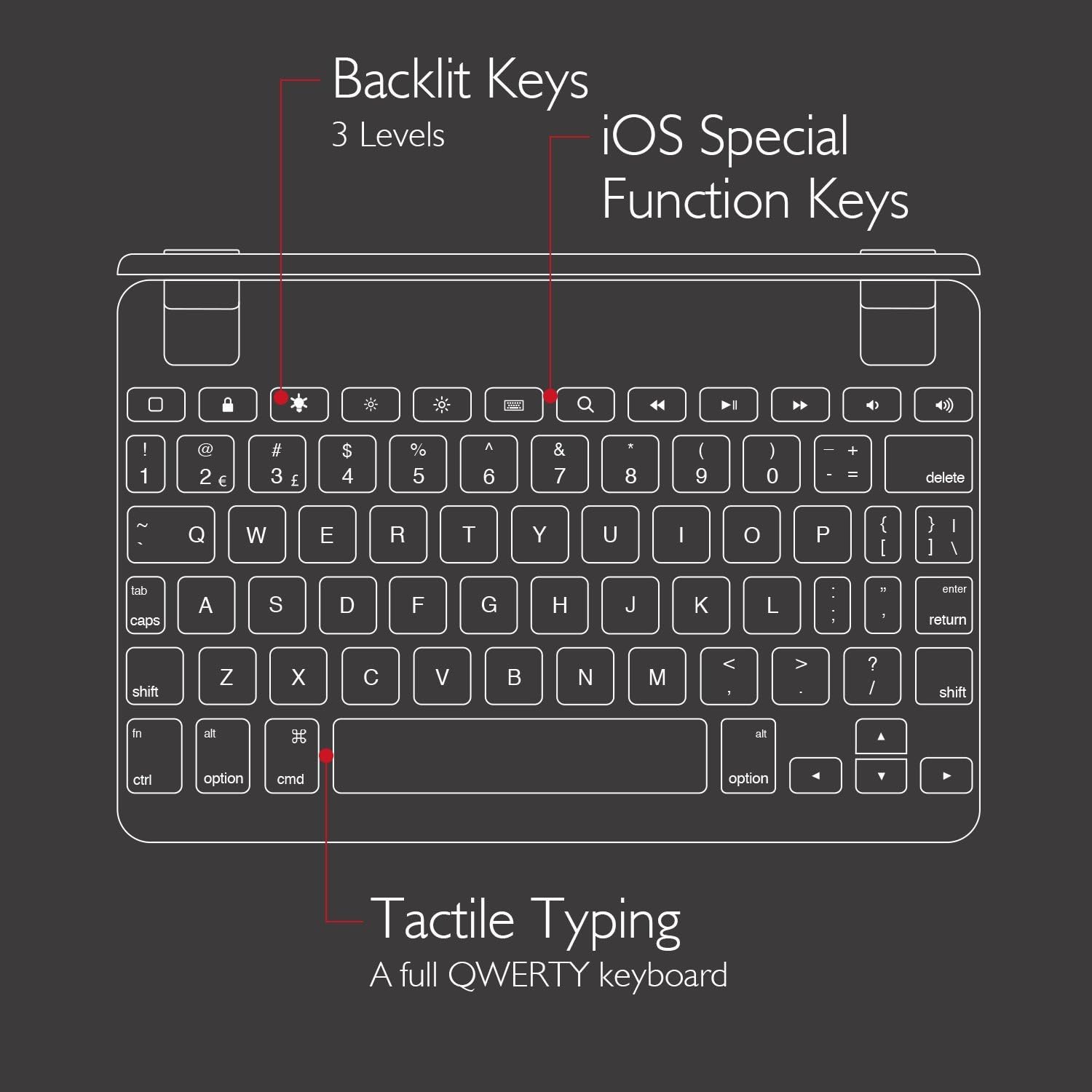
5.3 iOS Special Function Keys
The top row of the keyboard includes dedicated iOS special function keys for quick access to common iPad features, such as:
- מסך הבית
- התאמת בהירות המסך
- חיפוש
- פקדי הפעלת מדיה (הפעלה/השהיה, רצועה הבאה/קודמת)
- בקרת עוצמת הקול
- מסך נעילה

5.4 180-Degree Viewing and Detachable Design
The keyboard's patented hinges allow the iPad to rotate up to 180 degrees, offering various viewing angles for typing, watching media, or presenting. The iPad can also be easily removed from the hinges if you prefer to use it as a standalone tablet.

6. תחזוקה
6.1 ניקוי
- To clean the keyboard, use a soft, lint-free cloth.
- עבור סימנים עקשניים, מעט דמוי עורampen את המטלית עם מים או חומר ניקוי עדין ולא שוחק.
- הימנעו מריסוס חומרי ניקוי ישירות על המקלדת.
- Ensure the keyboard is completely dry before use or charging.
6.2 אחסון
When not in use, store the keyboard in a cool, dry place away from direct sunlight and extreme temperatures. If storing for an extended period, ensure the keyboard has a partial charge (around 50%) to preserve battery health.
7. פתרון תקלות
7.1 המקלדת לא מתחברת דרך בלוטות'
- ודא שהמקלדת דולקת וטעונה במלואה.
- ודא ש-Bluetooth מופעל באייפד שלך.
- נסה לנתק ולצימוד מחדש את המקלדת מהגדרות ה-Bluetooth של ה-iPad שלך.
- Restart both your iPad and the Brydge keyboard.
- Move the keyboard closer to your iPad to rule out interference.
7.2 מקשים אינם מגיבים
- בדוק אם המקלדת מחוברת כראוי דרך בלוטות'.
- ודא שהמקלדת טעונה.
- If specific keys are not working, try cleaning around the keys to remove any debris.
- Perform a hard reset on the keyboard (refer to manufacturer's website for specific instructions if needed, as this model may not have a dedicated reset button).
7.3 תאורת רקע לא עובדת
- Ensure the keyboard is sufficiently charged, as low battery can disable backlighting.
- Press the backlight key to cycle through brightness levels.
8. מפרטים
| מותג | ברידג' |
| מספר דגם | BRY5103 |
| מכשירים תואמים | iPad Mini (2019), iPad Mini 4 |
| טכנולוגיית קישוריות | בלוטות' |
| תיאור מקלדת | אַלחוּט |
| תכונות מיוחדות | Backlit, Rechargeable, 180-degree rotating hinges, Detachable |
| חוֹמֶר | 100% High-Grade Aluminum |
| צֶבַע | Gold (as per product listing, other colors may vary) |
| משקל פריט | בערך 11 אונקיות (312 גרם) |
| מידות המוצר (LxWxH) | 7.9 x 5.3 x 0.3 אינץ' (20.07 x 13.46 x 0.76 ס"מ) |
| מקור כוח | מופעל על סוללה (סוללת ליתיום יון אחת כלולה) |

9. אחריות ותמיכה
9.1 מידע אחריות
Specific warranty details for your Brydge 7.9 Keyboard may vary by region and retailer. Please refer to the warranty card included with your product or visit the official Brydge webאתר לקבלת מידע האחריות העדכני ביותר.
9.2 תמיכת לקוחות
For technical assistance, troubleshooting, or general inquiries, please contact Brydge customer support through their official website. You may also find additional resources, FAQs, and support articles online.
מסמכים קשורים - BRY5103
 |
מדריך למשתמש ומדריך למשתמש של מקלדת Brydge 12.9 Pro+ לאייפד מדריך למשתמש עבור Brydge 12.9 Pro+: הגדרה, צימוד, מחוות משטח עקיבה, קיצורי מקלדת ואחריות עבור iPad Pro. למד כיצד להשתמש במקלדת Brydge שלך ביעילות. |
 |
מדריך למשתמש של Brydge 12.9 עבור iPad Pro 12.9 מדריך למשתמש עבור מקלדת Brydge 12.9, המספק הוראות בנוגע להגדרה, ניהול צריכת חשמל, צימוד, טעינה וקיצורי מקלדת עבור iPad Pro 12.9. |
 |
Brydge 12.9 MAX + מדריך למשתמש מדריך למשתמש עבור מקלדת ומשטח עקיבה Brydge 12.9 MAX+, הכולל הגדרה, הפעלה, צימוד, עדכוני קושחה, הגדרות, מחוות משטח עקיבה, הכנסה/הסרה, טעינה, קיצורי מקלדת, אחריות ומידע על תאימות. |
 |
מדריך למשתמש של ברידג' 10.5 User manual for the Brydge 10.5 keyboard, providing instructions on insertion, removal, power management, pairing, charging, keyboard shortcuts, and warranty information. Includes compliance details. |
 |
מדריך למשתמש של Brydge 11.0 MAX+: התקנה, מחוות ואחריות מדריך מקיף למשתמש עבור מקלדת Brydge 11.0 MAX+ עם משטח עקיבה. למד כיצד להפעיל, להתאים, לעדכן קושחה, להשתמש במחוות משטח עקיבה, קיצורי מקלדת ולהבין את פרטי האחריות. |
 |
Brydge 10.2 MAX + מדריך למשתמש מדריך למשתמש עבור מקלדת ומשטח עקיבה Brydge 10.2 MAX+, המפרט ניהול צריכת חשמל, צימוד Bluetooth, טעינה, קיצורי מקלדת, אחריות ומידע על תאימות. |
Ask a question about this manual
Ask about setup, troubleshooting, compatibility, parts, safety, or missing instructions. Manuals+ will review the question and use this page’s manual context to help answer it.