
1. המוצר נגמרview
The Parrot Bebop 2 is a second-generation quadcopter drone designed for enhanced flight performance and high-quality aerial photography. It features a durable design, extended flight time, and advanced camera capabilities. When paired with the Black Skycontroller, it offers an extended range and precise control for an immersive flying experience.
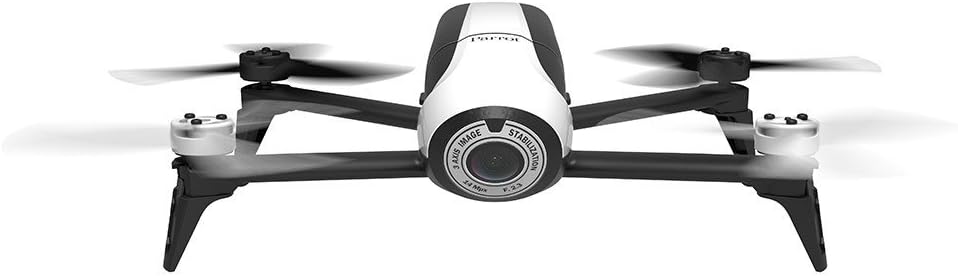
Image 1.1: Parrot Bebop 2 drone and Skycontroller in its retail packaging.
תכונות עיקריות:
- Enhanced 14 Megapixel Fish-Eye Lens: Offers 1080p video recording and high-quality image capture.
- זמן טיסה מורחב: Up to 25 minutes of flight thanks to a powerful 2700 mAh battery.
- Powerful Motors and Rear Flash LED: Designed for stable flight at various altitudes and improved visibility.
- Parrot Skycontroller: Connects to your phone or tablet, providing two joysticks for easy piloting and a Wi-Fi extender for increased range up to 1.25 miles.
- 3-Axis Digital Stabilization: Ensures a fixed angle of view regardless of flight conditions.
2. מה בקופסה
Your Parrot Bebop 2 + Black Skycontroller package includes the following components:
- 1 x Parrot Bebop 2 Drone
- 1 x Black Skycontroller
- 2 x Batteries (for drone)
- 1 x כבל USB
- 8 x Propellers (4 installed, 4 spares)
- 1 x Propeller Assembly Tool
- 1 x Charger with Cable and Universal Adapters
- 1 x Neckstrap (for Skycontroller)
- 1 x Adapter for iPad Mini
- 1 x Adapter for 7-inch Tablets
- 1 x Sunshade Cover (for tablet/smartphone)
- 2 x Quick Start Guides
3. מדריך התקנה
This section provides step-by-step instructions for setting up your Parrot Bebop 2 drone for its first flight. For a visual guide, please refer to the official setup video below.
Video 3.1: Official Parrot Bebop 2 Setup Tutorial. This video demonstrates propeller installation, battery insertion, app download, Wi-Fi connection, firmware update, and magnetometer calibration.
3.1. התקנת מדחף
- Carefully place each propeller onto its corresponding motor.
- Ensure that the polarized propellers are correctly matched to their motors (white propellers on white motor caps, black propellers on black motor caps).
- Use the supplied mounting tool to securely lock the propellers in place.
3.2. הכנסת סוללה
- הכנס את הסוללה הטעונה לתא הסוללות של הרחפן.
- Slide the battery forward until it latches securely into place. You should hear a distinct clicking sound.
3.3. Powering On the Drone
- Press the on/off button located on the back of the Bebop 2 drone. The LED indicator will illuminate.
3.4. הורדת אפליקציה וחיבור
- Download the FreeFlight 3 app from your tablet or smartphone's app store.
- Go to your device's settings and activate Wi-Fi.
- Select the Wi-Fi network corresponding to your Bebop 2 drone (e.g., "Bebop2-I000371").
- Launch the FreeFlight 3 app. The app will connect to your drone.
3.5. עדכון קושחה
- Upon connecting, the app will check for firmware updates. Ensure your Bebop 2 is running the latest firmware.
- If an update is available, follow the on-screen instructions within the app to download and install it.
- After the update, you will be prompted to restart your drone. The reboot process typically takes about two minutes.
3.6. Magnetometer Calibration
- Before the first flight, especially outdoors, you will need to calibrate the drone's magnetometer.
- Follow the visual instructions provided by the FreeFlight 3 app, rotating the drone along its Z, Y, and X axes as indicated.
3.7. FAA Registration
Please note that the Parrot Bebop 2 requires registration with the FAA (Federal Aviation Administration) for outdoor flight in the United States. Visit the FAA website for more information on how to register your drone and comply with local regulations.
4. תפעול
Once setup is complete, you are ready to operate your Parrot Bebop 2 drone. The FreeFlight 3 app provides intuitive controls for flight and camera functions.

Image 4.1: The Parrot Bebop 2 drone in flight.
4.1. בקרות טיסה בסיסיות
- המראה/נחיתה: Use the dedicated 'Take Off' and 'Landing' buttons within the FreeFlight 3 app.
- בקרת כיוון: Use the virtual joysticks on your tablet/smartphone screen or the physical joysticks on the Skycontroller to control the drone's movement (forward, backward, left, right).
- בקרת גובה: Adjust the altitude using the vertical control on the app or Skycontroller.
- יַצִיבוּת: The drone's advanced stabilization system helps maintain steady flight.
4.2. תפעול מצלמה
- הקלטת וידאו: Initiate 1080p video recording directly from the FreeFlight 3 app interface.
- צילום תמונה: Capture 14-megapixel still images during flight.
- שדה של View: The 186° fish-eye lens provides a wide perspective.
- סטרימינג בשידור חי: View live video feed from the drone on your connected device.
4.3. Skycontroller Usage
The Black Skycontroller enhances the flight experience by providing physical controls and extending the Wi-Fi range.
- טווח מורחב: The Skycontroller acts as a Wi-Fi extender, significantly increasing the drone's operational range.
- שליטה מדויקת: Physical joysticks offer more tactile and precise control compared to touch-screen controls.
- הרכבה של מכשיר: Use the provided adapters to securely mount your tablet or smartphone to the Skycontroller for FPV (First Person View) flying.
5. תחזוקה
Regular maintenance ensures the longevity and optimal performance of your Parrot Bebop 2 drone.
- טיפול בסוללה: Always use the official charger. Store batteries in a cool, dry place and avoid overcharging or fully discharging them.
- בדיקת מדחף: Regularly check propellers for any signs of damage (cracks, bends, chips). Replace damaged propellers immediately using the propeller assembly tool.
- ניקוי: Gently clean the drone's body and camera lens with a soft, dry cloth. Avoid using harsh chemicals or abrasive materials.
- עדכוני תוכנה: Keep the FreeFlight 3 app and drone firmware updated to ensure access to the latest features and performance improvements.
6. פתרון תקלות
If you encounter issues with your Parrot Bebop 2, refer to the following common troubleshooting tips:
- בעיות חיבור: Ensure both the drone and your controlling device (tablet/smartphone) have Wi-Fi enabled and are connected to the correct drone network. Try restarting both devices.
- רחפן לא מגיב: Check battery levels on both the drone and Skycontroller. Ensure all propellers are securely attached.
- איכות וידאו ירודה: Clean the camera lens. Ensure you are flying in good lighting conditions. Check for firmware updates.
- טיסה לא יציבה: Perform a magnetometer calibration. Ensure propellers are not damaged and are correctly installed.
- קריסת אפליקציה: Ensure your FreeFlight 3 app is updated. Try clearing the app's cache or reinstalling it.
7. מפרטים
Detailed technical specifications for the Parrot Bebop 2 drone:
| תכונה | מִפרָט |
|---|---|
| מותג | תוּכִּי |
| שם הדגם | Bebop 2 |
| מספר דגם | PF726103 |
| צֶבַע | לבן / שחור |
| חוֹמֶר | פּלָסטִי |
| משקל פריט | 1.1 פאונד |
| רזולוציית לכידת וידאו | 1080p |
| רזולוציית סטילס אפקטיבית | 14 מגה פיקסל |
| טכנולוגיית חיישן אופטי | CMOS |
| טכנולוגיית קישוריות | Wi-Fi |
| טכנולוגיית שלט רחוק | Wi-Fi |
| סוג בקרה | Remote Control (Skycontroller) |
| טווח מקסימלי | 1.25 Miles (with Skycontroller) |
| קיבולת סוללה | 2700 מיליamp שעות |
| הרכב תא הסוללה | ליתיום יון |
| סוג מדיה | מיקרו SDHC |
8. אחריות ותמיכה
8.1. מידע על אחריות
The Parrot Bebop 2 drone comes with a אחריות יצרן לשנה אחתאחריות זו מכסה פגמים בחומרים ובביצוע בשימוש רגיל. אנא שמור את הוכחת הרכישה שלך לצורך תביעות אחריות.
8.2. תמיכת לקוחות
For further assistance, technical support, or to inquire about replacement parts, please visit the official Parrot support website or contact their customer service. Detailed contact information can typically be found on the Parrot website or in the quick start guides included with your product.