
מָבוֹא
This manual provides comprehensive instructions for the setup, operation, and maintenance of your Zelotes T90 Professional 9200 DPI High Precision USB Wired Gaming Mouse. Please read this manual thoroughly before using the product to ensure optimal performance and longevity.

Figure 1: Zelotes T90 Professional Gaming Mouse, showcasinהעיצוב הארגונומי ותאורת ה-LED שלו.
תוכן החבילה
- 1 x Zelotes T90 Gaming Mouse
- 1 x מדריך הוראות (מסמך זה)
הגדרה
דרישות מערכת
- Operating System: Windows 98/ 2000/ ME/ NT / XP/ win 7/ win 8/ win 10/ Mac OS and other OS
- ממשק: יציאת USB
הַתקָנָה
- פירוק העכבר: Carefully remove the Zelotes T90 Gaming Mouse from its packaging.
- הסר סרט מגן: Before use, please remove the foot pad protective film located on the underside of the mouse.
- התחבר למחשב: Plug the USB connector of the mouse into an available USB port on your computer. The mouse is plug-and-play and does not require additional driver installation for basic functionality.
הוראות הפעלה
פונקציות כפתור
The Zelotes T90 mouse features 8 programmable buttons designed for enhanced gaming and productivity.
- לחצן לחץ שמאל
- לחצן קליק ימני
- כפתור אמצעי / גלגל גלילה
- לחצן קדימה: Quick forward function when browsing the web or navigating folders.
- לחצן אחורה: Quick backward function when browsing the web or navigating folders.
- לחצן DPI: מתאים את רגישות העכבר (DPI).
- מפתח אש: Configurable for rapid actions.
- מתג מצב אור: Controls the LED lighting effects.
התאמת DPI (רגישות)
The mouse supports 6-speed DPI adjustment, allowing you to customize sensitivity for different tasks or games. Press the כפתור DPI to cycle through the following settings:
- 1000 DPI: Indicated by red light flashing 3 times.
- 1600 DPI: Indicated by orange light.
- 2400 DPI: Indicated by green light.
- 3200 DPI: Indicated by light blue light.
- 5500 DPI: Indicated by blue light.
- 9200 DPI: Indicated by purple light.

Figure 2: Location of DPI and Fire Key buttons on the Zelotes T90 mouse.
Fire Key Function
- לחיצה קצרה: Performs a double click.
- לחיצה ארוכה (יותר מ-2 שניות): Switches to triple click mode. The light will flash 3 times to confirm the successful switch.
מתג מצב אור
The Zelotes T90 features various LED lighting modes:
- לחיצה קצרה: Cycles through 7-color breathing, 6 single-color breathing, and 6 single-color constant light modes (13 modes total).
- לחיצה ארוכה (יותר מ-2 שניות): Turns off the LED lights.

Figure 3: The Zelotes T90 mouse showcasing its 7-color cycle breathing and single-color lighting options.
מערכת כוונון משקל
The mouse includes 8 removable 2.5-gram weights, allowing you to customize the mouse's weight and balance for improved stability and control, especially during fast movements.
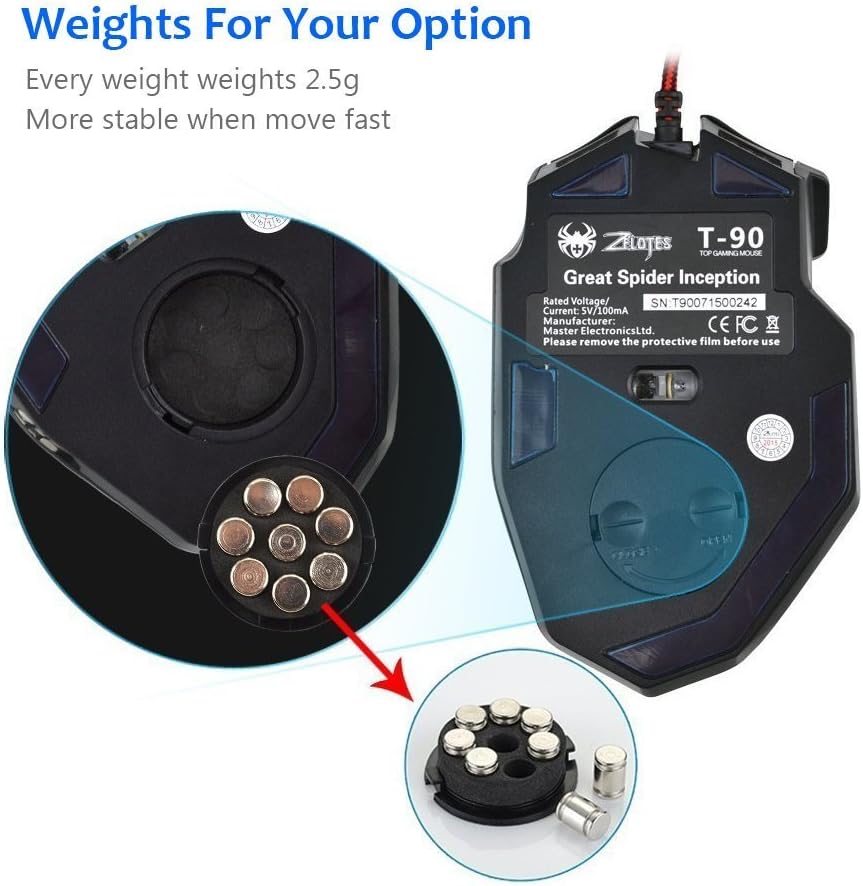
Figure 4: Location of the weight tuning system on the underside of the Zelotes T90 mouse.
תַחזוּקָה
ניקוי
- השתמש במטלית רכה ויבשה כדי לנקות את פני העכבר.
- עבור לכלוך עיקש, מעט דחוףampשטפו את המטלית במים או בתמיסת ניקוי עדינה. הימנעו מכימיקלים חזקים.
- Do not immerse the mouse in water or any liquid.
אִחסוּן
יש לאחסן את העכבר במקום קריר ויבש, הרחק מאור שמש ישיר וטמפרטורות קיצוניות, כאשר אינו בשימוש למשך תקופות ממושכות.
פתרון בעיות
| בְּעָיָה | סיבה אפשרית | פִּתָרוֹן |
|---|---|---|
| העכבר לא מגיב | חיבור USB רופף, יציאת USB פגומה, שגיאת מערכת. | ודא שכבל ה-USB מחובר היטב למחשב. נסה יציאת USB אחרת. הפעל מחדש את המחשב. |
| נורות LED לא עובדות | Lights turned off, software issue. | Short press the Light Mode Switch button to cycle through modes. Long press the Light Mode Switch button for more than 2 seconds to turn lights on if they were off. |
| הגדרת ה-DPI לא משתנה | כפתור ה-DPI לא נלחץ נכון. | Ensure you are pressing the dedicated DPI button. Observe the light flashes to confirm DPI changes. |
| סמן העכבר לא יציב או קופץ | חיישן אופטי מלוכלך, משטח עכבר לא מתאים. | נקו את החיישן האופטי בחלק התחתון של העכבר. השתמשו במשטח נקי ואחיד של משטח עכבר. |
| Mouse settings reset | Accidental factory reset. | Press the left and right buttons simultaneously for more than 2 seconds to restore factory settings. If settings are reset, reconfigure them as desired. |
מפרטים
| דֶגֶם | T90 |
| מידות (LxWxH) | 130 מ"מ x 81 מ"מ x 40 מ"מ (5.12 x 3.19 x 1.57 אינץ') |
| מִשׁקָל | 145g ± 5g (excluding cable) |
| משקל נגד | 8 x 2.5 Gram tuning weights |
| הגדרות DPI | 1000/1600/2400/3200/5500/9200 DPI |
| FPS | 6666 |
| תְאוּצָה | 23G |
| שיעור סקרים | 500 הרץ |
| Switch Life | 800 מיליון פעמים |
| כפתורים | 8 |
| אורך כבל USB | 1.8M braided-fiber cable |
| מִמְשָׁק | USB |
| סוג אופטי | Red wave |
| תְאִימוּת | Windows 98/ 2000/ ME/ NT / XP/ win 7/ win 8/ win 10/ Mac OS and other OS |
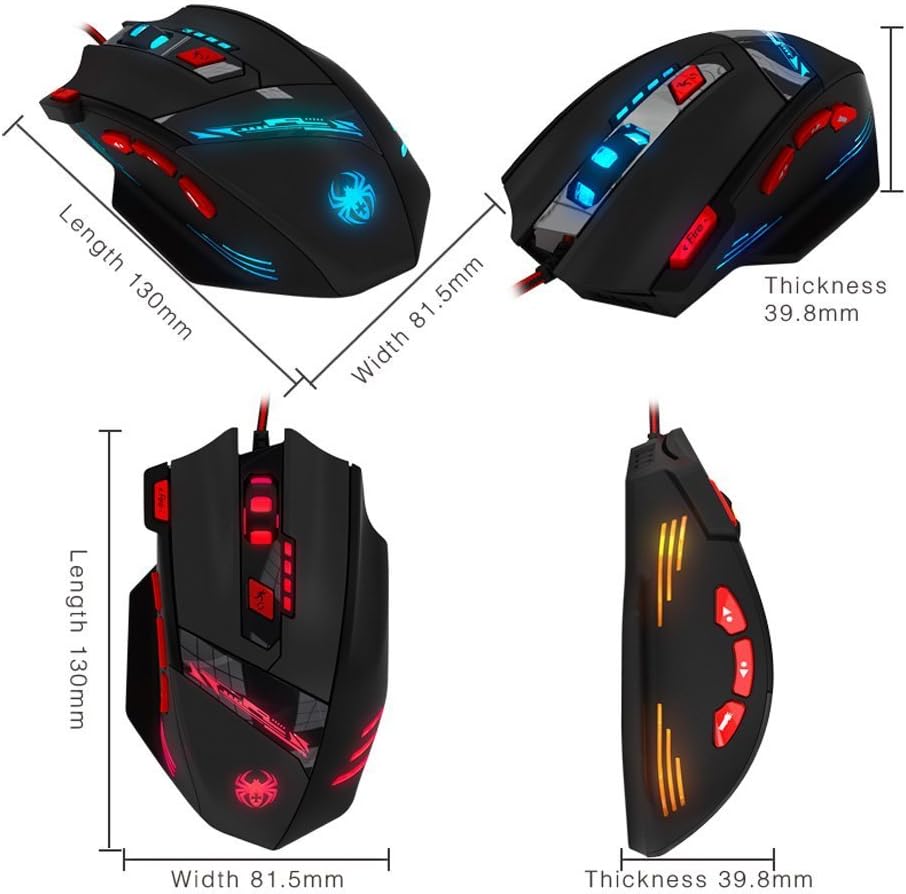
Figure 5: Detailed dimensions of the Zelotes T90 Professional Gaming Mouse.
עיצוב ארגונומי
The Zelotes T90 mouse is designed with ergonomics in mind, providing a comfortable fit for both fingertip and claw-style grips. This design aims to reduce fatigue during long periods of use.

Figure 6: Ergonomic design of the Zelotes T90 mouse, showing a comfortable hand grip.
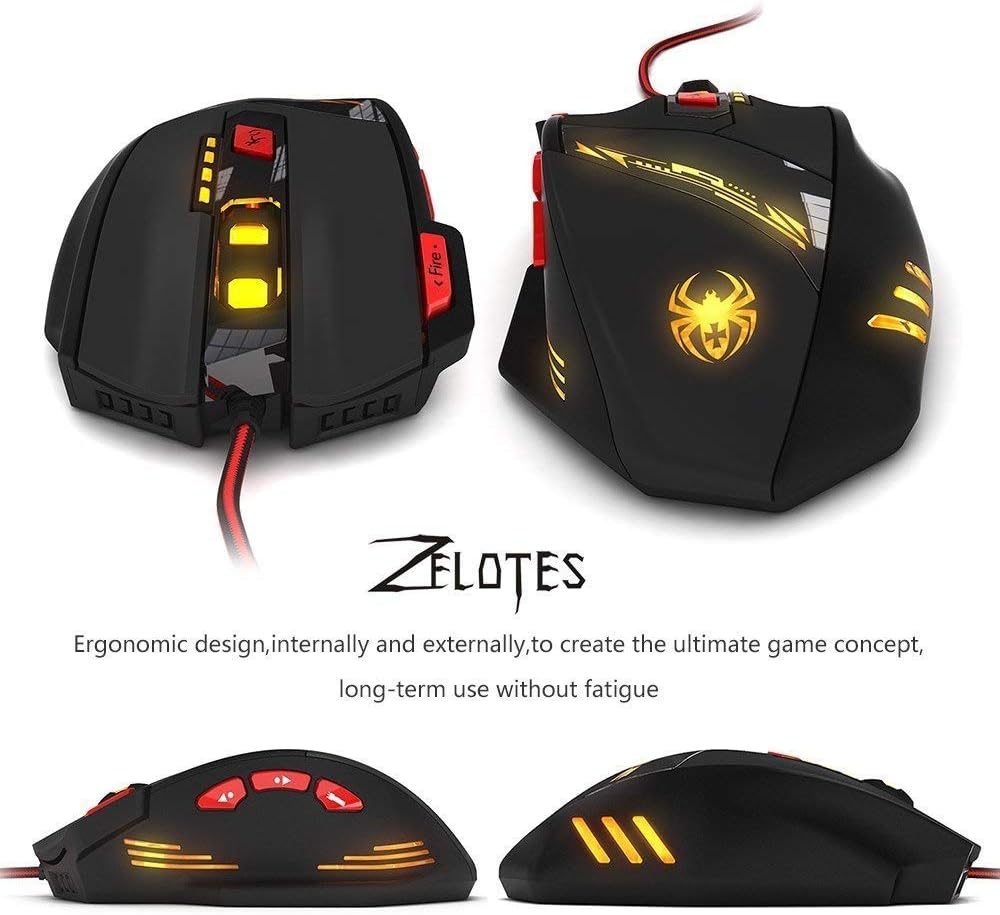
איור 7: שונים views highlighting the ergonomic contours of the Zelotes T90 mouse.
הערות חשובות
- Always remove the foot pad protective film before using the mouse.
- To restore the mouse to factory settings, press and hold the left and right mouse buttons simultaneously for more than 2 seconds.