
1. הקדמה
The Vivanco PAU 1501 is a versatile universal power supply designed for operating and charging a wide range of electronic devices, including both USB and non-USB compatible equipment. This manual provides essential information for the safe and efficient use of your power supply.
2. הוראות בטיחות
Please read these safety instructions carefully before using the device. Failure to follow these instructions may result in electric shock, fire, or damage to the product.
- Do not expose the power supply to rain, moisture, or extreme temperatures.
- Ensure the power supply is disconnected from the mains before cleaning or if it will not be used for an extended period.
- אל תפתח את ה-casing של ספק הכוח. אין חלקים בפנים הניתנים לתיקון על ידי המשתמש.
- Use only the provided or approved connectors.
- ודא את הכרךtage and polarity requirements of your device before connecting it to the power supply. Incorrect settings can damage your device.
- הרחק מהישג ידם של ילדים.
3. תכולת החבילה
The Vivanco PAU 1501 package typically includes:
- 1x Vivanco PAU 1501 Universal Power Supply Unit
- 8x Non-USB Output Connectors (various sizes)
- 3x USB Output Connectors (USB A, Mini USB, Micro USB)
- 1x מדריך הוראות
4. המוצר נגמרview
The Vivanco PAU 1501 features a compact design with a selectable voltage switch and multiple interchangeable output connectors to ensure compatibility with a wide range of devices.
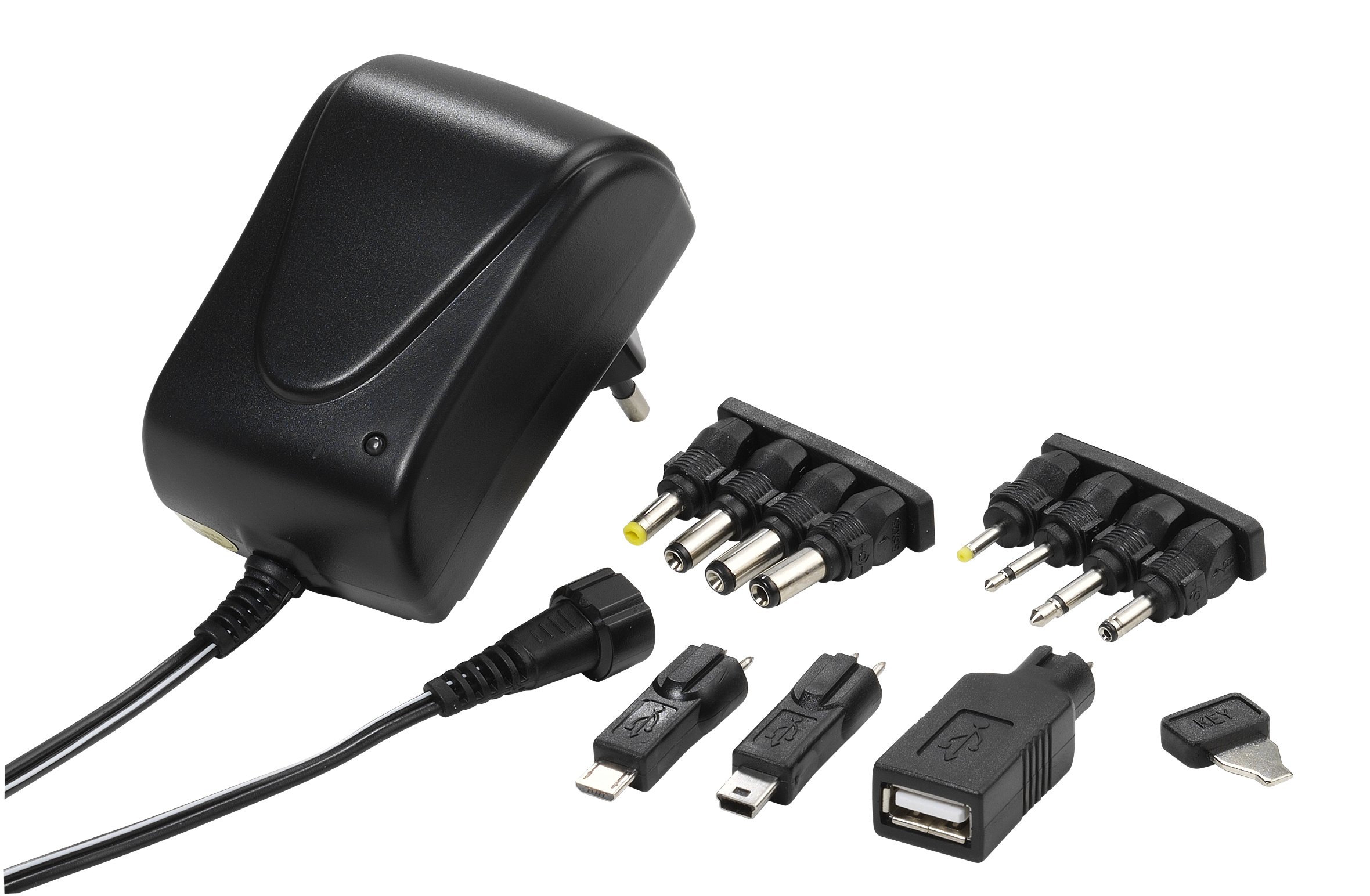
Image 1: The Vivanco PAU 1501 universal power supply unit shown with a selection of its interchangeable output connectors. The main unit features a voltage selector switch and an input for the AC power cable.
מרכיבי מפתח:
- יחידה ראשית: Contains the transformer, voltage selector, and output port.
- כרך ידtagמתג בורר e: Allows selection of output voltages (3.0V, 4.5V, 5.0V, 6.0V, 7.5V, 9.0V, 12V DC).
- כבל פלט: Connects to the interchangeable tips.
- Interchangeable Connectors: A variety of tips for different devices, including USB A, Mini USB, Micro USB, and 8 non-USB tips (2.5mm, 3.5mm, 5.5x2.1mm, 5.5x2.5mm, 3.5x1.35mm, 4.0x1.7mm, 5.5x1.5mm, 2.35x0.75mm).
- תקע חשמל: Type C/EF – 2 pins (European/hybrid FR-DE plug) for mains connection.
5. התקנה
Before connecting the power supply to your device, follow these steps:
- זיהוי דרישות המכשיר: Check your device's manual or specifications for its required input voltage (V) and current (mA or A). Also, determine the correct connector type and polarity (usually indicated by a diagram).
- Select Correct Voltage: אתר את הכרךtage selector switch on the Vivanco PAU 1501. Using a small tool (e.g., a coin or screwdriver), carefully rotate the switch to match your device's required voltage (e.g., 5.0V, 9.0V, 12V).
- Choose Correct Connector: Select the appropriate output connector tip that fits your device's power input port. For USB devices, choose USB A, Mini USB, or Micro USB. For non-USB devices, select one of the 8 barrel or jack connectors.
- Attach Connector: Firmly attach the chosen connector tip to the output cable of the power supply. Ensure it is securely seated.
6. הוראות הפעלה
Once setup is complete, you can begin using your universal power supply:
- התחבר למכשיר: Plug the selected connector tip into your electronic device's power input port.
- Connect to Mains: Insert the power supply's main plug into a suitable wall socket (100-240V AC, 50/60Hz).
- הפעלה: Your device should now receive power or begin charging. Some devices may have an indicator light.
- לְנַתֵק: To disconnect, first unplug the power supply from the wall socket, then remove the connector from your device.
חשוב: יש לוודא תמיד את עוצמת הקול הנכונהtage and connector are selected before plugging into your device to prevent damage.
7. תחזוקה
To ensure the longevity and proper functioning of your Vivanco PAU 1501 power supply, follow these maintenance guidelines:
- ניקוי: Disconnect the power supply from the mains before cleaning. Use a soft, dry cloth to wipe the exterior. Do not use liquid cleaners or solvents.
- אִחסוּן: Store the power supply and its connectors in a cool, dry place away from direct sunlight and moisture when not in use.
- טיפול בכבלים: Avoid bending or kinking the power cable excessively. Do not place heavy objects on the cable.
- בְּדִיקָה: Periodically inspect the power supply and cables for any signs of damage, such as frayed wires or cracked casings. If damage is found, discontinue use immediately.
8. פתרון תקלות
If you encounter issues with your Vivanco PAU 1501, refer to the following common problems and solutions:
| בְּעָיָה | סיבה אפשרית | פִּתָרוֹן |
|---|---|---|
| המכשיר לא נדלק/נטען. | כרך שגויtage נבחר. Incorrect connector tip. חיבור רופף. Wall socket not active. תקלה במכשיר. |
ודא את הכרךtage setting matches your device's requirements. Ensure the correct connector tip is used and securely attached. Check all connections are firm. בדוק את שקע הקיר עם מכשיר אחר. Test the device with its original power supply, if available. |
| ספק הכוח מרגיש חם. | פעולה רגילה תחת עומס. לְהַעֲמִיס יוֹתֵר מִדַי. אוורור לקוי. |
חמימות קלה היא נורמלית. אם חם מדי, נתק מיד. Ensure the device's current draw does not exceed 1500mA (1.5A). ודא שספק הכוח נמצא באזור מאוורר היטב. |
| Sparking when plugging into wall socket. | זרם כניסה רגיל. Faulty socket or plug. |
Minor sparking is common. If it's excessive or persistent, discontinue use. Check the wall socket and power supply plug for damage. Consult a qualified electrician if necessary. |
If the problem persists after trying these solutions, please contact Vivanco customer support.
9. מפרטים
| תכונה | פְּרָט |
|---|---|
| מספר דגם | PAU 1501 |
| קלט כרךtage | 100-240 V AC ~ 50/60 Hz, 0.35 A max. |
| פלט כרךtages (DC) | 3.0V, 4.5V, 5.0V, 6.0V, 7.5V, 9.0V, 12V (selectable) |
| זרם פלט מקסימלי | 1500 mA (1.5 A) max. |
| עוצמת פלט מקסימלית | 18 W |
| צריכת חשמל ללא עומס | < 0.3 W |
| יְעִילוּת | מקסימום 83% |
| מחברים פלט | 8 non-USB tips (2.5mm, 3.5mm, 5.5x2.1mm, 5.5x2.5mm, 3.5x1.35mm, 4.0x1.7mm, 5.5x1.5mm, 2.35x0.75mm), 3 USB tips (USB A, Mini USB, Micro USB) |
| סוג תקע | Type C/EF – 2 pins (European/hybrid FR-DE) |
| צֶבַע | שָׁחוֹר |
| תכונה מיוחדת | נייד, ידידותי לנסיעות |
10. אחריות ותמיכה
Specific warranty information for the Vivanco PAU 1501 is not provided in the product details. Please refer to the warranty card included with your purchase or contact your retailer for details regarding warranty terms and conditions.
For technical support or further inquiries, please visit the official Vivanco webלאתר או לפנות למחלקת שירות הלקוחות שלהם.
יַצרָן: Vivanco