
1. המוצר נגמרview
The NVX VUBT2 is a universal waterproof Bluetooth 4.0 audio receiver designed to add wireless audio streaming capabilities to various vehicles and vessels, including marine, boats, cars, and ATVs. It features a robust, water-resistant design and provides high-quality stereo audio output.
תכונות עיקריות:
- Bluetooth Profile: A2DP (אודיו סטריאו באיכות גבוהה)
- Bluetooth Core Specification: Version 4.0 with aptX
- פלטים: One Stereo Pair, Low-Level RCA Plugs
- פלט כרךtage: 2V RMS
- יחס אות לרעש: 93 dB (20 Hz - 20 kHz)
- עמידות במים: IPX67 rated for protection against dust and water immersion.
- קישוריות: 3.5mm audio input/output.
- הפעלה מרחוק: Amplifier remote turn-on feature.
2. מידע בטיחות
אנא קרא בעיון את כל ההוראות לפני ההתקנה והשימוש. אי ביצוע הוראות אלה עלול לגרום נזק למוצר, נזק לרכוש או פגיעה גופנית.
- ודא שהרכב מנותק מהחשמל לפני ההתקנה כדי למנוע קצר חשמלי.
- Use appropriate wiring gauges and fuses as recommended.
- Mount the device securely to prevent movement during operation.
- Do not expose the device to extreme temperatures or direct flame.
- While the device is waterproof (IPX67), ensure all connections are properly sealed and protected from direct water exposure to maintain integrity.
3. תכולת החבילה
ודא שכל הפריטים נמצאים בחבילה שלך:
- NVX VUBT2 Bluetooth Audio Receiver
- Power/Ground/Remote Wiring Harness with In-line Fuse
- כבל אודיו RCA 3.5 מ"מ
- Mounting Hardware (screws or adhesive pads)
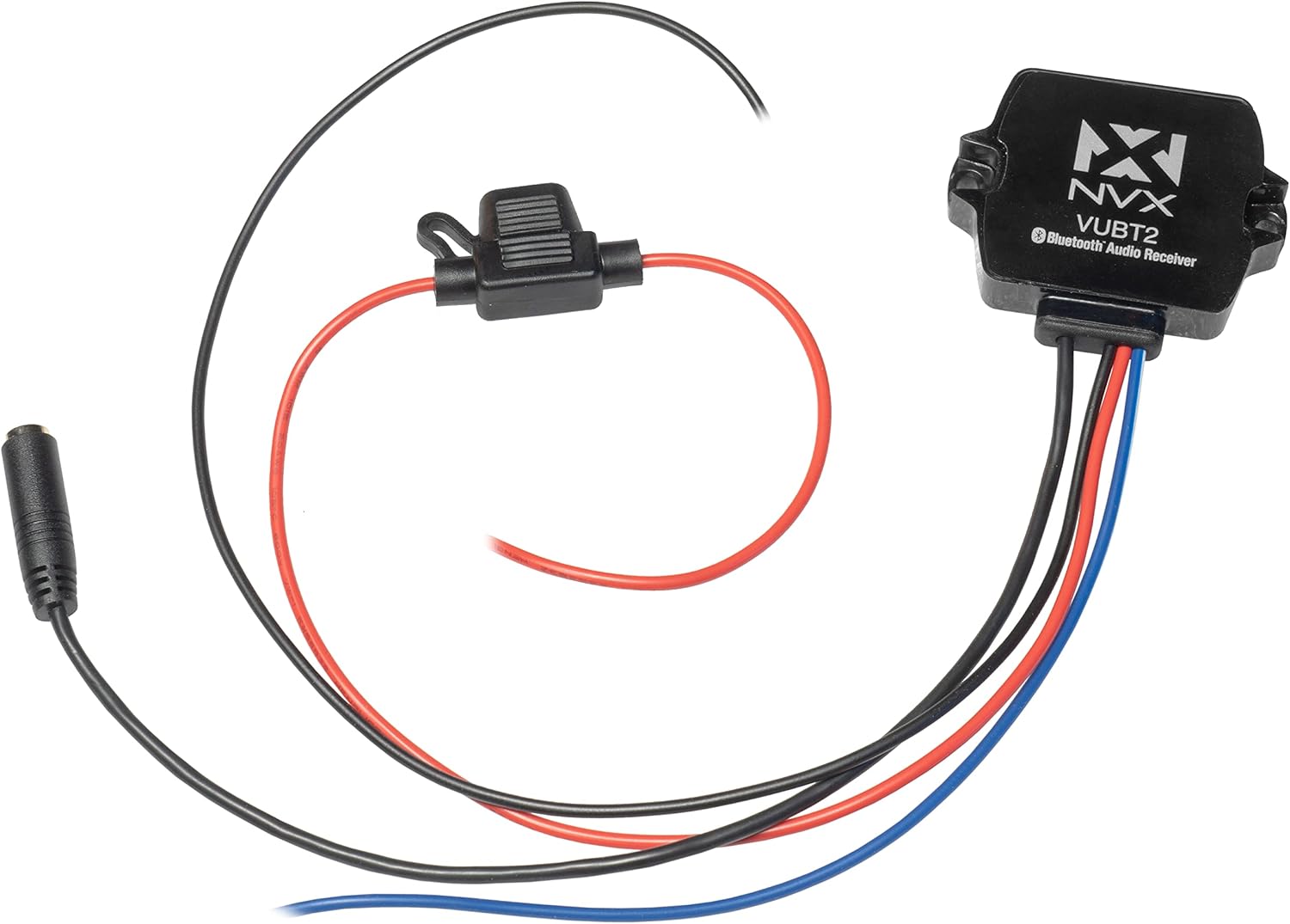
Image: The NVX VUBT2 Bluetooth Audio Receiver shown with its power/ground/remote wiring harness, in-line fuse, and 3.5mm to RCA audio cable.
4. התקנה והתקנה
4.1 חיבורי חיווט
The VUBT2 requires power, ground, and a remote turn-on connection. It outputs audio via RCA connections.
- חשמל (חוט אדום): Connect the red wire to a switched 12V power source. This can be the accessory wire from your vehicle's ignition or a dedicated switch. The in-line fuse should be installed close to the power source.
- הארקה (חוט שחור): Connect the black wire to a solid chassis ground point. Ensure a clean, secure connection for optimal performance.
- הפעלה מרחוק (חוט כחול): Connect the blue wire to the remote turn-on input of your amplifier or other audio components. This will power on the VUBT2 when your system is activated.
- Audio Output (3.5mm to RCA): Connect the 3.5mm jack from the VUBT2 to the included 3.5mm to RCA cable. Then, connect the RCA plugs (red for right, white for left) to the audio input of your ampלמכשיר או יחידת ראש.

Image: The NVX VUBT2 Bluetooth receiver wired to an amplifier, demonstrating the remote turn-on and RCA audio connections.

Image: Close-up of the 3.5mm audio output connected to RCA cables, ready for connection to an audio system.
4.2 הרכבה
The compact design of the VUBT2 allows for flexible mounting options. It can be mounted using screws through its integrated tabs or with adhesive pads (if included).
- Choose a location that is dry, secure, and allows for proper cable routing.
- Ensure the mounting surface is clean and flat if using adhesive.
- The device is IPX67 rated, making it suitable for exposed locations, but protecting connections is still recommended.

Image: The underside of the NVX VUBT2 unit, displaying the 3M adhesive backing for secure mounting in various applications.
5. הוראות הפעלה
5.1 זיווג בלוטות '
- Ensure the VUBT2 is powered on (your audio system is active).
- במכשיר הנייד שלך (סמארטפון, טאבלט וכו'), נווט אל הגדרות ה-Bluetooth.
- Scan for available Bluetooth devices. The VUBT2 will appear as "NVX VUBT2" or similar.
- Select the VUBT2 to pair. A confirmation tone or LED indicator may signal a successful connection.
- Once paired, your device will typically reconnect automatically when in range and the VUBT2 is powered on.
5.2 השמעת אודיו
After successful pairing, you can stream audio from your mobile device to your connected audio system. Control playback (play/pause, skip tracks, volume) directly from your paired device.

Image: A smartphone screen displaying music controls, illustrating how users can manage audio playback through the NVX VUBT2.
וידאו: אוברview of the NVX VUBT2 Universal Waterproof Bluetooth 4.0 Audio Receiver, demonstrating its features and applications in various environments.
6. תחזוקה
The NVX VUBT2 is designed for durability and minimal maintenance. Follow these guidelines to ensure longevity:
- ניקוי: השתמש רך, דamp cloth to wipe the exterior of the unit. Avoid harsh chemicals or abrasive cleaners.
- עמידות במים: While IPX67 rated, avoid prolonged submersion or high-pressure water jets directly on the unit or its connections. Regularly inspect wiring and connections for any signs of wear or damage that could compromise water resistance.
- חיבורים: בדקו מעת לעת את כל חיבורי החיווט כדי לוודא שהם מאובטחים וחופשיים מקורוזיה.

Image: The NVX VUBT2 unit covered in water droplets, illustrating its IPX67 water-resistance rating for use in challenging environments.
7. פתרון תקלות
| בְּעָיָה | סיבה אפשרית | פִּתָרוֹן |
|---|---|---|
| No power to the VUBT2. |
|
|
| לא ניתן להתאים עם מכשיר Bluetooth. |
|
|
| No audio output or distorted audio. |
|
|
| Bluetooth connection drops intermittently. |
|
|
8. מפרטים
| תכונה | פְּרָט |
|---|---|
| מותג | NVX |
| מספר דגם | VUBT2 (4326582821) |
| טכנולוגיית קישוריות | בלוטות' |
| Bluetooth Core Specification | Version 4.0 with aptX |
| Bluetooth Profile | A2DP (אודיו סטריאו באיכות גבוהה) |
| דירוג עמידות במים | IPX67 |
| סוג פלט שמע | RCA (Stereo Pair) |
| פלט כרךtage | 2V RMS |
| יחס אות לרעש | 93 dB (20 Hz - 20 kHz) |
| מספר ערוצים | 2 (סטריאו) |
| מכשירים תואמים | רמקולים, Ampבעלי חיים |
| UPC | 818060013812 |
| ASIN | B015XLMA08 |
9. מידע על אחריות
NVX products are designed and manufactured to the highest quality standards. For specific warranty details, including coverage period and terms, please refer to the warranty card included with your product or visit the official NVX webאתר. שמור את הוכחת הרכישה שלך לצורך תביעות אחריות.
10. תמיכת לקוחות
If you encounter any issues or have questions regarding your NVX VUBT2 Bluetooth Audio Receiver that are not covered in this manual, please contact NVX customer support for assistance.
- תמיכה מקוונת: Visit the official NVX webאתר לשאלות נפוצות, משאבי תמיכה ופרטי יצירת קשר.
- תמיכת מוכרים: For purchase-related inquiries, contact the seller directly.