
מָבוֹא
This manual provides detailed instructions for the Inateck Bluetooth 4.1 Sport Headset, Model P20 (BH1001). Please read this guide thoroughly before using the product to ensure proper operation and to maximize your listening experience. This headset is designed for active lifestyles, offering wireless audio with a secure fit and integrated microphone.
1. התקנה
1.1 תכולת החבילה
ודא שכל הפריטים נמצאים בחבילה:
- Inateck Bluetooth Sport Headset (P20 / BH1001)
- כבל טעינה USB
- זוגות מרובים של קצוות סיליקון לאוזניים (בגדלים שונים)
- נרתיק נשיאה
- מדריך למשתמש (מסמך זה)
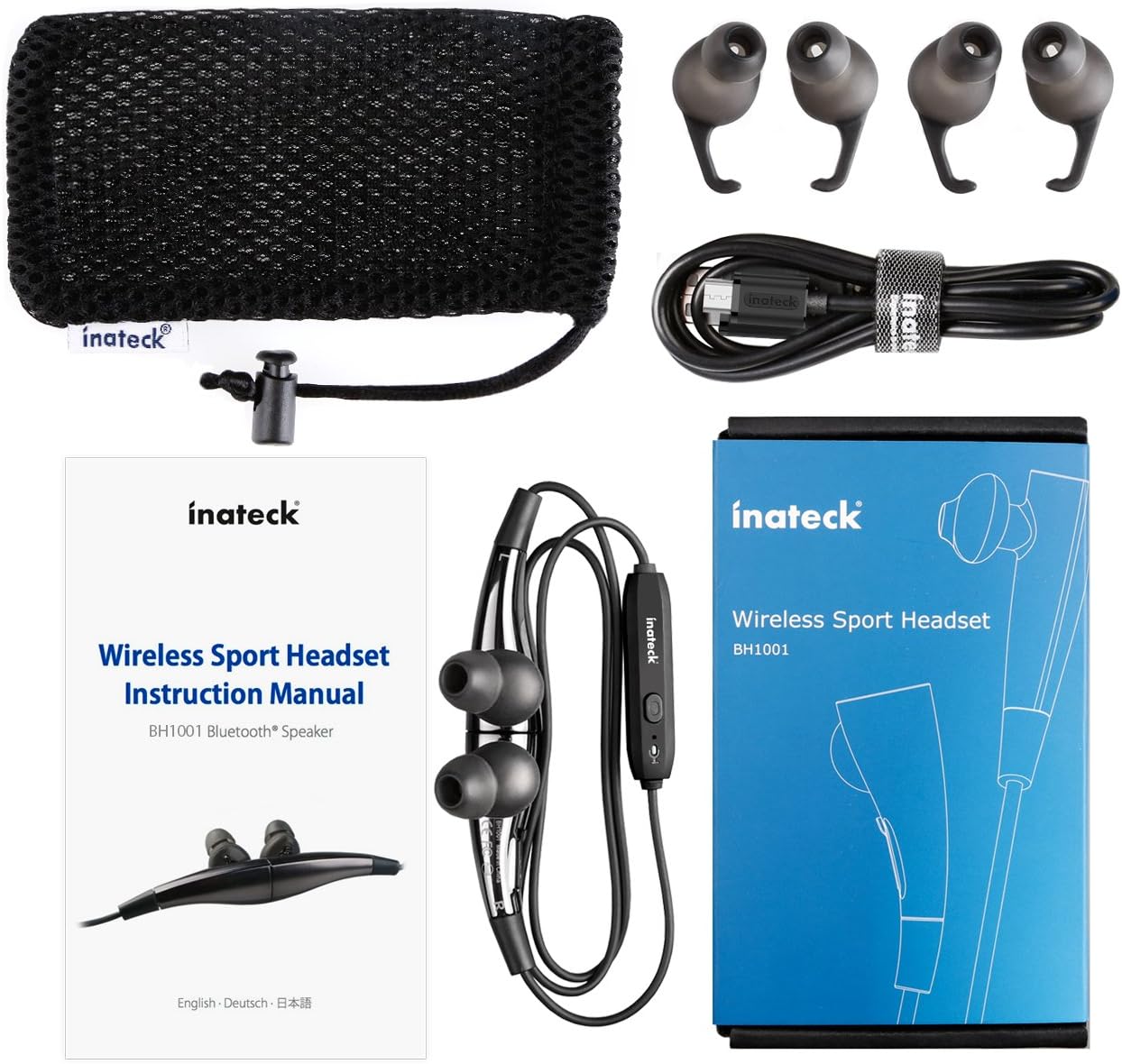
איור 1.1: Contents of the Inateck Bluetooth Sport Headset package.
1.2 טעינת האוזניות
Before first use, fully charge the headset. A full charge takes approximately 3 hours and provides at least 8 hours of music playback.
- Locate the Micro USB charging port on the headset.
- Connect the small end of the provided USB charging cable to the headset's Micro USB port.
- חבר את הקצה הגדול יותר של כבל ה-USB למקור מתח USB (למשל, יציאת USB של המחשב, מתאם USB לקיר).
- The status indicator light will illuminate during charging. It will change color or turn off once charging is complete.

איור 1.2: Charging the Inateck Bluetooth Sport Headset via Micro USB.
1.3 צימוד עם מכשיר בלוטות'
כדי לחבר את האוזניות שלך לטלפון חכם או למכשיר אחר התומך ב-Bluetooth:
- וודא שהדיבורית האישית כבויה.
- Press and hold the Multifunction Key (MFB) on the inline control unit for approximately 5-7 seconds until the status indicator light flashes red and blue alternately. This indicates pairing mode.
- במכשיר ה-Bluetooth שלך, הפעל את Bluetooth וחפש מכשירים חדשים.
- Select "Inateck BH1001" or "Inateck P20" from the list of available devices.
- Once paired, the status indicator light on the headset will flash blue slowly, and you may hear an audible confirmation.
- The headset will automatically attempt to reconnect to the last paired device when turned on.

איור 1.3: Inateck Headset paired with a mobile device for music playback.
2. הוראות הפעלה
2.1 בקרות אוזניות
The inline control unit provides easy access to various functions:

איור 2.1: מֵעַלview of the Inateck Headset control unit.
- Multifunction Key (MFB):
- לחיצה ממושכת (5-7 שניות): הפעלה/כיבוי, כניסה למצב צימוד
- לחיצה קצרה: השמעה/השהיה של מוזיקה, מענה/סיום שיחה
- Long press (during incoming call): Reject call
- הגברת עוצמת הקול (+) / הרצועה הבאה:
- לחיצה קצרה: הגבר את עוצמת הקול
- לחיצה ארוכה: דלג לרצועה הבאה
- הנמכת עוצמת הקול (-) / רצועה קודמת:
- לחיצה קצרה: הורד את עוצמת הקול
- Long press: Go to previous track
- יציאת מיקרו USB: לטעינת האוזניות.
- מחוון מצב: מציג מצב הפעלה, צימוד וטעינה.
- מִיקרוֹפוֹן: לשיחות דיבורית.
2.2 ענידת האוזניות
Select the ear tips that provide the most comfortable and secure fit for your ears. The headset is designed to be worn with the cable behind your neck, ensuring stability during physical activity.

איור 2.2: Proper wearing of the Inateck Sport Headset for active use.
2.3 Magnetic Earbuds Feature
The earbuds feature integrated magnets. When not in use, you can connect the two earbuds together, forming a necklace around your neck. This action automatically pauses music playback and prevents the headset from falling off.

איור 2.3: Magnetic earbuds feature for secure wearing around the neck.

איור 2.4: Headset worn as a necklace using the magnetic feature.
3. תחזוקה
- ניקוי: נגבו את האוזניות בעזרת מטלית רכה ויבשה. אין להשתמש בחומרי ניקוי שוחקים או ממסים.
- עצות אוזניים: Regularly remove and clean the silicone ear tips with mild soap and water. Ensure they are completely dry before reattaching.
- אִחסוּן: When not in use, store the headset in the provided carrying pouch to protect it from dust and damage. Avoid extreme temperatures.
- עמידות במים: The headset is designed to be water-resistant for sports and exercise (e.g., sweat, light rain). Do not submerge it in water or expose it to heavy rain.
4. פתרון תקלות
4.1 לא ניתן להדליק
Ensure the headset is fully charged. Connect it to a power source using the USB cable and allow it to charge for at least 30 minutes before attempting to power on again.
4.2 לא ניתן לבצע התאמה עם המכשיר
- Ensure the headset is in pairing mode (status indicator flashing red and blue alternately).
- Make sure Bluetooth is enabled on your device and it is within range (typically 10 meters or 33 feet).
- כבה והפעל את פונקציית ה-Bluetooth במכשיר שלך.
- If previously paired, try "forgetting" or "unpairing" the headset from your device's Bluetooth settings and then re-pair.
- ודא שאין התקני Bluetooth אחרים שמפריעים לחיבור.
4.3 אין צליל או איכות צליל ירודה
- בדוק את עוצמת הקול הן באוזניות והן במכשיר המחובר.
- ודא שהאוזניות מותאמות ומחוברות כראוי למכשיר שלך.
- Move closer to your device to reduce potential interference or range issues.
- Ensure the ear tips are correctly seated in your ears for optimal sound delivery.
- Reboot both the headset and your connected device.
4.4 חיבור לסירוגין
- ודא שאין מכשולים פיזיים בין האוזניות למכשיר שלך.
- Avoid placing your device in areas where the signal might be blocked (e.g., deep pockets, behind thick walls).
- מזער הפרעות ממכשירים אלחוטיים אחרים (נתבים Wi-Fi, התקני Bluetooth אחרים).
- Keep the headset and your device within the recommended Bluetooth range.
5. מפרטים
| מותג | Inateck |
| שם הדגם | P20 |
| מספר דגם | BH1001 |
| טכנולוגיית קישוריות | בלוטות' 4.1 |
| גורם צורה | בתוך האוזן |
| מיקום אוזניים | Intra-aural |
| שקע אוזניות | USB (לטעינה) |
| רמת עמידות במים | Waterproof (suitable for sweat/light rain) |
| תכונות מיוחדות | Sports and exercise, integrated microphone, magnetic earbuds |
| משקל פריט | 78 גרם |
| סוג בקרה | Volume Control, Multifunction Button |
| חוֹמֶר | פּלָסטִי |
6. מידע על אחריות
Inateck products typically come with a limited warranty. For specific warranty terms and conditions applicable to your Inateck Bluetooth Sport Headset, please refer to the warranty card included in your product packaging or visit the official Inateck webאתר. שמור את הוכחת הרכישה שלך לצורך תביעות אחריות.
7. תמיכת לקוחות
If you encounter any issues not covered in this manual or require further assistance, please contact Inateck customer support. You can usually find contact information, FAQs, and additional resources on the official Inateck webאֲתַר:
Webאֲתַר: www.inateck.com
Please have your product model (P20 / BH1001) and purchase details ready when contacting support.