
מָבוֹא
The ASTRO Gaming A40 TR Headset and MixAmp Pro TR are designed to provide a high-fidelity audio experience for gaming on PlayStation 4 and PC. The A40 TR headset offers user customization, allowing transformation from an open-back to a closed-back noise-canceling headset with optional Mod Kits. The MixAmp Pro TR features all-digital components for clear, interference-free audio and voice communication, with customizable settings via the ASTRO Command Center software.

תמונה: אוזניות ASTRO Gaming A40 TR ומיקסAmp Pro TR, showcasing both components together. The headset is black with gold accents, and the MixAmp is a compact black unit with control dials.
תוכן החבילה
ודא שכל הפריטים המפורטים להלן כלולים באריזת המוצר שלך:
- ASTRO A40 TR Headset
- ASTRO MixAmp פרו TR
- A40 TR Inline Mute Cable (2.0m)
- TOSlink Optical Cable (3.0m)
- Micro-USB Cable (3.0m)
- Digital Daisy Chain Cable (0.5m)
- Swappable Microphone
הגדרה
Connecting to PlayStation 4 (PS4)
- חבר את TOSlink Optical Cable from the MixAmp Pro TR's OPTICAL port to the PS4's Optical Out port.
- חבר את כבל מיקרו-USB from the MixAmp Pro TR's USB port to an available USB port on the PS4.
- חבר את A40 TR Inline Mute Cable from your A40 TR Headset to the headset port on the front of the MixAmp פרו TR.
- ב-PS4 שלך, נווט אל Settings > Sound and Screen > Audio Output Settings.
- מַעֲרֶכֶת יציאת פלט ראשית אֶל יציאה דיגיטלית (אופטית).
- לִבחוֹר Dolby Digital (Bitstream) for the audio format.
- עבור אל הגדרות> התקנים> התקני שמע.
- מַעֲרֶכֶת התקן קלט אֶל USB Headset (ASTRO MixAmp Pro TR).
- מַעֲרֶכֶת מכשיר פלט אֶל USB Headset (ASTRO MixAmp Pro TR).
- לְהַתְאִים בקרת עוצמת הקול (אוזניות) למקסימום.
- מַעֲרֶכֶת פלט לאוזניות אֶל אודיו של צ'אט or הכל שמע as preferred.
מתחבר למחשב
- חבר את כבל מיקרו-USB from the MixAmp Pro TR's USB port to an available USB port on your PC.
- חבר את A40 TR Inline Mute Cable from your A40 TR Headset to the headset port on the front of the MixAmp פרו TR.
- On your PC, ensure the MixAmp Pro TR is selected as the default playback and recording device in your sound settings.
- הורד והתקן את ASTRO Command Center software from the official ASTRO Gaming website to customize settings, update firmware, and manage EQ presets.
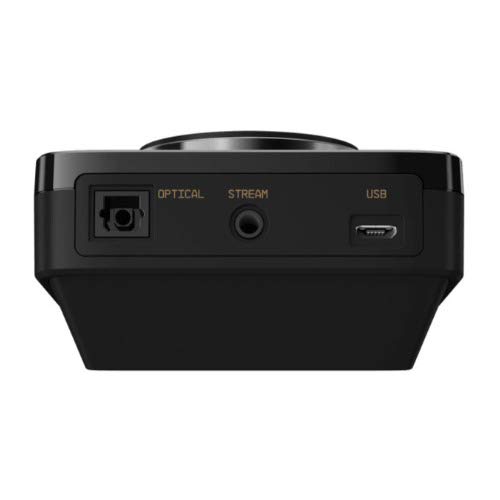
תמונה: אחורי view of the ASTRO MixAmp Pro TR, highlighting the Optical, USB, AUX, and Stream ports for various connections.
Operating the MixAmp פרו TR
המיקסAmp Pro TR provides intuitive controls for managing your audio experience:
- חוגת עוצמת קול ראשית: The large dial on the left controls the overall volume of your headset. Rotate clockwise to increase volume, counter-clockwise to decrease.
- Game/Voice Balance Dial: The smaller dial on the right allows you to adjust the balance between game audio and voice chat.
- Rotate towards "GAME" to prioritize game audio.
- Rotate towards "VOICE" to prioritize voice chat.
- EQ Presets Button: Located in the center, this button cycles through four customizable equalizer presets. The active preset is indicated by the illuminated icon (star, headphone, etc.). These presets can be configured using the ASTRO Command Center software.
- Dolby Button: Activates or deactivates Dolby Surround Sound. When active, the Dolby logo will illuminate.
- לחצן השתקת מיקרופון: Located on the A40 TR Inline Mute Cable, this switch mutes or unmutes your microphone. When muted, the MixAmp's volume dials will typically glow red.
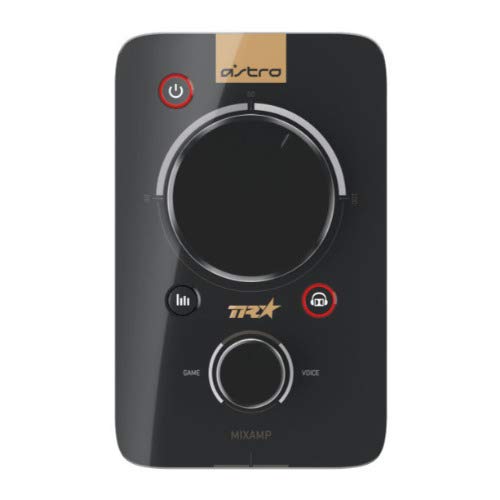
תמונה: למעלה view of the ASTRO MixAmp Pro TR, showing the large master volume dial, the smaller game/voice balance dial, and the EQ preset buttons.
תַחזוּקָה
- ניקוי: השתמשו במטלית רכה ויבשה כדי לנקות את האוזניות ואת המיקסAmpהימנעו מחומרי ניקוי שוחקים או ממסים.
- אִחסוּן: Store the headset and MixAmp במקום קריר ויבש הרחק מאור שמש ישיר וטמפרטורות קיצוניות.
- טיפול בכבלים: טפלו בכבלים בעדינות כדי למנוע נזק. הימנעו מכיפופים חדים או משיכה מוגזמת.
- כריות אוזניים: Periodically check ear cushions for wear and tear. Replacement cushions are available from ASTRO Gaming.
פתרון בעיות
If you encounter issues with your ASTRO Gaming A40 TR Headset or MixAmp פרו TR, נסה את הפתרונות הבאים:
| בְּעָיָה | פִּתָרוֹן |
|---|---|
| אין שמע מהאוזניות. |
|
| המיקרופון לא עובד. |
|
| איכות שמע מעוותת או ירודה. |
|
For more detailed troubleshooting, please refer to the official ASTRO Gaming support resources.
מפרטים
- מספר דגם: 939-001511
- תגובת תדירות: 20 - 20,000 הרץ
- עכבה נומינלית: 48 אוהם
- לחץ סרט ראש: 2.6N
- מידות המוצר: 9.06 x 13.87 x 4.33 אינץ'
- משקל פריט: 1.06 פאונד
- קישוריות: אופטי, USB
- תְאִימוּת: פלייסטיישן 4, מחשב
אחריות ותמיכה
For detailed warranty information and product support, please visit the official ASTRO Gaming webאתר או עיין בתיעוד המצורף:
Ensure you register your product on the ASTRO Gaming website for the latest updates and support.