
1. הקדמה
The Samson XPD1 Lavalier USB Digital Wireless System is designed to provide high-quality wireless audio for computer recordings, presentations, and other applications. This system includes a USB receiver, a belt pack transmitter, and a lavalier microphone, offering a convenient and reliable solution for capturing clear audio directly to your Mac or PC.
2. רכיבים נגמרוview
Familiarize yourself with the main components of your Samson XPD1 system:
- מקלט USB: Plugs directly into your computer's USB port. Features Status and Pair buttons, and a 3.5mm output jack for monitoring.
- Belt Pack Transmitter (PXD1): Worn by the user, it transmits audio wirelessly to the receiver. Includes a power button, gain control, and a connector for the lavalier microphone.
- Lavalier Microphone (LM5): A small, clip-on microphone designed for discreet placement and clear voice capture.
3. הוראות התקנה
3.1. Installing Batteries in the Transmitter
- Locate the battery compartment on the back of the PXD1 belt pack transmitter.
- פתח את מכסה התא.
- הכניסו שתי סוללות AA חדשות, תוך הקפדה על קוטביות נכונה (+/-).
- סגור היטב את מכסה תא הסוללות.
3.2. חיבור מיקרופון הלבלייר
- Take the lavalier microphone. The connector is designed to securely fit the transmitter.
- Plug the microphone's connector into the input jack on the top of the PXD1 belt pack transmitter.
- Gently twist the connector to ensure it is securely fastened and will not accidentally disconnect during use.

Figure 1: Samson LM5 Lavalier Microphone. Connect this to the belt pack transmitter.
3.3. חיבור מקלט ה-USB
- Plug the XPD1 USB receiver directly into an available USB-A port on your computer (Mac or PC).
- The receiver will draw power from the USB port.
- For optimal performance and to avoid interference, ensure the USB receiver has a clear, unobstructed line of sight to the transmitter.
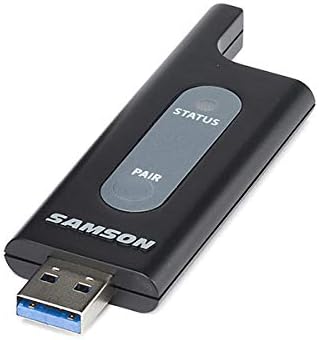
Figure 2: Samson XPD1 USB Receiver. Plug this into your computer's USB port.

Figure 3: Samson XPD1 USB Receiver connected to a mobile device (adapter not included).
3.4. צימוד המכשירים
The XPD1 system is designed for easy pairing. Typically, the units are pre-paired from the factory. If re-pairing is necessary:
- Turn on the belt pack transmitter.
- חבר את מקלט ה-USB למחשב שלך.
- Press and hold the 'Pair' button on the USB receiver until the status indicator begins to flash.
- Press and hold the 'Pair' button on the belt pack transmitter until its status indicator also flashes.
- Once both indicators show a solid light, the devices are successfully paired.
4. הוראות הפעלה
4.1. הפעלה / כיבוי
- To power on the belt pack transmitter, slide the power switch to the 'ON' position. The status indicator will light up.
- כדי לכבות את המכשיר, הסט את מתג ההפעלה למצב 'כבוי'.
- The USB receiver powers on automatically when plugged into a powered USB port.
4.2. כוונון הגברה
The belt pack transmitter features a gain control to adjust the microphone's input sensitivity. This control is located inside the battery compartment.
- פתח את מכסה תא הסוללות.
- Use a small screwdriver or similar tool to adjust the 'GAIN' dial to your desired level.
- Start with a lower gain setting and increase it gradually to avoid distortion.
- סגור את מכסה תא הסוללות.
4.3. ניטור שמע
The USB receiver includes a 3.5mm output jack, allowing you to monitor the audio directly from the receiver using headphones. This is useful for checking audio levels and quality during recording or live use.
4.4. טווח פעולה
The Samson XPD1 system offers an operating range of up to 100 feet (approximately 30 meters), depending on environmental conditions. Maintain a clear line of sight between the transmitter and receiver for optimal performance and to minimize interference.
5. תחזוקה
5.1. החלפת סוללה
Regularly check and replace the AA batteries in the belt pack transmitter to ensure consistent performance. Low battery power can affect audio quality and operating range.
5.2. ניקיון
Clean the units with a soft, dry cloth. Avoid using abrasive cleaners or solvents, which can damage the finish or internal components. Keep the microphone windscreen clean for optimal sound.
5.3. אחסון
When not in use, store the system in a cool, dry place. Remove batteries from the transmitter if storing for extended periods to prevent leakage.
6. פתרון תקלות
- אין קול או קול לסירוגין:
- Ensure both the transmitter and receiver are powered on and successfully paired (solid status lights).
- Check battery levels in the transmitter and replace if necessary.
- Verify the lavalier microphone is securely connected to the transmitter.
- Ensure the USB receiver is plugged into a functioning USB port on your computer.
- Check your computer's audio input settings to ensure the XPD1 is selected as the input device.
- צמצם את המרחק בין המשדר למקלט.
- Ensure there are no physical obstructions or other electronic devices causing interference between the transmitter and receiver.
- Crackling or Distorted Audio:
- Adjust the gain control on the transmitter. If the audio is too loud, it can cause distortion.
- Ensure the microphone is not too close to the sound source, which can lead to clipping.
- Check for potential sources of electromagnetic interference.
- Loss of Connection After Going Out of Range:
- If the connection is lost after moving out of range, you may need to restart the receiver (unplug and replug) or re-pair the devices once back within range.
7. מפרטים
| מותג | שמשון |
| שם הדגם | לאבלייר |
| מספר דגם | SWXPD1BLM5 |
| טכנולוגיית קישוריות | USB |
| סוג מחבר | USB |
| תכונה מיוחדת | USB, אלחוטי |
| מכשירים תואמים | מחשב נייד, מחשב אישי |
| רכיבים כלולים | USB cable (for receiver connection) |
| דפוס קוטבי | כל-כיווני |
| משקל פריט | 10.4 אונקיות |
| גורם צורת מיקרופון | לאבלייר |
| מקור כוח | Corded Electric (for receiver), Battery (for transmitter) |
| יחס אות לרעש | 74 dB |
| פלטפורמת חומרה | PC |
| מספר ערוצים | 1 |
| מידות פריט | 12 x 2.75 x 4.75 אינץ' |
| שימושים מומלצים | Speech, Voice Recording |
8. אחריות ותמיכה
8.1. מידע על אחריות
The Samson XPD1 Lavalier USB Digital Wireless System comes with a אחריות לחלקים ועבודה ל-2 שניםאנא שמור את הוכחת הרכישה שלך לצורך תביעות אחריות.
8.2. תמיכת לקוחות
For further assistance, technical support, or service inquiries, please visit the official Samson website or contact their customer service department. Refer to the product packaging or Samson's webאתר לקבלת פרטי הקשר העדכניים ביותר.