
1. הקדמה
The Edifier P180 is a stereo earbud headset designed for clear audio and convenient communication. Featuring an inline microphone and control, it offers a comfortable listening experience for various devices.

Figure 1: Edifier P180 Wired Earbud Headset
2. מה בקופסה
- Edifier P180 Earbud Headset
- כֶּבֶל
3. תכונות עיקריות
- Classic Comfort: Ergonomic design for comfortable wear without irritating the ear canal.
- איכות סאונד מעולה: Equipped with 16mm neodymium magnetic monomers for high-fidelity audio playback.
- Integrated Microphone and Control: 3.5mm stereo earphones with a built-in microphone and remote button for mobile phone communication.
- פונקציונליות: Single button control for picking up/hanging up calls and skipping songs (device dependent for iOS/Android).
- עיצוב עמיד: בנוי מחומרים איכותיים לאריכות ימים.

Figure 2: Ergonomic design for comfortable fit.
4. התקנה
- לִפְרוֹק: Carefully remove the Edifier P180 headset from its packaging.
- לִבדוֹק: Check the earbuds and cable for any visible damage.
- לְחַבֵּר: Insert the 3.5mm audio jack into the headphone port of your compatible device (smartphone, tablet, computer, etc.). Ensure the jack is fully inserted for proper audio and microphone function.
- מַצָב: Place the earbuds comfortably in your ears. The ergonomic design is intended to rest well without causing irritation.
5. הוראות הפעלה
The Edifier P180 features an inline control button for easy management of calls and music playback.
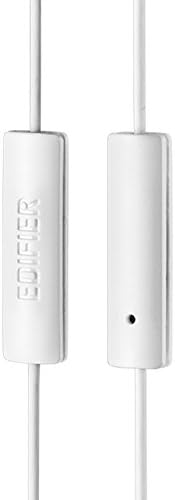
Figure 3: Inline microphone and control button.
- מענה / סיום שיחות: לחץ על לחצן הבקרה פעם אחת כדי לענות לשיחה נכנסת. לחץ עליו שוב כדי לסיים שיחה פעילה.
- השמעה/השהיה של מוזיקה: Press the control button once to play or pause audio playback.
- דילוג על מסלולים: Double-press the control button to skip to the next track. Triple-press to go to the previous track (functionality may vary by device and operating system).
- עוזר קולי: Long-press the control button to activate your device's voice assistant (e.g., Siri, Google Assistant).
סרטון 1: המוצר הרשמי הסתייםview of the Edifier P180 Classic Earbud Headsets, demonstrating features and usage.
6. תחזוקה
- ניקוי: נגבו בעדינות את האוזניות והכבל בעזרת מטלית רכה ויבשה. הימנעו משימוש בכימיקלים חזקים או בחומרים שוחקים.
- אִחסוּן: כאשר האוזניות אינן בשימוש, יש לאחסן אותן במקום נקי ויבש, הרחק מטמפרטורות קיצוניות ואור שמש ישיר. יש להימנע מסבך הכבל.
- הימנע מלחות: Do not expose the headset to water or excessive moisture, as this can damage the internal components.
7. פתרון תקלות
- אין צליל:
- ודא ששקע ה-3.5 מ"מ מוכנס במלואו ליציאת השמע של המכשיר.
- בדוק את הגדרות עוצמת הקול של המכשיר שלך.
- בדקו את האוזניות עם מכשיר אחר כדי לשלול בעיה ספציפית למכשיר.
- המיקרופון לא עובד:
- ודא ששקע ה-3.5 מ"מ מוכנס במלואו.
- בדוק את הגדרות קלט המיקרופון של המכשיר שלך.
- בדוק את המיקרופון עם מכשיר או אפליקציה אחרים.
- אודיו לסירוגין:
- Check the cable for any kinks or damage.
- ודא ששקע השמע נקי וללא לכלוך.
8. מפרטים
| תכונה | מִפרָט |
|---|---|
| מספר דגם | P180 |
| תגובת תדר | 20 הרץ - 20,000 הרץ |
| שקע אוזניות | 3.5 מ"מ ג 'ק |
| טכנולוגיית קישוריות | חוטי |
| משקל פריט | 1.76 אונקיות (50 גרם) |
| מידות המוצר | 2.01 x 5.59 x 0.91 אינץ' |
| חוֹמֶר | ניאודימיום |
| סוג בקרה | Inline Control Button |
| עַכָּבָּה | 32 אוהם |
| בקרת רעש | בידוד קול |
9. אחריות ותמיכה
The Edifier P180 headset is backed by a אחריות לשנה. For any support inquiries or warranty claims, please refer to the contact information provided with your purchase or visit the official Edifier webאֲתַר.