
1. הקדמה
The Flexson Analog to Digital Converter is designed to bridge the gap between audio devices with analog outputs and modern audio systems that primarily use digital inputs, such as the SONOS PLAYBAR. This device allows you to connect older televisions, CD players, or other audio sources with analog audio outputs (e.g., RCA or 3.5mm headphone jack) to a digital audio input (optical TOSLINK) on your sound system. It ensures reliable and lossless audio signal transmission, integrating your existing equipment with digital-only setups.
2. מידע בטיחות
- ספק כוח: השתמשו רק במתאם החשמל המצורף. ודאו שהעוצמהtage תואם לספק הכוח המקומי שלך.
- לַחוּת: Do not expose the device to water, rain, or excessive humidity. Avoid placing liquids near the unit.
- אוורור: ודאו אוורור נאות סביב היחידה. אין לחסום פתחי אוורור.
- חוֹם: הרחק את המכשיר ממקורות חום כגון רדיאטורים, אוגרי חום, תנורים או מכשירים אחרים המייצרים חום.
- ניקוי: נתק את החשמל לפני הניקוי. השתמש במטלית יבשה ורכה. אין להשתמש בחומרי ניקוי נוזליים או בחומרי ניקוי בתרסיס.
- שֵׁרוּת: אל תנסה לתת שירות למוצר זה בעצמך. הפנה את כל השירות לאנשי שירות מוסמכים.
3. תכולת החבילה
אנא סמן את התיבה עבור הפריטים הבאים:
- Flexson Analog to Digital Converter Unit
- מתאם מתח
- מדריך למשתמש (מסמך זה)
- Note: Audio cables (RCA, 3.5mm, Optical) are typically sold separately.
4. התקנה
Follow these steps to connect your Flexson Analog to Digital Converter:
- Connect Analog Audio Source: Connect an analog audio cable (e.g., 3.5mm stereo jack or RCA stereo cables) from your source device (e.g., TV headphone output, CD player RCA output) to the corresponding analog input port on the Flexson converter.
- Connect Digital Audio Output: Connect an optical TOSLINK cable from the 'Optical Out' port on the Flexson converter to the digital optical input on your SONOS PLAYBAR or other digital audio system.
- חבר חשמל: Plug the provided power adapter into the 'DC 5V' input on the Flexson converter, then plug the adapter into a wall outlet. The converter will power on automatically.
- Select Input on Audio System: On your SONOS PLAYBAR or digital audio system, select the optical input as the audio source.
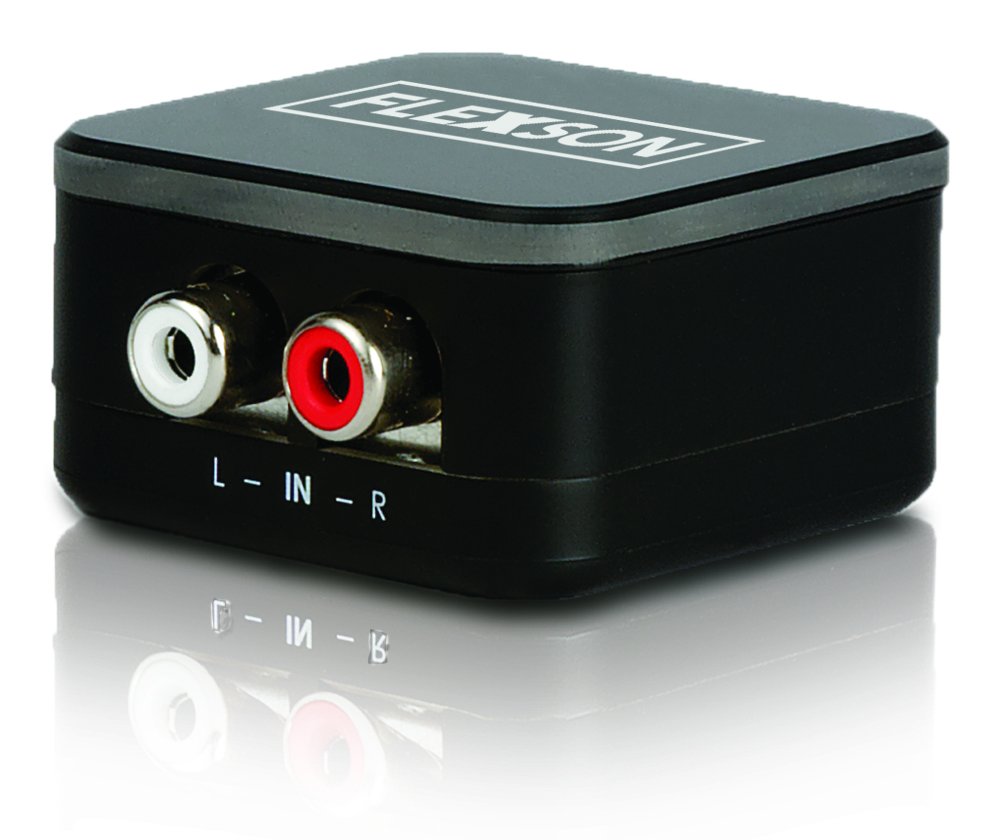
Image showing the compact Flexson Analog to Digital Converter unit with its various ports for analog input and digital optical output.
5. הפעלה
Once properly connected and powered, the Flexson Analog to Digital Converter operates automatically. It converts the incoming analog audio signal into a digital optical signal without requiring any user interaction. Ensure your source device is playing audio and your digital audio system is set to the correct input to hear sound.
6. תחזוקה
- ניקוי: Use a soft, dry cloth to wipe the exterior of the converter. Do not use abrasive cleaners or solvents.
- אִחסוּן: אם מאחסנים את המכשיר לתקופה ממושכת, נתקו אותו מהחשמל ואחסנו אותו במקום קריר ויבש הרחק מאור שמש ישיר.
- ניהול כבלים: Ensure all cables are connected securely and are not under strain or bent sharply.
7. פתרון תקלות
אין פלט סאונד
- בדוק כוח: Ensure the power adapter is securely connected to the converter and a working power outlet.
- אמת חיבורים: Double-check that all analog and digital audio cables are firmly connected to their respective ports on the source, converter, and audio system.
- פלט התקן מקור: Confirm that your analog source device (e.g., TV) is outputting audio through the connected port and its volume is turned up.
- Audio System Input: Ensure your SONOS PLAYBAR or digital audio system is set to the correct optical input.
- שלמות כבל: Test with different audio cables if possible, to rule out faulty cables.
איכות צליל ירודה / עיוות
- נפח מקור: Ensure the analog source device's volume is not set too high, which could cause distortion before conversion.
- איכות הכבלים: Use high-quality audio cables to minimize interference.
- הַפרָעָה: Keep the converter and audio cables away from strong electromagnetic fields or other electronic devices that might cause interference.
8. מפרטים
| מותג | פלקסון |
| דֶגֶם | FLXA2D1021 |
| ממשק קלט | Analog (e.g., 3.5mm, RCA stereo) |
| ממשק פלט | אופטי (TOSLINK) |
| משקל פריט | 0.16 קילוגרם |
| ספק כוח | מתח זרם ישר 5 וולט (דרך מתאם כלול) |
9. אחריות ותמיכה
This Flexson product comes with a standard manufacturer's warranty. Please refer to the warranty card included with your purchase or visit the official Flexson website for detailed warranty terms and conditions. For technical support, troubleshooting assistance, or to inquire about replacement parts, please contact Flexson customer support through their official channels.