
מָבוֹא
The Ultimate Ears ROLL is a powerful, portable wireless Bluetooth speaker designed for robust use in various environments. It delivers 360-degree sound with deep bass and features a waterproof and shockproof design, making it suitable for outdoor adventures and poolside enjoyment. This manual provides essential information for setting up, operating, maintaining, and troubleshooting your UE ROLL speaker.

תמונה: חזית view of the Ultimate Ears ROLL speaker in Sugarplum color, featuring prominent yellow plus and minus symbols for volume control.
הגדרה
1. טעינת הרמקול
Before initial use, fully charge your UE ROLL speaker. The charging port is located on the back of the speaker, protected by a waterproof flap.
- Locate the waterproof flap on the back of the speaker.
- Carefully open the flap to reveal the micro USB charging port.
- Connect the provided micro USB cable to the speaker and a compatible USB power source.
- Allow the speaker to charge until the charging indicator light shows a full charge. A full charge typically takes less than an hour with a 2A charger.
- ודא שהדלת העמידה למים סגורה היטב לאחר הטעינה כדי לשמור על עמידות למים.
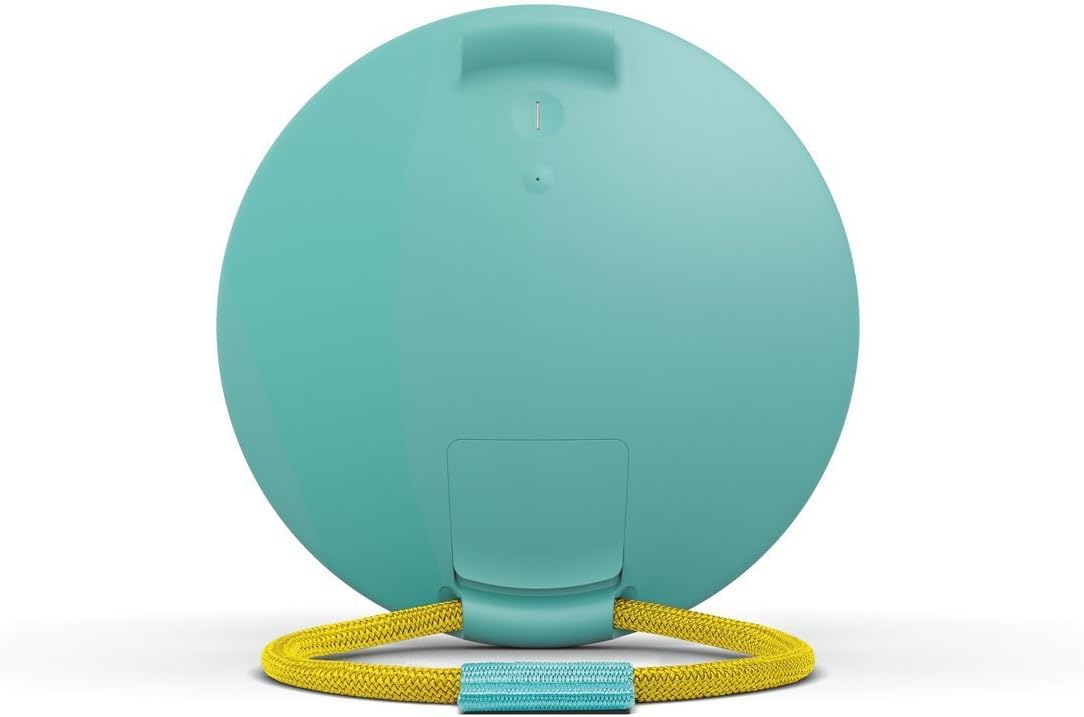
תמונה: אחורי view of the UE ROLL speaker with the protective flap opened, revealing the micro USB charging port and auxiliary input.
2. זיווג Bluetooth
The UE ROLL can pair with up to 8 Bluetooth devices.
- Press the power button on the back of the speaker to turn it on.
- Press and hold the Bluetooth button (located near the power button) until you hear an audible tone, indicating the speaker is in pairing mode.
- On your mobile device (smartphone, tablet, or computer), navigate to the Bluetooth settings.
- Select "UE ROLL" from the list of available devices to complete the pairing process.
3. UE ROLL Companion App
Enhance your speaker experience by downloading the UE ROLL companion app, available for Apple and Android mobile devices. The app allows for equalizer adjustments, volume control, power management, pairing with a second UE speaker for stereo or dual sound, and firmware updates.
הוראות הפעלה
בקרות
The UE ROLL features simple, intuitive controls:
- עוצמת הקול מעלה/הנמכת: Large '+' and '-' symbols on the front of the speaker control the volume.
- לחצן הפעלה: Located on the back of the speaker.
- לחצן התאמת בלוטות': Located on the back, near the power button.

Image: Diagram illustrating the power button, one-touch Bluetooth connection button, and the large volume up/down controls on the speaker's surface.
תכונות מיוחדות
- Waterproof (IPX7 Rated): The speaker is designed to withstand immersion in water up to 1 meter for 30 minutes. Ensure all ports are securely sealed by the waterproof flap before exposing the speaker to water. The speaker also floats, allowing for music playback in water.
- Bungee Cord: The integrated marine-grade bungee cord allows you to attach the speaker to various objects like bikes, backpacks, or shower rods.
- לְהִתְכּוֹפֵף: Use the UE ROLL app to pair your speaker with another Ultimate Ears speaker for enhanced sound, either in stereo or dual mode.
- Multi-Host: Two different devices can be paired to the speaker simultaneously, allowing for seamless music control between users.
- בדיקת רמת סוללה: Press the '+' and '-' volume buttons simultaneously to hear an audible announcement of the current battery charge level in 10% increments.
- פונקציית אזעקה: Set an alarm through the UE ROLL app to play your favorite music from a streaming service.

Image: Infographic highlighting the UE ROLL's features, including IPX7 waterproofing, 9-hour battery life, app integration, and 360-degree sound from two drivers and two tweeters.
סרטון מוצר רשמי
סרטון: סרטון רשמי של מוצרasing the Ultimate Ears ROLL speaker's durability and versatility in various outdoor and water-based activities, highlighting its waterproof and portable design.
תַחזוּקָה
- ניקוי: The speaker can be cleaned with warm, soapy water. Ensure the waterproof flap covering the ports is securely closed before cleaning.
- Waterproof Flap: Regularly inspect the waterproof flap for any signs of wear or damage. Ensure it forms a tight seal when closed to maintain the speaker's water resistance. Avoid excessive force when opening or closing the flap to prevent damage.
- עדכוני קושחה: Keep your speaker updated with the latest firmware via the UE ROLL companion app to ensure optimal performance and access to new features.
פתרון בעיות
- אין כוח: ודא שהרמקול טעון במלואו. חבר אותו למקור חשמל ואפשר לו להיטען במשך 30 דקות לפחות לפני שתנסה להפעיל אותו שוב.
- בעיות קישוריות Bluetooth:
- Ensure the speaker is in pairing mode (audible tone after pressing the Bluetooth button).
- בדוק ש-Bluetooth מופעל במכשיר הנייד שלך.
- Move the speaker closer to your device; the maximum wireless range is 65 feet.
- שכח את המכשיר מהגדרות ה-Bluetooth של הטלפון שלך ונסה לבצע התאמה מחדש.
- הפעל מחדש את הרמקול ואת המכשיר הנייד שלך.
- Sound Distortion at High Volume: While the speaker is designed for clear sound, some distortion may occur at maximum volume levels, especially with certain audio tracks. Try reducing the volume slightly.
- חיי סוללה מופחתים: Battery performance can degrade over time with extensive use. Ensure the speaker is fully charged before each use. Environmental conditions and usage patterns can also affect battery life.
מפרטים
| תכונה | פְּרָט |
|---|---|
| שם הדגם | גָלִיל |
| מספר דגם של פריט | 984-000517 |
| מותג | אוזניים אולטימטיביות |
| סוג רמקול | בָּחוּץ |
| תכונה מיוחדת | אֲטִימוּת |
| שימושים מומלצים | מוּסִיקָה |
| מכשירים תואמים | אייפון, אנדרואיד |
| תצורת ערוץ סאונד סראונד | 1.0 |
| צֶבַע | Sugarplum |
| רכיבים כלולים | Speaker, Battery, Bungee Cord |
| משקל פריט | 11.7 אונקיות (331.7 גרם) |
| רמת עמידות במים | עמיד למים (IPX7) |
| טווח מקסימלי | 65 רגל (בלוטות') |
| שיטת בקרה | אפליקציה |
| טכנולוגיית תקשורת אלחוטית | בלוטות' |
| גודל רמקול | 14.1 Centimeters (Diameter) |
| מקור כוח | מופעל על ידי סוללה (סוללה 1 A כלולה) |
| סוג מנהל התקן שמע | מנהל התקן דינמי |
| רמקול כוח פלט מרבי | 25 וואט |
| מידות המוצר | 5.3 x 5.3 x 1.6 אינץ' |
| תאריך ראשון זמין | 16 ביוני 2015 |
מידע על אחריות
The Ultimate Ears ROLL speaker comes with a Limited Warranty. For specific terms and conditions, please refer to the warranty documentation included with your product or visit the official Ultimate Ears support webאֲתַר.
תְמִיכָה
For further assistance, technical support, or product inquiries, please contact Ultimate Ears customer service:
- טֵלֵפוֹן: 646-454-3200
- תמיכה מקוונת: בקר ב Ultimate Ears Store on Amazon לקבלת מידע על המוצר ומשאבי תמיכה.