
1. הקדמה
The PowerDrive PD3000 is a 3000 Watt power inverter designed to convert 12V DC power from your vehicle's battery into 115V AC household power. This unit provides 3000 Watts of continuous AC power and has a high surge capacity of up to 6000 Watts to accommodate devices with high starting power requirements. It features integrated Bluetooth wireless technology for remote monitoring and control via a mobile application, along with a removable control panel for flexible placement. This manual provides essential information for the safe and efficient operation of your PowerDrive PD3000 inverter.
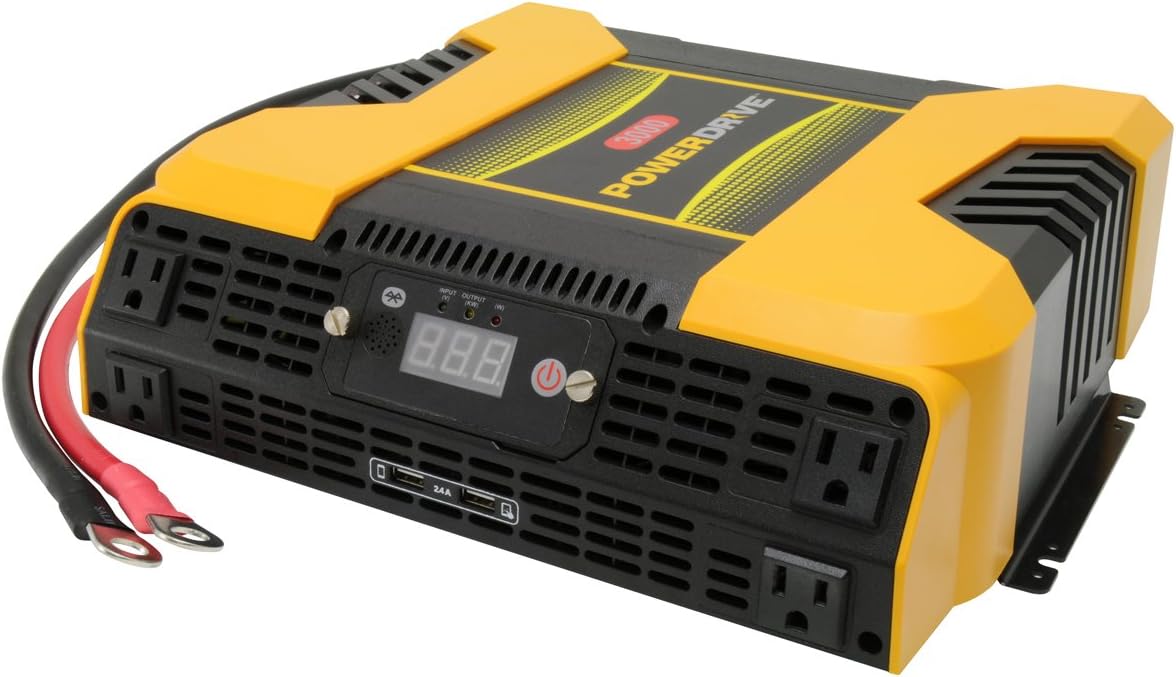
Figure 1.1: PowerDrive PD3000 3000 Watt Power Inverter, front view with outlets and display.
2. מידע בטיחות
Please read and understand all safety instructions before installing or operating the inverter. Failure to follow these instructions may result in electrical shock, fire, serious injury, or property damage.
- סכנת התחשמלות: אין לפתוח את הממיר גasinז. אין חלקים בפנים הניתנים לתיקון על ידי המשתמש. יש לפנות לכל טיפול וטיפול באנשי שירות מוסמכים.
- סכנת שריפה: Do not operate the inverter near flammable materials, gases, or vapors. Ensure adequate ventilation around the inverter.
- בטיחות סוללה: Connect the inverter only to a 12V DC battery system. Ensure battery terminals are clean and connections are secure. Wear eye protection and gloves when working with batteries.
- אוורור: Ensure the inverter is installed in a well-ventilated area. Do not block ventilation openings.
- הגנת עומס יתר: Do not exceed the inverter's continuous power rating of 3000 Watts. Overloading can damage the inverter and connected devices.
- לַחוּת: Do not expose the inverter to rain, moisture, or spray.
3. תכולת החבילה
ודא שכל הפריטים נמצאים בעת הוצאת האריזה:
- PowerDrive PD3000 Power Inverter Unit
- מדריך הוראות
- כבלי סוללה (אדום ושחור)
- Removable Control Panel with Cable
4. תכונות מוצר
The PowerDrive PD3000 inverter offers a range of features for versatile power conversion:
- תפוקת כוח גבוהה: Delivers 3000 Watts of continuous AC power with a 6000 Watt surge capacity.
- Multiple AC Outlets: Equipped with four (4) 3-prong AC outlets to support various devices.
- יציאות טעינה USB: Includes two (2) USB power ports (shared 2400mA total output) for charging mobile devices.
- קישוריות בלוטות': Allows remote access to features and settings via a free downloadable mobile application.
- לוח בקרה נשלף: Detachable control panel enables remote monitoring and testing, offering installation flexibility.
- בנייה עמידה: Features a robust ABS PVC composite housing designed to protect internal electronic components.
- הגנות בטיחות: Incorporates audible alarms and automatic shut-off triggers for low battery, high battery, and overload conditions.

Figure 4.1: Front panel of the PowerDrive PD3000 showing AC outlets, USB ports, and digital display.
5. התקנה והתקנה
התקנה נכונה היא קריטית להפעלה בטוחה ויעילה של הממיר שלכם.
5.1 הרכבת המהפך
- Choose a dry, well-ventilated location away from direct sunlight, heat sources, and flammable materials.
- Ensure there is sufficient space around the inverter for air circulation, especially around the cooling fans.
- Mount the inverter securely using appropriate hardware (not included) to prevent movement during operation.
5.2 חיבור למקור מתח DC של 12V
חָשׁוּב: ודא שהממיר כבוי לפני ביצוע חיבורים כלשהם.
- חבר את אָדוֹם (positive) battery cable to the אָדוֹם (positive) terminal on the inverter. Tighten securely.
- חבר את הקצה השני של אָדוֹם (positive) battery cable to the חיובי (+) terminal of your 12V DC battery. Tighten securely.
- חבר את שָׁחוֹר (negative) battery cable to the שָׁחוֹר (negative) terminal on the inverter. Tighten securely.
- חבר את הקצה השני של שָׁחוֹר (negative) battery cable to the שלילי (-) terminal of your 12V DC battery. Tighten securely.
- Verify all connections are tight and free from corrosion. Loose connections can cause overheating and damage.

Figure 5.1: PowerDrive PD3000 Inverter showing battery cable connections.

איור 5.2: אחורי view of the PowerDrive PD3000 showing cooling fans and battery terminals.
5.3 Removable Control Panel Installation
The control panel can be used directly on the inverter or detached for remote operation.
- To use remotely, gently pull the control panel from the inverter.
- Connect the provided cable to the port on the back of the detached control panel and to the corresponding port on the inverter.
- Mount the control panel in a convenient location for monitoring and control.

Figure 5.3: PowerDrive PD3000 Inverter with its control panel detached for remote use.
6. הוראות הפעלה
6.1 הפעלה/כיבוי
- After ensuring all battery connections are secure, press and hold the power button on the inverter or the remote control panel for approximately 1-2 seconds.
- The digital display will illuminate, and the inverter will begin providing AC power.
- To turn off, press and hold the power button again until the display turns off.
6.2 חיבור מכשירי AC
- Plug your 115V AC devices into the 3-prong AC outlets on the front of the inverter.
- ודא את סך הוואטtagההספק של כל המכשירים המחוברים אינו עולה על 3000 וואט.
- For devices with high starting loads (e.g., motors, compressors), ensure their surge wattage is within the inverter's 6000 Watt surge capacity.
6.3 שימוש ביציאות טעינה USB
- Connect your USB-powered devices (e.g., smartphones, tablets) to the USB ports.
- The two USB ports share a total output of 2400mA (2.4A).
6.4 Understanding the Digital Display and Indicators
The digital display shows real-time information such as input voltage or output wattage. Indicator lights provide status feedback:
- LED קלט: Indicates the status of the DC input power.
- LED פלט: Indicates the status of the AC output power.
- נורית תקלות: Illuminates to indicate an error condition (e.g., overload, low/high voltagה).
7. קישוריות בלוטות'
The PowerDrive PD3000 features Bluetooth wireless technology, allowing you to monitor and control the inverter using a compatible smartphone application.
7.1 Downloading the Mobile App
- חפש the official PowerDrive inverter app on your smartphone's app store (e.g., Apple App Store, Google Play Store).
- הורד והתקן את האפליקציה.
7.2 Pairing with Your Inverter
- ודא שה-Bluetooth מופעל בטלפון החכם שלך.
- Turn on the PowerDrive PD3000 inverter.
- Open the PowerDrive mobile app. The app should automatically detect nearby PowerDrive inverters.
- Follow the on-screen prompts within the app to pair with your PD3000 inverter.
7.3 תכונות האפליקציה
Once paired, the app allows you to:
- צג קלט כרךtage ופלט וואטtage.
- View inverter status and fault codes.
- Remotely turn the inverter on or off.
- Adjust certain settings (refer to the app's help section for details).

Figure 7.1: Smartphone displaying the PowerDrive mobile application interface.
8. תחזוקה
תחזוקה שוטפת מבטיחה ביצועים אופטימליים ואורך חיים של הממיר שלכם.
- ניקוי: יש לנקות מעת לעת את החלק החיצוני של הממיר בעזרת מטלית יבשה ורכה. אין להשתמש בחומרי ניקוי נוזליים או ממסים.
- אוורור: Ensure the cooling fans and ventilation openings are free from dust and debris. Use compressed air to clear blockages if necessary.
- חיבורים: Regularly check battery cable connections for tightness and corrosion. Clean terminals with a wire brush if corrosion is present.
- אִחסוּן: אם מאחסנים את הממיר למשך תקופה ממושכת, נתק אותו מהסוללה ואחסן אותו במקום קריר ויבש.
9. פתרון תקלות
This section addresses common issues you might encounter with your PowerDrive PD3000 inverter.
9.1 בעיות ופתרונות נפוצים
- הממיר לא נדלק:
- Check battery connections for tightness and proper polarity.
- ודא את נפח הסוללהtage is above 10.5V DC (Low Battery Shut Down Point).
- ודא שלחצן ההפעלה נלחץ והחזק למשך הזמן הנדרש.
- אין פלט AC:
- Check if the inverter is powered on and the Output LED is illuminated.
- Ensure the connected AC device is functioning correctly.
- Check for an overload condition (Fault LED illuminated). Reduce the load.
- Audible Alarm / Fault LED On:
- אזעקת סוללה חלשה: Activates at 11 ± 0.3V DC. Recharge or replace the battery. The inverter will shut down at 10.5 ± 0.3V DC.
- High Battery Shut Down: Occurs at 15.5 ± 0.5V DC. Check the charging system of your vehicle.
- לְהַעֲמִיס יוֹתֵר מִדַי: סך הוואטtage of connected devices exceeds 3000 Watts. Disconnect some devices.
- יתר טמפרטורה: Inverter is overheating. Ensure proper ventilation and reduce load.
- בעיות חיבור Bluetooth:
- Ensure Bluetooth is enabled on your smartphone and the inverter is powered on.
- Restart the mobile app and try pairing again.
- Ensure your smartphone is within range of the inverter.
10. מפרטים
| מִפרָט | עֵרֶך |
|---|---|
| דֶגֶם | PD3000 |
| Continuous AC Power Output | 3000 וואט |
| עוצמת נחשולי שיא | 6000 וואט |
| קלט DC כרךtage | 12.8V |
| פלט AC כרךtage | 115V |
| תדר פלט AC | 58-62 הרץ |
| יציאת USB | 5V / 2 (Shared 2400mA) |
| יעילות (מקסימום) | >88% |
| יעילות (עומס מלא) | >84% |
| Battery Drain (No AC Load) | <0.6א |
| Low Battery Alarm Trigger | 11 ± 0.3V DC |
| Low Battery Shut Down Point | 10.5 ± 0.3V DC |
| High Battery Shut Down Point | 15.5 ± 0.5V DC |
| Recovering Voltage after Under Voltage Turn-off | 12 ± 0.3V DC |
| משקל פריט | 12.14 פאונד |
| מידות המוצר | 16.2 x 16.3 x 7.6 אינץ' |
11. אחריות ותמיכה
For warranty information or technical support, please refer to the documentation included with your purchase or visit the official PowerDrive webאתר. שמור את הוכחת הרכישה שלך עבור כל תביעת אחריות.