
1. הקדמה
This manual provides detailed instructions for the installation, operation, and maintenance of your Antec P50 Window R Mid-Tower PC Case. The Antec P50 Window R is designed for silent computing with optimized airflow and support for Micro ATX and Mini-ITX motherboards. It features a dual-chamber structure, liquid cooling support, and multiple drive bays for a versatile build.
אנא קרא מדריך זה בעיון לפני תחילת ההתקנה כדי להבטיח התקנה נכונה ולמקסם את הביצועים ואורך החיים של המערכת שלך.
2. התקנה והתקנה
2.1 פריקה ובדיקה
Carefully remove the PC case from its packaging. Inspect the case for any signs of damage that may have occurred during shipping. Retain the packaging for future transport or warranty claims.
2.2 הסרת לוחות צד
Locate and unscrew the thumbscrews on the rear of the case. Slide the side panels backward and lift them off to access the interior.

תמונה: בזווית view of the Antec P50 Window R PC Case, showing its compact mid-tower design and front panel.
2.3 התקנת לוח אם
- התקן את מגן ה-I/O בפתח האחורי של המארז.
- Ensure the motherboard standoffs are correctly aligned for your Micro ATX or Mini-ITX motherboard.
- הנח בזהירות את לוח האם על המעמדים, תוך יישור חורי הברגים.
- אבטחו את לוח האם באמצעות הברגים המצורפים.

תמונה: פנים view of the Antec P50 Window R PC Case, highlighting the motherboard tray and cable routing options.
2.4 התקנת ספק כוח
The P50 Window R supports bottom-mount power supplies. Install your power supply into the designated compartment at the bottom rear of the case and secure it with screws.
2.5 התקנת כונן
The case features 6 drive bays:
- One 5.25" external drive bay (for optical drives).
- Three 3.5" HDD drive bays.
- Two 2.5" SSD drive bays.
Follow the case's internal guides for tool-less or screw-based installation of your storage devices.

תמונה: פנים view of the Antec P50 Window R PC Case, showing the rear of the motherboard tray with cable management space and drive bay locations.
2.6 התקנת כרטיס הרחבה
The case provides 4 expansion slots. Remove the slot covers as needed and install your graphics card or other expansion cards, securing them with screws.
2.7 התקנת מאוורר ורדיאטור
The P50 Window R comes with pre-installed fans: two 120mm fans and one 80mm fan at the front, and one 80mm fan at the rear. It supports additional 80mm/120mm fan mounts and a 240mm radiator in the front or top for liquid cooling.
- For liquid cooling, install the 240mm radiator in the designated front or top mounting points.
- Ensure fans are oriented correctly for optimal airflow (intake at front, exhaust at rear/top).
2.8 ניהול כבלים
נצלו את פתחי ניתוב הכבלים ואת נקודות הקשירה שמאחורי מגש לוח האם כדי לנהל את הכבלים. זה משפר את זרימת האוויר ואת האסתטיקה.
2.9 חיבור קלט/פלט של הלוח הקדמי
Connect the front panel cables (USB 3.0, USB 2.0, HD Audio, Power Switch, Reset Switch, Power LED, HDD LED) to the corresponding headers on your motherboard. Refer to your motherboard manual for header locations.
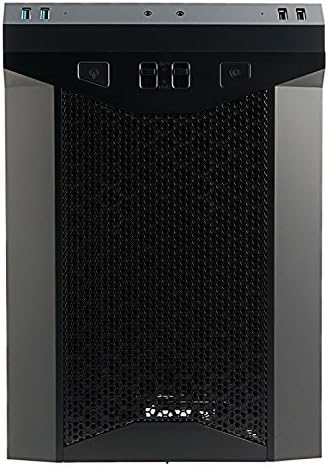
תמונה: חזית view of the Antec P50 Window R PC Case, showing the mesh intake and front panel controls.
3. תפעול
3.1 פקדים ויציאות בלוח הקדמי
הפאנל הקדמי מספק גישה נוחה ל:
- לחצן הפעלה: כדי להפעיל או לכבות את המערכת.
- לחצן איפוס: כדי להפעיל מחדש את המערכת.
- יציאות USB 3.0 (x2): להעברת נתונים במהירות גבוהה.
- יציאות USB 2.0 (x2): עבור התקני USB סטנדרטיים.
- שקעי אודיו: עבור אוזניות ומיקרופון.
- בקרות מאווררים: Two fan control switches are available to adjust fan speeds for optimal balance between cooling and noise.
3.2 זרימת אוויר וקירור
The P50 Window R features a dual-chamber structure designed for direct airflow, separating heat-generating components. The pre-installed fans and additional mounting options ensure efficient cooling for your system.
4. תחזוקה
4.1 ניקוי מסנני אבק
Regularly clean the dust filters to maintain optimal airflow and prevent dust buildup inside the case. Dust filters are typically located at the front, top, and bottom (for the power supply intake). Gently remove them and clean with compressed air or rinse with water (ensure they are completely dry before reinstallation).
4.2 ניקיון כללי
השתמש רך, דamp cloth to clean the exterior surfaces of the case. Avoid abrasive cleaners. For interior cleaning, use compressed air to remove dust from components and internal surfaces.
5. פתרון תקלות
5.1 המערכת לא נדלקת
- Ensure all power cables (24-pin ATX, 8-pin CPU, GPU power) are securely connected to the motherboard and components.
- ודא שמתג ספק הכוח נמצא במצב 'פועל'.
- ודא שכבל מתג ההפעלה של הלוח הקדמי מחובר כראוי לראש לוח האם.
5.2 רעש מוגזם
- בדוק אם כבלים כלשהם חוסמים את להבי המאוורר.
- ודא שכל המאווררים מותקנים בצורה מאובטחת.
- Utilize the front panel fan controls to adjust fan speeds.
5.3 Poor Cooling Performance
- Clean all dust filters to ensure unrestricted airflow.
- Verify that fans are oriented correctly (intake/exhaust).
- Ensure proper cable management to avoid blocking airflow.
5.4 Front Panel USB/Audio Ports Not Working
- Confirm that the front panel USB and audio cables are correctly connected to the corresponding headers on your motherboard.
6. מפרטים
| תכונה | פְּרָט |
|---|---|
| שם הדגם | P50 WINDOW R |
| סוג מקרה | מגדל אמצע |
| תאימות לוח אם | מיקרו ATX, מיני-ITX |
| מידות (D x B x H) | 355mm x 260mm x 355mm (13.98"D x 355"H) |
| חוֹמֶר | פוליקרבונט (PC) |
| דרייב בייס | 1 x 5.25" (external), 3 x 3.5" HDD, 2 x 2.5" SSD |
| חריצי הרחבה | 4 |
| יציאות קלט / פלט קדמיות | 2 x USB 3.0, 2 x USB 2.0, Audio In/Out, 2 x Fan Controls |
| מאווררים מותקנים מראש | Front: 2 x 120mm, 1 x 80mm; Rear: 1 x 80mm |
| תמיסת קירור נוזלי | 240mm radiator (front/top) |
| Max Video Card Size | 300 מ"מ |
| מקסימום גובה מצנן מעבד | 130 מ"מ |
| הרכבה של ספק כוח | הר תחתון |
| משקל פריט | 11.7 פאונד |
7. מידע על אחריות
The Antec P50 Window R PC Case comes with a Limited Warranty period (parts): 1 year. Please retain your proof of purchase for warranty claims. For specific terms and conditions, refer to the official Antec webאתר או צור קשר עם תמיכת הלקוחות.
8. תמיכה
For further assistance, technical support, or to inquire about replacement parts, please visit the official Antec website or contact their customer service department. You can often find FAQs, driver downloads, and additional resources on the manufacturer's support pages.
אנטק רשמי Webאֲתַר: www.antec.com