
Nowsonic 310700
Nowsonic Switcher Monitor Controller 310700 User Manual
Brand: Nowsonic
מָבוֹא
The Nowsonic Switcher is a passive monitor controller designed for connecting a stereophonic audio source and routing it to various monitoring systems. Its passive design ensures that the audio signal remains uncolored and undistorted, preserving the original sound quality. This device allows for precise volume control of the audio source, making it ideal for studio control rooms or editing suites where accurate monitoring is crucial without affecting the working level of the audio signal.
המוצר נגמרview
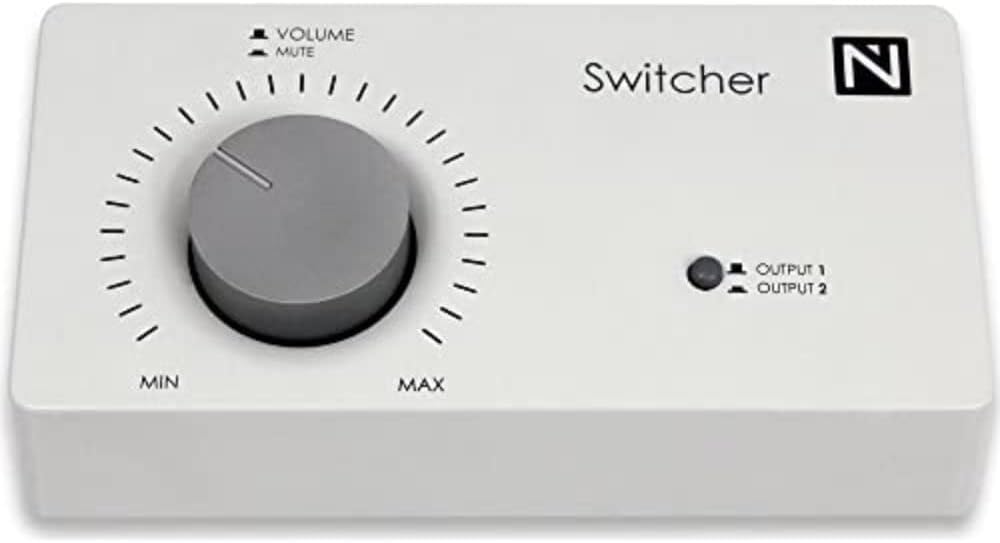
איור 1: חזית view of the Nowsonic Switcher Monitor Controller.
This image displays the front panel of the Nowsonic Switcher Monitor Controller. It features a large central volume knob with 'MIN' and 'MAX' markings, and 'VOLUME' and 'MUTE' labels above it. To the right, there is an LED indicator for 'OUTPUT 1' and 'OUTPUT 2', along with the 'Switcher' brand name and 'N' logo.
הגדרה
Follow these steps to set up your Nowsonic Switcher Monitor Controller:
- מיקום: Place the Switcher on a stable, flat surface near your audio source and monitoring systems. Ensure adequate ventilation around the unit.
- חיבור קלט שמע: Connect the stereo output of your audio source (e.g., audio interface, mixer, media player) to the input jacks on the rear panel of the Nowsonic Switcher. Use high-quality balanced or unbalanced cables as appropriate for your equipment.
- Monitor Output Connection: Connect your primary monitoring system (e.g., studio monitors, headphones amplifier) to the "Output 1" jacks on the rear panel. If you have a secondary monitoring system, connect it to the "Output 2" jacks.
- כּוֹחַ: As the Nowsonic Switcher is a passive device, it does not require an external power supply.
- הגדרת עוצמת קול ראשונית: Before powering on your audio source and monitors, ensure the volume knob on the Switcher is set to its minimum position (fully counter-clockwise, towards "MIN").
Note: Always ensure all connections are secure before operating your audio equipment to prevent damage or unexpected noise.
הוראות הפעלה
The Nowsonic Switcher provides intuitive control over your audio monitoring.
- בקרת עוצמת הקול: The large central knob controls the output volume. Rotate clockwise to increase volume (towards "MAX") and counter-clockwise to decrease volume (towards "MIN").
- פונקציית השתקה: The volume knob also features a mute function. Fully rotate the knob counter-clockwise past the "MIN" position to engage the mute function. The audio output will be silenced. Rotate clockwise to disengage mute and restore audio.
- בחירת פלט: The LED indicator on the front panel indicates the currently active output. Press the button next to the LED to toggle between "Output 1" and "Output 2". The LED will illuminate next to the selected output.
- נתיב אות: Remember that the Switcher is a passive device. It does not amplify the signal but attenuates it. Ensure your audio source provides a sufficient signal level for your monitoring needs.
תַחזוּקָה
Proper care and maintenance will ensure the longevity of your Nowsonic Switcher.
- ניקוי: השתמשו במטלית רכה ויבשה לניקוי החלק החיצוני של היחידה. אין להשתמש בחומרי ניקוי נוזליים, תרסיסים או ממסים, מכיוון שאלה עלולים לפגוע בגימור או ברכיבים הפנימיים.
- אִחסוּן: כאשר המכשיר אינו בשימוש למשך תקופות ממושכות, יש לאחסן אותו במקום קריר ויבש, הרחק מאור שמש ישיר וטמפרטורות קיצוניות.
- טיפול: Avoid dropping the unit or subjecting it to strong impacts, which can damage internal circuitry or external casing.
פתרון בעיות
If you encounter issues with your Nowsonic Switcher, refer to the following common problems and solutions:
| בְּעָיָה | סיבה אפשרית | פִּתָרוֹן |
|---|---|---|
| אין פלט קול. |
|
|
| Distorted or low-quality sound. |
|
|
מפרטים
| תכונה | פְּרָט |
|---|---|
| מספר דגם | 310700 |
| מותג | Nowsonic |
| משקל פריט | 299 גרם |
| מידות המוצר | 16.99 x 5 x 8.71 ס"מ |
| צֶבַע | לָבָן |
| מספר יציאות | 2 (Outputs) |
| סוּג | בקר מוניטור פסיבי |
אחריות ותמיכה
Information regarding the specific warranty terms and customer support for the Nowsonic Switcher Monitor Controller 310700 was not available in the provided product data. For detailed warranty information, technical support, or service inquiries, please refer to the official Nowsonic webאתר או צרו קשר ישירות עם שירות הלקוחות שלהם.
You may find contact details and further resources on the Nowsonic official webאֲתַר.
Ask a question about this manual
Ask about setup, troubleshooting, compatibility, parts, safety, or missing instructions. Manuals+ will review the question and use this page’s manual context to help answer it.